SonarQube is a code quality and vulnerability solution for development teams that integrates with CI/CD pipelines to ensure the software you produce is secure, reliable, and maintainable.
$720
per year per installation
WSO2 Choreo
Score 8.7 out of 10
N/A
Since WSO2's June 2021 acquisition of Platformer, the company now offers and supports Choreo, the former Platform IPaaS and low-code cloud native engineering for API Developers.
$0
1 project, up to 5 components. $100 in Choreo infrastructure credits per month.
Pricing
SonarQube Server
Choreo by WSO2
Editions & Modules
Community
Free
Developer EDITION
starting at $720
per year per installation
Enterprise EDITION
Contact sales for pricing
per year per installation
Data Center EDITION
Contact sales for pricing
per year per installation
Free
$0
1 project, up to 5 components. $100 in Choreo infrastructure credits per month.
Pay-As-You-Go
$150
per month Up to 10 projects and 30 components. $150 per component per month. Pass-through infrastructure costs.
Enterprise
Custom Quote
per year Unlimited projects and components. Discounts based on annual commitments available. Pass-through infrastructure costs, or use a data plane.
Offerings
Pricing Offerings
SonarQube Server
WSO2 Choreo
Free Trial
Yes
No
Free/Freemium Version
Yes
Yes
Premium Consulting/Integration Services
No
No
Entry-level Setup Fee
No setup fee
No setup fee
Additional Details
—
1 step is a maximum of 500ms of compute time. An incoming event, message, or outgoing API call is a minimum of 1 step.
More Pricing Information
Community Pulse
SonarQube Server
Choreo by WSO2
Considered Both Products
SonarQube Server
Verified User
Anonymous
Chose SonarQube Server
Some are still under consideration. Pricing is a big component. Some FOSS products have been considered is at par (at least for our needs) or catching up. Although the amazing support in the community weighs hard on the value. So, if it went away...so would some arguments …
SonarQube is more focused on code quality, whereas Veracode does a better job of finding security vulnerabilities. We lean towards SonarQube because we are looking for quality.
Jenkins and Gitlab are not exact alternatives for SonarQube, however, they do provide functionality for running and executing build pipelines for various languages and generating reports. However, they are not extensible, have no integration with IDEs and not suitable for …
SonarQube deployment worked well with our pipeline and had the right integrations with our IDE as well as it worked well with analyzing .NET frameworks when compared to GitHub and GitLab which has some of the functionality and can do some checks, but SonarQube made more sense …
SonarQube is a SAST, SOOS focuses on SCA and DAST - both of which we felt were out of scope for our immediate needs. Plus, through plugins SonarQube is able to accomplish some SCA.
SonarQube identifies significant more thing compared to the built-in suggestions in IntelliJ IDEA. The suggestions how to correct issues are also a lot better with SonarQube. IntelliJ IDEA provides great refactoring support to make it easy to refactor the code to solve issues. …
Getting SonarQube instead of the other tools we tested was an easy choice. Snyk was way too much limited to only Docker images and dependency analysis at that time. And Checkmarx was very hard to adapt to our needs : configuring custom quality gates was way too much of a …
SonarQube is much improved version as compared to SonarLint and Findbugs or any other software we found in similar category. It's open source and can be easily integrated with code pipeline.
I have used GitHub more that fortify so I am more familiar with GitHub for checking for vulnerabilities. I have noticed GitHub is good for checking different packages within your project but as far as checking code Quality and coverage Sonar is the better one in my opinion. …
I have used other tools like SoapUI and Postman, but their working and use case are totally different from the SonarQube, so basically cannot compare SonarQube with them. We use SonarQube in our project to basically calculate the code quality report mostly. In that report, we …
I personally evaluated klocwork in a previous company and it worked well for Static Code Analysis for C++ applications but the Java support was not as good as SonarQube.
Also the overall tooling and integrations provided by SonarQube is stellar and very other competitors can …
SonarQube is an open-source. It's a scalable product. The costs for this application, for the kind of job it does, are pretty descent. Pipeline scan is more secured in SonarQube. Its a very good tool and its support multiple languages. Its main core competency is of static code …
SonarQube contains all of their features. Findbugs has very limited capabilities. It is just a static code analyser and does not check for a continous code quality and also not possible to integrate its plugin azure devops .net pipelines and more importantly SonarQube ui is …
Sonar Qube doesn't do as good of a job of finding security vulnerabilities as dedicated SAST software, but it does more for code quality that the developers want to see. A comparison of Sonar Qube to something like Veracode or Fortify isn't apples to apples since they're not …
We found SonarQube right at the beginning of our research process and found that it met most of our needs. SonarQube fit very nicely into our TFS continuous integration process. We seamlessly integrated the SonarQube steps into our TFS process via the Microsoft Marketplace. …
Gitlab, if you have the right license, ships with a static analysis tool. It integrates better with Gitlab, but didn't seem to have the same quality output that Sonarqube did. Sonarqube's community version is plenty suitable for day to day analysis operations.
Large codebase: The tool's static analysis capabilities can help teams quickly identify and fix bugs, vulnerabilities, and code smells in large codebases.
Compliance and security: The tool can check the code against industry standards or regulations, such as OWASP and CWE, and identify any issues that need to be addressed.
Agile development: SonarQube can be integrated with CI/CD pipelines allowing teams to continuously monitor and improve code quality throughout the development process.
Teams using multiple languages: Teams that use multiple programming languages can benefit from using SonarQube, as the tool supports a wide range of languages and can be integrated with a variety of development tools.
Scenarios where SonarQube may be less appropriate:
Small codebase: Organizations with a small codebase may not see the full benefits of using SonarQube, as the tool's static analysis capabilities may be overkill for a smaller codebase.
Limited resources: Organizations with limited resources may find it difficult to set up and configure SonarQube, as the tool can be complex and may require specialized expertise.
Limited integration: Organizations that use development tools or IDEs that are not supported by SonarQube may find it difficult to integrate the tool into their existing development workflow.
Limited scalability: Large organizations with millions of lines of code may find SonarQube's performance and scalability to be an issue. It may take longer for the analysis to finish and the results may not be as accurate.
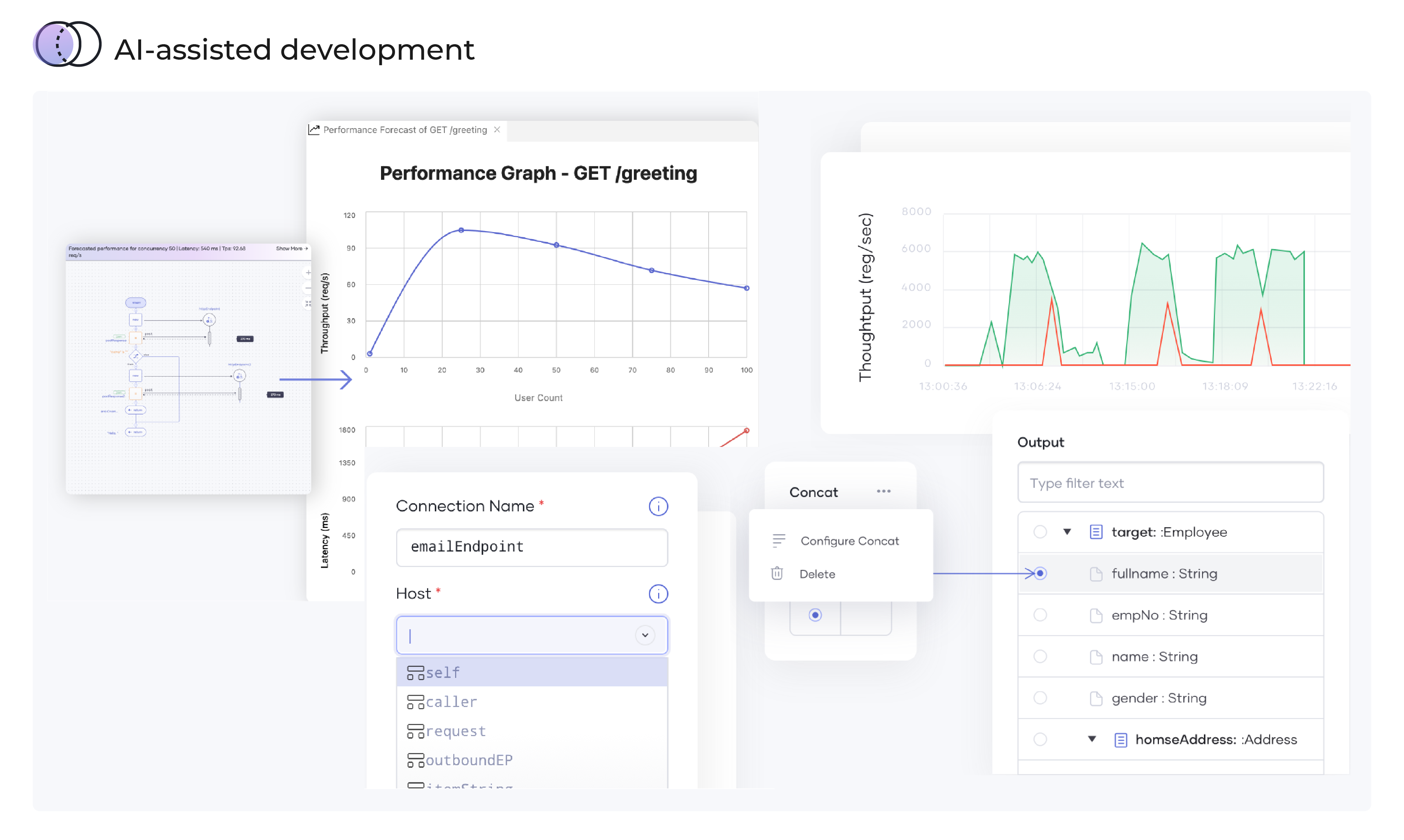
While you are developing your code, my case is codes for bots, you'll have more power and if you have an API ally that shows forecasts of latencies and throughputs: Choreo by WS02 is that friend. It is very ideal in giving insights on intelligent data mapping, code anomalies as you develop the codes or applications.
We we easily able to integrate the SonarQube steps into our TFS process via the Microsoft Marektplace, we didn't have the need to call SonarQube support. We've used their online documentation and community forum if we ran into any issues.
SonarQube identifies significant more thing compared to the built-in suggestions in IntelliJ IDEA. The suggestions how to correct issues are also a lot better with SonarQube. IntelliJ IDEA provides great refactoring support to make it easy to refactor the code to solve issues. We use these tools together and they really complement each other.
Positive ROI from the standpoint of flagging several issues that would have otherwise likely been unaddressed and caused more time to be spent closer to launch
Slightly positive ROI from time-saving perspective (it's an automated check which is nice, but depending on the issues it finds, can take developers time to investigate and resolve)