Chose Workday Adaptive Planning
In my opinion, Spreadsheet Server is not even in the same game as Workday Adaptive Planning. While it is flexible in Excel, it still requires a lot of back and forth for analysis.

| Product | Rating | Most Used By | Product Summary | Starting Price |
|---|---|---|---|---|
 Spreadsheet Server | N/A | The Spreadsheet Server platform is designed to work as a Microsoft add-in to provide live reporting data and analysis from the user’s ERP solution into Excel. The vendor aims to help users eliminate the hassle of re-keying or downloading any data into spreadsheets make that spreadsheet an integral part of their business environment. | N/A | |
 Workday Adaptive Planning | Mid-Size Companies (51-1,000 employees) | Workday Adaptive Planning streamlines planning workflows, using AI and real-time data integration to improve collaboration and provide predictive forecasts for better strategic analysis. | N/A |
| Spreadsheet Server | Workday Adaptive Planning | |||||||||||||||
|---|---|---|---|---|---|---|---|---|---|---|---|---|---|---|---|---|
| Editions & Modules | No answers on this topic | No answers on this topic | ||||||||||||||
| Offerings |
| |||||||||||||||
| Entry-level Setup Fee | No setup fee | Optional | ||||||||||||||
| Additional Details | Prices can be different for any company interested in Spreadsheet Server depending on size and who should be involved. Feel free to contact us for a free demo to see if it is the right reporting tool for you. | — | ||||||||||||||
| More Pricing Information | ||||||||||||||||
| Spreadsheet Server | Workday Adaptive Planning | |
|---|---|---|
| Considered Both Products | Spreadsheet Server No answer on this topic |  Workday Adaptive Planning |
| Spreadsheet Server | Workday Adaptive Planning | ||||||||||||||||||||||||
|---|---|---|---|---|---|---|---|---|---|---|---|---|---|---|---|---|---|---|---|---|---|---|---|---|---|
| Security |
| ||||||||||||||||||||||||
| Reporting & Analytics |
| ||||||||||||||||||||||||
| Customization |
| ||||||||||||||||||||||||
| BI Standard Reporting |
| ||||||||||||||||||||||||
| Ad-hoc Reporting |
| ||||||||||||||||||||||||
| Report Output and Scheduling |
| ||||||||||||||||||||||||
| Data Discovery and Visualization |
| ||||||||||||||||||||||||
| Access Control and Security |
| ||||||||||||||||||||||||
| Mobile Capabilities |
| ||||||||||||||||||||||||
| Budgeting, Planning, and Forecasting |
| ||||||||||||||||||||||||
| Consolidation and Close |
| ||||||||||||||||||||||||
| Financial Reporting and Compliance |
| ||||||||||||||||||||||||
| Analytics and Reporting |
| ||||||||||||||||||||||||
| Integration |
|
| Spreadsheet Server | Workday Adaptive Planning | |
|---|---|---|
| Small Businesses |  QuickBooks Self-Employed (discontinued) Score 8.9 out of 10 | No answers on this topic |
| Medium-sized Companies |  Zoho Books Score 8.9 out of 10 |  Centage Score 9.4 out of 10 |
| Enterprises |  Oracle Fusion Cloud Enterprise Performance Management Score 10.0 out of 10 |  OneStream Score 8.8 out of 10 |
| All Alternatives | View all alternatives | View all alternatives |
| Spreadsheet Server | Workday Adaptive Planning | |
|---|---|---|
| Likelihood to Recommend | 8.0 (0 ratings) | 9.0 (0 ratings) |
| Likelihood to Renew | 9.0 (0 ratings) | 7.6 (0 ratings) |
| Usability | 8.0 (0 ratings) | 8.9 (0 ratings) |
| Availability | - (0 ratings) | 7.3 (0 ratings) |
| Performance | - (0 ratings) | 9.1 (0 ratings) |
| Support Rating | 6.0 (0 ratings) | 8.2 (0 ratings) |
| In-Person Training | - (0 ratings) | 8.2 (0 ratings) |
| Online Training | - (0 ratings) | 7.3 (0 ratings) |
| Implementation Rating | - (0 ratings) | 8.6 (0 ratings) |
| Configurability | - (0 ratings) | 8.2 (0 ratings) |
| Ease of integration | - (0 ratings) | 7.3 (0 ratings) |
| Product Scalability | - (0 ratings) | 8.2 (0 ratings) |
| Vendor post-sale | - (0 ratings) | 8.2 (0 ratings) |
| Vendor pre-sale | - (0 ratings) | 6.4 (0 ratings) |
| Spreadsheet Server | Workday Adaptive Planning | |
|---|---|---|
| Likelihood to Recommend |
 Mary Soffner Controller |
|
| Pros |
|
 Warren Sampson Financial Planning and Analysis Manager |
| Cons |
|
|
| Likelihood to Renew |
 Pamela Lee, CPA Sr. Manager Internal Auditor |
|
| Usability |
|
 Marvin Hartsfield Director of Finance |
| Reliability and Availability | No answers on this topic |
|
| Performance | No answers on this topic |
|
| Support Rating |
|
 Dmitry Zaichenko, MBA Director of Financial Planning and Analysis |
| In-Person Training | No answers on this topic |
|
| Online Training | No answers on this topic |
|
| Implementation Rating | No answers on this topic |
 Brad MacDonald Sr. Director, Finance |
| Alternatives Considered |
|
|
| Scalability | No answers on this topic |
|
| Return on Investment |
|
|
| ScreenShots | Spreadsheet Server Screenshots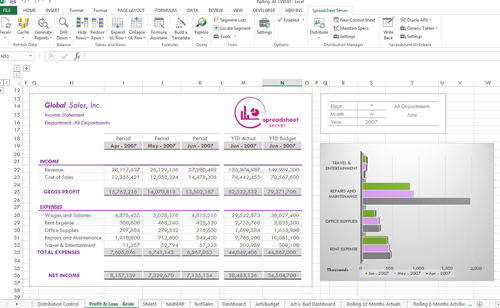  | Workday Adaptive Planning Screenshots   |