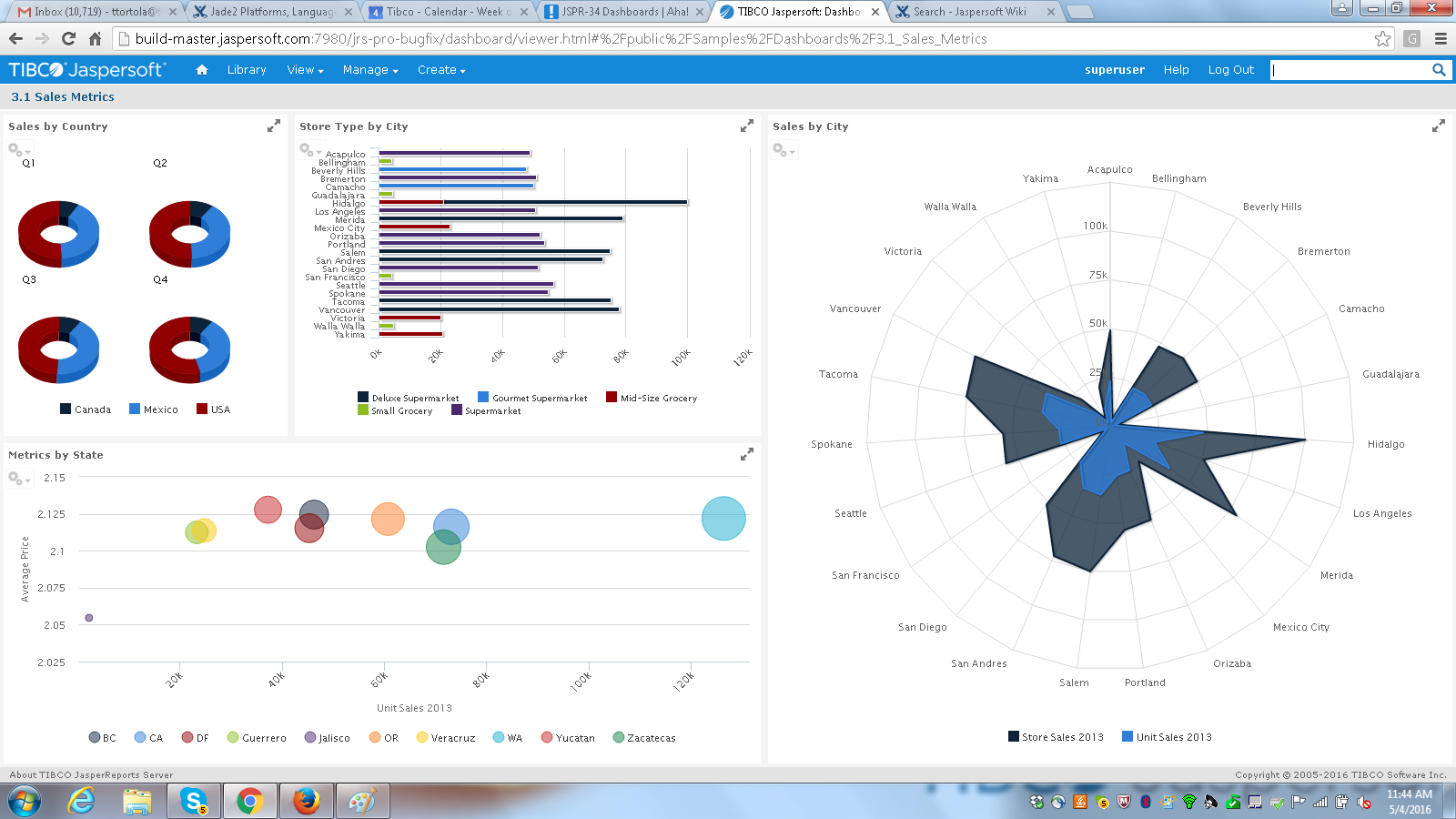
Jaspersoft commercial edition is an embedded business intelligence suite designed to be built-into SaaS products as an integrated reporting engine. It provides reports and dashboards for customer-facing applications without requiring app developers to build their own reporting engine.
N/A
Windward Core
Score 9.1 out of 10
Enterprise companies (1,001+ employees)
Windward’s low-code document generation solution embeds into any application, enabling users to populate data-smart documents within the familiar landscape of Microsoft Office. It's a solution from PDFTron since the April 2021 acquisition.
$19
Per User, Per Month (10 user minimum)*
Pricing
Jaspersoft
Windward Core
Editions & Modules
No answers on this topic
Windward Hub Standard
$19.00
Per User, Per Month (10 user minimum)*
Windward Hub Premium
$49.00
Per User, Per Month (10 user minimum)*
Windward Core Pro
$547.00
per month*
Windward Core Flex
$605.00
per month*
Windward Hub Enterprise
Custom Pricing
Offerings
Pricing Offerings
Jaspersoft
Windward Core
Free Trial
Yes
Yes
Free/Freemium Version
Yes
No
Premium Consulting/Integration Services
No
No
Entry-level Setup Fee
No setup fee
No setup fee
Additional Details
Jaspersoft offers flexible pricing for ISVs and SaaS per customer or by CPU core.
*Pay annually: 15% discount
10% discount for quarterly payment of Windward Core.
TIBCO does a better job in providing seamless data mapping and migration from one legacy system to other without any loss of traffic or compromising the security of the data. Whereas with another tool sometimes because of the integral framework there may be some questions as to …
Very cost-effective and was easy to work with. However as I’ve said before, when your data volumes grow significantly over the years it’s important to plan what your needs will be. Twice in my career, we chose Jaspersoft Enterprise Edition and both times outgrew it in under 6 …
Power BI has a more user-friendly UI and tools but is hard to integrate with our application. Qlik Sense is default vendor for our organization in some countries.
Price was a big factor. Jaspersoft is well priced compared to Tableau. We found Glow scaled badly. With Jaspersoft, we can add as much horsepower as we need.
As I believe Business Objects was no longer being supported, we moved onto using TIBCO Jaspersoft. We have used Jaspersoft to create new reports, as well as, convert existing reports from different platforms, such as BO. We selected Jaspersoft as it seemed like a good fit that …
When looking at the different features of these reporting engines, and what we were going to be using it for, the answer seemed clear. Jasper offered exactly what we were looking for, and did so for a price that we were happy with. For a scalable, feature-rich reporting engine …
It's been a long time since we have been using Jasper, so I can't really remember the details, but mainly it was about comparing how easy it was to integrate with our Java-based product, reporting capability, and datasources/platform supported.
We used Business Objects for reporting, but the licensing exceeded our budget so we had to look for other reporting server options. We used the community version of the reports server for some time with no problems, just limitations on what we could/couldn't do. We were very …
The support and chances of implementing the own branding, as we ship TIBCO Jaspersoft as a stand-alone server we did our own branding for the Jasper server with the login page and the theme, hiding the unnecessary options to the user. The ease of creating canned reports using …
More flexible than Qlik, easier to integrate and cheaper to run. Less polished and ultimately capable than Tableau, but more flexible commercially and technically. In terms of commercials and support, easier to deal with than either Qlik or Tableau.
Tibco Jaspersoft is a stronger competitor than the Microsoft Reports and ETL products. The flexibility and power of using the software, multi platform and deployment and monitoring has no comparison to what you use.
It would be interesting to integrate some features of …
SharePoint is a nice tool, however, it requires a lot of effort to create the forms and code for pulling in data if it's not within SharePoint itself. Maintenance of reports will require SharePoint knowledge as well. Windward removes many obstacles in traditional report …
Unfortunately, I was not involved in the research process when selecting Windward, so I can't speak to the alternatives. However, it has worked out very well for us.
Prior to Windward, we were using an HTML to PDF conversion for our reporting solution. It required substantial development to create and modify our reports and the styling was never up to our standards. Windward has certainly helped decrease our time in developing and …
We evaluated several other products to integrate with our new software, but Windward Studios was an obvious standout above the majority. Other applications required some level of software development knowledge and experience to create templates and a much steeper learning …
Again, it's been so long since I've used another reporting tool it would be hard for me to say. I just know we used a couple of components, and their report designers never offered the simplicity of designing a report directly in an MS Office document.
A weak point of WindWard is its antiquity compared to other tools already positioned within the globe of software developers. However, a critical success factor is the ease and speed to get results, and in that WindWard has a good advantage. For this reason and to be able to …
I have never used a alternative but i have peers who have used Dundas. The speed and flexability of Java Reporting Engine is much greater that that of Dundas. This had a big part to play with the Java Reporting Engine syncing with out backend much easier.
Each tool in our kit has its strengths and weaknesses. When we need to build complex reports and native Microsoft Office output is a secondary (or less) consideration, we turn to tools from Jaspersoft or InetSoft, which are great for building complex reports but are frankly …
Truthfully when I came to AmWINS this was the only product that they had as an add on to Excel. I did not do any research before coming here. I also did not know what AutoTag Template Designer was before coming here but I enjoy working with it in Excel and Word.
TIBCO Jaspersoft is well suited for users who are not too technical. These users are able to easily drag and drop domain fields from their database to create friendly table reports. Users can easily add filters to their reports which allows for reusability. On the other hand, if a user is looking to add information that has many-to-many relationships, duplicates will appear. Having duplicates in an ad-hoc view and not being able to easily remove them is a big issue for many of our clients.
AutoTag is a brilliant solution for less complex reports where native Microsoft Office output is required. This is where AutoTag really shines. It's also appropriate in situations where our customers want to develop and maintain their own reports but don't necessarily want to commit an experienced data person or report developer to do the work. For complex report requirements that need JavaScript or considerable data manipulation inside the report templates, we will continue to look at other tools in our kit.
AutoTag can easily be connected to virtually any data source. The wizard walks you through all the needed steps. This is very helpful in getting reports from multiple sources or departments.
WindWard has put together a Wiki based user guide and has the best tech support I have ever worked with. For the rare occasions that we get stuck trying to convert a report the help is plentiful.
AutoTag is built within the Office suite and is therefore able to leverage all the familiar features. This is very useful when you need to make reports useful and appealing.
The UI on the report designer, Jaspersoft Studio, looks a little outdated. I think that Studio as a whole could use a facelift. Additionally, Jaspersoft Studio tends to slow down over time, requiring a restart of the program.
There is a bit of a learning curve with all of the intricacies of Jaspersoft Studio, it's kind of overwhelming when trying to learn it from nothing.
One functionality that seems to be missing, that would help our use-case, would be the ability to parameterize a JSON URL as a data source. For example, if there was a call to a set of JSON data, it has to be a static URL. But in many cases, APIs that return JSON take parameters via the URL. Jaspersoft does not support that.
It would be very helpful if it was possible for tag logic to handle an array of data. Without it, the syntax can become very verbose when there are multiple logical conditions to check.
Most tags are only built to handle a single piece of data so it can be a little confusing when a query only appears to return 1 record.
We've converted our library of reports to use Jaspersoft. Our clients have had a taste of Jaspersoft and we've had very positive feedback from those interactions. Our internal employees have had great success using iReports and JasperStudio to create very robust reports that better show the data our clients expect to see. Overall, our experiences with Jaspersoft have been great and it's proven to be a very good decision for the direction of our business.
I think it's a tool well suited for a software developer. Others with less coding skills could struggle somewhat with the tool. I find java a little unforgiving as a language for expressions and not very user friendly for the technically dis-inclined. Sometimes the numeric conversions cause issues (who knew that 0 and 0.0 would cause different things to happen). Previous experience with a reporting tool that used visual basic for its' expressions that I found much simpler to use. On the other hand, java is so widespread, you can easily google the syntax to accomplish what you need to do.
For the most part, the Windward report designer is intuitive for our users; but there are a few areas where it is less intuitive. In these cases, our users need to search Windwards support wiki site, or even contact their support technicians. This can also be due to the short time we've had Windward and our lack of knowledge.
There have been a few instances where Tomcat has consumed 100% CPU, which requires a restart to resolve, but other than that reliability has been excellent.
They have a great customer support ticketing system in which they always respond same-day. They offer conference calls with srcreensharing as well in order to better understand your issues.
I wish that the lower level support access came with more than just 12 cases per year though as this makes us less likely to reach out for questions on things that we then instead try to solve ourselves which results in loss of time in trying to acquire new features and or solve a problem.
Support is something they take pride in. Once an issue is raised, they are quick to respond and provide details on a fix. No complaints on support here.
It did the job of getting us to our deadline we set for ourselves for initial launch. The customer we launched the product for was also there to learn about it at the same in order to better understand the capabilities. This helped greatly so that the customer was on the same page on what was possible when using jaspersoft. I think most people would not want their customers aware the product they are using is third-party but in this case it was a new experience for us both and so as we learned more about jaspersoft, we both had better communication on what the future road map was for their business needs in BI.
Resources available in the TIBCO Knowledge Base are covering almost everything. They are well organized, and covering almost every possibility. There is always the change to get back to the TIBCO support or to the dedicated Customer Success Manager whenever something very specific or bound to a customization is not covered.
Super easy to install and/or upgrade! For all the big name software out there that does some business critical things, Jasper is a pleasure to install and/or upgrade. The bundled installer is all ONE install (one shell script execution at least) that sets up everything. Vastly superior to most other software of this caliber.
TIBCO does a better job in providing seamless data mapping and migration from one legacy system to other without any loss of traffic or compromising the security of the data. Whereas with another tool sometimes because of the integral framework there may be some questions as to why the data packets were lost during mapping and migration.
Prior to Windward, we were using an HTML to PDF conversion for our reporting solution. It required substantial development to create and modify our reports and the styling was never up to our standards. Windward has certainly helped decrease our time in developing and modifying reports and has also helped us greatly improve the styling of them as well.
I used the free version, so obviously the positive side is we did not have to pay
Next advantage is you can pick it up relatively fast, even though I think the UI can be much improved. Otherwise creating PDF reports by programming is quite a complicate task, to me anyway