TrustRadius: an HG Insights company

Progress Test Studio

Score9 out of 10

10 Reviews and Ratings

What is Progress Test Studio?

Progress Test Studio aims to be the easiest to use Web Automation tool on the market, widely used by Enterprise QA’s for testing, but easy enough for anyone.

The product automates testing for WPF, Silverlight, Web, HTML, Angular, React, KUIB, iOS, Android, Mobile Web, and API’s.

Test Studio is ideal for a no-code or low-code approach for: QA Test Automation, Application Monitoring, Performance and Load Testing, Web/Marketing Process Automation, and Mobile App Automation.

Categories & Use Cases

Media

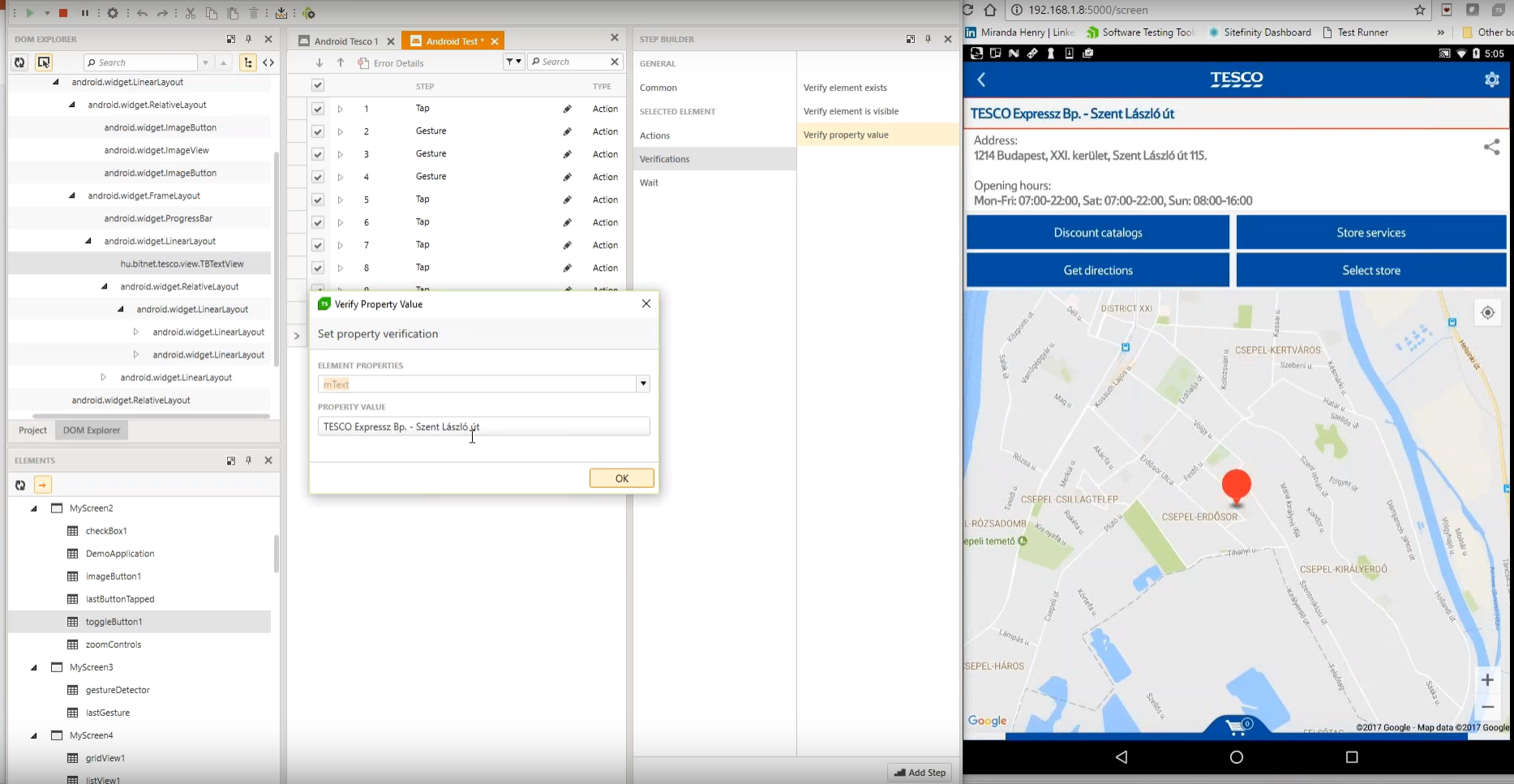
Test Studio Mobile – Codeless Test Automation for iOS and Android: Native, Hybrid, and Mobile Web applications. Including sophisticated find logic for test re-use across multiple devices. The Android Instrumentation Wizard will get you testing in no time.  And codeless maintenance will empower your QA’s.
Test Studio Ultimate - makes it easy to reuse your functional tests as Performance tests, and in Load tests. This saves you many hours of extra maintenance. The Test Studio Runtime and Full License include the Profiler for tracking windows performance counter data. Combined this data will help you pinpoint the bottlenecks in your application.
Test Studio allows you to customize the element find logic to custom fit each application. With a focus on ease-of-use a tester can quickly record their manual test and execute it back as automation. The Test Studio Element Highlighter will help you quickly add Verifications on-the-fly as you record your test. There are 4 different ways to automate applications with Test Studio, and only 1 way requires code.
Test Studio for API’s – Codelessly capture and assemble your api calls into intricate tests with GoTo conditional operations and verifications, and of course it integrates with Fiddler. You can easily integrate Test Studio into your Continuous Integration process as well.

1 / 4

Progress Test Studio

Pros

  • Easy to configure.
  • Plugins can be integrated easily with visual studio.
  • Takes less time to run all the test scenarios, [and] also generates graphics report for all the tests.
  • Keeps bugs [out of] the production.

Cons

  • Cost is very high.
  • It takes time to load the application; improvement needed.

Most Important Features

  • It's having the platform to perform test cases for windows or desktop, Web applications, and manual. which is basically required in our organization because we developed all kinds of applications.

Return on Investment

  • We are very satisfied to using this tool.
  • Application deployment on time.
  • stakeholders are very satisfied.

Other Software Used

Progress Kendo UI, Google Hangouts Meet, Microsoft Teams

One of the best UI Automation tools out there

Pros

  • Very user-friendly interface.
  • The element repository is a great feature and really help us save time when the interface is changed.
  • C# or VB.net can be used to edit code making it even easier for those who have previous knowledge on such languages.

Cons

  • The coding IDE is a tad slow compared to Visual Studio.
  • Quite expensive, but there are several features that make up for the price.

Return on Investment

  • Saved us a lot of time in manual testing, and therefore man hours.

Alternatives Considered

Selenium and Visual Studio IDE

Other Software Used

Visual Studio IDE

Great experience over all

Pros

  • Great for Regression testing
  • Cut down on test time

Cons

  • Mobile test compatibility and ease of use

Return on Investment

  • Mobile side in the begin had issues getting better with each release

Good experiences of TestStudio in cloud solution regression tests

Pros

  • Easy to automate functional QUI tests
  • Easy to analyze test results
  • Easy to take in use and learn usage

Cons

  • No major issues, automated scheduling has some tricks

Return on Investment

  • Excellent results, workloads for continuous regresssion testing has been decreased by more than 50 percent.
  • Time window needed for regression tests has decreased more than 50 percent.

TestStudio enabled test automation on a Silverlight application

Pros

  • Easy to use.
  • Reduces manual testing work considerably.
  • Possibility to schedule test runs outside office hours.

Cons

  • Client start-up time is a bit slow. Application is a bit sluggish, when there is a lot of tests open.
  • Automated scheduling environment is a bit challenging to maintain.

Return on Investment

  • Excellent results, workloads for continuous regression testing has been decreased by more than 50 percent.
  • Time window needed for regression tests has decreased more than 50 percent.

Alternatives Considered

Selenium

Other Software Used

Visual Studio IDE, Microsoft Visual Studio Team System, Microsoft Office 365