Adobe Customer Journey Analytics B2B Edition vs. Woopra

Overview
ProductRatingMost Used ByProduct SummaryStarting Price
Adobe Customer Journey Analytics B2B Edition
Score 0.0 out of 10
N/A
Launched in June of 2025, Adobe Customer Journey Analytics B2B Edition gives marketing sales teams actionable insights that let them optimize customer experiences, expand the sales pipeline, and drive strategic growth across the buyer’s journey.N/A
Woopra
Score 3.0 out of 10
Enterprise companies (1,001+ employees)
Woopra provides real-time customer analytics. It begins by tracking users across digital touch points (website, mobile app, help desk, marketing automation, etc.) and building a comprehensive behavioral profile for each user. These Customer Profiles are Woopra's building blocks, which are used to generate custom analytics reports, funnel analytics, retention analytics, and more.
$999
per month
Pricing
Adobe Customer Journey Analytics B2B EditionWoopra
Editions & Modules
No answers on this topic
Pro
$999.00
per month
Offerings
Pricing Offerings
Adobe Customer Journey Analytics B2B EditionWoopra
Free Trial
NoYes
Free/Freemium Version
NoYes
Premium Consulting/Integration Services
NoNo
Entry-level Setup FeeNo setup feeOptional
Additional DetailsContact Adobe for pricing information.
More Pricing Information
Community Pulse
Adobe Customer Journey Analytics B2B EditionWoopra
Considered Both Products
Adobe Customer Journey Analytics B2B Edition

No answer on this topic

Woopra
Chose Woopra
Woopra has comprehensive reporting tools, though I'm not too familiar with other tools.
Chose Woopra
Mixpanel looks too mobile oriented. Very limited in some scenarios.
Google analytics seems too B2C products oriented. More on aggregated data, retention, funnel and conversion.
Woopra allows a better follow of particular users when needed.
Chose Woopra
Easier to use. Loved the tracking functionality allowing to see individual user paths and 'labels' attached to a customer. you can assign customers to a specific bucket, which you can't do in GA.
Chose Woopra
Woopra is much easier to setup and use than Google Analytics. I've spent hours trying to create custom reports in Google analytics. Woopra does not take this much time to get solid reporting for our site. If you need something that tracks marketing efforts then Google …
Chose Woopra
In our infancy, we purchased Intercom, and have never gotten rid of it. Every time it comes up, we find a reason to hold on. Currently that reason is that support uses it for live chat. Their support is great, and I want to say that they are cheaper (don't quote me on that). If …
Chose Woopra
I do not know how to compare these to other such tools, as I only use analytics tools that do not collect PII for security purposes. I would not call this an analytics tool though, but rather a product quality measurement tool—it allows you to easily see high level data and …
Chose Woopra
Woopra's user interface is far superior than any of the competition. I found other analytics software to be clunky and hard to use. With Woopra, I always know exactly where to go in the app to get the results I'm looking for. This saves me valuable time; in the end time is …
Chose Woopra
Woopra's main differentiators against these products were:
  • Individual user profiles and views vs. panel data and aggregate reports
  • Turnkey integrations with SalesForce, Marketo, and dozens of other tools
Chose Woopra
Google Analytics is another product we use, but we've found their product pretty hard to use and follow. Woopra is the product that solves this problem and makes analytics easy to understand.
Chose Woopra
Woopra has more flexible ways to visualize the data. Also found Woopra to be more reliable than the other analytic packages that we have used in the past. Quick turnaround when we do see a bug.
Chose Woopra
Google Analytics, Mixpanel. Woopra blows both of these out the water, the UI and level of easy segmentation is a big factor in this but also they have some nice real time features that these other tools simply do not have that add a lot of value.
Chose Woopra
We looked a number of similar products, and while we liked the others, they did different things to Woopra. Woopra was much better at not just showing us high level analytics, but being able to query them, and drill down all the way to a specific user's behaviour in a much more …
Best Alternatives
Adobe Customer Journey Analytics B2B EditionWoopra
Small Businesses
Ortto
Ortto
Score 9.0 out of 10
Fullstory
Fullstory
Score 9.1 out of 10
Medium-sized Companies
Quadient Inspire
Quadient Inspire
Score 8.6 out of 10
Whatfix
Whatfix
Score 8.2 out of 10
Enterprises
Quadient Inspire
Quadient Inspire
Score 8.6 out of 10
Whatfix
Whatfix
Score 8.2 out of 10
All AlternativesView all alternativesView all alternatives
User Ratings
Adobe Customer Journey Analytics B2B EditionWoopra
Likelihood to Recommend
-
(0 ratings)
7.0
(0 ratings)
Likelihood to Renew
-
(0 ratings)
9.0
(0 ratings)
Usability
-
(0 ratings)
9.0
(0 ratings)
Support Rating
-
(0 ratings)
10.0
(0 ratings)
Implementation Rating
-
(0 ratings)
10.0
(0 ratings)
User Testimonials
Adobe Customer Journey Analytics B2B EditionWoopra
Likelihood to Recommend
No answers on this topic
We have only used it on web applications so I would recommend it in that case. Deploy has been pretty straightforward. Usage is very intuitive so if you are looking for an analytics product to implement fast and easy (for example for a startup or when starting a project) it is also a good scenario to recommend Woopra. The free tier has been pretty useful to us.
Read full review
Pros
No answers on this topic
  • Woopra does a great job showing you stats for specific site visitors.
  • The install and setup process is very easy and intuitive.
  • Woopra does a fantastic job showing the technology being used my our visitors.
  • I love Woopra's ability to show geographically where a user is located.
Read full review
Cons
No answers on this topic
  • The interface is not set up well for analysis.
  • The native developers I worked with did not like that the SDK has not been updated in a few years.
  • The interface does not make tools, such as building segments and creating filters, very intuitive.
Read full review
Likelihood to Renew
No answers on this topic
We just really like the tool. There are lots of us using it internally... from Product, to marketing, to customer service, to optimization team, to traffic acquisition, to Executives. Really helps us answer questions about how well things are going, and what is not going well.
Read full review
Usability
No answers on this topic
The UI and reports are great overall. Creating reports just requires a few too many screens and clicks. Also dashboard tiles can't be resized. Both of these are easy items that are being addressed
Read full review
Support Rating
No answers on this topic
Team was always responsive and helpful with special use cases.
Read full review
Implementation Rating
No answers on this topic
Compared to other products, the support was a small effort. We only had part time contributions from a product management intern and front end developer.
Read full review
Alternatives Considered
No answers on this topic
Woopra's user interface is far superior than any of the competition. I found other analytics software to be clunky and hard to use. With Woopra, I always know exactly where to go in the app to get the results I'm looking for. This saves me valuable time; in the end time is money
Read full review
Return on Investment
No answers on this topic
  • Really helped us begin to segment our users based on their engagement and retention.
  • Helped increase retention by about 1.5% after about 5 months of implementation (don't shoot the messenger if your team can't implement that quickly).
  • I felt like it had great potential to create a pipeline between sales and the CSM, but I had trouble getting the sales team to implement it properly as they had their noses deep in calls and emails (they struggle entering notes in SalesForces as well, so it's more a company specific problem).
Read full review
ScreenShots

Adobe Customer Journey Analytics B2B Edition Screenshots
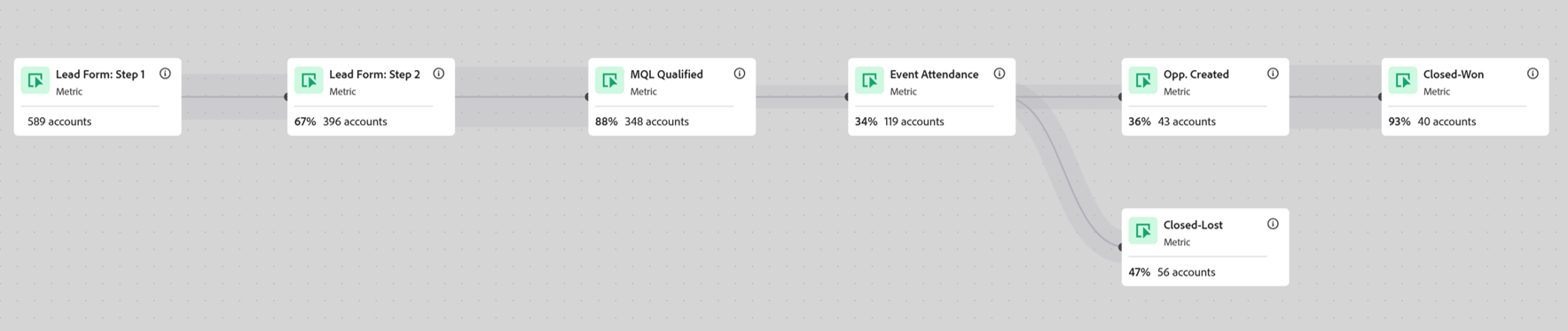
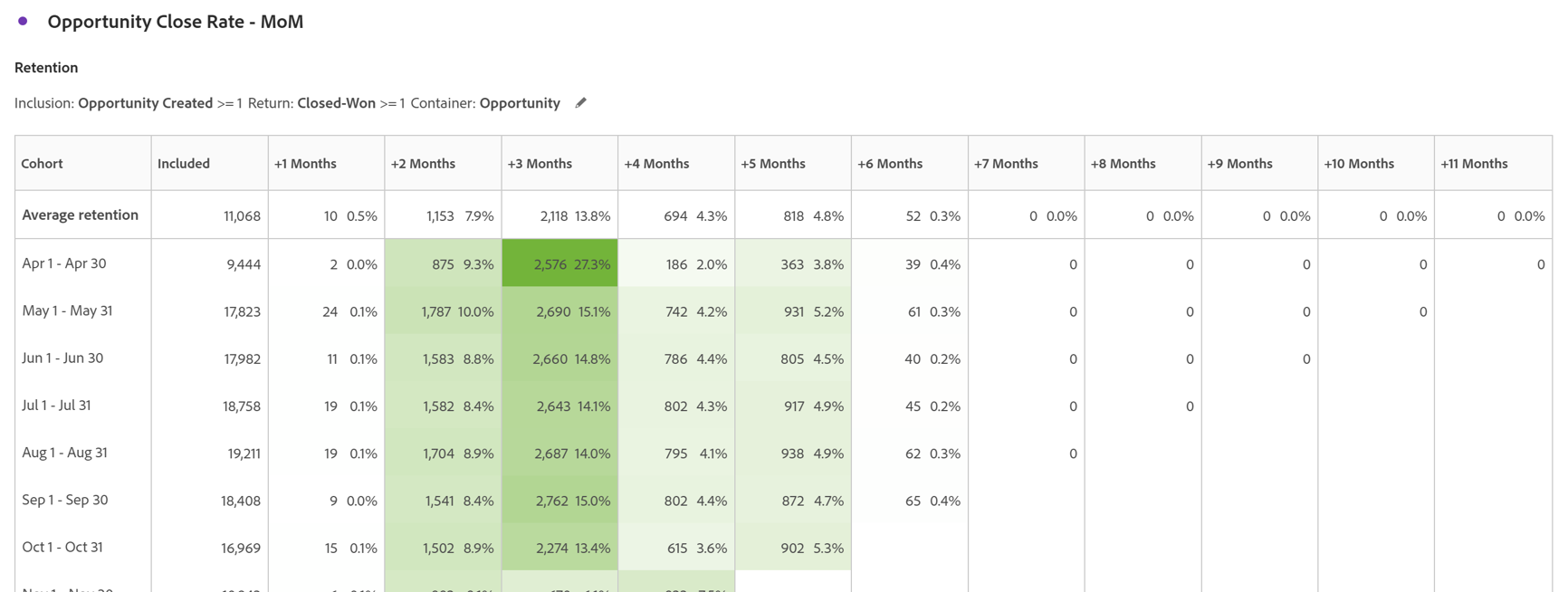
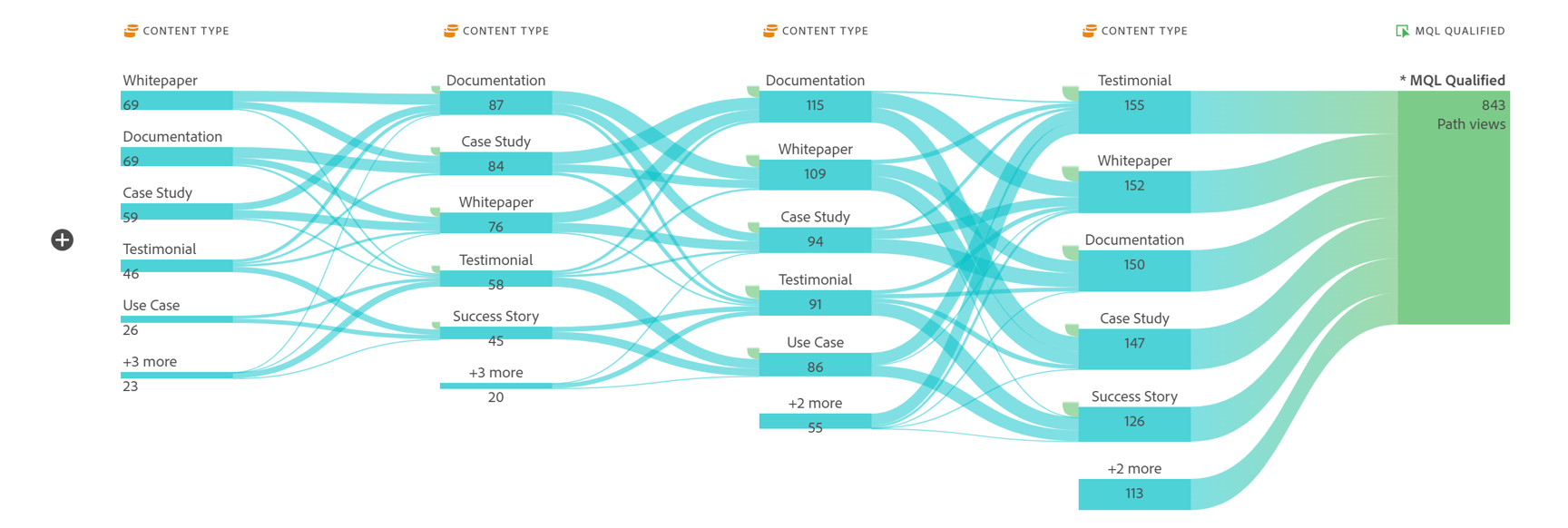
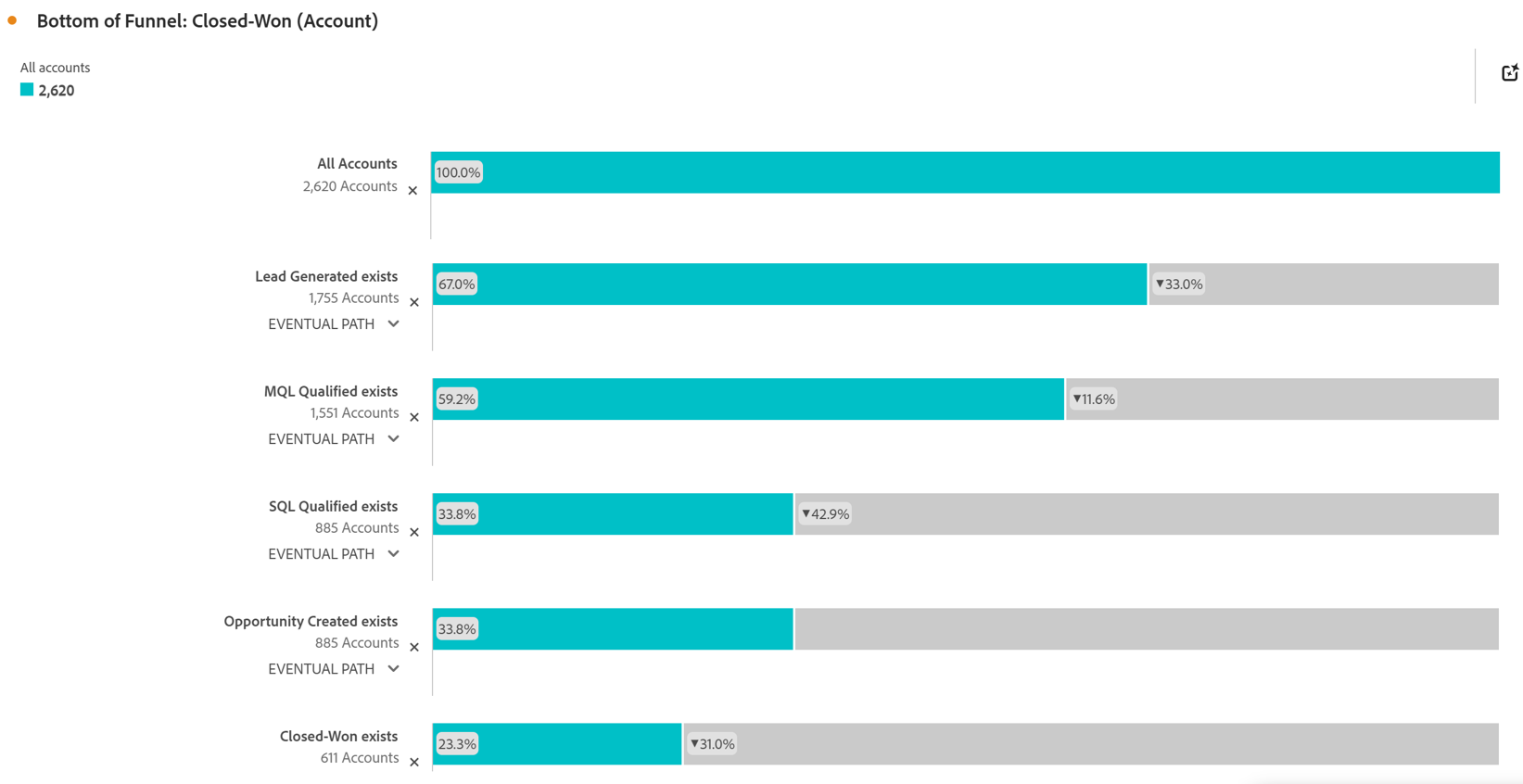
Screenshot of Account Based Marketing Engagement using the Journey Canvas feature. Effective Account Based Marketing requires a deep understanding of the buying journey at the account level to determine the most impactful marketing activities to drive deal closer. Identify which experiences - both online and offline - are most impactful in driving closed opportunities. Journey canvas maps every interaction across accounts, buying groups, opportunities, campaigns and channels for clarity on what's working and what isn't. The Journey Canvas feature in CJA B2B Edition lets users see a detailed path for a specific high value account or buying group, including all known online and offline interactions. And users can contextualize key events, such as an MQL trigger and an Opportunity creation. Plus, Sales Development Reps can see the interaction history for specific accounts before outreach, allowing for highly relevant conversations.Screenshot of Cohort Segmentation. This identifies key groups of buyers to publish to CDP for activation in paid media, personalization or email orchestration. Cohort tables lets users group B2B entities - Accounts, Opportunities, Buying Groups - based on a shared starting point and track their progress across pipeline stages over time. By analyzing behavior patterns of buying groups, marketing and sales teams can understand the time to reach key milestones in the buying journey and determine which marketing efforts lead to faster pipeline progression.Screenshot of In-Person Events. The impact of in-person event attendance can be optimized by reporting on engaged accounts and viewing activity across multiple in-person events. Flow lets you visualize the paths accounts and buying groups take between key interactions or stages over time. Understanding what behaviors led to a key milestone, such as registering for an in-person event or flagging a lead as an MQL, helps both marketing and sales teams understand the most influential experiences that lead to conversion. For in-person events, the steps leading up to registration may include previous in-person event attendance, as well as digital experiences such as downloading white papers and case studies.Screenshot of Sales Stage Progression. The fallout report in CJA B2B Edition gives you sales funnel insights by letting you visualize conversion and drop off rates between predefined steps in a sequential journey. The fallout report can answer key questions around which steps in the sales stages caused the most drop off towards deal close.

Woopra Screenshots

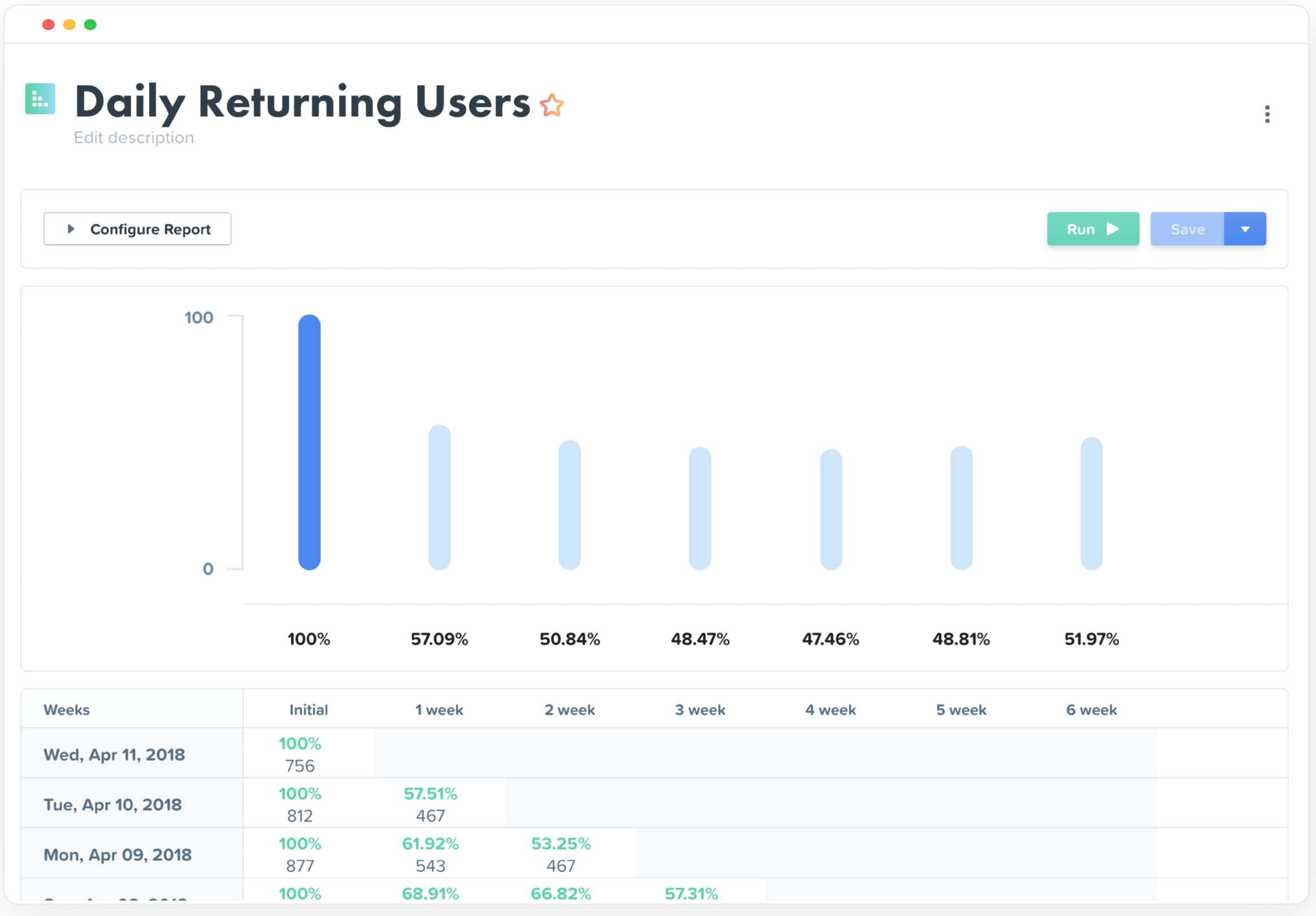
Screenshot of Screenshot of Screenshot of People Profiles - Understand Individual Users from Every AngleScreenshot of Journey Analytics Reports - Uncover critical obstacles and opportunities at every point in the customer experience - from campaign conversions to product engagement.Screenshot of Trends Analytics Reports - Analyze the growth of any metric over time and uncover the hidden forces that drive performance.Screenshot of Retention Analytics Reports - Measure the engagement of features and actions over time to proactively reduce churn and identify the behaviors that drive success.