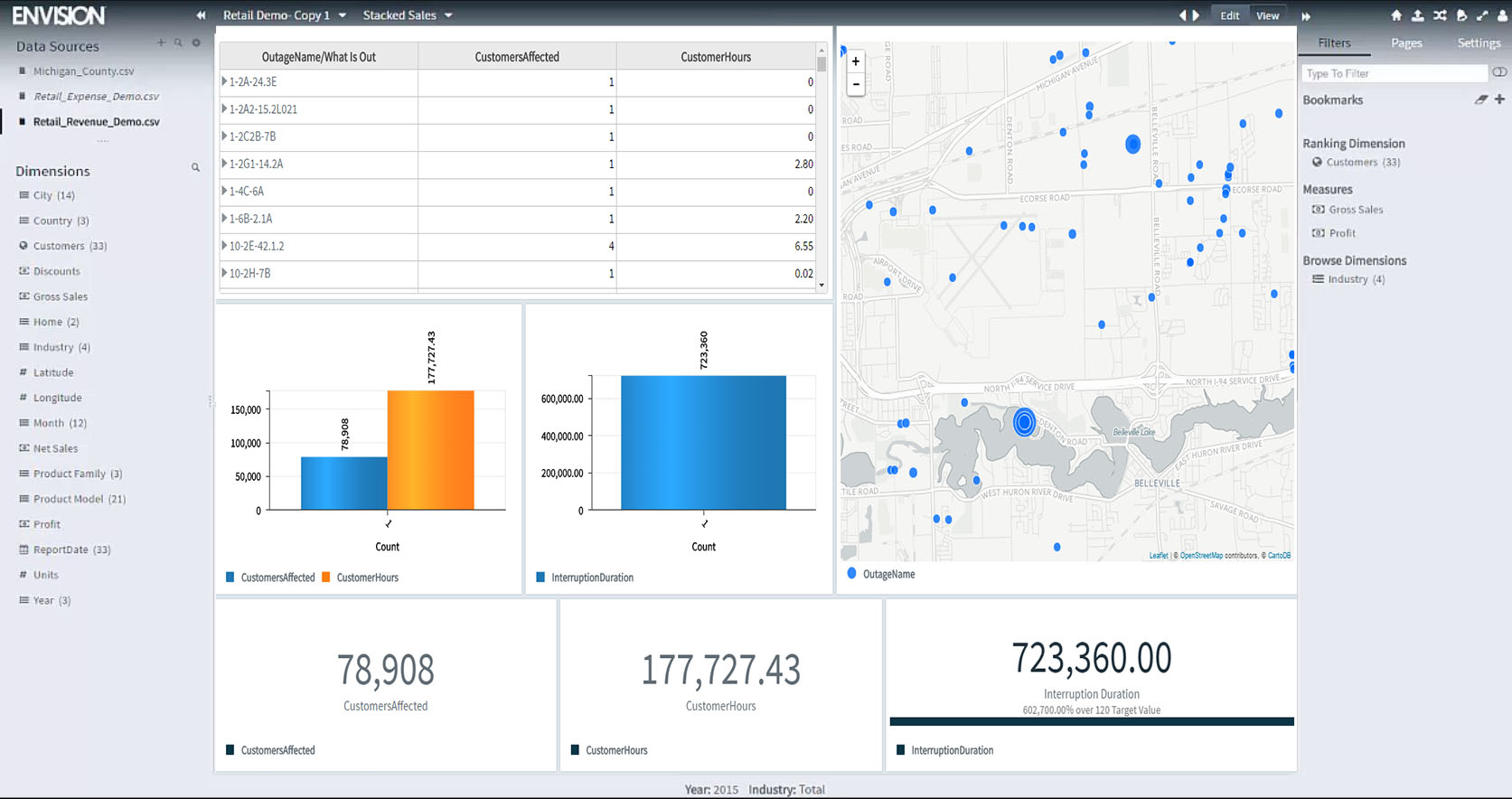
Altair SmartSight (formerly Carriots Analytics) is a cloud data
analytics platform for embedded, Big Data, and IoT applications. It provides
secure and rapid free-form data visualization and exploration, scalable
throughout the enterprise in real time.
N/A
Zendesk Explore
Score 8.8 out of 10
N/A
Zendesk offers Explore, a business intelligence and customer analytics tool which integrates with the Zendesk suite featuring ticket analytics, custom fields, dashboards, and other features. Zendesk is migrating customers of the BIME analytics product, which is approaching end of support, to Zendesk Explore in 2019.
N/A
Pricing
Altair SmartSight
Zendesk Explore
Editions & Modules
No answers on this topic
Offerings
Pricing Offerings
Altair SmartSight
Zendesk Explore
Free Trial
Yes
No
Free/Freemium Version
No
No
Premium Consulting/Integration Services
No
No
Entry-level Setup Fee
No setup fee
No setup fee
Additional Details
—
—
More Pricing Information
Community Pulse
Altair SmartSight
Zendesk Explore
Considered Both Products
Altair SmartSight
Verified User
Anonymous
Chose Altair SmartSight
I have evaluated a lot of tools like Power BI, Tableau, Orange etc..

Altair smart sight stacks up against all the products mentioned above because it comes with a wide variety of applications and services like Big Data, IoT services, Embedded systems, cloud-based service, data visualization, Machine learning, dashboarding, and much more. I have …
Altair SmartSight stacks up against other competitors when it comes to user experience and performance on a limited amount of data (<2M records). Moreover Carriots Analytics has a good customer service and an efficient and prepared expertise service. It is less efficient when …
Zendesk Explore stands out against Freshchat and Freshdesk for it's deeper analytics capabilities and seamless integration with Zendesk ecosystem. While Freshdesk offers reporting, it lacks on the same level of granular insights and customization that Zendesk Explore provides. …
I selected Zendesk Explore only to provide an easy and quick access for my managers and supervisors regading metrics and volume trends. Is not the most flexible nor complete data visualization tool, but works well for day-to-day follow ups. You need to use another tool if you …
What's good with Zendesk Explore is that data is already provided since it's included in the package. We get the data from Zendesk Support and make a report in Zendesk Explore.
It provides suggested templates and report formats also which you don't get on the other platforms. …
Zendesk Explore is more user friendly and the software plus maintenance cost is less. The report section is more detailed and no lag while creating report for a large data source. The report segments and formats are editable which make it more convenient to make a report …
We tried other reporting and Zendesk Explore was by far the best as it was already implemented into our support system we were already using; Zendesk. The main selling point for us, is that all of the reports are customizable and that no coding knowledge is needed to build out …
Zendesk Explore is better than Freshservice Analytics. In Freshservice, even though the interface is more attractive, the functions are not as good as Zendesk Explore. Reports and dashboards are hard to build, and the materials to learn are not as good as the materials on …
For support data, we have only used Explore because it came with our ZenDesk membership. So I can't speak to other solutions! That said, it's awesome to have Knowledge Base and support data in one place.
Information about each profile and task execution is also available, such as active sessions for profile configuration details and internal connections created for the profile. The task viewer shows all tasks running in the application along with their status and other information about each task. In case of problems, this is useful for looking up the details of a task and providing information to the system administrator or helpdesk.
Compared to other analytics functions of other Ticket Management System, Zendesk Explore is the easiest to learn. Moreover, the learning curve is high. Once you pick up the fundamentals, you will be able to create all types of analytic reports. In addition, if you know basic coding or SQL, you can create your own metrics and attributes to capture extremely specific elements such as the tickets that contain a certain word or etc.
As with most "suite" products, if you already use other Zendesk features (Chat, Talk, etc), then Zendesk Explore adds an extra facet to the customer experience. The more we know about our clientele, the better we can understand/anticipate their needs.
I like that we can get as in-depth as we feel is necessary. For example, is just one customer having an issue? Or are many experiencing a similar problem? We can better rack this type of trend using Explore.
Our team can dive deep into the data based on exactly what we're looking for. If the marketing team wants a certain kind of segment, we can give them that info. If we want to sort by date or another set of parameters, we can do that as well.
As I already shared the details related to Altair Smart Sight It comes with a wide range of products that is really helpful for an organization that wants to design its dashboards, Embeds application, and much more. Products like Big Data, IoT services, Embedded systems, cloud-based services, data visualization, Machine learning, dashboarding, and much more. And No one is perfect there is always a place for improvement So Because of that I am giving it a 9.
I rate Zendesk Explore 8 out of 10 for it's overall usability because it offers powerful reporting and analytics with an easy to navigate interface and intuitive dashboards. It helps improve customer satisfaction by providing valuable insights into ticket handling, agent performance and customer satisfaction. Though the complex query builder can be challenging for non technical users.
You can rapidly adjust your account, such as changing your email or password. We may learn about the app, the engines available for creating execution profiles, and add-ons. Accessibility to the Community and help materials are also available from the same site
Zendesk Community is extremely useful for Zendesk Explore beginners. The live support provided by Zendesk will also help a lot. If you don't know anything you can ask live support right away. However, one drawback of Zendesk Community and Support is the creation of complex reports on Zendesk Explore. Zendesk Community and Support cannot really help you much if you are trying to build a complex report as they are not a complete expert on it as well.
Altair smart sight stacks up against all the products mentioned above because it comes with a wide variety of applications and services like Big Data, IoT services, Embedded systems, cloud-based service, data visualization, Machine learning, dashboarding, and much more. I have used the other products like Logi Composer, Tableau CRM, and PowerBI but they only handle the specific use cases. So Because of that Altair Smartsight really provide a good and wide range of solution.
Zendesk Explore stands out against Freshchat and Freshdesk for it's deeper analytics capabilities and seamless integration with Zendesk ecosystem. While Freshdesk offers reporting, it lacks on the same level of granular insights and customization that Zendesk Explore provides. Compared to Freshchat which focuses more on live chat and conversational analytics Zendesk Explore excels in historical trend analysis and comprehensive dashboarding. We choose Zendesk Explore for it's robust reporting and drill down capabilities.