AWeber vs. Salesforce Marketing Cloud

Overview
ProductRatingMost Used ByProduct SummaryStarting Price
AWeber
Score 8.9 out of 10
N/A
AWeber is an email marketing and automation solution. It provides support for mobile-friendly HTML email newsletters, autoresponder campaigns, subscriber segmentation and management, RSS-to-email features, signup forms for websites or blogs, and more.
$15
per month Starting at
Salesforce Marketing Cloud
Score 8.1 out of 10
N/A
Marketing Cloud is an AI-powered, cloud-based digital marketing platform within the Salesforce Customer 360 ecosystem. Marketers can segment their audience, deliver personalized messages, track campaign performance, engage leads and accounts, and optimize strategies based on real-time insights.
$1,250
per month
Pricing
AWeberSalesforce Marketing Cloud
Editions & Modules
AWeber Lite
$15
per month Starting at
AWeber Plus
$30
per month Starting at
Done For You Email
$30
per month Starting at
Unlimited
$899
per month
Account Engagement
$1,250
per month
Engagement
$1,250
per month
Intelligence
$3,000
per month
Loyalty Management
$20,000
per month
Personalization
$100,000
per year
Data Cloud for Marketing
$108,000
per year
Offerings
Pricing Offerings
AWeberSalesforce Marketing Cloud
Free Trial
YesYes
Free/Freemium Version
YesNo
Premium Consulting/Integration Services
NoNo
Entry-level Setup Fee$79 one-time feeNo setup fee
Additional DetailsAWeber offers usage-based pricing starting at $15/month. Plans scale based on the number of subscribers and features needed. Options include: Lite Plan – Core tools like email automation, landing pages, sign-up forms, and AI Writing Assistant. Plus Plan – Advanced features including split automation paths, behavioral triggers, analytics, A/B testing, ecommerce, and custom branding. Done For You – A fully built email marketing system (emails, landing pages, and automations) delivered in 7 days, with 30 days of unlimited edits. All plans include 24/7 support. 14-day free trial available.
More Pricing Information
Community Pulse
AWeberSalesforce Marketing Cloud
Considered Both Products
AWeber
Chose AWeber
AWeber just needs to improve landing page features and ready-made templates.

Chose AWeber
AWeber made it easy to get started. They were priced competitively, but we felt they had better customer support, which is especially important when you are just setting up an email list for the first time, and want to ensure you have the workflow correct.

They also took the …
Chose AWeber
We often use Canva to design our content and then export it as an image to upload into Aweber, as Aweber designs and limitations are too much of a hindrance to our needs. Canva is a brilliant tool for marketing and saves you a lot of time being able to adapt or change an …
Chose AWeber
AWeber is exact in between of Eloqua and Mailchimp. It has more options and functionality then Mail chimp, but it is lighter (not as coding heavy) than Eloqua. This is a good fit if you are in the walk phase of your email strategy and have a database under 2MM
Chose AWeber
If you are evaluating an email marketing or email broadcast software that is easy to use, at a reasonable price and does the makes sure the emails get delivered in the inboxes and not in the spam folders and has all the necessary reporting functionality then try AWeber. …
Chose AWeber
We switched to AWeber from Mailchimp because the system seemed better suited for our industry, even though it is more expensive. We may go back to Mailchimp now that they have added so many features.

Constant Contact is too expensive for the value that we would receive.
Chose AWeber
We could have used the tracking systems that come with each marketing campaign software we use (or get asked to use) but we wanted the best automated permissions management system we could find. They have the experience, the technology, and the great support we are always able …
Chose AWeber
Mailchimp all of a sudden came up with all of these restrictions. I found that they did not communicate that well with their existing users. I have used Act-On at one of my customer's businesses. This is really an enterprise marketing automation tool and is not suited for …
Chose AWeber
AWeber has more capacity than Mailchimp, so it depends a lot on the need of the company. You must take into account the cost of the two. Another detail is that Mailchimp can be really tedious to configure the automation of emails. Without a doubt, AWeber has more advanced …
Chose AWeber
I found Constant Contact's dashboard and email editor clunky and annoying to use. It's been several years so perhaps they have improved and updated it.
MailChimp is pretty comparable, and it just depends on your needs as to which is more appropriate. I do feel that MailChimp's …
Chose AWeber
MailChimp is a great "starter" email service, especially for consumer businesses. AWeber offers a bit more power and sophistication, especially for B2B companies, while still being easy to use and price competitive. Constant Contact had seemed to lag in features for a while …
Chose AWeber
Drip is definitely for the advanced marketing team, it is not user friendly and very confusing for anyone that doesn't know how to set up a funnel. However, for anyone that does it is amazing.
Chose AWeber
The reason we [opted for] AWeber over others is for its email delivery rates. AWeber is great for freelancers, large enterprises, mid-zize business, etc. A 14% discount is available if you pay quarterly and more if you pay annually. AWeber is priced roughly in the middle of …
Chose AWeber
My organization used AWeber for about a year and has since moved to the HubSpot CRM. This was for a variety of reasons, but in terms of email marketing in particular, AWeber is still a very strong contender. If I were to start my own business, I would absolutely go back to …
Chose AWeber
AWeber is more robust, and for professional marketers because it has so many features like tagging, and moving people to different lists based on triggers. Its analytics features are important for marketing managers.

AWeber's deliverability is better than MailChimp or Constant …
Chose AWeber
It did its job and it did it well. AWeber had all of the features of the competitors, but AWeber was the easiest to use of the bunch. The other software had too many bells and whistles and caused confusion among my team when we worked on different mailings and campaigns.
Chose AWeber
It is easier of a solution to work with when compared to other alternatives such as Sendinblue or MailChimp. Ultimately what I valued is the deliverability and quality to be able to deliver our emails. If you are seeking a more robust enterprise-level solution I would then …
Chose AWeber
It is less expensive than Constant Contact but more expensive than MailChimp. We ended up recently switching to Kajabi because it integrates landing pages. Constant Contact and MailChimp both have easier user interfaces and better design options.
Chose AWeber
Compared to Constant Contact, I find Aweber very easy to use. Setting up an autoresponder sequence is very straightforward, at least for us because we've used it for so long. Constant Contact is a very difficult and hard to use service. We hate it and knock it every chance …
Chose AWeber
I have also used Constant Contact, MailChimp, and Lead Master. I think that Aweber is superior to these other applications in it's ability to "get down to business" so to speak. By this I mean that the interface is less about cartoony graphics and done-for-you simplicity. …
Chose AWeber
If you send out less than 2000 emails monthly then Mailchimp is a free alternative. It's hard to argue with free although I am not sure how much the free mailchimp version includes in terms of automation.
Chose AWeber
For small businesses Mailchimp's free plan and more robust feature set is likely a better fit, unless they have prior familiarity with the Aweber platform. Klaviyo and Listrak are better suited for Ecommerce businesses.
Chose AWeber
At the time we used it , AWeber offered features that MailChimp (free version) wasn't offering. We used AWeber instead of Infusionsoft because of the price. We have since switched from AWeber to ActiveCampaign for our email marketing. We liked how ActiveCampaign worked. It was …
Salesforce Marketing Cloud
Chose Salesforce Marketing Cloud
I have worked with all three providers across different businesses and seen the benefit of each one in different ways. It is good that Salesforce Marketing Cloud connects well with salesforce as a sales management CRM. Hubspot is a lot. more user friendly of an interface and …
Chose Salesforce Marketing Cloud
I find the data stored in the database is very much cleansed and hence the overall decision making process improves. Also the customised emails, digital marketing features stacks the Salesforce Marketing Cloud way above others
Chose Salesforce Marketing Cloud
We use Salesforce Marketing Cloud for lead management, generating reports, tracking customer and dealer information, inputting orders, and more. I prefer HubSpot for email marketing and automation because it is easier to use and the emails are designed much better. We …
Chose Salesforce Marketing Cloud
We are now more aware of how to use Salesforce rather than SAP. So ease of working is one of the reason.
Chose Salesforce Marketing Cloud
I think that all of the marketing platforms I have evaluated and used in the past serve different markets and purposes. Salesforce Marketing Cloud was more palatable to our team because of our existing tech stack where we had Salesforce CRM already deployed and in use. Compared …
Chose Salesforce Marketing Cloud
Hubspot is more user friendly, more intuitive, and has functionality built in from the start that allows you to get things off the ground faster than SFMC. I use SFMC because that is the current platform at my employer.
Chose Salesforce Marketing Cloud
Mailchimp is great for simple email use. It's straightforward and great for beginners in the email space. It does not offer nearly as much in the way of complexity as Salesforce Marketing Cloud does, so is limited with what it can do. Salesforce Marketing Cloud is much more …
Chose Salesforce Marketing Cloud
It has more features and a fuller capacity for all things marketing. Pardot was clunky and lacked a good email builder. It wasn't my choice to select this software, but I see its value, and the team has benefitted from it. We hope they continue to improve functionality and …
Chose Salesforce Marketing Cloud
Salesforce Marketing Cloud is a more comprehensive product than HubSpot Marketing Cloud. It integrates better with multiple channels, is a powerful audience builder, and is an efficient AI. However, Salesforce Marketing Cloud is also more expensive and requires Salesforce.com …
Chose Salesforce Marketing Cloud
I prefer Salesforce Marketing Cloud over Mailchimp.
Chose Salesforce Marketing Cloud
Salesforce Marketing Cloud stands out for its comprehensive features, scalability, and seamless integration capabilities. Compared to other platforms, its unified suite of tools for email, social media, mobile, and advertising enables streamlined cross-channel campaign …
Chose Salesforce Marketing Cloud
Not to sound like I am completely against Salesforce Marketing Cloud, I believe HubSpot has worked alot on their marketing platform to simplify the interface along with keeping the rich functions a marketing platform would want. Campaign monitor is a bit more basic, but perfect …
Chose Salesforce Marketing Cloud
My previous organization used Pardot and also Mailchimp. Salesforce Marketing Cloud is more powerful than both of those tools and integrates more deeply with Salesforce CRM.
Chose Salesforce Marketing Cloud
Overall, 80 percent of the features and boiler plate and standard across all these tools. Salesforce leads in integrations and global scalability. But lacks in User interface and ease of use.

Chose Salesforce Marketing Cloud
Salesforce Marketing Cloud is superior to other marketing platforms I have used in the past.
Chose Salesforce Marketing Cloud
Salesforce Marketing Cloud offers many opportunities for personalization and supports big data integration. It features powerful tools like SQL for data and AMPscript for email creation. If someone wants to master the platform, it might require some initial learning, which I …
Chose Salesforce Marketing Cloud
We use these both in conjunction together now rather than rivals as the data that can be held in both does differ slightly and one platform email maker is slightly better so we do a lot of the creative in one platform and then have it link in and have all the data flow into the …
Chose Salesforce Marketing Cloud
I used other tools and Salesforce MArketing Cloud is the tool I find the easiest to use, and its interface helps me the most to achieve what I need.
Chose Salesforce Marketing Cloud
Salesforce Marketing Cloud is intuitive and does what it needs to do. The functions are easy to find, and the automation options work smoothly. You find an intuitive workspace in both HubSpot and Marketo Engage, and the options in these programs look similar to Salesforce Sales …
Chose Salesforce Marketing Cloud
Pardot has a tighter integration with Salesforce CRM compared to Marketo. This allows for more seamless data transfer. MCAE has a slightly more user-friendly interface compared to Marketo, which can make it easier for non-technical users to navigate. From the cost perspective, …
Chose Salesforce Marketing Cloud
Both products have a very similar approach on the Engagment part. At least at the time we used Hootsuite, it didn't had integration with Instagram, so that was a big win when we changed to Social Studio. Also, the automation tools of Social Studio were a great diferential in …
Chose Salesforce Marketing Cloud
Not sure; haven't compared to other competitors.
Chose Salesforce Marketing Cloud
Salesforce Marketing Cloud stacks up well against Adobe Campaign and Sendinblue. I found it to be a more robust and feature-rich platform than Adobe Campaign and Sendinblue.
Chose Salesforce Marketing Cloud
Salesforce is faster and has better and more logical visualisation. Salesforce is evolving and has more relevant products from one vendor. Salesforce proved its course to AI supported user activity. AI module exists in Salesforce Marketing Cloud Interaction Studio, sure will …
Chose Salesforce Marketing Cloud
The breadth of the services and features Salesforce Marketing Cloud Interaction Studio offers stacks up against its competitors and makes it an ideal choice. The future scope of Salesforce Marketing Cloud Interaction Studio is more impressive than its alternatives and the past …
Features
AWeberSalesforce Marketing Cloud
Email & Online Marketing
Comparison of Email & Online Marketing features of Product A and Product B
AWeber
7.7
Ratings
3% below category average
Salesforce Marketing Cloud
7.9
Ratings
4% above category average
WYSIWYG email editor8.90 Ratings8.10 Ratings
Dynamic content7.00 Ratings7.60 Ratings
Landing pages6.00 Ratings7.80 Ratings
A/B testing8.00 Ratings7.90 Ratings
Mobile optimization7.00 Ratings7.30 Ratings
Email deliverability reporting8.00 Ratings8.20 Ratings
List management8.00 Ratings8.50 Ratings
Triggered drip sequences8.90 Ratings8.10 Ratings
Ability to test dynamic content00 Ratings7.70 Ratings
Reporting & Analytics
Comparison of Reporting & Analytics features of Product A and Product B
AWeber
8.6
Ratings
11% above category average
Salesforce Marketing Cloud
8.2
Ratings
11% above category average
Dashboards8.90 Ratings8.40 Ratings
Standard reports8.90 Ratings8.40 Ratings
Custom reports7.90 Ratings7.90 Ratings
Pre-Send Testing
Comparison of Pre-Send Testing features of Product A and Product B
AWeber
7.6
Ratings
5% below category average
Salesforce Marketing Cloud
-
Ratings
URL Validation7.70 Ratings00 Ratings
Link Tracking8.40 Ratings00 Ratings
Image Validation7.10 Ratings00 Ratings
Inbox Display7.10 Ratings00 Ratings
Spam Testing7.10 Ratings00 Ratings
Email Previews8.40 Ratings00 Ratings
Lead Management
Comparison of Lead Management features of Product A and Product B
AWeber
-
Ratings
Salesforce Marketing Cloud
8.3
Ratings
6% above category average
Lead nurturing automation00 Ratings8.30 Ratings
Lead scoring and grading00 Ratings8.20 Ratings
Data quality management00 Ratings8.10 Ratings
Automated sales alerts and tasks00 Ratings8.60 Ratings
Campaign Management
Comparison of Campaign Management features of Product A and Product B
AWeber
-
Ratings
Salesforce Marketing Cloud
7.8
Ratings
5% above category average
Calendaring00 Ratings8.30 Ratings
Event/webinar marketing00 Ratings7.30 Ratings
Social Media Marketing
Comparison of Social Media Marketing features of Product A and Product B
AWeber
-
Ratings
Salesforce Marketing Cloud
8.2
Ratings
9% above category average
Social sharing and campaigns00 Ratings8.40 Ratings
Social profile integration00 Ratings7.90 Ratings
Platform & Infrastructure
Comparison of Platform & Infrastructure features of Product A and Product B
AWeber
-
Ratings
Salesforce Marketing Cloud
7.6
Ratings
2% above category average
API00 Ratings7.00 Ratings
Role-based workflow & approvals00 Ratings7.50 Ratings
Customizability00 Ratings7.40 Ratings
Integration with Salesforce.com00 Ratings8.30 Ratings
Integration with Microsoft Dynamics CRM00 Ratings8.70 Ratings
Integration with SugarCRM00 Ratings7.60 Ratings
Third-party software integrations00 Ratings7.00 Ratings
Best Alternatives
AWeberSalesforce Marketing Cloud
Small Businesses
Mad Mimi
Mad Mimi
Score 10.0 out of 10
Vbout
Vbout
Score 9.9 out of 10
Medium-sized Companies
VerticalResponse
VerticalResponse
Score 10.0 out of 10
PFL Direct Mail Platform
Score 9.0 out of 10
Enterprises
Emma by Marigold
Emma by Marigold
Score 9.4 out of 10
PFL Direct Mail Platform
Score 9.0 out of 10
All AlternativesView all alternativesView all alternatives
User Ratings
AWeberSalesforce Marketing Cloud
Likelihood to Recommend
8.0
(0 ratings)
8.1
(0 ratings)
Likelihood to Renew
6.8
(0 ratings)
8.1
(0 ratings)
Usability
8.0
(0 ratings)
4.1
(0 ratings)
Availability
-
(0 ratings)
10.0
(0 ratings)
Performance
-
(0 ratings)
9.6
(0 ratings)
Support Rating
10.0
(0 ratings)
7.0
(0 ratings)
In-Person Training
-
(0 ratings)
5.0
(0 ratings)
Online Training
-
(0 ratings)
8.1
(0 ratings)
Implementation Rating
-
(0 ratings)
3.0
(0 ratings)
Ease of integration
-
(0 ratings)
7.0
(0 ratings)
Product Scalability
-
(0 ratings)
7.6
(0 ratings)
Vendor post-sale
-
(0 ratings)
8.0
(0 ratings)
Vendor pre-sale
-
(0 ratings)
7.0
(0 ratings)
User Testimonials
AWeberSalesforce Marketing Cloud
Likelihood to Recommend
AWeber is an excellent email marketing solution for small to mid-sized businesses, especially those that are just starting with email marketing campaigns. AWeber is also good for bloggers. But it's not perfect for an affiliate marketer who wants to make a landing page on AWeber. Businesses that require advanced segmentation options may need to consider other email marketing platforms.
Read full review
At least for us, what we noticed is the best use case is that it replaces the use of cloud teams, which has a more complex platform to navigate; since we are already using Salesforce, it was just more straightforward to allow the teams to continue to do that as opposed to giving them a new system. This also works for us because they are both selling the same product in different ways. Any team collaboration is where this product shines.
Read full review
Pros
  • Aweber's email deliverability is among the best in the industry. I have used other email services and Aweber is superior in deliverability.
  • It is easy to setup an autoresponder sequence, a series of time delayed emails delivered over a period of time. This makes it super easy to follow up with leads and customers.
  • Aweber's blog broadcast features makes it easy to notify subscribers of new content on your blog. It can be setup to broadcast when ever you make a new post or summarize posts on a periodic basis.
Read full review
  • Filter relevant content so you can priorize those that are more relevant and resolve it first
  • Measure the traffic in the different social networks, as well as the response rate, average response time and other relevant metrics
  • Configure automation rules to order the work of those who must interact with the customer
Read full review
Cons
  • Double opt-in requirements. While I understand the rationale for double opt-in, I wish Aweber did not require double opt-in when importing email addresses from the client's existing client database as I feel we end up losing a good number of people who are existing customers and have given the business permission to email them but who either don't notice or don't take the extra step to confirm their subscription to the Aweber list.
  • The user interface when designing and setting up html newsletters is not as clearcut and obvious as Constant Contact; it takes more time to get the newsletters to "look right" using Aweber's existing templates.
  • I wish Aweber made it easier to embed a video message simply by inserting the video link or embed code into the email body. The process it seems to require (the last time I tried) was to create a screenshot of the video or insert the video thumbnail image and then link to the video in the right column link section .. it's a 2 step process and would be nice if it were a one click process. Not a deal breaker but I just feel like it could be faster and more efficient to embed video messages in an email.
Read full review
  • Automation studio is very hard to use. We need to create a Data extension with all required fields before we can run SQL. So it takes a lot of time.
  • Query Studio is much easier to use but it often gives an error while running the same SQL in Automation Studio works fine.
  • We were not able to set up SMS messages as SFMC is not supporting MMS which is a big problem.
Read full review
Likelihood to Renew
AWeber is easy and intuitive for me use. I really like the simplicity and the structure of the work flow as it saves me time. AWeber also integrates with all the other programs, systems and gateways that I use on a daily basis (WordPress, Paypal, LeadPages, Facebook and more) and if I have any questions or have trouble the AWeber customer service technicians are very helpful.
Read full review
We are happy with Pardot. It has made our jobs easier and installed some reporting functions that have increased our ROI with the company. We have worked hard to set-up the functions in Pardot and it has taken time, but paid off.
Read full review
Usability
See previous answers ... the design / customization interface could be more intuitive and elegant .. for example, for me it has been difficult to easily figure out how to place pictures / images to the right, left or center of text.
Read full review
You won't find another solution that has as many features as Salesforce Marketing Cloud Interaction Studio. We all know Salesforce, we all know how big they are and it's not for nothing... Their tools do most of the things you want, need and even imagine. Using it is complicated, but the usability is infinite.
Read full review
Reliability and Availability
No answers on this topic
Upgrades and timing of the upgrades were communicated well and planned during off hours for our work. If we did have a campaign scheduled during that time, it would kick-off after the system was back active. There were a few unplanned system down times, but it was a rare occurrence and those times were also short in duration.
Read full review
Performance
No answers on this topic
Though the make up of MA apps is not built this way today, it would be nice to see them become more real-time. The integration between Salesforce and Pardot is not a true real-time integration. If I modify something in Salesforce, those changes are not automatically reflected in Pardot immediately. There is a delay of about 15 minutes before the systems sync. This delay, although not long, is less than ideal We would love the systems to be integrated real time such that changes are propagated from one system to the other immediately.
Read full review
Support Rating
I have always received prompt phone or live chat support that has resolved my issues on the first call in a competent, knowledgeable and friendly manner. By contrast MailChimp offers no live chat or phone support; they only offer email support and the response time for MailChimp is slow by comparison to AWeber.
Read full review
They are really responsive and more than not solve the problem or give you insight to how you can manage the solution yourself. I do find however sometimes a long delay on the more complex issues when they need to loop in other departments. but overall a good experience with support
Read full review
In-Person Training
No answers on this topic
Training program is not very well established. There is very little documentations. More often than not it's in-person training. I wish there were more video tutorials so that somebody can learn the system quickly. Their documentation is very much like an RFP. Long and very technichal. They should definitly improve on this area.
Read full review
Online Training
No answers on this topic
Pardot's online training touches on all topics briefly and vaguely without much indepth exploration into how a final outcome could look, such as Nurturing Campaigns, Email templates, landing page templates, etc... The only true way to uncover Pardot's full capabilities is to have Front End design and coding experience. Without this key skill set, I would not recommend Pardot to another business.
Read full review
Implementation Rating
No answers on this topic
From an IT perspective, once you set up the Javascript beacon and start collecting data there is a waiting game. During this time you can start labeling your site actions which can be labor intensive for a single person, but you don't really have the final end-users on the platform yet. We did a lot of training so users were experienced, but it wasn't until they had their first tasks to accomplish that they started using the system and had questions. I'd recommend setting up some immediate goals for an end-user to start segmenting for the purpose of displaying message campaigns so you can jump start end-user action.
Read full review
Alternatives Considered
MailChimp is a great "starter" email service, especially for consumer businesses. AWeber offers a bit more power and sophistication, especially for B2B companies, while still being easy to use and price competitive. Constant Contact had seemed to lag in features for a while though it has now largely caught up. However, it's got a more complex pricing model and is less attractive for users who send multiple messages per month to a smaller list.
Read full review
We use Salesforce Marketing Cloud for lead management, generating reports, tracking customer and dealer information, inputting orders, and more. I prefer HubSpot for email marketing and automation because it is easier to use and the emails are designed much better. We currently use Salesforce and HubSpot, and we are very happy to have both, as they have different pros/cons.
Read full review
Scalability
No answers on this topic
Salesforce Marketing Cloud does a great job at what it is designed to do. There are several SaaS products in the Marketing Automation arena and SFMC is one of the top providers. There are several things it does well, such as email marketing and automation, leads generation/segmentation/qualification, and reporting/analytics. There are a few areas of improvement when it comes to the product and they surround legacy systems and architecture, outdated UI/UX, as well as targeting data in the activity logs for reporting and segmentation.
Read full review
Return on Investment
  • Aweber has been a great way to introduce clients to the process of online marketing and publishing. Many of them have never used the web or email to truly nurture their customer relationships. The combination of dependable features and low price make Aweber a good "toe in the water" of internet marketing.
  • Aweber has helped my clients raise awareness of their products and services through targeted email campaigns and regular publishing. It's a great way to deliver coupons and special offers directly to a customer's inbox.
  • Awber has helped me teach my clients that a collection of names and email addresses is only worthwhile if you use it to communicate what matters to your customers. Many businesses collect contact information at live events or through other means, but rarely do they actually do anything with it. By using Aweber to reach out to their customer base, they are able to see through the analytics how valuable that conversation can be.
Read full review
  • We have been able to create mature lead generation opportunities using Salesforce Marketing Cloud in conjunction with CRM.
  • We have had to spend much more in technical support
  • We have been able to save on costs of daily maintenance emails through automation.
Read full review
ScreenShots

AWeber Screenshots

Screenshot of an example of email sequences triggered by actions like purchases or sign-ups to nurture leads, re-engage customers, or onboarding new subscribers. Use tags and behavior-based logic to send the right message at the right time, in the subscriber’s time zone.Screenshot of AWeber's interface for building on-brand email graphics and social content. Built-in Canva access lets users create custom visuals for headers, announcements, and promotions in just a few clicks.Screenshot of where to create and send professional emails used to promote products and drive more sales. Built-in tools like content blocks, saved templates, and branded elements make it easy to stay consistent and launch campaigns faster.Screenshot of where to launch product pages, event signups, or lead capture forms in minutes. Every landing page includes built-in forms, payment collection, and automated follow-ups.Screenshot of the editor used to sell digital products directly from an email or landing page. The checkout experience can be customized with pricing and real-time purchase tracking, while automating confirmation emails and follow-ups to boost customer satisfaction.Screenshot of the editor to write emails faster using built-in AI. This offers help brainstorming content, refining text tone, or generating subject lines to improve open rates, ideal for creators and small teams looking to save time without sacrificing quality.

Salesforce Marketing Cloud Screenshots

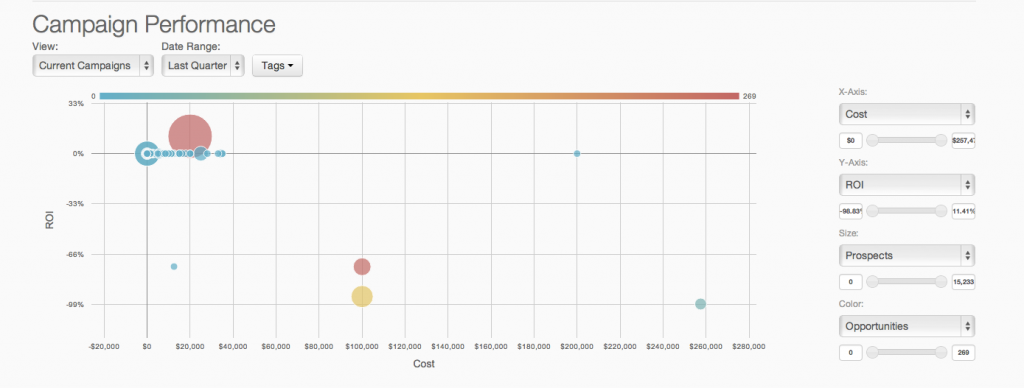
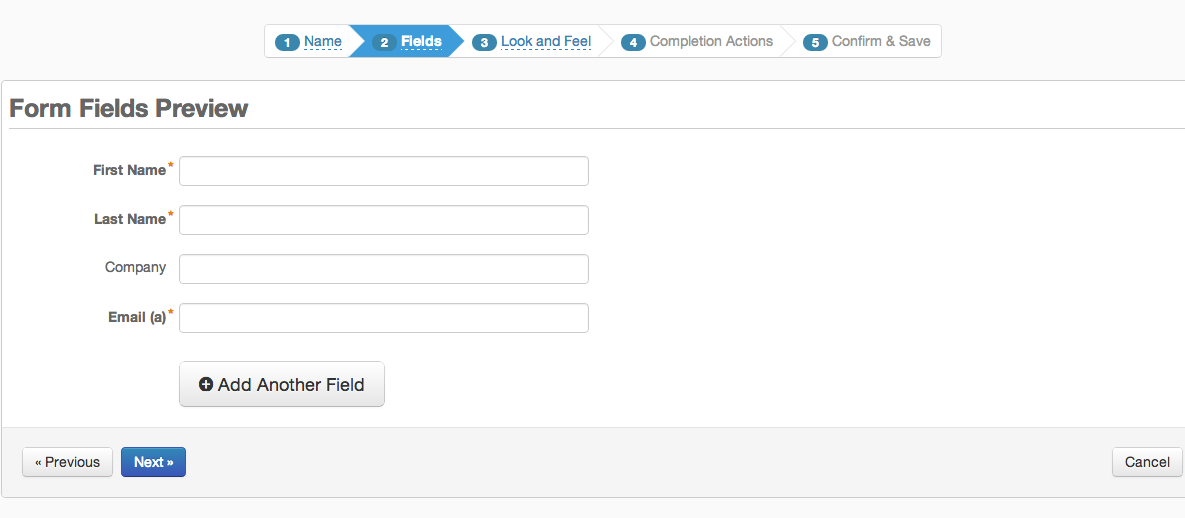
Screenshot of Pardot Analytics - Pardot's reporting and analytics can be used to perform true revenue impact analysis and closed-loop reporting.Screenshot of Pardot Email Analytics - The reach and impact of  email marketing efforts are displayed in real-time with advanced reporting and analytics by device, and email client.Screenshot of Pardot Forms and Landing Pages - Pardot's form and landing page builders are used to turn online traffic to leads with targeted offers and content marketing.Screenshot of Pardot Email Marketing - Lead nurturing flows are defined via an interface that enables definition of the simplest or most complex segmented and targeted campaigns.