Chose AWS CloudFormation
Since the product I'm involved is primarily hosted on AWS we use CloudFormation but in some other products where we have hybrid cloud deployments we prefer terraform which is opensource.

| Product | Rating | Most Used By | Product Summary | Starting Price |
|---|---|---|---|---|
 AWS CloudFormation | N/A | AWS CloudFormation gives developers and systems administrators a way to create and manage a collection of related AWS resources, provisioning and updating them in a predictable fashion. Use AWS CloudFormation’s sample templates or create templates to describe the AWS resources, and any associated dependencies or runtime parameters, required to run an application. Users don’t need to figure out the order for provisioning AWS services or the subtleties of making those dependencies work.… | $0 | |
 DigitalOcean | N/A | DigitalOcean is an infrastructure-as-a-service (IaaS) platform from the company of the same name headquartered in New York. It is known for its support of managed Kubernetes clusters and “droplets” feature. | $5 Starting Price Per Month |
| AWS CloudFormation | DigitalOcean | |||||||||||||||
|---|---|---|---|---|---|---|---|---|---|---|---|---|---|---|---|---|
| Editions & Modules |
|
| ||||||||||||||
| Offerings |
| |||||||||||||||
| Entry-level Setup Fee | No setup fee | No setup fee | ||||||||||||||
| Additional Details | There is no additional charge for using AWS CloudFormation with resource providers in the following namespaces: AWS::*, Alexa::*, and Custom::*. In this case you pay for AWS resources (such as Amazon EC2 instances, Elastic Load Balancing load balancers, etc.) created using AWS CloudFormation as if you created them manually. You only pay for what you use, as you use it; there are no minimum fees and no required upfront commitments. When you use resource providers with AWS CloudFormation outside the namespaces mentioned above, you incur charges per handler operation. Handler operations are create, update, delete, read, or list actions on a resource. | — | ||||||||||||||
| More Pricing Information | ||||||||||||||||
| AWS CloudFormation | DigitalOcean | |
|---|---|---|
| Considered Both Products | AWS CloudFormation  Manuela Jacqueline Mercado Rodríguez Senior Full Stack Developer Chose AWS CloudFormation AWS CloudFormation has more features and robustness. It is suited for professional projects since it provides stability and a wide variety of options for configurations. These include not only dividing stacks by specific code changes, but also in regions. This allows more … | DigitalOcean  Vinaya Kumar B Engineering Lead Chose DigitalOcean The target segment of DigitalOcean is application developers and small teams working in startups for easily configuring and deploying infrastructure in the cloud. We selected DigitalOcean for some of our usecases as it is cost effective and easy to integrate with compared to …  Jan Saggiori Director Chose DigitalOcean Simple, and quick setup, competitive pricing as well as geographically you can choose the location of the datacenter. The setup of the machine with RAM / CPU and SDD gives all options, it is just what we always needed and find our self very well with such type of service by … Chose DigitalOcean I chose DigitalOcean over Oracle Cloud because it's simpler, more cost-effective, and quicker to deploy. DigitalOcean’s intuitive interface allows me to manage servers easily, while Oracle Cloud is more complex and suited for larger enterprises. Also, DigitalOcean’s transparent …  Krzysztof Falcman Lead Backend Engineer Chose DigitalOcean DigitalOcean Spaces  Marco Carnevali VP Products Chose DigitalOcean DigitalOcean is an easier and cheaper way to [set up] new machines. The UX is really good and it's easy to find what you need. Competition offer[s] a complicated way to manage machines and the cost is sometimes more than [...] double of what DigitalOcean offer[s]. However[,] …  Bobby Johnson Co-Founder / Full Stack Dev Chose DigitalOcean As I have said, DigitalOcean was slightly more expensive than something like HostGator, but the amount of customization and quality of service make it worth any difference. AWS was always a pain to set up and use, but DigitalOcean makes it cake.  Leonel Quinteros Director of Technology Chose DigitalOcean Digital Ocean is easier to start with and was a great choice for that project. On other projects, I may choose Google Cloud products because of their more complex product offerings and advanced features. Products like Storage or Pub/Sub isn't available on Digital Ocean and the …  Fedor Paretsky Co-Founder/CEO Chose DigitalOcean Amazon has a very complex UI and many products to offer. They haven't polished up their UI and it has a much greater learning curve compared to DigitalOcean. However, Amazon Web Services (AWS) does have more comprehensive cloud computing services, which forces some companies to …  Tarun Mangukiya Co-Founder Chose DigitalOcean Initially we started using DigitalOcean due to their pricing point as we were in development phase. Slowly when we used it, we starting liking it a lot as it is very fast & easy to get started, compared to the other Cloud Providers we've used. Also they have blogs and …  Jeanine Schoessler Web Developer Chose DigitalOcean Site5's customer service and support have declined over the recent years. The last couple of tickets that I submitted in 2016 were never addressed by their help team. The only customer service agent seems to be on their Twitter account. Site5 does not allow any configuration of …  Praneeth Karnena Co-Founder & Editor-in-Chief Chose DigitalOcean Vultr is a new player in the game. They don't advertise their hardware model and for that reason, people may not trust them. I have run few benchmarks on Vultr, they performed slightly better than DigitalOcean but they aren't trustworthy. Their transparency index is very low …  Craig Nash Sr. Network Engineer Chose DigitalOcean Compared service to service, Digitalocean comes out on top usually, for smaller better spec servers. This is what they do, and specialty shops are always the best route, with no exception here. However, if you need more than a server, or are not comfortable doing more than …  Chris Putnam Senior Web Developer Chose DigitalOcean DigitalOcean has a much lower price point for VPS - but they are not fully managed as with other services. DigitalOcean VPSs are good for quick simple applications that we are comfortable and efficient at deploying ourselves. We do not generally recommend them for clients, as …  Tyler Longren IT Consultant Chose DigitalOcean DigitalOcean isn't nearly as robust as Google Cloud. DigitalOcean provides VPSs, as does Google Cloud. However, Google Cloud offers many other products as well. ChunkHost is very similar to DigitalOcean, but doesn't have the infrastructure that DigitalOcean has. Geographical …  Hernán Silva Front-end developer Chose DigitalOcean AWS: Too complex to set things up. Period. Mediatemple: Great features, services and customer service. Prices are a bit high for what they offer. Linode: Outstanding features and customer support. Difficult to start with for novice users.  Chris Gabriel Interactive Designer & Developer Chose DigitalOcean My cost savings were significant and I felt like I was much more in control of the hardware and processes. I also had issues with certain marketing decisions my former hosting company made, DigitalOcean was an easy choice!  Joey Yax Web Developer Chose DigitalOcean Linode was my long time go-to and we still have several sites hosted and maintained on their servers. Initially, I was skeptical of DigitalOcean's pricing, but they've proven to be an excellent alternative. Linode is more mature in their toolset, but both are really great …  Edward Larkey Linux System Administrator Chose DigitalOcean It was the right balance of cost, ease of use, and support. |
| AWS CloudFormation | DigitalOcean | ||||||||||||||||||||||||||||||
|---|---|---|---|---|---|---|---|---|---|---|---|---|---|---|---|---|---|---|---|---|---|---|---|---|---|---|---|---|---|---|---|
| Infrastructure-as-a-Service (IaaS) |
|
| AWS CloudFormation | DigitalOcean | |
|---|---|---|
| Small Businesses |  HashiCorp Terraform Score 8.5 out of 10 | DigitalOcean Droplets Score 8.7 out of 10 |
| Medium-sized Companies |  Ansible Score 9.2 out of 10 |  SAP on IBM Cloud Score 9.5 out of 10 |
| Enterprises | Ansible Score 9.2 out of 10 | SAP on IBM Cloud Score 9.5 out of 10 |
| All Alternatives | View all alternatives | View all alternatives |
| AWS CloudFormation | DigitalOcean | |
|---|---|---|
| Likelihood to Recommend | 7.6 (0 ratings) | 8.2 (0 ratings) |
| Likelihood to Renew | - (0 ratings) | 9.0 (0 ratings) |
| Usability | - (0 ratings) | 8.0 (0 ratings) |
| Availability | - (0 ratings) | 10.0 (0 ratings) |
| Performance | - (0 ratings) | 9.0 (0 ratings) |
| Support Rating | - (0 ratings) | 8.8 (0 ratings) |
| Product Scalability | - (0 ratings) | 10.0 (0 ratings) |
| AWS CloudFormation | DigitalOcean | |
|---|---|---|
| Likelihood to Recommend |
|
|
| Pros |
|
 Chris Widner VP of Technology & Human Resources |
| Cons |
|
Leonel Quinteros Director of Technology |
| Likelihood to Renew | No answers on this topic |
 Creede Lambard Devops Engineer |
| Usability |
|
|
| Reliability and Availability | No answers on this topic |
Hernán Silva Front-end developer |
| Performance | No answers on this topic |
Hernán Silva Front-end developer |
| Support Rating | No answers on this topic |
Bobby Johnson Co-Founder / Full Stack Dev |
| Alternatives Considered |
|
|
| Scalability | No answers on this topic |
Hernán Silva Front-end developer |
| Return on Investment |
|
|
| ScreenShots | AWS CloudFormation Screenshots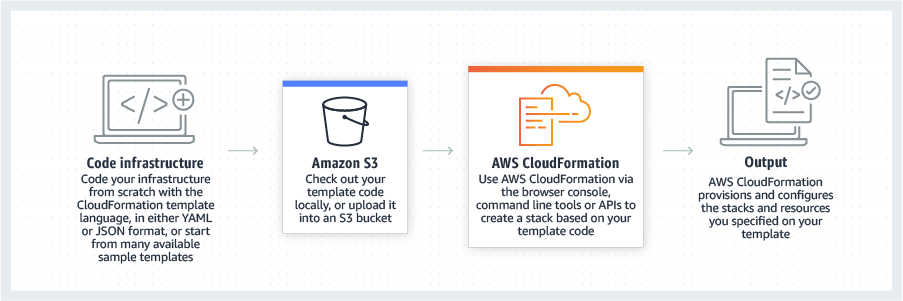    |
