AWS CloudFormation vs. Google Compute Engine

Overview
ProductRatingMost Used ByProduct SummaryStarting Price
AWS CloudFormation
Score 8.8 out of 10
N/A
AWS CloudFormation gives developers and systems administrators a way to create and manage a collection of related AWS resources, provisioning and updating them in a predictable fashion. Use AWS CloudFormation’s sample templates or create templates to describe the AWS resources, and any associated dependencies or runtime parameters, required to run an application. Users don’t need to figure out the order for provisioning AWS services or the subtleties of making those dependencies work.…
$0
Google Compute Engine
Score 8.3 out of 10
N/A
Google Compute Engine is an infrastructure-as-a-service (IaaS) product from Google Cloud. It provides virtual machines with carbon-neutral infrastructure which run on the same data centers that Google itself uses.
$0.01
Hour
Pricing
AWS CloudFormationGoogle Compute Engine
Editions & Modules
Free Tier - 1,000 Handler Operations per Month per Account
$0.00
Handler Operation
$0.0009
per handler operation
Preemptible Price - Predefined Memory
0.000892 / GB
Hour
Three-year commitment price - Predefined Memory
$0.001907 / GB
Hour
One-year commitment price - Predefined Memory
$0.002669 / GB
Hour
On-demand price - Predefined Memory
$0.004237 / GB
Hour
Preemptible Price - Predefined vCPUs
0.006655 / vCPU
Hour
Three-year commitment price - Predefined vCPUS
$0.014225 / CPU
Hour
One-year commitment price - Predefined vCPUS
$0.019915 / vCPU
Hour
On-demand price - Predefined vCPUS
$0.031611 / vCPU
Hour
Offerings
Pricing Offerings
AWS CloudFormationGoogle Compute Engine
Free Trial
YesYes
Free/Freemium Version
YesYes
Premium Consulting/Integration Services
NoNo
Entry-level Setup FeeNo setup feeNo setup fee
Additional DetailsThere is no additional charge for using AWS CloudFormation with resource providers in the following namespaces: AWS::*, Alexa::*, and Custom::*. In this case you pay for AWS resources (such as Amazon EC2 instances, Elastic Load Balancing load balancers, etc.) created using AWS CloudFormation as if you created them manually. You only pay for what you use, as you use it; there are no minimum fees and no required upfront commitments. When you use resource providers with AWS CloudFormation outside the namespaces mentioned above, you incur charges per handler operation. Handler operations are create, update, delete, read, or list actions on a resource.Prices vary according to region (i.e US central, east, & west time zones). Google Compute Engine also offers a discounted rate for a 1 & 3 year commitment.
More Pricing Information
Community Pulse
AWS CloudFormationGoogle Compute Engine
Considered Both Products
AWS CloudFormation
Chose AWS CloudFormation
Since the product I'm involved is primarily hosted on AWS we use CloudFormation but in some other products where we have hybrid cloud deployments we prefer terraform which is opensource.

Chose AWS CloudFormation
Cloning a virtual machine creates a virtual machine that is cloning a virtual machine creates a virtual machine that is a copy of the original. The new virtual machine is configured with the same virtual hardware, installed software, and other properties that were configured …
Chose AWS CloudFormation
As we have our whole infrastructure on AWS, that is why we selected AWS CloudFormation. AWS CloudFormation is better integrated with AWS services than other available products and also provides visibility and tracking on AWS. AWS CloudFormation is free while Terraform …
Chose AWS CloudFormation
We didn't look into anything else as Cloudformation was "built-in" for AWS, it just kind of made sense to go with that. Terraform was something that we briefly looked into Terraform but decides to stick with Cloudformation because our task was relatively "simple". Apparently if …
Chose AWS CloudFormation
AWS CloudFormation has more features and robustness. It is suited for professional projects since it provides stability and a wide variety of options for configurations. These include not only dividing stacks by specific code changes, but also in regions. This allows more …
Chose AWS CloudFormation
The only real comparison would be to Terraform, which is another IaC technology at the infra level. Terraform is cloud-agnostic, which means most popular cloud providers are supported. While AWS CloudFormation is AWS-only. Although, if you consider CDK, CDK for Terraform …
Google Compute Engine
Chose Google Compute Engine
Cloud providers offering virtual machines are quite common. I think, Google, however, is arguably one of the top players in the market, with some of the largest (if not the largest) and most advanced server farms in the world. If you're looking for reliability and cost …
Chose Google Compute Engine
Google Cloud SQL, Google Cloud Storage, Google Cloud Virtual Private Cloud (VPC) and Google Cloud Deployment Manager
Chose Google Compute Engine
The perfect blend of setup flexibility, costing and trust of Google could be my answer to the comparison. This being a server backed service so, ruling out the functions. The Setup flexibility and speed set the GCE apart from Kubernetes. Compliance, regulation and the security …
Chose Google Compute Engine
We have tried using DigitalOcean droplets for some of our minor and non critical VMs. In our experience, Google Compute Engine fares well in comparison the DigitalOcean droplets as they provide better availability, better support and in general, a better experience.
Chose Google Compute Engine
As far as user-friendliness is concerned, I personally rank Google Cloud above both AWS and Azure. Their user interface makes it easy to manage, which is important.
Chose Google Compute Engine
I find Google Compute Engine to be much easier to use than Amazon's EC2 service. The console makes much more sense, permission management is much cleaner, and I'd say the other categories feel on par with EC2: performance, how fine-grained the settings are, connecting to …
Chose Google Compute Engine
The obvious and natural alternatives to GCE are AWS EC2 and Azure VMs. I would say all three are more similar than not. Picking one will most likely depend on what platform you're on already, where your running services are, and which one is more familiar to your team.
Chose Google Compute Engine
Comparabale to AWS EC2. We selected GCE because of the out-of-the-box K8 engine setup. On AWS, I find it a bit tedious.
Chose Google Compute Engine
When configuring Amazon ECS, it is a bit confusing as you are not able to find the actual issue. You need to enable Additional AppInsights to get detailed level info, which is not a concern when configuring on the Instance Level. Moreover, Azure VM does not provide an …
Chose Google Compute Engine
The Google Cloud computing engine is fair at the top because it bills customers, automatic discounting for extended use, and how fast it can be turned on. We enjoy things around setting it up very easily via APIs and CLI commands, and with the always-on recommendations from …
Chose Google Compute Engine
I have utilised Google Compute Engine in addition to Amazon EC2. Both exhibit excellent performance in terms of consumption, speed, and efficiency.My decision to adopt Google Compute Engine was solely based on how user-friendly it is. more basic UI/UX than EC2.Google's customer …
Chose Google Compute Engine
Google Compute Engine is a different animal than GKE, used for different purposes. Compares 1:1 with ECS, and is an equivalent product.
Chose Google Compute Engine
Ec2 has much more compatibility with different tech stacks than Google Compute Engine.
Chose Google Compute Engine
The price difference is not very high between them. Both of them provide good services.
Chose Google Compute Engine
Amazon Elastic Compute Cloud (EC2), Amazon Elastic Kubernetes Service (EKS), Azure VMware Solution and Azure Kubernetes Service (AKS)
Chose Google Compute Engine
Google Compute Engine provides on-demand computing resources that are easy to scale up or down according to my organization needs. This allows our business to quickly adapt to changes in demand without having to invest in additional hardware. It also offers a very competitive …
Chose Google Compute Engine
While Amazon EC2 is the best tool for developers to build an app and make it live, It has some downsides too. EC2 requires so much development while Google Compute Engine makes it easy to build an app within a days. EC2 pricing also relatively high compare to Google Compute …
Chose Google Compute Engine
GCE is available in 3 different regions whereas Ec2 is available in 11 different regions. The compute resources offered by the GCE has lower maximum capacity compared to AWS Ec2. The pricing model of GCE offers first 10 mins free and then charging in increments of 10 mins.
Both …
Chose Google Compute Engine
I prefer the Compute Engine Over these as it provides us with Better Scalability, Performance, and Reliability Security-related Issues don't arise with the Compute Engine, but yes, in terms of accessing or running, it can be improved a bit as compared to EC2 offered by AWS.
Chose Google Compute Engine
the main reason of choosing GCE is availability and user friendly UI with a very good documentation and API explanations. Great visibility over the infra and security.
Chose Google Compute Engine
The features specific to Google Compute Engine vs Amazon EC2 along with cost and availability are comparable, there may be other services within the vendor which may mean that one is more suitable for specific applications than the other one. We have used both for different …
Chose Google Compute Engine
Google was easy to start with in terms of ease of use and support access.
Chose Google Compute Engine
Google Compute Engine provides a one stop solution for all the complex features and the UI is better than Amazon's EC2 and Azure Machine learning for ease of usability.

It's always good to have an eco-system of products from Google as it's one of the most used search engine and …
Chose Google Compute Engine
AWS has become the de facto standard. Skills in Google Compute Engine and AWS are not easily transferable. Still, after getting to know Google Compute Engine well, productivity can be very high and ROI impressive. There are many additional services offered around Google Compute …
Chose Google Compute Engine
We decided to use GCE mainly for its price and good looking UI.
Features
AWS CloudFormationGoogle Compute Engine
Infrastructure-as-a-Service (IaaS)
Comparison of Infrastructure-as-a-Service (IaaS) features of Product A and Product B
AWS CloudFormation
-
Ratings
Google Compute Engine
7.3
Ratings
10% below category average
Service-level Agreement (SLA) uptime00 Ratings8.10 Ratings
Dynamic scaling00 Ratings8.30 Ratings
Elastic load balancing00 Ratings8.00 Ratings
Pre-configured templates00 Ratings7.50 Ratings
Monitoring tools00 Ratings3.00 Ratings
Pre-defined machine images00 Ratings7.30 Ratings
Operating system support00 Ratings7.90 Ratings
Security controls00 Ratings7.90 Ratings
Automation00 Ratings7.90 Ratings
Best Alternatives
AWS CloudFormationGoogle Compute Engine
Small Businesses
HashiCorp Terraform
HashiCorp Terraform
Score 8.5 out of 10
DigitalOcean Droplets
Score 8.7 out of 10
Medium-sized Companies
Ansible
Ansible
Score 9.2 out of 10
SAP on IBM Cloud
SAP on IBM Cloud
Score 9.5 out of 10
Enterprises
Ansible
Ansible
Score 9.2 out of 10
SAP on IBM Cloud
SAP on IBM Cloud
Score 9.5 out of 10
All AlternativesView all alternativesView all alternatives
User Ratings
AWS CloudFormationGoogle Compute Engine
Likelihood to Recommend
7.6
(0 ratings)
7.6
(0 ratings)
Likelihood to Renew
-
(0 ratings)
9.0
(0 ratings)
Usability
-
(0 ratings)
9.0
(0 ratings)
Availability
-
(0 ratings)
8.6
(0 ratings)
Performance
-
(0 ratings)
8.4
(0 ratings)
Support Rating
-
(0 ratings)
10.0
(0 ratings)
User Testimonials
AWS CloudFormationGoogle Compute Engine
Likelihood to Recommend
Cloning a virtual machine creates a virtual machine that is a copy of the original. The new virtual machine is configured with the Cloning Cloning a virtual machine creates a virtual machine that is a copy of the original. The new virtual machine is configured with the same virtual hardware, installed software, and other properties that were configured for the original virtual machine. For information about persistent memory and PMem storage, see the vSphere Resource Management Guide. For information virtual machine creates a virtual machine that is a copy of the original. The new virtual machine is configured with the same virtual hardware, installed software, and other properties that were configured for the original virtual machine. For information about persistent memory and PMem storage, see the vSphere Resource. Management guide. For information virtual hardware, installed software cloning a virtual machine creates a virtual machine that is a copy of the original. The new virtual machine is configured with the same virtual hardware, installed software, and other properties that were configured for the original virtual machine. For information about persistent memory and PMem storage, see the vSphere Resource Management Guide. For information and other properties that were configured for the original virtual machine. For information about persistent memory and PMem storage, see the vSphere Resource Management Guide. For information.
Read full review
It is excellent if you have any workloads that need raw computing or plan to have any state-full services running in your environment like DBs (for which you don't want to use Managed services), cache, etc. It also gives you complete control over which versions of software, OS, etc., you need, and thus, you can build anything and deploy it on GCE.
Read full review
Pros
  • IaC, transactional on top of that
  • Support for "mainstream" general programming languages
  • Sharable IaC "snippets" that can setup standardized environments for individuals quickly
  • OOP techniques are available thanks to OOP languages
Read full review
  • A simple web-based interface that is a breeze to train new engineers to use. Our experienced engineers never have trouble finding or doing anything on GCE.
  • Sustained use and Committed use discounts mean we get top-tier VMs for an incredibly competitive price.
  • Wonderful identity and access management that gives us peace-of-mind when granting access to machines to contractors and other 3rd parties.
  • Fast VMs, lastest in hardware, and enough RAM to power even the hungriest of our services.
Read full review
Cons
  • Error Description upon Failure Needs to be Improved.
  • Slow to create, delete or update.
  • Need to delete resources manually. It can ask before starting deletion whether to skip those resources or delete them.
Read full review
  • The L7 load balancer can be difficult to get set up. It's limited in its functionality, especially with the container engine.
  • It's hard to find certain objects on the web console. Often times the things I need to get to are buried in advanced menus.
  • Google's decision to only support MySQL on their relational DB service means that I have to manage Postgres instances in Compute on my own, managing everything from storage to backups.
Read full review
Likelihood to Renew
No answers on this topic
Its pretty good, easy and good performance. Also, interface is very good for starters compared to competitors. Infra as Code (IaC) using Terraform even added easiness for creation, management and deletion of compute Virtual Machines (VM). Overall, very good and very easy cloud based compute platform which simplified infrastructure, very much recommend.
Read full review
Usability
It's easy enough to get a shared template & apply it. You don't even have to download-then-upload or copy-and-paste, a publicly-accessible url works.
Diving deeper, it has enough powerful capabilities to make the life of a platform / DevOps engineer bearable.
However, you need equally deep knowledge to troubleshoot issues, when they inevitably pop up. This is the same for all IaC technologies, as they are additional abstraction layers on top of the native API provided by the cloud providers.
Read full review
Having interacted with several cloud services, GCE stands out to me as more usable than most. The naming and locating of features is a little more intuitive than most I've interacted with, and hinting is also quite helpful. Getting staff up to speed has proven to be overall less painful than others.
Read full review
Reliability and Availability
No answers on this topic
Google Compute Engine works well for cloud project with lesser geographical audience. It sometimes gives error while everything is set up perfectly. We also keep on check any updates available because that's one reason of site getting down. Google Compute Engine is ultimately a top solution to build an app and publish it online within a few minutes
Read full review
Performance
No answers on this topic
The raw computer power is excellent; our applications feel snappy, pages load almos instantly for our customers and so on. The primary reason it is not a perfect 10 is that the native tools for monitoring individual VM performance can be complex, making it challenging to easily diagnose specific resource bottlenecks without significant configuration
Read full review
Support Rating
No answers on this topic
  • The documentation needs to be better for intermediate users - There are first steps that one can easily follow, but after that, the documentation is often spotty or not in a form where one can follow the steps and accomplish the task. Also, the documentation and the product often go out of sync, where the commands from the documentation do not work with the current version of the product.
  • Google support was great and their presence on site was very helpful in dealing with various issues.
Read full review
Alternatives Considered
Since the product I'm involved is primarily hosted on AWS we use CloudFormation but in some other products where we have hybrid cloud deployments we prefer Terraform which is opensource.
Read full review
When configuring Amazon ECS, it is a bit confusing as you are not able to find the actual issue. You need to enable Additional AppInsights to get detailed level info, which is not a concern when configuring on the Instance Level. Moreover, Azure VM does not provide an in-browser option; instead, it is Azure Bastion, but for that, you have to enable a dedicated subnet, which is a bit unnecessary.
Read full review
Scalability
No answers on this topic
It works really well with other Google Cloud services, making it easy to build scalable solutions across different teams and locations.
Read full review
Return on Investment
  • + We can standup a VPC in minutes
  • - It took a lot of inital time to set up
  • + With logging/rollback, made testing much easier.
Read full review
  • Scalability means flexibility and less upfront costs
  • Can become expensive when hard set compute requirements are clear, but things like Spot VMs can help here too, or just having your own infrastructure and scaling up with Google. This is for more advanced cases though
  • Ramp up time is long, but after that it is quick to do many things and ROI is awesome
Read full review
ScreenShots

AWS CloudFormation Screenshots

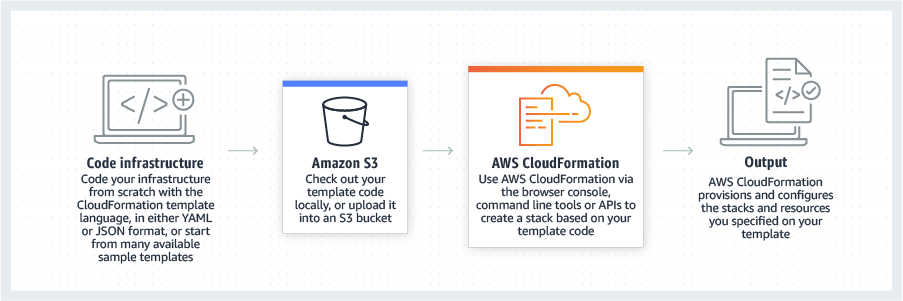
Screenshot of CloudFormation - How it works overviewScreenshot of CloudFormation - High level how it worksScreenshot of CloudFormation - Template exampleScreenshot of CloudFormation - Template inputs overview

Google Compute Engine Screenshots

Screenshot of How to choose the right VM
With thousands of applications, each with different requirements, which VM is right for you?Screenshot of documentation, guides, and reference architectures
Migration Center is Google Cloud's unified migration platform with features like cloud spend estimation, asset discovery, and a variety of tooling for different migration scenarios.