AWS CloudFormation vs. TeamCity

Overview
ProductRatingMost Used ByProduct SummaryStarting Price
AWS CloudFormation
Score 8.8 out of 10
N/A
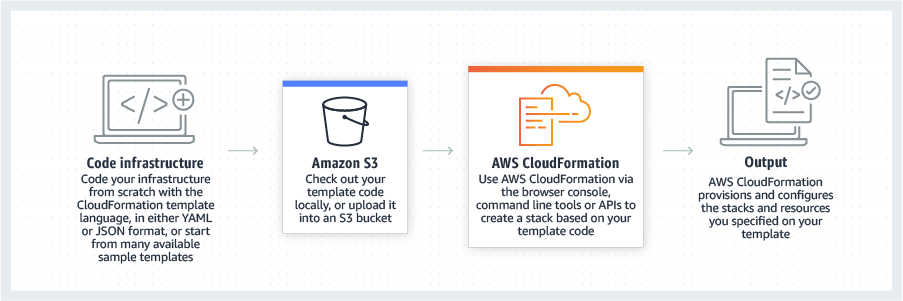
AWS CloudFormation gives developers and systems administrators a way to create and manage a collection of related AWS resources, provisioning and updating them in a predictable fashion. Use AWS CloudFormation’s sample templates or create templates to describe the AWS resources, and any associated dependencies or runtime parameters, required to run an application. Users don’t need to figure out the order for provisioning AWS services or the subtleties of making those dependencies work.…
$0
TeamCity
Score 7.4 out of 10
N/A
TeamCity is a continuous integration server from Czeck company JetBrains.N/A
Pricing
AWS CloudFormationTeamCity
Editions & Modules
Free Tier - 1,000 Handler Operations per Month per Account
$0.00
Handler Operation
$0.0009
per handler operation
No answers on this topic
Offerings
Pricing Offerings
AWS CloudFormationTeamCity
Free Trial
YesNo
Free/Freemium Version
YesNo
Premium Consulting/Integration Services
NoNo
Entry-level Setup FeeNo setup feeNo setup fee
Additional DetailsThere is no additional charge for using AWS CloudFormation with resource providers in the following namespaces: AWS::*, Alexa::*, and Custom::*. In this case you pay for AWS resources (such as Amazon EC2 instances, Elastic Load Balancing load balancers, etc.) created using AWS CloudFormation as if you created them manually. You only pay for what you use, as you use it; there are no minimum fees and no required upfront commitments. When you use resource providers with AWS CloudFormation outside the namespaces mentioned above, you incur charges per handler operation. Handler operations are create, update, delete, read, or list actions on a resource.
More Pricing Information
Community Pulse
AWS CloudFormationTeamCity
Considered Both Products
AWS CloudFormation
Chose AWS CloudFormation
Since the product I'm involved is primarily hosted on AWS we use CloudFormation but in some other products where we have hybrid cloud deployments we prefer terraform which is opensource.
Chose AWS CloudFormation
Cloning a virtual machine creates a virtual machine that is cloning a virtual machine creates a virtual machine that is a copy of the original. The new virtual machine is configured with the same virtual hardware, installed software, and other properties that were configured …
Chose AWS CloudFormation
As we have our whole infrastructure on AWS, that is why we selected AWS CloudFormation. AWS CloudFormation is better integrated with AWS services than other available products and also provides visibility and tracking on AWS. AWS CloudFormation is free while Terraform …
Chose AWS CloudFormation
We didn't look into anything else as Cloudformation was "built-in" for AWS, it just kind of made sense to go with that. Terraform was something that we briefly looked into Terraform but decides to stick with Cloudformation because our task was relatively "simple". Apparently if …
Chose AWS CloudFormation
AWS CloudFormation has more features and robustness. It is suited for professional projects since it provides stability and a wide variety of options for configurations. These include not only dividing stacks by specific code changes, but also in regions. This allows more …
Chose AWS CloudFormation
The only real comparison would be to Terraform, which is another IaC technology at the infra level. Terraform is cloud-agnostic, which means most popular cloud providers are supported. While AWS CloudFormation is AWS-only. Although, if you consider CDK, CDK for Terraform …
TeamCity
Chose TeamCity
Jenkins relies on being open source as the primary driver for its success. This low cost is a huge factor for many companies, both small and large. The professional, free tier of TeamCity offers a huge amount of growth before ever needing to pay anything. I personally also find …
Chose TeamCity
Since we were already making use of other JetBrains offerings, TeamCity had a leg up on the competition due to the ease of integration with these tools. With that said, TeamCity's feature set stacks up well with the competition. Jenkins definitely has some nice features, but …
Chose TeamCity
We are in the process to select one of them, but we are not decided yet
Chose TeamCity
This application is easy to install and deploy at site than most of the similar solutions in market. Easy user interface is one of the reason it can be installed. However each software have its good points and bad points. Study your organizations case and then only choose …
Chose TeamCity
I would also like to compare TeamCity against Snap-Ci as well as Concourse. We chose TeamCity over all of these tools because of its ability to be set up easily against a restricting corporate firewall. We needed to integrate unit tests, integration tests, pushes to production, …
Chose TeamCity
While TeamCity is more limited product than VSTS (VSTS includes a git repository), it is easier to use and better priced.
Chose TeamCity
TeamCity competes against the TFS build, Visual Studio Team services and Jenkins the open source workhorse. The reason for selecting TeamCity was because it was found to be a great fit for all the diverse projects on a spectrum of technologies we have which the TFS Build …
Chose TeamCity
TeamCity by far has the best interface TeamCity still supported our old SubVersion reports as well.
Chose TeamCity
TeamCity is a great on-premise Continuous Integration tool.
Visual Studio Team Services (VSTS) is a hosted SAAS application in Microsoft's Cloud.
VSTS is a Source Code Repository, Build and Release System, and Agile Project Management Platform - whereas TeamCity is a Build and …
Chose TeamCity
I like the quality of Jetbrains products. TeamCity is well supported and regularly updated by Jetbrains. They have an active support forum and most questions are answered quickly.

TeamCity is very extendable and has been able to handle everything we've been required to do.
Chose TeamCity
We've only ever really used TeamCity as a CI platform. Running tests on these CI clusters is worlds more efficient and just plain easier than having to run individual tests on your local machine. You just hit one button here, versus either writing some run script or even worse …
Chose TeamCity
TeamCity is the best combination of price and full features. It has a good web UI and doesn't need a lot of manual configuration files, but it still is incredibly extensible and can do just about any build or release task you set it at. If it can't do it, the odds are it has a …
Chose TeamCity
Jenkins and Team Foundation Server (TFS) are both strong products. Compared to Jenkins, TeamCity is much more mature and polished. Though Jenkins is open-source/free, the cost of TeamCity is a drop in the bucket compared to the total cost of even one project we're using it …
Best Alternatives
AWS CloudFormationTeamCity
Small Businesses
HashiCorp Terraform
HashiCorp Terraform
Score 8.5 out of 10
GitLab
GitLab
Score 8.7 out of 10
Medium-sized Companies
Ansible
Ansible
Score 9.2 out of 10
GitLab
GitLab
Score 8.7 out of 10
Enterprises
Ansible
Ansible
Score 9.2 out of 10
GitLab
GitLab
Score 8.7 out of 10
All AlternativesView all alternativesView all alternatives
User Ratings
AWS CloudFormationTeamCity
Likelihood to Recommend
7.6
(0 ratings)
10.0
(0 ratings)
Performance
-
(0 ratings)
9.3
(0 ratings)
User Testimonials
AWS CloudFormationTeamCity
Likelihood to Recommend
Cloning a virtual machine creates a virtual machine that is a copy of the original. The new virtual machine is configured with the Cloning Cloning a virtual machine creates a virtual machine that is a copy of the original. The new virtual machine is configured with the same virtual hardware, installed software, and other properties that were configured for the original virtual machine. For information about persistent memory and PMem storage, see the vSphere Resource Management Guide. For information virtual machine creates a virtual machine that is a copy of the original. The new virtual machine is configured with the same virtual hardware, installed software, and other properties that were configured for the original virtual machine. For information about persistent memory and PMem storage, see the vSphere Resource. Management guide. For information virtual hardware, installed software cloning a virtual machine creates a virtual machine that is a copy of the original. The new virtual machine is configured with the same virtual hardware, installed software, and other properties that were configured for the original virtual machine. For information about persistent memory and PMem storage, see the vSphere Resource Management Guide. For information and other properties that were configured for the original virtual machine. For information about persistent memory and PMem storage, see the vSphere Resource Management Guide. For information.
Read full review
TeamCity is well suited for an organization using continuous integration, meaning you release code to production often, and an agile project management system. There are free versions available for small teams and enterprise versions available for large teams with many different builds. TeamCity is probably overkill for basic e-commerce or blog website builds that do not require much development after the initial launch
Read full review
Pros
  • IaC, transactional on top of that
  • Support for "mainstream" general programming languages
  • Sharable IaC "snippets" that can setup standardized environments for individuals quickly
  • OOP techniques are available thanks to OOP languages
Read full review
  • Fully customizable build process. Each step of the build process can be parameterized and customized to address specific needs of particular applications. This allowed us to easily convert from a custom VM-based environment to our current Docker-based environment.
  • Manages large numbers of build agents seamlessly. This allows us to run multiple builds on many different applications in a most efficient manner.
  • Build steps can be managed in an arbitrary manner, allowing some parts of the process to proceed in parallel while restricting others to depend on completion of all relevant steps.
Read full review
Cons
  • Error Description upon Failure Needs to be Improved.
  • Slow to create, delete or update.
  • Need to delete resources manually. It can ask before starting deletion whether to skip those resources or delete them.
Read full review
  • It is not plug and play thing
  • Need more specific configurations for smaller projects as well
  • Online help is less available
  • Basic implementation is easy but I think feature add on can be complex as it involve some language knowledge as well.
Read full review
Usability
It's easy enough to get a shared template & apply it. You don't even have to download-then-upload or copy-and-paste, a publicly-accessible url works.
Diving deeper, it has enough powerful capabilities to make the life of a platform / DevOps engineer bearable.
However, you need equally deep knowledge to troubleshoot issues, when they inevitably pop up. This is the same for all IaC technologies, as they are additional abstraction layers on top of the native API provided by the cloud providers.
Read full review
No answers on this topic
Performance
No answers on this topic
TeamCity runs really well, even when sharing a small instance with other applications. The user interface adequately conveys important information without being overly bloated, and it is snappy. There isn't any significant overhead to build agents or unit test runners that we have measured.
Read full review
Alternatives Considered
Since the product I'm involved is primarily hosted on AWS we use CloudFormation but in some other products where we have hybrid cloud deployments we prefer Terraform which is opensource.
Read full review
Jenkins relies on being open source as the primary driver for its success. This low cost is a huge factor for many companies, both small and large. The professional, free tier of TeamCity offers a huge amount of growth before ever needing to pay anything. I personally also find the user experience of TeamCity to be much better, both from a look and feel, as well as from an out-of-the-box feature set perspective. The big selling feature of ADO is its native integration with Azure. TeamCity integrates very well with out-of-the-box .NET support and greatly simplifies our use of another diverse tooling outside of the Microsoft ecosystem.
Read full review
Return on Investment
  • + We can standup a VPC in minutes
  • - It took a lot of inital time to set up
  • + With logging/rollback, made testing much easier.
Read full review
  • TeamCity was a key contributor to our organization's adoption of Agile.
  • TeamCity made it possible to KILL "It works on my laptop" conversations with Developers. If it does not compile in TeamCity - the project is not deployable. TeamCity's easy to use interface made it possible to quickly adopt a "Deploy Only from TeamCity" policy, further ensuring TeamCity Builds were the gold-standard for well-configured source code.

Read full review
ScreenShots

AWS CloudFormation Screenshots

Screenshot of CloudFormation - How it works overviewScreenshot of CloudFormation - High level how it worksScreenshot of CloudFormation - Template exampleScreenshot of CloudFormation - Template inputs overview