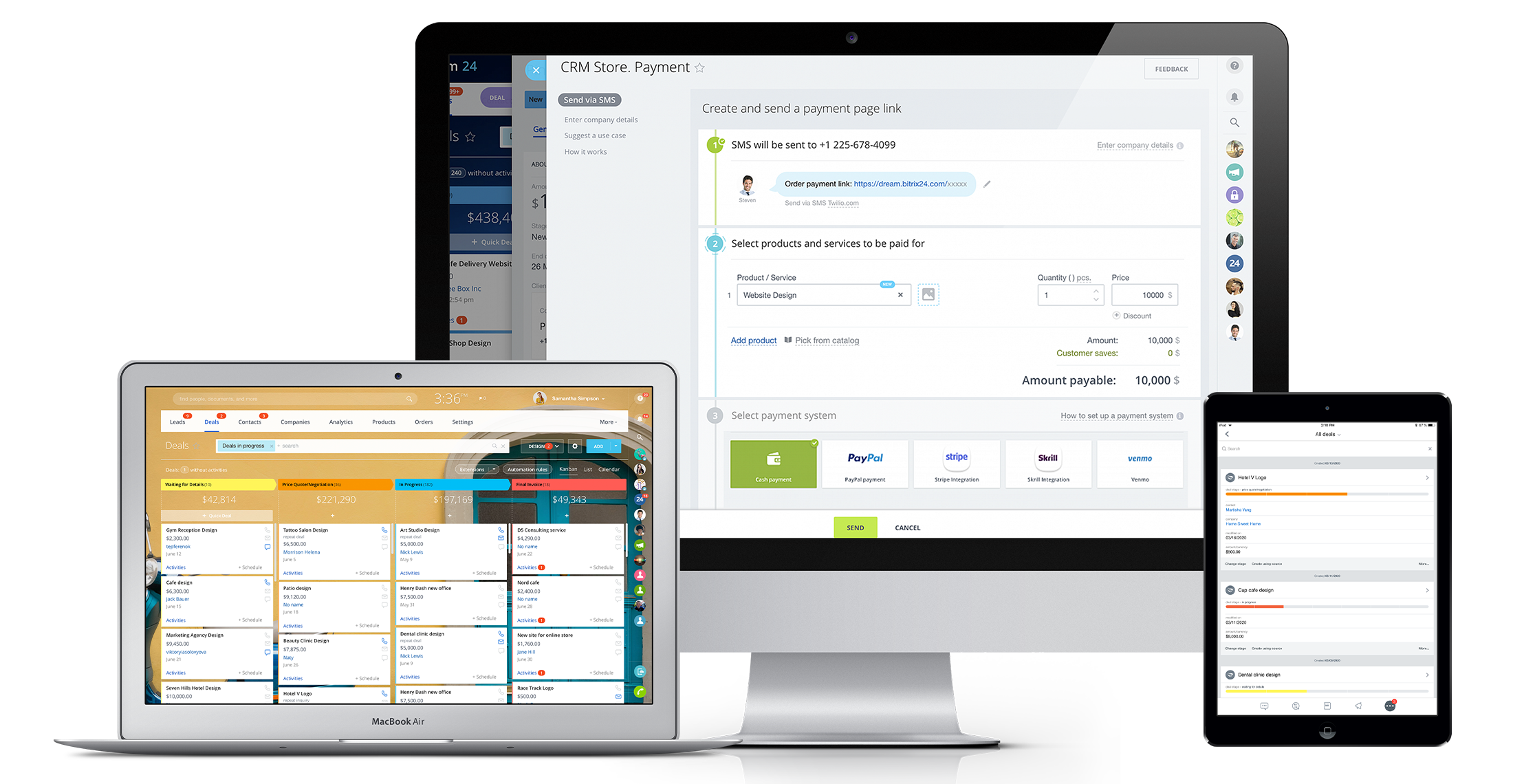
Bitrix24 is a local-hosted or cloud-based social intranet and project management platform that also contains core HR (HRMS) and CRM features. Bitrix24 also provides time management services and employee self-service.
$61
per month up to 5 users
Notion
Score 8.7 out of 10
N/A
Notion aims to present users with an all-in-one workspace — for notes, tasks, wikis, and databases, from Notion Labs in San Francisco.
In fact, I use both, but in different ways, monday to control the internal agenda, Bitrix for all other parts within the company, such as task control, chat with employees and with calendar also for control in two systems. Bitrix is more complete and has many more features, …
1CRM was not so smart tool and firstly it took us a very long time to understand the basic working of 1CRM that is why I admire the ease Bitrix24 has provided us that its interface is clean and all the features are visible and obvious. We don’t have to spend much of our time in …
These other CRMs are very modular and this implies that each module has an additional cost associated with it, unlike Bitrix24 that has all the tools in one with a single annual or monthly payment.
The plethora of features and also the beta ones like CRM Analytics, Sales center, and Online Store. I forgot you can also build an online store too. For the value, ease of use, features, this is one of the best to use. It's a time saver from changing from one app to another, …
Salesforce will appear to cost more "out of the box" but due to the way B24 operates, Salesfoce will cost you less and consume much less of your time to deploy
We went with Bitrix because it avoided the per seat cost of large sales teams. We discovered you get what you pay for. We wasted $800 given their no refund policy, but more importantly lost 3 months of quality sales management.
Bitrix24 has the most comprehensive software package, that can grow with the business. Its free package is the same as the paid package in terms of functionalities. Its Gantt chart capability allows all of the users to visually see the progress of the projects, in a way that …
Bitrix stacks up beautifully and goes beyond others in certain features. Just like any other software it has its own pros and cons but overall is an excellent software to work on if it can satisfy majority of your needs. Overall it can do very well with just a few minor …
I've attempted various task administration/joint effort apparatuses including Asana, Basecamp, Wrike, Wunderlist, Zoho, Salesforce, and so on. I can't address the client support of Bitrix, as I haven't reached them. Up until now, the framework has been genuinely dependable. The …
Bitrix24 is less expensive but less flexible and less tailor made. It doesn’t allow Active Directory synchronization which is a must have for us. It has a worse user experience. Building workflows is complex.
Bitrix24 has a very wide functionality, compared to competitors. But the technical program is crude. It is very unstable work. Therefore, our company currently uses AmoCRM.
The choice of the B24 was prompted by the fact that in 2012 the company had a box version, but without the CMR. The license was expired, the version was no longer supported by B24. In the stages, the company's directorate drove the employees into tasks for B24, but with …
Bitrix24 is more complete in terms of features and suits better as a communication tool to work as an internal social network. It lets you test or use the product for free (not just for a small period of time).This trial is limited to 12 users (enough to get a good perception …
Bitrix24 is very well suited to our oranization as per our busineess function. We need something which partly does CRM function, share function, chat, meetings. In all, we found Bitrix24 better and cheaper than Sharepoint. Sharepoint is very good but it has his own way [of …
We use Zoho for our own firm and Bitrix24 for our client's firm. Overall, the key differences noted, so far, are 1. the user interface for Bitrix24 is much more visual 2. It has much better privacy and access controls 3. Customer service is faster 4. the mobile app is easier …
Notion is far superior to OneNote. OneNote is unnecessarily complex and quite constrained by 'old ways' of doing things. Notion is a more simplistic interface and just 'works'.
Needed something outside of Microsoft Office for overall deal and project tracking and collating our collective knowledge and learnings from different deals. We have not evaluated against anything else.
I listed only the other tools we use. These are not necessarily competitors to Notion, nor we use them for the same things. For organising tasks and collaborative work we only use Notion. Slack is good for communication, Figma for design and development, while Miro for …
I like Notion more than Trello and Google Sheets because it has the best parts of both. Trello is good for making lists of tasks, but it can’t do much else. Google Sheets is great for organizing data, but it can get messy. I chose Notion because I can make lists, tables, and …
The first major difference is the ability to create formulas using other columns and even using other formulas. This increases the possibility of customization to another level. I couldn't do the same things using these other tools. The second is the infinite number of things …
I think Miro also has it's downsides but in general there is more options to illustrate one's creative ideas and workflows etc. Notion is slightly more limiting in that sense. And due to two facor authentification I also tend to work more in google sheets and google docs and …
Notion pretty much combines all the capabilities each one of these platforms have and just takes the most important ideas and concentrates on making them stand out. I can create a "Trello" type of timeline, and use a more traditional "Jira" or "Asana" type of waterfall view. …
Notion goes beyond file storage, which are what the two selected above primarily offer. Also I have used Notion for personal use cases and projects and have found it to have a really amazing user experience and UI. Microsoft products tend to fail at having a good UX. Also, …
The company uses both Notion and Trello within the company. Notion is more for North America employees while Trello is used between Operation team overseas and in North America. Sometimes it's a preference of how the tools look like for project management. I would say both …
Jira is a great tool, that is probably more robust than Notion and more scalable. But for a small company (under 50 people) the investment is hard to swallow without a significant revenue stream justifying it. Notion is a perfect low cost option that meets 80% of the …
We found Notion to be a lot easier to use than ClickUp. They offer a similar feature set, but ClickUp was a lot less user-friendly in my opinion. We also tried Trello and Todoist, but found they were just lacking the features we needed. We still use Trello for some internal …
Notion's flexibility and extensive customization options make it the perfect tool for my personal organization. I appreciate not being confined to a single format, and I find that the process of personalizing my workspace sparks creativity, which is a great asset for managing …
Notion is the most in depth of all of the above applications. You can make a simple to-do list and share it with other people, or dive deep into formulas and page linking. I appreciate that it does not take a large time to set up like Monday.com, but it still offers a huge …
Notion has a powerful feature, and it is their templates within databases. They allow our operation to flow seamlessly and create new tasks with defined subtasks in seconds.
not nearly as useful, it is just a file organiser tool but Notion has the functionality of creating many thing in one page, allowing to include more pages and link with other spaces. such as Miro, google drive, calendar, etc Integration is part of what makes Notion the best …
I think that Notion adds a better user experience which is more customisable. Some of these apps are really rigid and dont give youthe flexability that Notion does.
I found that Notion offered the most versatility. In particular it allowed me to super easily format and reformat information depending on how I was using it. This has proven incredibly useful. And has allowed me to store various types of information all in the same place.
Notion is less complicated than ClickUp and more user friendly, especially for those who prefer simplicity. I am aware that ClickUp does offer simple template and let us scale it but Notion is one step ahead because of the UI design is easier to use. I like Confluence at work …
I've used Evernote in the past and currently use Asana alongside Notion, so I can compare them based on my experience.
Notion is much more flexible than Evernote. While Evernote is great for basic note-taking, Notion allows me to structure my notes with nested pages, databases, …
We were using Nation for the whole company and it's amazing, however, for the CS team with the tech/ops we are using Trello. As a CS & Operation manager, the reminders/alarms/notifications are the most important for handling time and minimizing the SLAs, so I created automation …
Bitrix24 is highly beneficial for teams that are geographically dispersed or working remotely. Its real-time communication tools, including instant messaging and video conferencing, enable seamless collaboration regardless of physical location. The centralized document management feature ensures that team members can easily access and collaborate on shared documents from anywhere, facilitating efficient teamwork in a remote or distributed environment.
At the company I work for, we use Notion as an organizational base for all sectors and projects. For example, we use it for the marketing team, customer support team, among others. And for each one, we can create pipelines, tasks, due dates, execution time, tags with different colors. It's something very versatile that helps with everything around here. We've even created a sales funnel in Notion.
I use Notion on my personal tablet, and unlike on the computer, I have a lot of difficulty editing backgrounds, GIFs, and page dividers. It's not as user-friendly, and often the elements end up cut off or misaligned, which is frustrating.
While the current calendar feature is helpful, I'd love to see more customization options. The Google Calendar style isn't always ideal, especially for tasks without specific times or for ongoing projects that require daily maintenance.
It would be fantastic to have more flexibility in customizing Notion pages. For example, I'd love to create planners with the freedom to add illustration boxes, stickers, or GIFs without being restricted to a fixed layout.
It has become the central nervous system of the business and has constantly proven to be of value. We are not just renewing but might even upgrade to advanced Bitrix24 plans and will be adding more user licenses in the next 3 months. Bitrix24 has a sharper learning curve initially. However once it is surpassed, it opens doors to a range of creative deployment strategies
This application is a complete scam and way over priced for what you are getting. They are filled full of false advertising and false statements regarding integrations. They claim to integrate with quickbooks and they DO NOT. This software accomplished nothing but making our day to day lives more difficult and wasted months of our time attempting to build out.
Notion addresses most of our needs and help teams to organize their tasks, track their progresses and then archive for future reference. The company uses Notion to share announcement, holiday schedules, employee contact information and organizational structures. Everyone finds it useful and helpful. The notifications are instant. Reminders are on time.
I can't recall any instance of unplanned outages over the past 1 year of use. Likewise for application errors. However note that, advanced users will have a learning curve
It comes with a lot of features for managing customers relation for making a dynamic marketing strategy. Sharing and attaching any type of file makes our work much easier for our portfolio. I personally don’t like its customer service that needs to be vigilant and should know the way they should treat their clients
Overall the training was very comprehensive. The trainer did provider necessary additional reading materials as well. However the general approach at Bitrix24 is to divert users to self-help documentation and videos. It is recommended that atleast 1-2 personnel in the organization be "Bitrix24 experts" so that lower phases of training requirements are covered internally itself. Also the best part about Bitrix24 is that not all users need to go very deep while using it. We have multiple counsellors who started using it on day 2 without any major hiccups
The plethora of features and also the beta ones like CRM Analytics, Sales center, and Online Store. I forgot you can also build an online store too. For the value, ease of use, features, this is one of the best to use. It's a time saver from changing from one app to another, just use one. It is a one-stop CRM. If you are a startup you can begin with this and then slowly get on a paying option. The free offers a lot too. This platform can grow with your business and help save time too.
Notion is much more robust than Google Tasks, which I find very limited. Notion is far more customizable and affordable than Asana, which is more of a turnkey solution for teams that want to work within a pre-defined structure. Notion and ClickUp are comparable, in my opinion, in terms of task management and affordability, however Notion is the more customizable and expansive option whereas ClickUp is mostly just for task management.
The scalability and reliability is almost 9.5/10 to be honest. We istarted with Bitrix24 for just 2 functions and now have expanded its usage to 2 more. In terms of users, every full-time employee (FTE) now uses Bitrix24 without fail. We are also working on giving limited/partial access to external service providers
With Bitrix, we have been able to create projects from the start within the software. We have been able to access our workflow, chat notes, documents, etc- all from one place.
The reporting feature is a favorite. It is very easy to create your own reports, download them and share them with others within your team. Depending on the division that you're reporting for, you can tailor Bitrix's reports to support your needs.
The biggest negative has been the limited functionality of the mobile app. It would be nice to be able to do everything from mobile app, vs limited functionality. This would include creating all tasks, projects, making edits, etc. While capabilities are there, they are not as full as on the desktop version.