Blackboard Learn by Anthology vs. EYardstick

Overview
ProductRatingMost Used ByProduct SummaryStarting Price
Blackboard Learn by Anthology
Score 6.0 out of 10
N/A
Blackboard Inc. is an enterprise learning management systems vendor. Blackboard was founded in 1997 and became a public company in 2004. The company provides education, mobile, communication, and commerce software and related services to clients including education providers, corporations and government organizations. As of December 2010, Blackboard software and services are used by over 9,300 institutions in more than 60 countries. Blackboard Learn is the company's flagship LMS, supporting…N/A
EYardstick
Score 9.8 out of 10
N/A
EYardstick’s Pre-Employment Tests Enable Hiring Teams With Detailed Insights On Candidate’s Knowledge, Skill And Disposition Measured By Online Video Interviews To Take A Justified Decision In Screening Out Misfits, Saving A Lot Of Time And Effort. Be it Coding, Sales Aptitude, Customer Support, Entry Level or any other Role; EYardstick evaluates the skill for almost any role.N/A
Pricing
Blackboard Learn by AnthologyEYardstick
Editions & Modules
No answers on this topic
Offerings
Pricing Offerings
Blackboard Learn by AnthologyEYardstick
Free Trial
YesYes
Free/Freemium Version
NoNo
Premium Consulting/Integration Services
NoNo
Entry-level Setup FeeOptional$100
Additional DetailsMust contact vendor for pricing information.
More Pricing Information
Community Pulse
Blackboard Learn by AnthologyEYardstick
Features
Blackboard Learn by AnthologyEYardstick
Learning Management
Comparison of Learning Management features of Product A and Product B
Blackboard Learn by Anthology
8.6
Ratings
5% above category average
EYardstick
-
Ratings
Course authoring9.00 Ratings00 Ratings
Course catalog or library9.00 Ratings00 Ratings
Player/Portal8.00 Ratings00 Ratings
Learning content6.10 Ratings00 Ratings
Mobile friendly9.00 Ratings00 Ratings
Progress tracking & certifications7.00 Ratings00 Ratings
Assignments9.00 Ratings00 Ratings
Compliance management9.00 Ratings00 Ratings
Learning administration10.00 Ratings00 Ratings
Learning reporting & analytics9.00 Ratings00 Ratings
Social learning9.00 Ratings00 Ratings
Single Sign On (SSO) Enabled Learning9.00 Ratings00 Ratings
User Ratings
Blackboard Learn by AnthologyEYardstick
Likelihood to Recommend
9.9
(0 ratings)
9.8
(0 ratings)
Likelihood to Renew
4.6
(0 ratings)
-
(0 ratings)
Usability
10.0
(0 ratings)
-
(0 ratings)
Support Rating
7.7
(0 ratings)
9.8
(0 ratings)
Online Training
7.0
(0 ratings)
-
(0 ratings)
Implementation Rating
10.0
(0 ratings)
-
(0 ratings)
User Testimonials
Blackboard Learn by AnthologyEYardstick
Likelihood to Recommend
A school with a well-established technology imprint with their students (for example, ours is a BYOB school where every student has their own laptop and must bring it to school every day and where over 99% of our families have reliable broadband at home) is a reasonable scenario for using The arrogance and intransigence of the sales force is quite disconcerting… They are no longer the only game in town and don't yet realize it. Less well-off schools/families may find it a challenge if students must be on campus or at a public library in order to use the technology. Obviously, during the pandemic, this became problematic for some districts.
Read full review
After using EYardstick, we have been able to ensure the candidates I hire are of a high enough calibre to perform at or above expectations.
Read full review
Pros
  • Provides HTML quality course content that is easily retrievable and viewable.
  • Provides multiple methods of communication: email, threaded discussions, real-time "live" online discussions, as well as grade portal.
  • Allows facilitators multiple methods of grading or providing feedback: threaded discussions, rubric scoring, personal comments, inline viewer, or download/upload attachments.
Read full review
  • Coding simulators with pre-built questions for many roles.
  • Wide variety of topics in software testing space.
  • Availability of questions on niche topics like BDD, Cucumber, etc.
Read full review
Cons
  • Although the current graphic user interface is easy to use, it can be improved with larger fonts, dynamic menus, and attractive graphics.
  • The system does not include a module to pay the school fee.
  • The roster tab lacks detailed information about students.
Read full review
  • No AIML elements yet, I would like to see it very soon from EYardstick.
Read full review
Likelihood to Renew
There are several aspects of Desire2Learn that outweigh the benefits of using Blackboard. I find that the Desire2Learn system is a bit more user friendly and looks more up-to-date. However, the decision to renew systems is not up to me because the entire University uses the same system. Regardless, I think I would choose Desire2Learn over Blackboard because of its improved user interface.
Read full review
No answers on this topic
Usability
It is very usable for both faculty and students. The interface is pretty intuitive and most students can use it without a lot of additional training. Faculty do need some training to effectively use the interface, but they usually get it pretty quickly. We have had to create some additional programming to give faculty a way to delve deeper into the content.
Read full review
No answers on this topic
Support Rating
Itʻs a good platform for certain things such as tests. Blackboard may not be the most user friendly but there is always room for improvement in any website, business, etc. When used with other platforms such as Google Classroom, Blackboard can be more effective, but when used by itself I feel it is not as impactful from a student perspective.
Read full review
I frankly didn't have to interact much as the tool was very much self explaining. The account manager I deal with is good as she calls regularly to check on how things are going and if any help is needed from EYardstick's end.
Read full review
Implementation Rating
Blackboard's Managed Hosting was top-notch in getting us up and running quickly.
Read full review
No answers on this topic
Alternatives Considered
Blackboard is the all around better fit for our intuition. It provides the "bells and whistles" we require in having a diverse faculty and flexibility in course delivery. The "bells and whistles" aren't cheap, but we have found that budgeting for this large expense has been more than worth it for us.
Read full review
HirePro was more service oriented than product oriented. EYardstick had a lot of self help and very easy for a novice to pick and start using it. Most of the features are self explanatory. Also our demand was to cater to a wide variety of job roles. EYardstick helped us in assessments for BPO hiring to typing tests to core IT exams with 360 degree proctoring solution.
Read full review
Return on Investment
  • It has answered all my needs for distance learning and met most of the objectives
  • The only negative I can think of is not having access to the past course material and not being able to download the lectures
  • Another positive is the zoom integration feature
Read full review
  • Product is licensed per test.
  • Pricing is transparent.
Read full review
ScreenShots

Blackboard Learn by Anthology Screenshots

Screenshot of A modern and intuitive learning management system (LMS) designed in collaboration with the global education community, providing students and faculty with a more inclusive, flexible, and insightful experience.Screenshot of Fostering a sense of belonging is essential to student success. To truly create an inclusive learning environment requires a holistic approach, and Blackboard Learn leads the market in many critical areas which allow your institution to meet students of all backgrounds where they are. Built to be mobile-first, Blackboard Learn is the only LMS that provides the same great experience on PC, tablet, and smartphone. And we're proud that Blackboard Learn was the First LMS to achieve accessibility Certification from the National Federation of the Blind and all of our interfaces undergo rigorous accessibility testing. Learn also has the best integration with our market-leading accessibility product, Ally, of any LMS. Learn also ensures that every user has an experience which reflects – and celebrates – their unique identity. To take just one example, users can record their name pronunciation, and choose their preferred pronouns.Screenshot of Blackboard Learn supports instructors with multiple formative and summative assessment methods, and features capabilities that reduce stress for students. For example, we’ve recently released features that allow students to use different test-taking strategies and understand their progress through assessments – including a timer that can be hidden – to maximize their result and minimize anxiety. Grading workflows have been designed to increase efficiency for instructors and give more insightful feedback to students. For instance, we’ve recently revamped the overall grade functionality to make it easier for instructors to change weightings between tasks and tailor to individual students. Blackboard Learn also offers deep integrations with hundreds of partners to create even more interactive and engaging courses, including the deepest interaction of any LMS with Microsoft Teams.Screenshot of Blackboard Learn presents insights embedded right into instructor and student workflows - making useful information readily available, and making it easier for instructors to help students where and when they need it most. Learn's progress tracking tools help students and instructors always know how they're tracking to achieve their goals - and where there is opportunity for improvement. Quick actions are tied to these insights, like following up with students in groups or individually. Blackboard Learn also provides built-in value with Blackboard Data Reporting to help leaders understand how the LMS is being used, student performance, and surfacing opportunities for continuous improvement.

EYardstick Screenshots

Screenshot of Video Interviews
Video interviews are much faster than traditional telephonic interviews in which; up to 80% of the candidates get rejected. EYardstick does the job of finding the right fit for you so you can only talk to the right candidates in subsequent interview rounds.
1. Know your candidate before he knows you
2. Spend more time with the right candidate – No more wasted phone interviews
3. Create an Engaging Candidate Experience that showcases your brand
4. Make your recruitment team’s life easier
5. Justify the resume of a candidate sent to the Hiring Manager with detailed analysis on various assessed parameters set for the roleScreenshot of Writing Ability Test ?

EYardstick goes a step ahead by adding Artificial Intelligence (AI) element to the evaluation process which automatically evaluates the Writings/Long Answers against 5 proven set criteria. 1. Style 2. Mechanics 3. Grammar 4. Orientation and 5.Usage, which gives an objective score by considering the length of the Writings/Long Answer within the given time, versus the above criteria.Screenshot of EYardstick Coding Tab
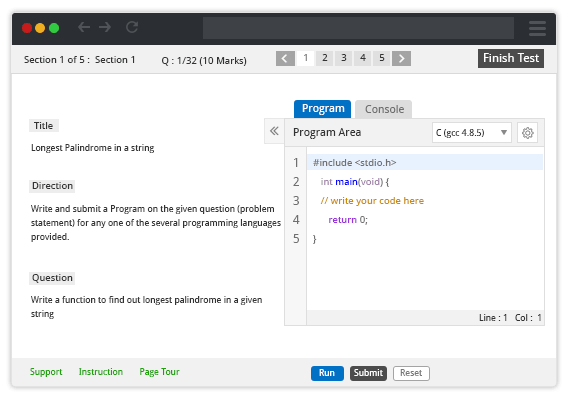
EYardstick is all about innovative ways of improving the candidate selection process, we go a step deep into making questions for the online coding test depending on their need, be it the Algorithm Based questions or Data Structures or Fix the Error kind of questions or case-wise built problem statement questions.