Bonterra ETO vs. Salesforce Service Cloud

Overview
ProductRatingMost Used ByProduct SummaryStarting Price
Bonterra ETO
Score 6.4 out of 10
Enterprise companies (1,001+ employees)
Bonterra ETO is a case management platform that consolidates data, caseloads, and service delivery programs, helping users to save time and serve more people. ETO is purpose-built for organizations looking to improve their program and case management. ETO is built in accordance with industry security standards and includes tools that helps users to focus on advancing their missions, as well as: Reduce time spent entering data into separate systems to increase…N/A
Salesforce Service Cloud
Score 8.5 out of 10
N/A
Service Cloud is a customer service platform that helps businesses manage and resolve customer inquiries and issues. It provides tools for case management, knowledge base, omni-channel support, automation, and analytics, enabling companies to deliver exceptional customer service experiences.
$25
per month
Pricing
Bonterra ETOSalesforce Service Cloud
Editions & Modules
No answers on this topic
Starter Suite
$25
per month
Pro Suite
$100
per month per user
Enterprise
$165
per month per user
Unlimited
$330
per month per user
Agentforce 1
$550
per month per user
Offerings
Pricing Offerings
Bonterra ETOSalesforce Service Cloud
Free Trial
NoYes
Free/Freemium Version
NoYes
Premium Consulting/Integration Services
NoNo
Entry-level Setup FeeRequiredNo setup fee
Additional Details
More Pricing Information
Community Pulse
Bonterra ETOSalesforce Service Cloud
Considered Both Products
Bonterra ETO
Chose Bonterra ETO
A high degree of customization, poor performance, and design. I did not select ETO (predates my time here), so I can't speak to that.

Chose Bonterra ETO
We had an internally developed database. ETO, by far, is a more stable environment to work in. I was not involved in the decision to select SS.
Chose Bonterra ETO
We originally built our program around SharePoint and were dissatisfied by the lack of transparency it provided. We then moved to ETO, primarily because it was the cheapest of the other solutions that we looked at. Now, we are realizing that we are not getting any real value …
Chose Bonterra ETO
When we made our decision several years ago Social Solutions had just acquired Apricot. At that time it was recommended to use ETO based off our revenue stream. However, it seems like Social Solutions has put in a lot more time and effort into Apricot over ETO and it seems more …
Chose Bonterra ETO
To be quite honest, ETO was selected prior to my arrival at my job. I believe it was selected because of its notoriety for serving non-profits specifically.
Chose Bonterra ETO
Some comparable options for us were Apricot and Salesforce. Apricot didn't have the capacity to stretch to as many different programs and clients as we had. Salesforce was similar: it is better suited for tracking individual donors instead of the vast network of clients and …
Chose Bonterra ETO
There are other, tailored solutions by private developers that were not available on this list. The major one is HIFIS, developed by the Government of Canada to track shelter use. What we didn't like about it is the inability of individual organizations to customize their own …
Chose Bonterra ETO
We had primarily been using Access and Excel for tracking in many of our programs prior to ETO, with the exception of a few programs that used specific programs required or provided by funders. Access and Excel have so many limitations--I don't think I need to detail them here. …
Chose Bonterra ETO
We have been using ETO for a while. I haven't come across another reporting system quite as robust as ETO. For this reason, we are continuing with ETO.
Chose Bonterra ETO
We found ETO to much more user friendly and much easier to customize for our needs in house.
Chose Bonterra ETO
My organization recently went through a process of analyzing other databases on the market. These databases include Salesforce and Apricot, another Social Solutions project. ETO is far more robust than these other products as they do not include the reporting capability that …
Chose Bonterra ETO
We have not evaluated any other current products, as we have been using ETO for 7 years.
Chose Bonterra ETO
Many similar products have a very high price point of entry. The financial investment is greater with other options that I've looked at in the last few years. ETO is additionally more customizable to your organization's unique needs. However, the customer service at Social …
Chose Bonterra ETO
The back end customizable features. We like having ownership of our report building, and overall usability.
Chose Bonterra ETO
I've use ClientTrack in the past and while the UI is currently nicer than ETO the reporting isn't as robust.
ChildPlus is another software that is geared toward Head Start programs and is slick and easy. The reporting is also not as good as ETO but the data entry side is very …
Chose Bonterra ETO
Given the diversity of the services we offer and the vastly different service goals/models of those programs, ETO is the only program we've found that offers us the flexibility we need in both data entry and reporting. Also, many of our funding requirements change annually …
Chose Bonterra ETO
No other software package we've researched can match ETO's reporting capabilities. All other software packages, however, have better interfaces, are browser-neutral, and are mobile-friendly. We selected Social Solutions ETO because it was the best software package we could …
Chose Bonterra ETO
Salesforce is currently being used as a requirement of a few grants that we currently have. G*Stars is another popular Workforce Development software that several of our Workforce Development Agencies are using. Preferably for us, we use Social Solutions ETO. I believe all …
Salesforce Service Cloud
Chose Salesforce Service Cloud
I honestly prefer Zendesk to Salesforce Service Cloud. I find that Zendesk is easier to manage both on the support ticket side, as well as the knowledge center side. It looks and feels easier to use than Salesforce Service Cloud. Salesforce Service Cloud is fine, but it is …
Chose Salesforce Service Cloud
Zoho is not very real-time, it has limited integration capabilities, and the UI is not very satisfactory for any incoming customer. The performance is slow and impacts the overall customer journey. The data stored in the backend is slightly scattered and needs to be cleaned …
Chose Salesforce Service Cloud
Salesforce is a really great case management tool. Made things a lot easier for our team. Wanted something fairly simple that had a variety of capabilities we could customize.
Chose Salesforce Service Cloud
We used Salesforce for years, Left for Hubspot, and then came back to Salesforce (SF). As they say, don't fix it if it's not broken. Salesforce and customizing were better for us.
Chose Salesforce Service Cloud
Salesforce Service Cloud offers deep integration with our current and expanding CRM data, along with numerous pre-built features that didn't exist in Kayako when we used it. (We used to use an instance Kayako installed in a private cloud environment.) Salesforce Service Cloud …
Chose Salesforce Service Cloud
Because it has good ratings and it is easy to setup .it also has good word of mouth.
Chose Salesforce Service Cloud
Zendesk has it's own challenges in terms of Administrator difficulties and a completely different back-end than Salesforce Service Cloud. I would recommend Salesforce Service Cloud if you need a clean database of Companies and Contacts. Zendesk does not excel in overall CRM …
Chose Salesforce Service Cloud
Insightly, Buildium and Hootsuite
Chose Salesforce Service Cloud
Salesforce Service Cloud has more unique customization features that benefit the organization as a whole.
Chose Salesforce Service Cloud
I'm not at the level where I would be part of the decision making process for choosing a vendor or product for the organization. Every position I've held, I've come into a company that has already implemented or is in the process of implementing Salesforce. Honestly I would not …
Chose Salesforce Service Cloud
All of the software's are well established and good, but what gave the edge to us its easy integration capability with other systems, experience cloud integration and Einstein analytics which made us move forward Salesforce. Salesforce also have better service and industry …
Chose Salesforce Service Cloud
The major value proposition is that service cloud offers integrated services. That covers a multitude of lacking features. All of our agents preferred Freshdesk. Salesforce service cloud was lacking so many basic features compared to it that it was frustrating to switch. Simple …
Chose Salesforce Service Cloud
We have been using Salesforce Service Cloud for well over ten years.
Chose Salesforce Service Cloud
Salesforce service cloud is more configurable than Zendesk and Freshdesk. It has its own inbuilt AI chatbot also which further improves service agent efficiency. Salesforce is more integration agnostic and has pre-built connectors with multiple 3rd party systems. However, in …
Chose Salesforce Service Cloud
We were after a robust and very scalable solution, which could be rapidly implemented. Salesforce Service Cloud not only fitted the bill, but it was much easier to source skills and find on-line learning to help achieve our goals. Although the other technologies could have …
Chose Salesforce Service Cloud
Salesforce allows a lot more visibility and allows us to build better reporting. It is initially trickier to set up and learn, however, comprehensive training and processes have lead to increased customer satisfaction and retention.
Chose Salesforce Service Cloud
This solution provided our organization a flexible platform. The other solutions were rigid or required complex integrations.
Chose Salesforce Service Cloud
Salesforce is lightyears behind Zendesk. You have to be trained as a Salesforce admin to do anything, while Zendesk takes minutes to set up and is actually customer friendly. There are not native telephony options within Salesforce and the tools you use to integrate are …
Chose Salesforce Service Cloud
We previously used a home grown, proprietary system for our needs. This started to get costly and clunky as our database grew. We ended up going with Salesforce because they are purely cloud based. They also have a large footprint and very robust solution so they help us …
Chose Salesforce Service Cloud
Well, I worked with SAP in the past when I was in other companies. It was way more complex and not user-friendly. You had to take a lot of steps in order to accomplish simple tasks and not everyone could work at the same time in the same program. I would 100% recommend …
Chose Salesforce Service Cloud
Zendesk changed their agreements making us unable to continue with them due to our agreements with our customers. SalesForce allowed us to maintain our customer agreements.
Chose Salesforce Service Cloud
I used other products in another company as a database and can say that Salesforce Service Cloud is much more user friendly for customer service needs and makes work faster to process than the named program before. Integration between departments is more clear and simple to …
Features
Bonterra ETOSalesforce Service Cloud
Incident and problem management
Comparison of Incident and problem management features of Product A and Product B
Bonterra ETO
-
Ratings
Salesforce Service Cloud
8.8
Ratings
9% above category average
Organize and prioritize service tickets00 Ratings9.40 Ratings
Expert directory00 Ratings8.50 Ratings
Subscription-based notifications00 Ratings8.60 Ratings
ITSM collaboration and documentation00 Ratings8.20 Ratings
Ticket creation and submission00 Ratings9.30 Ratings
Ticket response00 Ratings9.10 Ratings
Self Help Community
Comparison of Self Help Community features of Product A and Product B
Bonterra ETO
-
Ratings
Salesforce Service Cloud
8.7
Ratings
11% above category average
External knowledge base00 Ratings8.40 Ratings
Internal knowledge base00 Ratings8.90 Ratings
Multi-Channel Help
Comparison of Multi-Channel Help features of Product A and Product B
Bonterra ETO
-
Ratings
Salesforce Service Cloud
8.7
Ratings
11% above category average
Customer portal00 Ratings8.00 Ratings
IVR00 Ratings8.80 Ratings
Social integration00 Ratings8.90 Ratings
Email support00 Ratings9.20 Ratings
Help Desk CRM integration00 Ratings8.80 Ratings
Best Alternatives
Bonterra ETOSalesforce Service Cloud
Small Businesses
Bonterra Apricot
Bonterra Apricot
Score 9.5 out of 10
Agiloft Service Desk (discontinued)
Score 9.0 out of 10
Medium-sized Companies
TIBCO® BPM Enterprise
Score 7.0 out of 10
Agiloft Service Desk (discontinued)
Score 9.0 out of 10
Enterprises
Infor Human Resources
Score 7.1 out of 10
SysAid
SysAid
Score 9.1 out of 10
All AlternativesView all alternativesView all alternatives
User Ratings
Bonterra ETOSalesforce Service Cloud
Likelihood to Recommend
7.0
(0 ratings)
8.3
(0 ratings)
Likelihood to Renew
1.0
(0 ratings)
6.2
(0 ratings)
Usability
1.0
(0 ratings)
8.0
(0 ratings)
Availability
9.1
(0 ratings)
9.5
(0 ratings)
Performance
7.3
(0 ratings)
8.6
(0 ratings)
Support Rating
4.0
(0 ratings)
7.0
(0 ratings)
In-Person Training
-
(0 ratings)
10.0
(0 ratings)
Online Training
7.3
(0 ratings)
9.0
(0 ratings)
Implementation Rating
5.1
(0 ratings)
7.0
(0 ratings)
Ease of integration
-
(0 ratings)
5.0
(0 ratings)
Product Scalability
5.5
(0 ratings)
-
(0 ratings)
Vendor post-sale
6.4
(0 ratings)
8.0
(0 ratings)
Vendor pre-sale
6.4
(0 ratings)
8.0
(0 ratings)
User Testimonials
Bonterra ETOSalesforce Service Cloud
Likelihood to Recommend
I can see from an education perspective how it would be an incredible fit. The functionality is all there and growing. From a CAC perspective, it's still a work in progress, especially for larger CACs where lots more services are provided and the lines between programs blur a bit more. I think that ETO is becoming more user-friendly for CACs and Social Solutions is moving in the right direction too. I can't wait for some of the new features to roll out and be able to use them in our system. I really do think that will improve our user experience significantly.
Read full review
This cloud is a good option for attracting large numbers of customers for mid-scale and large-scale organizations. However, it’s not suitable for small companies or startups due to its high cost. For use cases where real-time input from customers is taken and then processed on the cloud to give them output, this platform is a must.
Read full review
Pros
  • ETO captures the variety of data that can give us more ways to understand what is happening with the participants we serve.
  • Participant dashboards are customizable and can be very helpful for direct service providers in serving their participants.
  • The referral system within ETO allows us to make easier referrals between programs and track how often that occurs.
  • It doesn't take a strong technical person to set up programs and other pieces within ETO.
Read full review
  • Super fast set-up of the service from design through to production.
  • Robust method of release management from sandbox, to test, to production.
  • User access controls can be fine grain, which is great for GDPR requirements, limiting access to only necessary data.
  • Simple api integrations with other third party systems
  • Broad range of features and functionality
  • Einstein search features provides faster information mining for our agents as they help to resolve customer requests.
Read full review
Cons
  • ETO needs to be mobile friendly because a lot of our staff do outreach work, including all touchpoints, demographics, enrollments, and dashboards on their phone.
  • Too many ways to get to the same thing. E.g. Add New Participant Tab, Add New Participant in Navigation Bar, Add New Participant on Home Page, etc. This generates mistakes and a need for very thorough training and tight oversight.
  • Inability to remove touchpoints from custom universes once they have already been added. There is a limit of 20 touchpoints per custom universe. If the touchpoints in a universe have become obsolete or irrelevant, there is no way to make room for a new, more relevant touchpoint. Old touchpoints can be disabled but not removed.
  • Need to pay extra for email and calendar notifications. This should be a built-in function, as the software already costs a lot, and many organizations cannot afford to spend more to get this vital functionality.
  • It would be great if a "Case Conference" chat feature could be attached to participants. Case managers could enter the chat room and relay important information about the participant to each other. This could also work when people aren't there in real time, like emails. The important part is that all of this information would be accessible UNDER the participant's profile or dashboard that it's regarding.
Read full review
  • A free trial would be extremely valuable to customers who are not able to commit to a full plan.
  • The pricing of this program is not priced competitively with other similar services.
  • Can be quite time consuming to maintain.
  • Not user friendly if you aren’t tech savvy/familiar with software.
Read full review
Likelihood to Renew
Social Solutions has been great for our organization. It has allowed us to not only report on data, but to dive into it to see trends and give snapshots of the current status of our neighbors. Social Solutions has been helpful in getting us to see additional ways we can use our data and ways that it is easier for front line staff to use this tool
Read full review
Professional edition works best for a small company with lower call volumes and is very useful but as you grow exponetially I think it has limited ability to do all the things we want to - SLA management, defect, release management to name a few. Reports and dashboards being available in real time.
Read full review
Usability
6 years of experience dealing with a poor interface, unreliable reports, and broken promises with virtually zero improvements. I have too many issues to list but have an entire file if anyone ever shows interest from a site Manager. I listed some of the issues in some of the first questions in this review and I appreciate the opportunity to share my experiences.
Read full review
I love that the Salesforce Service cloud provides all of the functionality that I need when implementing business processes for our customer support representatives. It even has enough functions and features that allow us to customize and expand upon our current processes, giving us the ability to go above and beyond what we've thought we could ever do. Using cases coupled with Salesforce's automation tools help ease the workload and keeps our data integrity intact.
Read full review
Reliability and Availability
Routine maintenance is announced with plenty of lead time, and the few times I've been unable to log in to the system properly a simple refresh was all that was required to fix.
Read full review
Salesforce's Trust Center clearly communicates occasional issues to anyone who subscribes, down to an organization's cloud instance. Bundled sandboxes ease updates, and seasonal upgrades are seamless, scheduled well in advance with plenty of information about what's coming. Support agents have noticed intermittent Omni-Channel disconnects due to internet connections, and these are clearly notified.
Read full review
Performance
Mostly really strong now, although I understand that for some years before switching their hosting service to AWS performance was a real issue with ETO and we had frequent problems with pages timing out or other glitches stemming from performance issues. With AWS that is mostly a thing of the past, although it is still a major issue with the reporting tool which is unable to run reports on the entire database due to performance limitations, instead requiring admins to define universes prior to running queries.
Read full review
Load times can be slow, but this is also based on how much customization you have done. We added a lot of custom fields which could cause additional slowness in loading. This was never anything that affected our overall efficiency. I did not notice that Service Cloud slowed down any of the systems we had it integrated with
Read full review
Support Rating
We love the first tier customer support folks! They're friendly, helpful, and knowledgeable within the scope of their position. The experiences we've had with their supervisors have also been mostly good and again they seem to be doing what they can within the scope of their positions. This is what prevents me from selecting 1. Unfortunately, none of these wonderful folks can offer real solutions when things are actually broken. They verify there's a problem and send it to the black hole called "the developers". After that, we don't hear anything useful and we figure out how to live with/work around the problem ourselves. (Requests for updates typically get "still with the developer" responses.) This is highly frustrating given that most of our issues are basic system issues (functionality that worked then broke after an update by Social Solutions, servers not syncing, report universes not flattening automatically, etc.). All we want is for the system to work as designed and to be fixed in a timely fashion when it doesn't. Apparently, that's too much to ask. (And no, we don't expect it to happen instantly, programming and quality control checks obviously take time.)
Read full review
Salesforce offers support, although it generally gets routed to overseas support teams first, and once they are unable to help, it gets escalated up the chain to higher tiers. Frequently, the answer back from support is that there is no native solution, and we either have to turn to the AppExchange for some solution provided by another developer, or custom build our own solution.
Read full review
In-Person Training
No answers on this topic
Our in-person training was provided by our implementation partner and it was quite good. This was in part because we were already working with them and so it naturally leant itself to a good training relationship. And because they were building our customizations and configuring things, they could then provide training on those things naturally.
Read full review
Online Training
Really good trainer and exhaustive curriculum covered, but ETO is a complex enough system that you don't *really* know how to use it until you've been in the trenches for a few weeks. For instance, I took a Report Writing training and emerged with some fluency in the reports interface and a vague understanding of the process, but immediately encountered a legion of instance-specific idiosyncrasies that would have been totally impossible to address in a webinar training for a dozen folks from different orgs working in different instances.
Read full review
Trailheads are great but it was often unclear what actually applied to our organization. This made it difficult to get a whole lot out of it. Part of it is that because the basic Salesforce features didn't quite work for us, we had to add customizations, which then nullified a lot of the training.
Read full review
Implementation Rating
Hard to say, as I was not with the agency at the time. However, based on our use of the software ~5years later I can say that there were no catastrophic design choices made during implementation that have become unduly burdensome as we've scaled up.
Read full review
I would go through an implementation very differently knowing what I know now. It was difficult coming from systems we liked in post-sales service and having to adapt to the clunky and underwhelming feature set in Salesforce. I would trim back our expectations
Read full review
Alternatives Considered
We originally built our program around SharePoint and were dissatisfied by the lack of transparency it provided. We then moved to ETO, primarily because it was the cheapest of the other solutions that we looked at. Now, we are realizing that we are not getting any real value from our ETO system, so we will likely be investing in a more sophisticated system.
Read full review
I honestly prefer Zendesk to Salesforce Service Cloud. I find that Zendesk is easier to manage both on the support ticket side, as well as the knowledge center side. It looks and feels easier to use than Salesforce Service Cloud. Salesforce Service Cloud is fine, but it is expensive as well.
Read full review
Scalability
The core product scales well, and we've grown quite a bit as an agency during our use of ETO. However, there are some real pain points particularly around creating new programs and managing report universes that require extensive offline checklist resources and a full-spectrum understanding of how changing settings in one part of ETO can have downstream impact in other areas. This can introduce a "chilling" effect on proposed changes to the system, where there is strong incentive to leave things as-is to avoid unforeseen consequences.
Read full review
The product has scaled up with our company growth just fine. No issues here other than slowness in clicking around and running reports
Read full review
Return on Investment
  • It has saved us time in terms of putting together reports for internal use and for external funders.
  • Better accountability for gathering information.
  • Given the monthly cost of the system we are probably paying too much but the cost of switching to another piece of software doesn't quite justify a move yet.
Read full review
  • We have cut our service team in half over the past 5 years due to the efficiency of the tool
  • The amount of direct inquiries to our technical team is less than 10% compared to the number support tickets that get entered in the system for them to work in a more organized manner
  • Responses are 100% more timely because tickets can be responded to by any individual in the queue or on the team, as opposed to direct emails to just one person
Read full review
ScreenShots

Bonterra ETO Screenshots

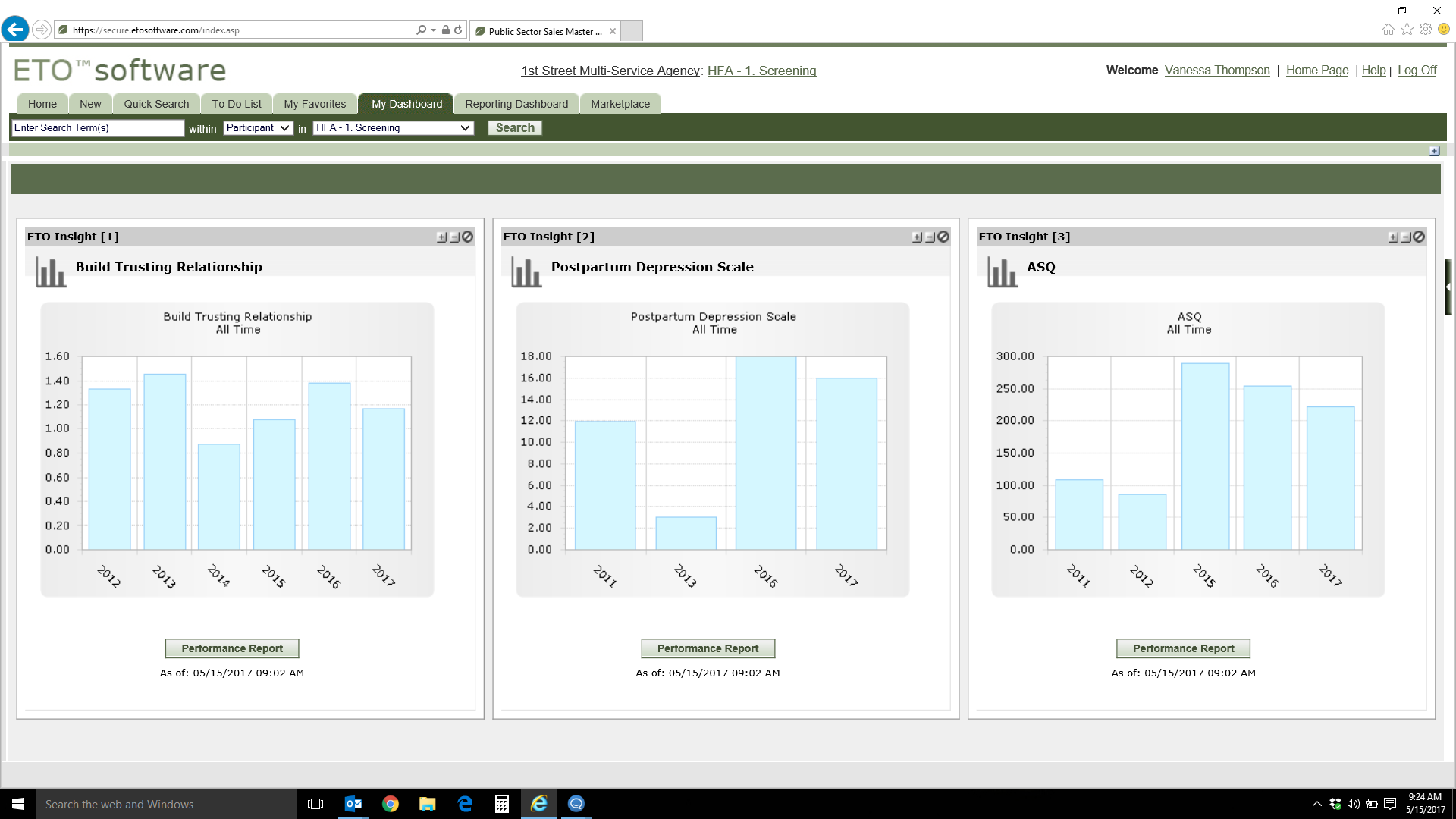
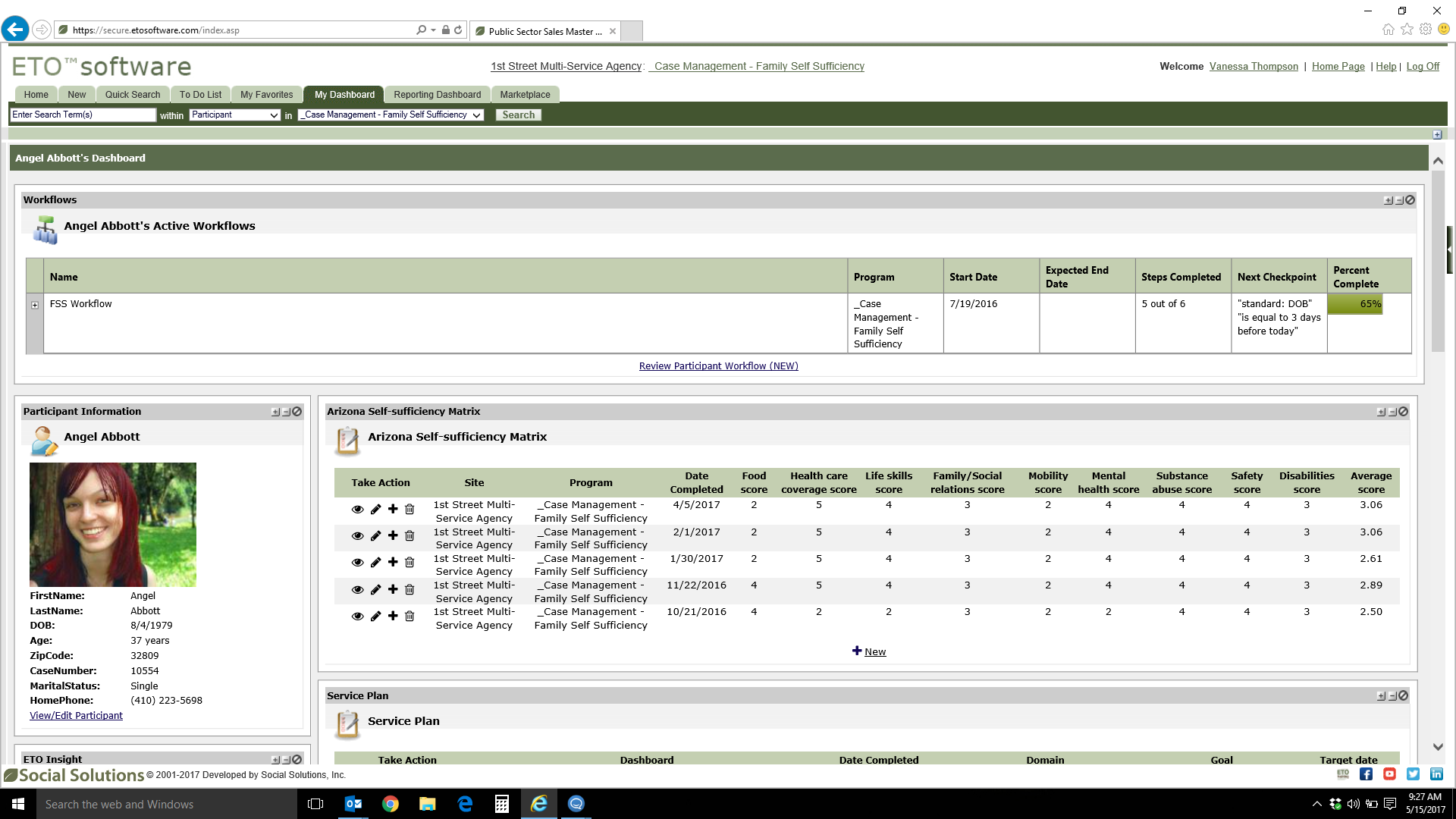
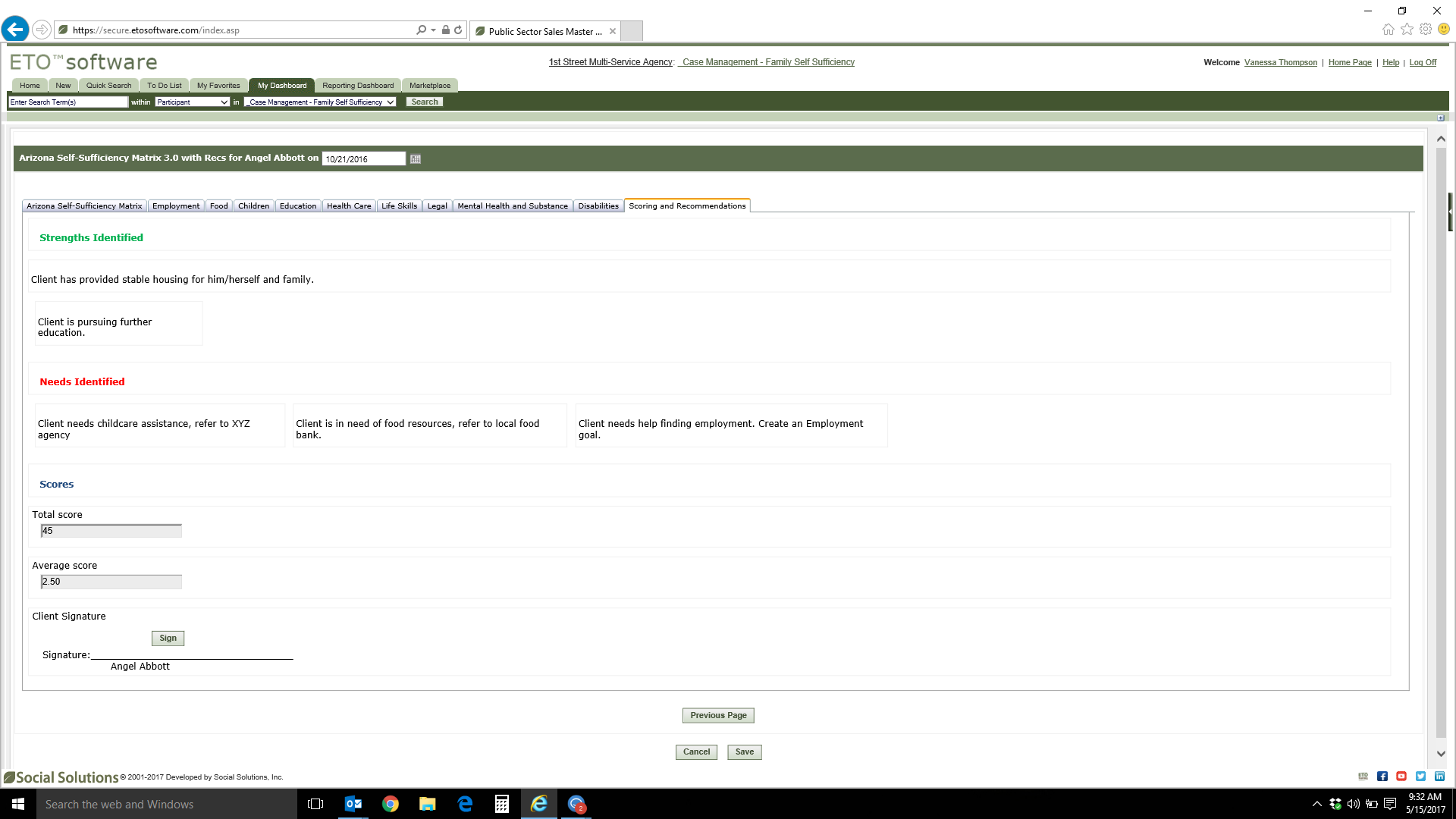
Screenshot of Screenshot of Screenshot of Screenshot of Screenshot of

Salesforce Service Cloud Screenshots

Screenshot of Workflows and OrchestrationScreenshot of Service CatalogScreenshot of Contact Center