ClickMeeting vs. GlobalMeet Webcast

Overview
ProductRatingMost Used ByProduct SummaryStarting Price
ClickMeeting
Score 7.8 out of 10
N/A
ClickMeeting is a webinar solution formerly owned by GetResponse, an email marketing software company. ClickMeeting's online meeting and collaboration tools are designed to support the sales, marketing, e-learning, and training needs of business of all sizes.
$25
up to 25 attendees
GlobalMeet Webcast
Score 9.3 out of 10
Enterprise companies (1,001+ employees)
GlobalMeet Webcast enables users to conduct online broadcasts and features HD video streaming and interactive audience engagement tools. It also offers customized event branding, webcast recording and editing capabilities, and event reporting.
$3.20
per month per attendee
Pricing
ClickMeetingGlobalMeet Webcast
Editions & Modules
Live 25
$25
up to 25 attendees
Live 50
$35
up to 50 attendees
Automated 25
$40
up to 25 attendees
Automated 50
$45
up to 50 attendees
Live 100
$60
up to 100 attendees
Automated 100
$75
up to 100 attendees
Live 200
$119
up to 200 attendees
Live 500
$139
up to 500 attendees
Automated 200
$145
up to 200 attendees
Enterprise
$165
500 - 5000
Automated 500
$179
up to 500 attendees
Live 1000
$239
up to 1000 attendees
Automated 1000
$279
up to 1000 attendees
Essentials
$3.20
per month per attendee
Professional
$5.20
per month per attendee
Enterprise
$7.20
per month per attendee
Offerings
Pricing Offerings
ClickMeetingGlobalMeet Webcast
Free Trial
YesNo
Free/Freemium Version
NoNo
Premium Consulting/Integration Services
NoNo
Entry-level Setup FeeNo setup feeOptional
Additional DetailsDetailed enterprise pricing on demand.There are 2 ways to consume GlobalMeet Webcast. (1) As a fully managed event- which means the GlobalMeet professional services team helps setup the webcast portal, run the rehearsal and is the production manager during the live event. (Picture a TV news producer- taking people on and off camera, launching pre-recorded videos, advancing presentation slides, troubleshooting technical issues that arise, etc.) Typical price for a managed event is between $ 4K and $10K – price dependent on the Attendee Capacity (500 – 100K) and then any “extras” needed such as captions, transcriptions, translations, on-site production A/V for hybrid events, etc. (2) As a license (paid monthly or annually) that can be used to hold as many webcast events as desired. The license is ‘self-service’ but if there are particular events where professional services are required, the user can add the managed component to a single event,w hich GlobalMeet states is fairly common among license customers. Licenses can be used all year for marketing events, webinars, monthly meetings, etc and managed services can be added for the big annual meeting, CEO Town Hall or other high profile event. Typical license costs between $ 30K - $90K / year (cost dependent on the max # of attendees needed for meetings- 1K, 5K, 50K etc and the feature set.)
More Pricing Information
Community Pulse
ClickMeetingGlobalMeet Webcast
Considered Both Products
ClickMeeting
Chose ClickMeeting
ClickMeeting stands out due to its more visually appealing interface and simplified usability. The layout feels more intuitive, especially for hosting webinars and interactive sessions. The platform is easier to navigate for both hosts and participants. Another strength of …
Chose ClickMeeting
For several years we have been using the ClickMeeting platform exclusively for our webinars. As for meetings within the organization - here we previously used other platforms. However, since we have ClickMeeting we also use this platform to organize meetings for our teams. …
Chose ClickMeeting
We selected ClickMeeting for its specialized focus on webinars and virtual events, which aligns with our organization's needs. ClickMeeting's dedicated webinar features and ease of use make it an ideal choice for hosting engaging and interactive online presentations and live Q&A…
Chose ClickMeeting
The interface is clear and legible, user-friendly. The quality of audio-video is outstanding, as with the other platform we sometimes encountered some issues. ClickMeeting has a lot better registration tools and other user engaging features (polls and surveys). The technical …
Chose ClickMeeting
I only use ClickMeeting to conduct online meetings and webinars. I don't need to change the program to another one. I am satisfied with the functionalities that the program offers. The ability to upload your own files and record meetings is very nice. The program helps a lot in …
Chose ClickMeeting
While Google Meet is a reliable product for small, internal meetings, the specific features and functionalities of ClickMeeting make it a better fit for the purposes of organizing large scale events and webinars. Whether through the ability to add multiple event managers, …
Chose ClickMeeting
ClickMeeting distinguishes itself as a standout EU solution primarily due to its GDPR compliance, a feature that sets it apart in the competitive market. Unlike Teams and Zoom, which often grapple with GDPR-related issues, ClickMeeting's adherence to these regulations makes it …
Chose ClickMeeting
In addition to its benefits for staff meetings and online courses, ClickMeeting offers a range of teaching tools that enhance the learning experience. These tools allow for interactive presentations, real-time collaboration, and engaging multimedia content. Furthermore, …
Chose ClickMeeting
While Google Meet is a reliable platform for simple meetings, ClickMeeting offers a more comprehensive set of features tailored for webinars and large-scale events. These include advanced event management, interactive engagement tools like polls and Q&As, and seamless screen …
Chose ClickMeeting
ClickMeeting won competition with other products becuse it gives ability to organise big events, has good support and takes care of clients.
Chose ClickMeeting
We chose ClickMeeting because this solution offers us the optimal basis for our language teaching. Working with the ClickMeeting platform comes in our opinion closest to the possibilities of a face-to-face language training. All classroom tools can be found on the platform, …
Chose ClickMeeting
Our organization considered using skype, but it did not seem safe in terms of data security. Skype also offered fewer features than the ClickMeeting platform. Clickmeeting is a very secure platform. It offers a number of different functions. There is a possibility to conduct …
Chose ClickMeeting
ClickMeeting is better priced, has post-event abilities that I am looking for. LOVE the automated webinars. Love being able to make a separate studio room for a tech check with guest presenters. Been using for so long, the product is very stable, tech support chat is really …
Chose ClickMeeting
Zoom is fine for education, however, it has no support for earning with it ClickMeeting gives us suport for conntact with clients, we can manage webinars easily, it's integrated with FB, it save our time fo administration and organizational work it's really adopted for need of …
Chose ClickMeeting
- does not require installation - clear interface - fast chat technical support - available in Polish language - provides a stable connection - it allows us to share presentations - we can also record the meeting - the process of creating the meeting is quick and easy also …
Chose ClickMeeting
ClickMeeting is more intuitive and provides more stable connectiond during meeting. It also reduces risk of sudden disconnection or logout.
Chose ClickMeeting
ClickMeeting is more intuitive and faster.
Chose ClickMeeting
First of all, ClickMeeting is simpler to use. It has default modes that I can use right away, and there is an option to integrate with Moodle. This makes for an interesting ecosystem for learning. In terms of usage alone, for me Zoom was not as intuitive as ClickMeeting. …
Chose ClickMeeting
ClickMeeting is an intuitive and easy-to-use platform. You can use the ClickMeeting platform from your browser, you don't need to download any application. We also value this tool for its good video
GlobalMeet Webcast
Chose GlobalMeet Webcast
Global Meet is better than MS Teams for a large audience.
Chose GlobalMeet Webcast
We are currently evaluating whether Microsoft Teams Townhall is also an option. The evaluation is ongoing. Previously, we tried MS Teams Live Event, which was well suited for some events but specifically not for the GlobalWebcasts.
Chose GlobalMeet Webcast
GlobalMeet is much superior in service and attention to detail for their client's events. Repeat business is a gauge of success and they have much repeat business.
Chose GlobalMeet Webcast
Their pricing was higher than Zoom - and their options for global participation was less functional, so it made sense for us to transition to Zoom for a subsequent meeting. Their functionality was better than Microsoft Teams. Their over usability and user experience was …
Chose GlobalMeet Webcast
We used to use GoToMeeting and found GlobalMeet far surpassed my earlier experiences with web conferencing.
Features
ClickMeetingGlobalMeet Webcast
Performance & Compatibility of Online Events Software
Comparison of Performance & Compatibility of Online Events Software features of Product A and Product B
ClickMeeting
9.5
Ratings
18% above category average
GlobalMeet Webcast
9.0
Ratings
12% above category average
High quality audio9.80 Ratings9.50 Ratings
High quality video9.40 Ratings00 Ratings
Low bandwidth requirements9.10 Ratings00 Ratings
Mobile support9.90 Ratings9.00 Ratings
Screen Sharing
Comparison of Screen Sharing features of Product A and Product B
ClickMeeting
9.9
Ratings
22% above category average
GlobalMeet Webcast
-
Ratings
Desktop sharing9.90 Ratings00 Ratings
Whiteboards9.80 Ratings00 Ratings
Online Meetings / Events
Comparison of Online Meetings / Events features of Product A and Product B
ClickMeeting
9.8
Ratings
17% above category average
GlobalMeet Webcast
9.6
Ratings
18% above category average
Calendar integration9.90 Ratings10.00 Ratings
Meeting initiation9.80 Ratings00 Ratings
Integrates with social media9.90 Ratings00 Ratings
Record meetings / events9.90 Ratings9.00 Ratings
Slideshows9.40 Ratings10.00 Ratings
Online Events Collaboration
Comparison of Online Events Collaboration features of Product A and Product B
ClickMeeting
9.3
Ratings
13% above category average
GlobalMeet Webcast
10.0
Ratings
19% above category average
Live chat9.40 Ratings00 Ratings
Audience polling9.10 Ratings10.00 Ratings
Q&A9.40 Ratings10.00 Ratings
Online Events Security
Comparison of Online Events Security features of Product A and Product B
ClickMeeting
9.5
Ratings
16% above category average
GlobalMeet Webcast
9.7
Ratings
16% above category average
User authentication9.60 Ratings00 Ratings
Participant roles & permissions9.10 Ratings10.00 Ratings
Confidential attendee list9.90 Ratings10.00 Ratings
Best Alternatives
ClickMeetingGlobalMeet Webcast
Small Businesses
Intermedia AnyMeeting Pro
Score 7.1 out of 10
BigMarker
BigMarker
Score 6.0 out of 10
Medium-sized Companies
JioMeet
JioMeet
Score 10.0 out of 10
Zoho Meeting
Zoho Meeting
Score 9.2 out of 10
Enterprises
Webex Meetings
Webex Meetings
Score 8.4 out of 10
ON24
ON24
Score 8.8 out of 10
All AlternativesView all alternativesView all alternatives
User Ratings
ClickMeetingGlobalMeet Webcast
Likelihood to Recommend
9.9
(0 ratings)
8.0
(0 ratings)
Likelihood to Renew
9.1
(0 ratings)
-
(0 ratings)
Usability
9.5
(0 ratings)
-
(0 ratings)
Support Rating
9.9
(0 ratings)
-
(0 ratings)
Implementation Rating
9.1
(0 ratings)
-
(0 ratings)
User Testimonials
ClickMeetingGlobalMeet Webcast
Likelihood to Recommend
ClickMeeting is highly suitable for large-scale webinars, remote training sessions, team meetings, and non-profit outreach events due to its robust features and user-friendly interface. However, for small team meetings or highly interactive workshops, a simpler or more specialized platform might be preferable. Also, its performance could be impacted in areas with limited or unstable internet connections. Overall, it's an excellent tool for remote communication and collaboration, but its suitability may depend on the specific needs and circumstances.
Read full review
Their team was very hands-on and helpful in the set-up and execution of our meeting. I would recommend them, especially for first-time virtual meeting planners. They were thorough and thoughtful in the planning process, which made the execution smoother.
Read full review
Pros
  • Branding. Most platforms don't allow you the same flexibility in branding the webinar room as ClickMeeting. This makes your visitors enjoy a seamless experience from your website to your webcasts.
  • Lightweight. There are no downloads required from the viewer's end at all (unlike other major platforms). This allows for a quick, easy experience for everyone logging in for the first time. It also eliminates many firewall issues that may exist on workplace computers.
  • Customizable. You can literally reshape the way the presentation screen appears for your webcasts, with the ability to save different layouts and reuse them based on your needs. This makes it easy to execute several different types of web-based events without trying to fit your presentation model into a specific mold.
Read full review
  • It's very helpful to have a point of contact to manage communication and the event. We've worked with a few event managers over the years and they have all been great.
  • We've also had great experience during the production (e.g., pre-recording sessions for simlive events). All the production team members we've worked with have been professional and efficient.
  • Our main account contact has been an absolute pleasure to work with. He is detail oriented and responsive. And we particularly appreciate his thoughtful follow-ups after the events to confirm everything met our expectations.
Read full review
Cons
  • Export Quality - Isn't the best, we upgraded our plan and still didn't see a difference
  • No sound bugs in the last presentation - Still haven't gotten to the bottom of this but at 3 separate times, our webinar lost sound for what seemed to be no reason.
Read full review
  • Although I love the polling feature, there are a few kinks that could be worked out, as the dialogue box at times interferes with the presentation.
  • Have the "guest" and "host" bubbles bigger when logging in, sometimes guests get confused and log in as a host accidentally thinking they need a password to join.
  • A kink I've noticed lately, is not being able to upload presentations forcing me to use screenshare. I'm not sure if it's a naming convention or why this error occurs.
  • I have limited use in the webcam feature as when using it in the past there was a serious lag time making it difficult to communicate, but, it could've been my internet speed as well... I'll have to give it another shot.
Read full review
Usability
ClickMeeting solves many problems related to the organization of online meetings. Thanks to this platform, you can easily connect with other people from anywhere in the world without leaving your home. This saves time and travel costs. ClickMeeting also enables interactive exchange of information, presentations and documents, which allows for more effective teamwork. Additionally, the platform offers features such as meeting recording, allowing you to easily store and share information. ClickMeeting also provides high quality audio and video, which allows for smooth and effective online communication. All these benefits translate into time savings and increased work efficiency.
Read full review
Generally, I find it relatively easy to use, but I'm a techie, so I understand that a certain amount of training is required for most other business users. The counterpoint here is, of course, that GM provides excellent knowledge articles and training material. The barrier of entry is a bit high due to customer hesitation to "just try it". Training is necessary, but well done and available. Knowledge is a Self-Service after all.
Read full review
Support Rating
ClickMeeting has never disappointed. This platform made us organize webinars and trainings for our target groups more often. Our internal communication has also improved thanks to the use of this tool. ClickMeeting responds to all our need and we are very glad that we decided to use it. It is a cost-effective tool which is quite important for NGO.
Read full review
No answers on this topic
Implementation Rating
It was very simple.
Read full review
No answers on this topic
Alternatives Considered
In addition to its benefits for staff meetings and online courses, ClickMeeting offers a range of teaching tools that enhance the learning experience. These tools allow for interactive presentations, real-time collaboration, and engaging multimedia content. Furthermore, ClickMeeting's optimized video streaming capabilities minimize delays, ensuring a smooth and uninterrupted learning environment for students.
Read full review
GlobalMeet is much superior in service and attention to detail for their client's events. Repeat business is a gauge of success and they have much repeat business.
Read full review
Return on Investment
  • At the webinars I organize, I have between 50% and 70% of the attendees from the list of all those signed up! This is a very high conversion rate, which I achieve by automatically sending out reminders about the upcoming webinar. Yesterday the success rate was 20% attendance.
Read full review
  • GlobalMeet Webcast has allowed us to provide our training to a large audience at a price point suited for a non-profit
Read full review
ScreenShots

ClickMeeting Screenshots

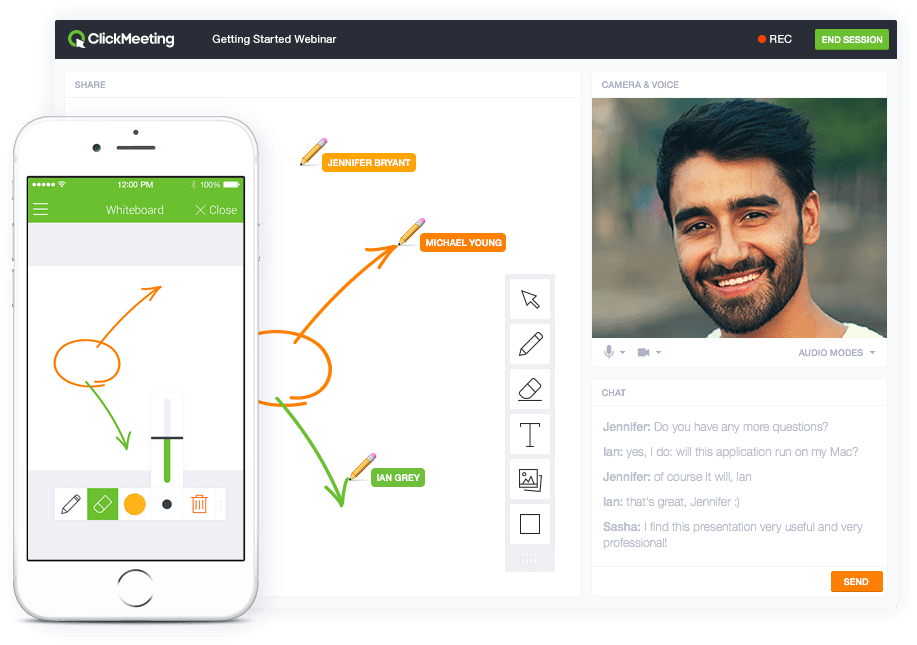
Screenshot of Whiteboard featureScreenshot of Presentation featureScreenshot of Responsive designScreenshot of Webinar roomScreenshot of Webinar room 2Screenshot of Webinar room 3

GlobalMeet Webcast Screenshots

Screenshot of GlobalMeet Webcast for Banking and Financial ServicesScreenshot of GlobalMeet Webcast keeps events secure