ClickUp vs. Jotform

Overview
ProductRatingMost Used ByProduct SummaryStarting Price
ClickUp
Score 8.5 out of 10
Small Businesses (1-50 employees)
ClickUp is an all-in-one productivity platform. It’s a hub where teams can come together to plan, organize, and collaborate on work using tasks, Docs, Chat, Goals, and Whiteboard. Customized with just a few clicks, ClickUp helps teams of all types and sizes deliver work more effectively, to boost productivity to new heights. ClickUp aims to make the world more productive by removing friction caused by using many different applications. The platform boasts millions…
$0
Jotform
Score 8.5 out of 10
N/A
Jotform Enterprise is a digital workspace productivity tool that provides a platform for organizations. The aim of Jotform Enterprise is to give companies an easy-to-navigate tool that makes reaching out to customers, collaborating with coworkers, and collecting e-signatures and data a more seamless process. Jotform Enterprise strives to enable companies to make data-driven decisions without compromising when it comes to quality and security. It doesn’t matter what type of…
$0
Pricing
ClickUpJotform
Editions & Modules
Free
$0.00
Unlimited
$9.00 ($5.00)
per member per month (annual contract pricing)
Business
$19.00 ($12.00)
per member per month (annual contract pricing)
Business Plus
$29.00 ($19.00)
per member per month (annual contract pricing)
Enterprise
Contact Sales
Free
$0.00
Bronze
$34.00
Monthly
Silver
$39.00
Monthly
Gold
$99.00
Monthly
Enterprise
Custom
Offerings
Pricing Offerings
ClickUpJotform
Free Trial
YesYes
Free/Freemium Version
YesYes
Premium Consulting/Integration Services
NoNo
Entry-level Setup FeeNo setup feeNo setup fee
Additional Details
More Pricing Information
Community Pulse
ClickUpJotform
Considered Both Products
ClickUp
Chose ClickUp
I still use both. ClickUp is a little "bigger" and has some more tunning over details. When someone ask me about which to choose, my answer is "you must try them"... start using both and you'll find the best using them and asking users how they feel.
Chose ClickUp
The big selling point of Notion is that it is completely customisable. I would say ClickUp is only slightly less customisable and because the framework and support is there in ClickUp, it is actually faster to onboard people too. ClickUp gives businesses a better foundation to …
Chose ClickUp
Access is great - but not a shareable cloud environment. Monday.com is a close second - CU pips them at the post at this stage. It does become difficult to switch so the choice of tool at the beginning is very very important. The continuous improvements in CU gives me a lot of …
Chose ClickUp
We used ClickUp because if offered the most versatility, while still remaining functional and efficient for our entire company. ClickUp offers features that save time for every team member, and it was very easy to implement and integrate within our company.
Chose ClickUp
Love how ClickUp allows tasks to be opened in their own little window, where you can then see additional info. Monday.com forced us to have every field visible as a column, which lead to really complicated and difficult to navigate boards. ClickUp's Lists are cleaner, more …
Chose ClickUp
I walked away from so many other products that I tried primarily because I wanted to have a task and productivity tool that allowed me to re-envision my 'data' at the task level. I wanted to be able to have Gantt views and dashboard views and then dive in deeper with comments …
Chose ClickUp
ClickUp is more efficient than all of these tools combined. Trello only has one type of view, kanban. You can't customize it to list, dashboard, or calendar. Notion is much harder to manage my company's departments and connect everything like ClickUp. Notion doesn't have the …
Chose ClickUp
More customization and ease of use.
Chose ClickUp
It combines them all with a user friendly interface and a really nice workflow. It keeps work in as less places as possible which makes it easy for new colleagues.
Chose ClickUp
ClickUp has the best UX by far. It also has the most necessary features and the fewest unnecessary features.
Chose ClickUp
Clickup feels a lot more complete and professional.
Chose ClickUp
ClickUp's features were far superior in terms of what we could do for project management and flexible enough we could adjust it to our use case. We found Notion too basic and Monday.com too restrictive. ClickUp is the perfect blend of what we need and their new features often …
Chose ClickUp
I did not make the decision to move to ClickUp, but I did provide feedback and hear feedback from our internal team about how ClickUp centralizes a lot of the company wides resources into one space. I feel that ClickUp provides more dynamic workflow building beyond Jira and …
Chose ClickUp
ClickUp is definitely a marked improvement in just about every way from Redmine. UI, functionalities, usability- all of it has been a much better experience in ClickUp. As for JIRA and AirTable, I think ClickUp's overall layout and organization style trumps those sites by …
Chose ClickUp
We liked ClickUp for the flexibility, the ease of set up, ClickUp university, and the price.
Chose ClickUp
All of them are based on activity management, however ClickUp stands out in several areas: integrations with other tools, management of several spaces simultaneously through views/dashboards, the vast majority of the tools listed do not allow me to have visibility of everything …
Chose ClickUp
Notion, Clickup is easier and it is better looking
Chose ClickUp
ClickUp is by far the most easy to use, superb interface and functionality. The notifications are far superior too.
Chose ClickUp
The best feature of ClcikUp over others is it's customization as well as hierarchy. Departments, clients, operations become easier to manage if the hierarchy is setup in a good way that can allow your business scale without altering it repeatedly.
Customization is another …
Chose ClickUp
It has been probably around 4 years. A big part of the decision between monday and ClickUp (CU) when we decided on a platform was the pricing model of CU was more suitable. There has been massive updates since we started using CU. So not sure how it stacks up now
Chose ClickUp
Much more flexible and complete, you can shape it for your liking.
Chose ClickUp
ClickUp can be very simple, yet very advanced. That helps us get started while providing something we can grow into as well, to avoid a future switch again.
Jotform
Chose Jotform
Jotform works better for our small business with the excellent free features
Chose Jotform
Not used any other products besides Google Forms.
Chose Jotform
Jotform is easier for the customers to use. They don't require any plug-ins or special procedures to be able to fill out the form and send it back to us. Adobe was more steps, and didn't always work as we expected. Making changes to the forms were also difficult after the fact.
Chose Jotform
More question types, conditions, calculated fields.
Chose Jotform
Allows anyone to use this platform
Chose Jotform
Jotform is so much more versatile that Google Forms, which we originally used. Google Forms was blocked by some of our users, where we have not had that problem with Jotform.
Chose Jotform
Jotform is an all-inclusive platform. Google lacks the features, templates, and form fields that are crucial in a form builder for any business. The branding and customization is a level far above what Google offers. I wouldn't go back to Google after working with Jotform as I …
Chose Jotform
Jotform looks more professional when the form is complete, I like being able to have questions side by side and on cards, as opposed to the stacked option google forms provides. I also like the logo addition and customisation options on Jotform. But the main advantage over …
Chose Jotform
I think it's better than mailchimp. Similar to Zapier in that it's just very sleak and user friendly but Jotform even more so. Wix is awesome too to be fair but yeah I'd say Jotform is up there with all of these. Better than mailchimp which can be really frustrating for me. …
Chose Jotform
API integration is smooth and possibility of customization are really really complete. Above all also the final user does not have problem in using the form
Chose Jotform
Google Forms and Microsoft SharePoint
Chose Jotform
We just cannot compare. Jotform is way ahead of the others: much more customization, options, logic... Jotform is just way better.
Chose Jotform
Docusign is more well known for signing legal documents across large enterprise but it was difficult to setup and get started on. Compared to Docusign, Jotform was much easier to build, design and create our first form which we were able to embed on our website straight away. …
Chose Jotform
Jotform's free tier seems stronger than some of the entry-level tiers of other products, which is why we decided to test it.
Chose Jotform
Jotform vs Google
- Submissions are organized nicely in Jotform
- Jotform has creative freedom. Google doesn't have as many question options and editing abilities.
Chose Jotform
Jotform has so many more features to choose from when creating a form or survey and the way you get your data is unbeatable as far as it collecting it and putting it together to have and discuss the submissions. The basic free option is also better. You get way more submissions …
Chose Jotform
DigiSigner does not offer a free option.
Chose Jotform
Although Calendly excels in appointment scheduling, Jotform surpasses it by providing a comprehensive suite of features at an affordable rate, making it an ideal choice for emerging businesses looking to maximize value.
Chose Jotform
I have used Paperform which was hard to use and did not offer a free version. I have also tried Typeform but had to pay for the ability for my customers to upload a photo.
Chose Jotform
Jotform is abysmal and unintuitive compared to fillout.com. Its customer service is also abysmal. The feature set at Jotform is nothing special compared to alternatives. The service cost is on par with or more expensive than alternatives. There is no reason to use Jotform …
Chose Jotform
Jotform offers better integration where you can publicly list the form for anyone with a link can submit informaiton and we are able to get full PDF reports on those worksheets. Nothing currently does something as simple as this. Jotform's user experience is a whole lot better.
Features
ClickUpJotform
Project Management
Comparison of Project Management features of Product A and Product B
ClickUp
8.0
Ratings
4% above category average
Jotform
-
Ratings
Task Management8.90 Ratings00 Ratings
Resource Management7.90 Ratings00 Ratings
Gantt Charts7.80 Ratings00 Ratings
Scheduling7.80 Ratings00 Ratings
Workflow Automation7.90 Ratings00 Ratings
Team Collaboration8.80 Ratings00 Ratings
Support for Agile Methodology8.40 Ratings00 Ratings
Support for Waterfall Methodology8.30 Ratings00 Ratings
Document Management7.90 Ratings00 Ratings
Email integration7.80 Ratings00 Ratings
Mobile Access6.80 Ratings00 Ratings
Timesheet Tracking7.50 Ratings00 Ratings
Professional Services Automation
Comparison of Professional Services Automation features of Product A and Product B
ClickUp
7.7
Ratings
2% above category average
Jotform
-
Ratings
Project & financial reporting7.70 Ratings00 Ratings
Survey Format & Appearance
Comparison of Survey Format & Appearance features of Product A and Product B
ClickUp
-
Ratings
Jotform
8.0
Ratings
0% above category average
Survey templates00 Ratings8.60 Ratings
Themes00 Ratings7.40 Ratings
Custom logo/branding00 Ratings8.10 Ratings
Survey Content
Comparison of Survey Content features of Product A and Product B
ClickUp
-
Ratings
Jotform
7.6
Ratings
11% below category average
Changes to live survey00 Ratings7.60 Ratings
Question design help00 Ratings7.50 Ratings
Multiple question types00 Ratings7.70 Ratings
Survey Logic
Comparison of Survey Logic features of Product A and Product B
ClickUp
-
Ratings
Jotform
7.3
Ratings
12% below category average
Survey logic flexibility00 Ratings7.30 Ratings
Survey Reporting & Analytics
Comparison of Survey Reporting & Analytics features of Product A and Product B
ClickUp
-
Ratings
Jotform
7.5
Ratings
8% below category average
Response tracking00 Ratings7.60 Ratings
Data export00 Ratings7.90 Ratings
Standard reports00 Ratings7.70 Ratings
Custom reports00 Ratings7.40 Ratings
Analytics00 Ratings7.20 Ratings
Survey Administration & Security
Comparison of Survey Administration & Security features of Product A and Product B
ClickUp
-
Ratings
Jotform
7.4
Ratings
16% below category average
Access controls00 Ratings7.40 Ratings
Compliance00 Ratings7.40 Ratings
Survey Distribution
Comparison of Survey Distribution features of Product A and Product B
ClickUp
-
Ratings
Jotform
7.1
Ratings
14% below category average
Vendor-offered crowdsourcing00 Ratings7.00 Ratings
Respondent restrictions00 Ratings7.10 Ratings
Best Alternatives
ClickUpJotform
Small Businesses
Stackby
Stackby
Score 9.0 out of 10
Square 9 Softworks
Square 9 Softworks
Score 9.1 out of 10
Medium-sized Companies
InEight
InEight
Score 8.3 out of 10
Qualaroo
Qualaroo
Score 6.1 out of 10
Enterprises
InEight
InEight
Score 8.3 out of 10
Verint Voice of the Customer
Score 10.0 out of 10
All AlternativesView all alternativesView all alternatives
User Ratings
ClickUpJotform
Likelihood to Recommend
8.6
(0 ratings)
8.8
(0 ratings)
Likelihood to Renew
7.3
(0 ratings)
9.4
(0 ratings)
Usability
7.8
(0 ratings)
9.4
(0 ratings)
Availability
9.5
(0 ratings)
-
(0 ratings)
Performance
8.0
(0 ratings)
-
(0 ratings)
Support Rating
9.4
(0 ratings)
7.4
(0 ratings)
Online Training
10.0
(0 ratings)
-
(0 ratings)
Implementation Rating
7.9
(0 ratings)
8.9
(0 ratings)
Configurability
8.0
(0 ratings)
-
(0 ratings)
Ease of integration
7.0
(0 ratings)
9.1
(0 ratings)
Product Scalability
8.9
(0 ratings)
-
(0 ratings)
Vendor post-sale
5.0
(0 ratings)
-
(0 ratings)
Vendor pre-sale
5.0
(0 ratings)
-
(0 ratings)
User Testimonials
ClickUpJotform
Likelihood to Recommend
Great for project management, reoccurring task management, building trackers and keeping track of what everyone is up to. Like all software that has great functionality, having solid governance and control over access is essential. I recommend ensuring that your admins/owners have a close eye on what is going on across the space or it can turn into an unmanageable nightmare.
Read full review
With a vast selection of pre-designed templates to choose from, ranging from event registrations to customer feedback surveys, JotForm caters to a broad spectrum of needs. Each template is fully customizable, allowing you to align the form's aesthetics with your brand identity effortlessly. JotForm has arrived to streamline and elevate your processes to a whole new level.
Read full review
Pros
  • Customization of fields in Tickets
  • Integrations with other sites such as Google, Figma, JIRA, and GitHub
  • Combining many apps into one- Ticketing, sprint tracking, form submissions, documentation, file management, and chats
  • Continual improvements. The ClickUp team is always making amazing strides to update the site and make it that much better for its users
Read full review
  • The ease of use is my favorite part of the Jotform. You don't have to be an IT guru to use it, but the results of your creation will surely make people think you are.
  • Jotform keeps all my event request organized and accurate.
  • Editing forms is done with ease.
Read full review
Cons
  • Their chat feature was nonexistent, and a revamp was rolled out recently.
  • Their whiteboard function for visual collaboration feels clunky and difficult to use smoothly.
  • Their table view/feature (which is supposed to feel like a spreadsheet) is lacking and makes it difficult to copy/move information.
Read full review
  • I would love for Jotform to offer an a la carte for some of the products like maybe we pay for more form views and submissions but not all the other stuff.
  • Flexibility in css.
  • More options in the name field, maybe I want the last name first or for it to be a full one entry box.
  • A phone number entry field.
Read full review
Likelihood to Renew
We're very pleased with how the system works in general. For over a year we've barely ever had any problems with ClickUp and there might have only been one or two times when it wasn't operational for us due to a global emergency. Moreover, when we had a problem once with renewing our licenses we've been contacted directly by our account manager and taken care of in a very professional way (with a due refund as well). The exceptional customer service makes us firmly believe that ClickUp is just the right tool for us.
Read full review
It's exceptional software
Read full review
Usability
Far easier to use than any other PM tool. ClickUp is incredibly intuitive and had us saving time and energy within the first week of implementation. In my opinion, PM software should make it easier to focus on the deliverables - it shouldn't take all your time and energy to learn how to use the tool in the first place. ClickUp is a user-friendly tool that actually helps us focus on what's important.
Read full review
It is very user-friendly and intuitive. The interface is very simple and straightforward. The elements are easily accessible even without having any prior knowledge of the interface. The customer support is incredibly awesome. They respond to you within 24-48hrs tops. They also provide a list of questions and answers that have already been asked.
Read full review
Reliability and Availability
For over a year ClickUp was unavailable to us just twice for a couple of hours. I would say for a system this big and working globally that was a minor issue. They managed to fix all the issues within a couple hours and then it was back up and running perfectly fine.
Read full review
No answers on this topic
Performance
The speed of ClickUp is average to be honest. This is one of the biggest flaws of the system, sometimes it's also lagging a little bit but we also have a lot of documents, lists etc. on our workspace. However, with the next version of ClickUp I've seen they are planning to increase the speed by almost 500%, probably by changing the technology, so I am more than looking forward to it.
Read full review
No answers on this topic
Support Rating
Support are genuinely helpful and really nice to deal with. I had a bug on my workspace that I’d been experiencing for a while. They looked into it for me and asked some questions. Once they found the issue and resolved it, they even filmed a video detailing how they’d fixed it. That level of support is fantastic.
Read full review
Their support is truly awful and negligent [in my opinion]. It's rare for me to get so mad as to write a review about it but given what we do, I think it's necessary to document it. We work in mental health and having client data [transmitted] through the API correctly can be a matter of life and death for someone in crisis. We have had repeated issues with this in JotForm and reset the integration multiple times and yet it continues. [In my experience] tags don't transmit, complete contacts are absent, or parts of data [are] missing despite being mapped. [Again, per my experience] their support will initially respond and then you hear nothing. It's been a huge issue and we are leaving them as a result. [I feel] it's truly infuriating and negligent.
Read full review
Online Training
There are multiple guides on literally all of the functions you can find within the system, therefore it's easy to learn anything you'd really like to use, starting from project and people management, down to Gantts, mind maps, time tracking, inviting Clients as guests to work with you on the projects and so much more.
Read full review
No answers on this topic
Implementation Rating
Start small. Don’t try to build the most elaborate plans first. Resist the urge to get into Gantt charts if no one is used to them. Just get work written, add dates and assignees, and start getting used to it. If you did not use a work management tool before, you need to be gracious with yourself about the fact that you likely do not have the muscle memory for working this way yet. But you will get there.
And leverage people who know it if possible. Look for ClickUp experts and vendors. They can really supercharge your effectiveness at building the tool out and speed up the process.
Read full review
Had to opt for Jotform to open in a separate window for some of my phones as being intergrated into my own site caused restricted viewing problems on some devices like mobiles.
Read full review
Alternatives Considered
Every other tool I have used has been for organizing tasks and work only. There were some of the other features, but none of them had the ability to do everything we need to manage a project from start to finish
Read full review
Compared to Google and Microsoft, Jotform has a lot more features. I particularly love the e-signature because it makes the form feel more trustworthy for our team.
When compared to the other form builders, it is frankly too expensive for us to use them, while Jotform has just enough features for casual users like us.
Read full review
Scalability
Scaling with ClickUp is superb. If you create a workflow best suited for your organization then it's all about creating new accounts and teaching the new employees the workflow you're using. It's that simple. There is no black magic when it comes to Clickup.
Read full review
No answers on this topic
Return on Investment
  • We stopped losing customers due to lack of organization and management
  • Deixamos de perder clientes pela falta de organização e gestão
  • We increased our revenue by 30% by offering CRM implementation within ClickUp
  • Aumentamos nossa receita em 30% por oferecermos implementação de CRM dentro do clickup
  • We no longer waste time using different tools to manage tasks and internal communication with the team.
  • Deixamos de perder tempo usando ferramentas diferentes para gerir tarefa e comunicação interna com o time
Read full review
  • It saved me time. Within minutes I was able to create and share forms to collect demographic data.
  • While struggling to use another software, I thought of Jotform and it was able to assist me with collating the data I had to confirm results previously obtained.
  • I could not easily identify what new information was provided in a resubmission by a respondent.
Read full review
ScreenShots

ClickUp Screenshots

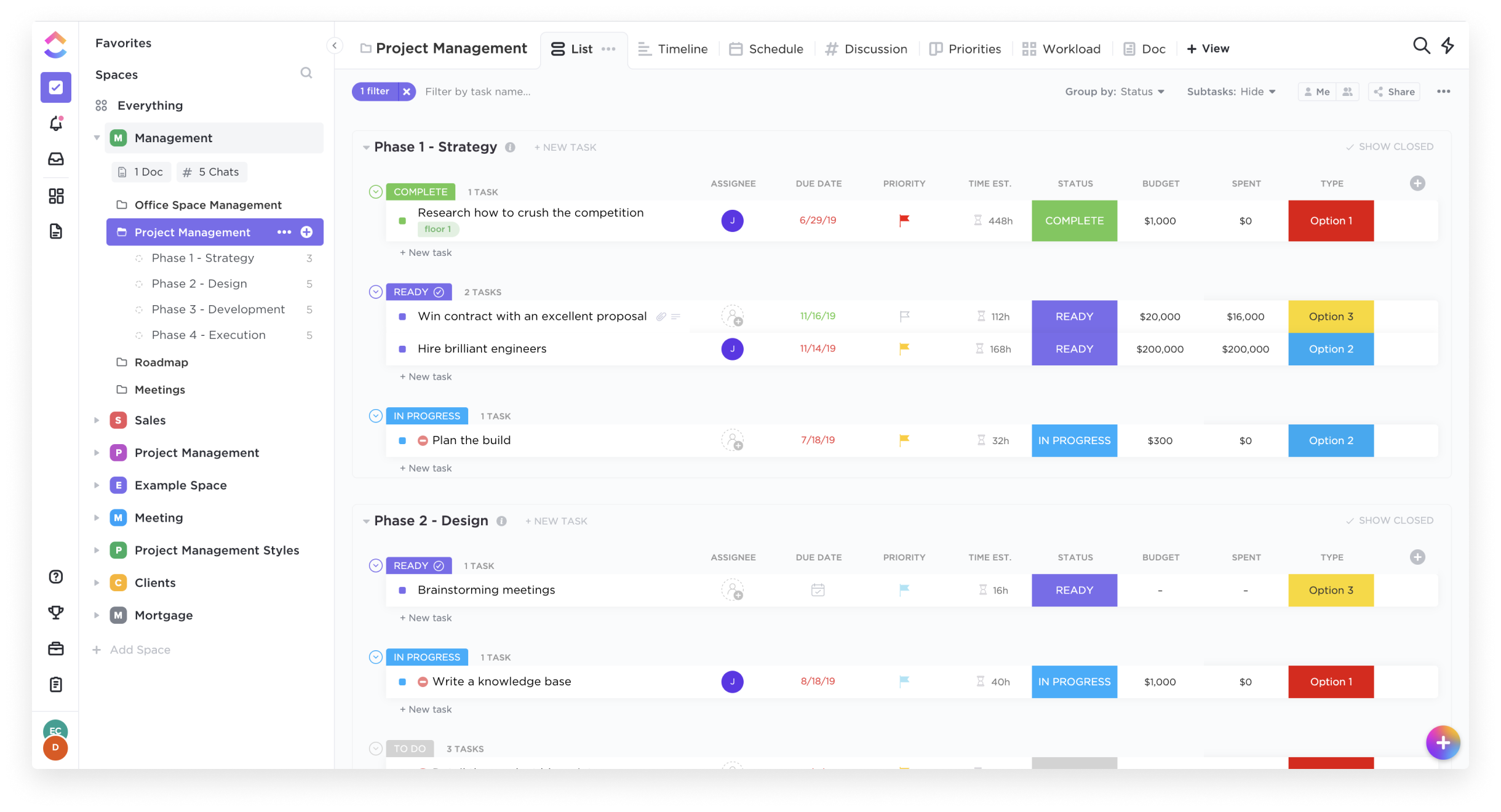
Screenshot of List ViewScreenshot of Box ViewScreenshot of Board ViewScreenshot of Calendar View

Jotform Screenshots

Screenshot of Screenshot of Screenshot of Screenshot of Screenshot of Screenshot of