Copper vs. Insightly

Overview
ProductRatingMost Used ByProduct SummaryStarting Price
Copper
Score 5.0 out of 10
N/A
Copper is a customer relationship management (CRM) built as an integration into Google Apps.
$9
per month per user
Insightly
Score 7.4 out of 10
N/A
Insightly is presented as a modern, affordable CRM that is easy to use, simple to customize, and that scales with companies as they grow, designed to solve common pain points that legacy CRMs can't. Available in any vertical, Insightly CRM customers can add companion products for marketing automation, customer service, and integrations in the same platform. Insightly has more than a million users worldwide.
$29
per month (billed annually) per user
Pricing
CopperInsightly
Editions & Modules
Starter - Paid Annually
$9.00
per month per user
Basic - Paid Annually
$23.00
per month per user
Professional - Paid Annually
$59.00
per month per user
Business - Paid Annually
$99.00
per month per user
Plus
$29
per month (billed annually) per user
Professional
$49
per month (billed annually) per user
Enterprise
$99
per month (billed annually) per user
Offerings
Pricing Offerings
CopperInsightly
Free Trial
YesYes
Free/Freemium Version
NoNo
Premium Consulting/Integration Services
NoNo
Entry-level Setup FeeNo setup feeNo setup fee
Additional DetailsUp to 15% discount for annual pricing.
More Pricing Information
Community Pulse
CopperInsightly
Considered Both Products
Copper
Chose Copper
It's the perfect bridge between advance for our needs, and simple for our team to actually use it, and learn it quickly.

Chose Copper
Unlike Copper, I find Hubspot not as intuitive when it comes to their dashboard and customization. Copper offers much better value without having to pay for multiple add-on modules.
Chose Copper
We outgrew pipedrive and moved into Copper.
After about a few years our sales teams grew and we needed a global slution for all teams across the globe, hence, moved into Hubspot.
Chose Copper
I have only watched reviews of a few other CRMs before seeing Copper so I was lucky enough to find Copper early on in the search.
Chose Copper
Much prefer Zoho based on the full spectrum of items Zoho offers
Chose Copper
In all fairness, other CRM tools I have used were set up by a corporate IT person who knew much more than I do about programming. Therefore, those were easy to use and had the features I expected them to have. Whereas I, with minimal IT experience, set up Copper by myself. It …
Chose Copper
We selected Copper over these other CRMs mainly because of its ability to integrate with Google Workspace. Members of our team have used Salesforce in the past and found it to be a nightmare to work with/on. Candidly, Copper doesn't fill all of our needs so we supplement that …
Chose Copper
When I switched from being an employee to employer, one of my first tasks was to find a CRM that was suitable for me. Moving from Pipedrive to Copper was an easy decision. I only needed a place to store my contacts, have a great calendar, and be able to email directly from …
Chose Copper
Much less expensive and easier to set and use than Salesforce. We did not evaluate other systems.
Chose Copper

The software is designed to mimic the look of Google products. This makes it easy to use for people already familiar with Google products.

It syncs with G Suite apps like Google Contacts and Google Calendar, and it is directly accessible from Gmail. It appears as a sidebar …

Chose Copper
Copper is cheaper than Hubspot if you have a lower amount of users and still need advanced features. However, the TERRIBLE customer service and DECEPTIVE cancellation policy should make you think twice before trying to save a few bucks.
Chose Copper
I selected Copper because of its interface with all things Google, specifically the sync feature for calendar and capture of email correspondence. It made sense to use Copper because our corporate communications is built on the Google platform. Bloomerang is an excellent tool …
Chose Copper
More complete than SugarCRM by a long shot with reporting and ability to seamlessly integrate with ANYTHING at all. Less complicated than Salesforce Lightning from implementation and maintenance but Copper lacks deep customization ability and sheer size. Zoho CRM is a dying CRM …
Chose Copper
Copper is right in the middle in terms of price when comparing other CRMs, which is actually pretty awesome because I've used about 10 other CRM's and I've never been happy until I started using Copper. Pipedrive was very competitively priced, but I couldn't stand the UI. …
Chose Copper
I didn't have much authorization in the selection of Copper, however, I have looked into switching costs and leaving Copper due to their limited workflow automations. Hubspot and Salesforce look more robust and integrated with our other marketing tools.

We are too sunk in with …
Chose Copper
Copper is simple and free, and we didn’t have a need for a more elaborate CRM that didn’t have event specific features. We do utilize a more specific marketing flow for drip campaigns but for basic email tracking for sales, Copper does what it needs to.
Chose Copper
For my company, we chose Copper over Salesforce and HubSpot for a few reasons. First and foremost, G-Suite integration. This was one of the most attractive features we liked about Copper. The integration allows for seamless lead import, automated activity tracking and much …
Chose Copper
ProsperWorks is just an amazing lightweight CRM. Unless you're a large organization that needs to build out crazy custom reporting and tools that integrate into your CRM, Prosperworks is the best bet. Instead of being an IT project that you need to get a bunch of other people …
Chose Copper
ProsperWorks had the robust Google Apps integration, Forecasting, Roles/Permissions, and Opportunity Tracking and the price point was right for us. All of the other softwares we evaluated (except Salesforce) where missing one or more of the features. We didn't go with …
Chose Copper
It is a very powerful tool to the level of Sugar and SalesForce. With its tight integration, as a Google product, it is seamless and really assists in managing communication with clients. While Zoho offers a great low-cost solution, ProsperWorks definitely hits the mark for …
Chose Copper
We selected to test ProsperWorks and then switched back to Insightly because we had workflows set up and training created specific to Insightly. The cost for Prosperworks with fewer features than our current CRM made it easy to decide to switch back, at least for now. We might …
Chose Copper
I find Sales Force to be way more complex than my needs. Sales Force is difficult to configure, It is expensive, and not user friendly. I currently use both products daily.
Chose Copper
We did not evaluate anything else - I wasn’t a part of the decision to purchase
Chose Copper
The story of this review, Monday.com features should be replicated across Copper.
Insightly
Chose Insightly
I did not select Insightly for our company as I am a user but not a decision maker, but compared to Chronus, Insightly is a much more organized CRM. Chronus also had technical issues that slowed or prevented our work, and I have rarely run into that in my time using Insightly.
Chose Insightly
Insightly has just worked much better. The thing about Insightly that really sets it apart is the email linking. Having the ability to read all of the emails sent and received during the project let's you see the full story of the projects inception to its completion. …
Chose Insightly
I have forgotten the names of the softwares because we did the scoping over a year ago, but insightly was the best by far for our needs. The other two were focused on a different side of property services and had a lot of features that were not applicable. Without insightly, we …
Chose Insightly
Insightly is significantly better than Zendesk. It is easy to use, pleasant to look at, and makes sense. However, I don't think Insightly is fair now compared to Salesforce. Insightly can do many of the same things as Salesforce, but I've only started on some of these features. …
Chose Insightly
I did not select Insightly; my executive team selected Insightly. I would rate Insightly below any other CRM or marketing platform I've used based on its inefficiencies, lack of intuitive work processes, poorly functioning mobile app, and even the design, which is not appealing …
Chose Insightly
Insightly can be easily navigated and is straightforward. Based on my experience, it is more intuitive, and the menu buttons are self-explanatory, unlike the salesforce I have experienced. There are just a lot of buttons to click from, or sometimes, it could be a drop-down box …
Chose Insightly
These have higher prices and offer more extensive products we wouldn't utilize at our growth stage.
Chose Insightly
I moved jobs and my new employer uses Insightly.
Chose Insightly
I find them superior for what they do.
Insightly does a better job on managing marketing lists
Chose Insightly
Not too sure sorry, I have not used any other CRMs. We do use platforms such as Monday to track our workflows, we find it a lot easier to track actions as a whole. However Insightly does store details and information regarding our clients a lot better then Monday would.
Chose Insightly
Insightly was easy to customise and allows for us to have fields in our CRM that are relevant to us. Workflow management and marketing is better on other platforms
Chose Insightly
HubSpot‘s interface is much cleaner and easier to use in my opinion. I did not like working within Salesforce.
Chose Insightly
We mainly selected Insightly for ease of use for end users and its ability to allow us to customize.

Once we had it, we began to see all of the other things (already mentioned) that were great about it.
Chose Insightly
We’re looking to use a simple CRM that can fulfill our needs for a CRM. We needed to manage our Pipeline and Opportunities in a simple and easy format, that the entire team could utilize on a daily basis and Dashboard that were useable and changeable to our needs. Insightly has …
Chose Insightly
Not quite as capable as SalesForce, but much better suited for smaller companies, since SF cannot quite compete at the same price level.
Chose Insightly
I have had experience with other tools and the Insightly support is far better than my experience with the other tools. Support and training are critical when it comes to the adoption of a new tool within an organization. Insightly very much values their partnerships and …
Chose Insightly
The Insightly Marketing app is more flexible than Mailchimp, and we love how it's integrated with Insightly's tags.
Chose Insightly
Has all the features a business needs like ease of use, robust reporting & customizations without the high cost that comes other well known CRMs
Chose Insightly
Insightly can stand on the same line with these other powerful crms. I selected insightly because they are a great value CRM with all the features from the big competition in terms of customisation. They are a powerful software that keeps up with the Joneses but does it at a …
Chose Insightly
Salesforce was always confusing to use, and quite a mess. Companies that I worked at in the past had to invest a significant amount of time creating a salesforce portal or skin to actually make it usable by the sales representatives. Even then, integration was always a bit …
Chose Insightly
Insightly has far more modern applications than Goldmine. It allows for more customizations. Our reports are nicer looking and it seems much more user friendly. Insightly also seems to be more than just sales focused. Goldmine seemed to really be geared more towards a sales …
Chose Insightly
Insightly is by far best Crm ive used , very clear and spot on with organization and simplicity making it very user friendly for anyone of any age
Features
CopperInsightly
Sales Force Automation
Comparison of Sales Force Automation features of Product A and Product B
Copper
3.1
Ratings
85% below category average
Insightly
7.3
Ratings
5% below category average
Customer data management / contact management6.00 Ratings8.60 Ratings
Workflow management1.00 Ratings6.60 Ratings
Territory management5.00 Ratings6.80 Ratings
Opportunity management6.00 Ratings8.70 Ratings
Integration with email client (e.g., Outlook or Gmail)1.00 Ratings6.70 Ratings
Contract management5.20 Ratings6.50 Ratings
Quote & order management2.00 Ratings8.30 Ratings
Interaction tracking1.00 Ratings5.90 Ratings
Channel / partner relationship management1.00 Ratings7.70 Ratings
Customer Service & Support
Comparison of Customer Service & Support features of Product A and Product B
Copper
1.4
Ratings
137% below category average
Insightly
7.1
Ratings
6% below category average
Case management1.20 Ratings7.00 Ratings
Call center management1.50 Ratings7.20 Ratings
Help desk management1.60 Ratings7.10 Ratings
Marketing Automation
Comparison of Marketing Automation features of Product A and Product B
Copper
2.4
Ratings
104% below category average
Insightly
4.9
Ratings
43% below category average
Lead management3.40 Ratings5.40 Ratings
Email marketing1.40 Ratings4.50 Ratings
CRM Project Management
Comparison of CRM Project Management features of Product A and Product B
Copper
1.9
Ratings
120% below category average
Insightly
6.3
Ratings
19% below category average
Task management2.00 Ratings6.30 Ratings
Billing and invoicing management1.70 Ratings6.00 Ratings
Reporting2.00 Ratings6.50 Ratings
CRM Reporting & Analytics
Comparison of CRM Reporting & Analytics features of Product A and Product B
Copper
3.3
Ratings
79% below category average
Insightly
7.5
Ratings
1% below category average
Forecasting3.00 Ratings7.00 Ratings
Pipeline visualization4.00 Ratings8.00 Ratings
Customizable reports3.00 Ratings7.50 Ratings
Customization
Comparison of Customization features of Product A and Product B
Copper
3.6
Ratings
70% below category average
Insightly
6.2
Ratings
19% below category average
Custom fields3.00 Ratings6.50 Ratings
Custom objects3.40 Ratings6.00 Ratings
Scripting environment4.10 Ratings6.80 Ratings
API for custom integration4.00 Ratings5.50 Ratings
Security
Comparison of Security features of Product A and Product B
Copper
6.9
Ratings
19% below category average
Insightly
8.0
Ratings
4% below category average
Single sign-on capability8.70 Ratings7.80 Ratings
Role-based user permissions5.00 Ratings8.20 Ratings
Social CRM
Comparison of Social CRM features of Product A and Product B
Copper
2.0
Ratings
114% below category average
Insightly
7.4
Ratings
1% above category average
Social data2.00 Ratings6.80 Ratings
Social engagement2.00 Ratings8.00 Ratings
Integrations with 3rd-party Software
Comparison of Integrations with 3rd-party Software features of Product A and Product B
Copper
2.0
Ratings
114% below category average
Insightly
6.0
Ratings
20% below category average
Marketing automation3.00 Ratings6.90 Ratings
Compensation management1.00 Ratings5.10 Ratings
Platform
Comparison of Platform features of Product A and Product B
Copper
7.9
Ratings
7% above category average
Insightly
4.8
Ratings
42% below category average
Mobile access7.90 Ratings4.80 Ratings
Best Alternatives
CopperInsightly
Small Businesses
Salesmate
Salesmate
Score 10.0 out of 10
Salesmate
Salesmate
Score 10.0 out of 10
Medium-sized Companies
Creatio
Creatio
Score 9.7 out of 10
Creatio
Creatio
Score 9.7 out of 10
Enterprises
Creatio
Creatio
Score 9.7 out of 10
Creatio
Creatio
Score 9.7 out of 10
All AlternativesView all alternativesView all alternatives
User Ratings
CopperInsightly
Likelihood to Recommend
5.0
(0 ratings)
7.1
(0 ratings)
Likelihood to Renew
-
(0 ratings)
9.2
(0 ratings)
Usability
5.0
(0 ratings)
7.4
(0 ratings)
Availability
-
(0 ratings)
9.0
(0 ratings)
Performance
-
(0 ratings)
7.9
(0 ratings)
Support Rating
1.9
(0 ratings)
8.9
(0 ratings)
In-Person Training
-
(0 ratings)
9.1
(0 ratings)
Online Training
-
(0 ratings)
9.0
(0 ratings)
Implementation Rating
-
(0 ratings)
8.2
(0 ratings)
Configurability
-
(0 ratings)
9.9
(0 ratings)
Ease of integration
-
(0 ratings)
9.0
(0 ratings)
Product Scalability
-
(0 ratings)
9.0
(0 ratings)
Vendor post-sale
-
(0 ratings)
9.1
(0 ratings)
Vendor pre-sale
-
(0 ratings)
7.8
(0 ratings)
User Testimonials
CopperInsightly
Likelihood to Recommend
Copper has helped me extensively keep track of not only my own but my company's workflow. With so many projects and quotes to track, it has become essential to keep me on task and not miss any of our goals. It has been a perfect fit with our specific workflow, but I don't think it has the customizability just yet to be a perfect fit for every company out there.
Read full review
For what we use it for and the ease of use I am happy to recommend Insightly however I can appreciate that others may have more complex feature requirements than I use. As such I would mainly only recommend it to people who I feel would use it in a similar capacity to me.
Read full review
Pros
  • The Google integration and Chrome extension automatically tracks and updates prospect and lead activity in the CRM. Data entry is simplified.
  • Copper is a very user-friendly CRM with the ability to create custom fields, multiple pipelines, sales stages, etc. It is truly customizable and far less complex than other CRMs I have used in the past.
  • Copper makes it simple to add leads manually, through Gmail or using a template and uploading a large list.
  • Great support. We are very happy with our account management team and they strive to make sure we are getting the most out of the platform.
  • Pricing is very competitive.
Read full review
  • Customization. Although there are some limitations, the world is almost your oyster with Insightly's customizations.
  • Simplicity. I appreciate when policy screens are not loaded with too much going on. Insightly looks clean.
  • Support. Their help center and the Insightly team is amazing.
Read full review
Cons
  • Window change: for mobile - when you tap on a card from a pipeline it takes you to the lead’s basic info. I wish it would immediately just open all activities so I can quick see notes
  • I usually use Copper on the go. When you open the Copper app, it immediately opens a collab window. I wish it had some sort of easy dashboard….plus a notes area. I open Copper on mobile to quickly search for someone’s name or to take quick notes from a sales meeting
Read full review
  • The Inquiry feature is missing some functionality, so it is not as useful as the Request feature
  • The Actual Close Date does not autofill when a Request record is closed and marked as Lost/Abandoned
  • The customizable objects and fields are very useful but the System Settings interface could be more user-friendly
Read full review
Likelihood to Renew
No answers on this topic
Insightly offers a great product; it's the right fit for our company at this time. We were, however, considering moving to Contactually due to their cost effective automation features. However, they lacked the project management capabilities of Insightly. As our company grows, we would love to stay with Insightly - and if they can nail the automation and add the ability to customize a little bit more, it would be the perfect solution for us. For a larger company with a more involved sales team, you might find the metrics/reporting to be a bit basic. Insightly offers great customer service even to free customers
Read full review
Usability
I would rate Copper overall usability as a 10. It is easy to use. I am not extremely computer friendly so I needed to find something that would fit what I can do. Copper definitely fit the bill. I would highly recommend it to anyone of any level of computer knowledge.
Read full review
Some items are not easily accessible as an admin, and the number of available resources is outdated (video from 2017). For basic tasks such as updating prospects or contacts, it is fine. However, when you change the screen size, the system becomes less responsive, with tables often being difficult to read.
Read full review
Reliability and Availability
No answers on this topic
The provider is 100% available, with no downtime, maintenance, or unexpected outages. We have been able to perform solid continuous services for 12 months without any interruptions. We have backups as well, unlike the in-house backup that they keep on their end. I believe they have a very good redundancy and backup infrastructure in case they get any outages.
Read full review
Performance
No answers on this topic
Pages normally load quickly, but every now and then, as entering updates to fields, it take a while to update. Sometimes even after refreshing the screen, we have to exit and go back in to get the fields or queries to update.
Read full review
Support Rating
It has been so far so good, they have been quick to respond to queries, and do follow up as well. But then again this is a work in progress and I guess they would not have a solution to every problem every posed to them right away. Hence I will refrain from making any judgments.
Read full review
We have used Insightly for almost 2 years now. We have always been able to get in touch with support for a variety of reasons and they have never disappointed us. The support staff have always been very understanding. They have assisted with answers to our questions and have provided great tech support. We would highly recommend them.
Read full review
In-Person Training
No answers on this topic
Well, we didn’t get the chance to do this in-person training but rather one-on-one online training with HR in-house. There were PowerPoints to discuss as well as video instructions on how to use the app, so it was okay. We were able to play around with it during the training or onboarding session.
Read full review
Online Training
No answers on this topic
I've used Insightly's online training &/ or learned as I went. I've found the blogs and online written material helpful. I've also attended a few webinars, which can be useful if you use a J-I-T approach so as not to overwhelm you (or your staff) with functionality that you are using just yet. The fact that it's all available on their website and you can learn at your own pace is invaluable
Read full review
Implementation Rating
No answers on this topic
did not participate in the implementation of this product did not participate in the implementation of this product did not participate in the implementation of this product did not participate in the implementation of this product did not participate in the implementation of this product did not participate in the implementation of this product
Read full review
Alternatives Considered
In all fairness, other CRM tools I have used were set up by a corporate IT person who knew much more than I do about programming. Therefore, those were easy to use and had the features I expected them to have. Whereas I, with minimal IT experience, set up Copper by myself. It works very well for what we do, so it is a very user-friendly program.
Read full review
Insightly actually have many different fields and customization options for data management. Other programs do not have the ability to organize data in this way. It is easy to manage customer contact information, phone call and email tracking, company management and many other data fields. Microsoft and Google do not provide equivalent programs or services. Insightly customer service is quick to respond and address issues. It just takes quite a few emails in order to properly specify an issue or request
Read full review
Scalability
No answers on this topic
(+) Being able to download my LinkedIn connections was a huge benefit. (+) I use the task function to stay on top of my follow-up activity which is another positive feature. (+) The sorting capabilities also help me pinpoint the contacts that I need to stay on top of. (-) When I add a new lead from an existing organization, I would like the organization's information to automatically populate the fields like address, website, description. I enter all that information manually. (-) My mass mailing experience has been tedious due to the email function being interrupted and crashing due to bad email addresses in some of my records. (-) Many of my leads do not have current email addresses. I wish Insightly offered a tool to help find email addresses. I spend too much time researching to find email addresses.
Read full review
Return on Investment
  • The ability to nurture abandoned prospects via Sequences has proven to be a great tool for our Business Development Team. Rather than leaving the nurturing to Marketing, the BD Team is able to play a more active role in reviving abandoned Opportunities with a higher potential for conversion to clients.
  • Probably the biggest positive impact Copper has had for our company is its ability to export to Sheets. As a financial services company, we live inside of spreadsheets and are constantly crunching numbers. Being able to pull important data out of Copper and into a tool like sheets has allowed us to create a robust series of charts and metrics enabling us to tweak our performance for the better.
  • The biggest negative impact Copper has had on our overall business might be in the inability to track interactions between members of our company that don't have Copper licenses. While we don't need every member of our company to use all of the features within the CRM platform, the lack of email tracking for all people within our company causes the interaction counts for prospects/clients to be skewed and not reflect the true count of total interactions.
Read full review
  • For negative impact, the time setting up the various data fields and making sure the data was right and how it showed was not easy.
  • Having the integrations available has saved all of us time jumping from platform to platform. Definitely assisted with focus and probably scrubbed at least one meeting.
  • For the few issues we had setting up and customizing the tool, the ease of adoption across all the departments has been truly spectacular and beyond expectations.
  • Hoping the team will make it more plug and play for future rollouts and work on the mobile app and then this platform would be 100!
Read full review
ScreenShots

Insightly Screenshots

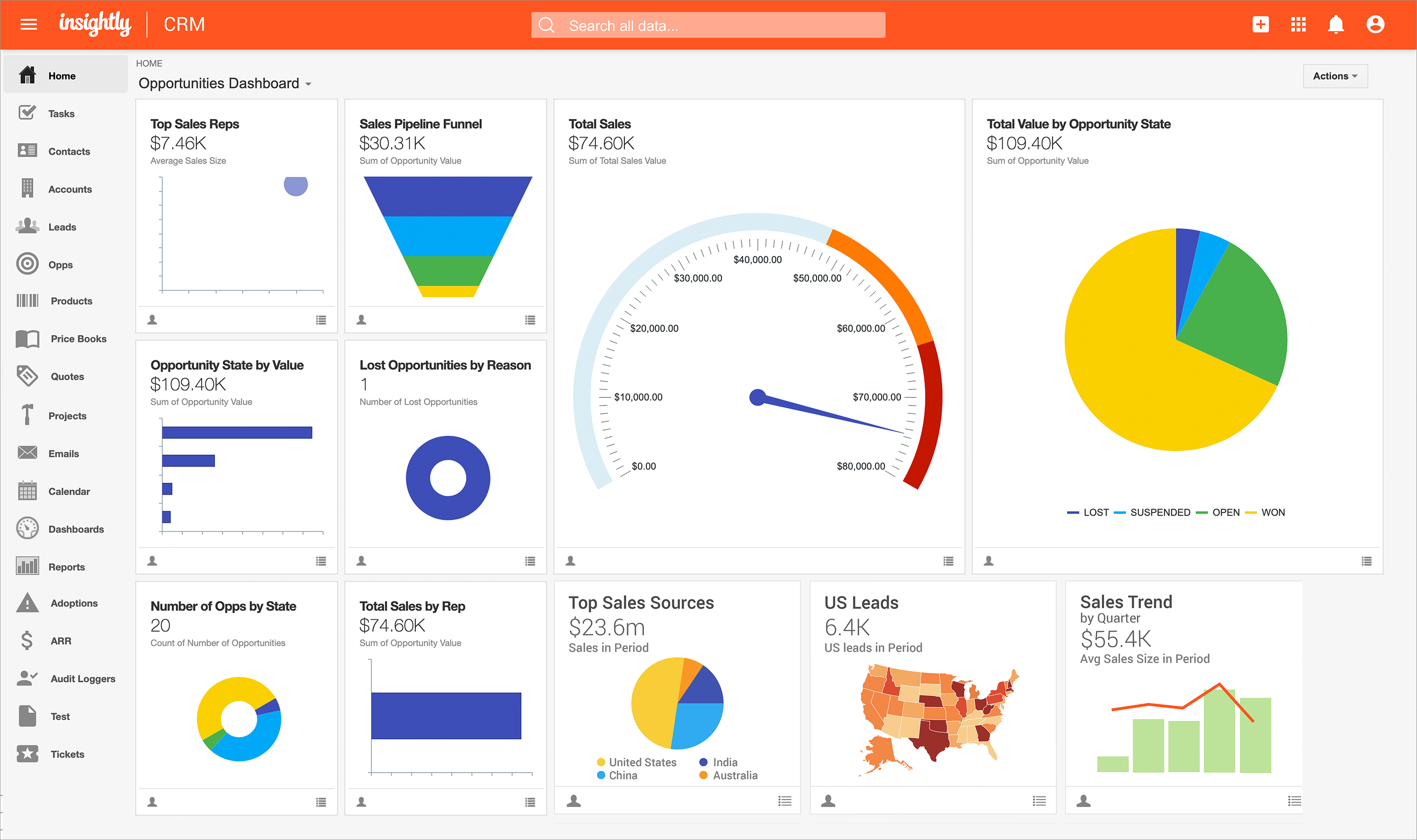
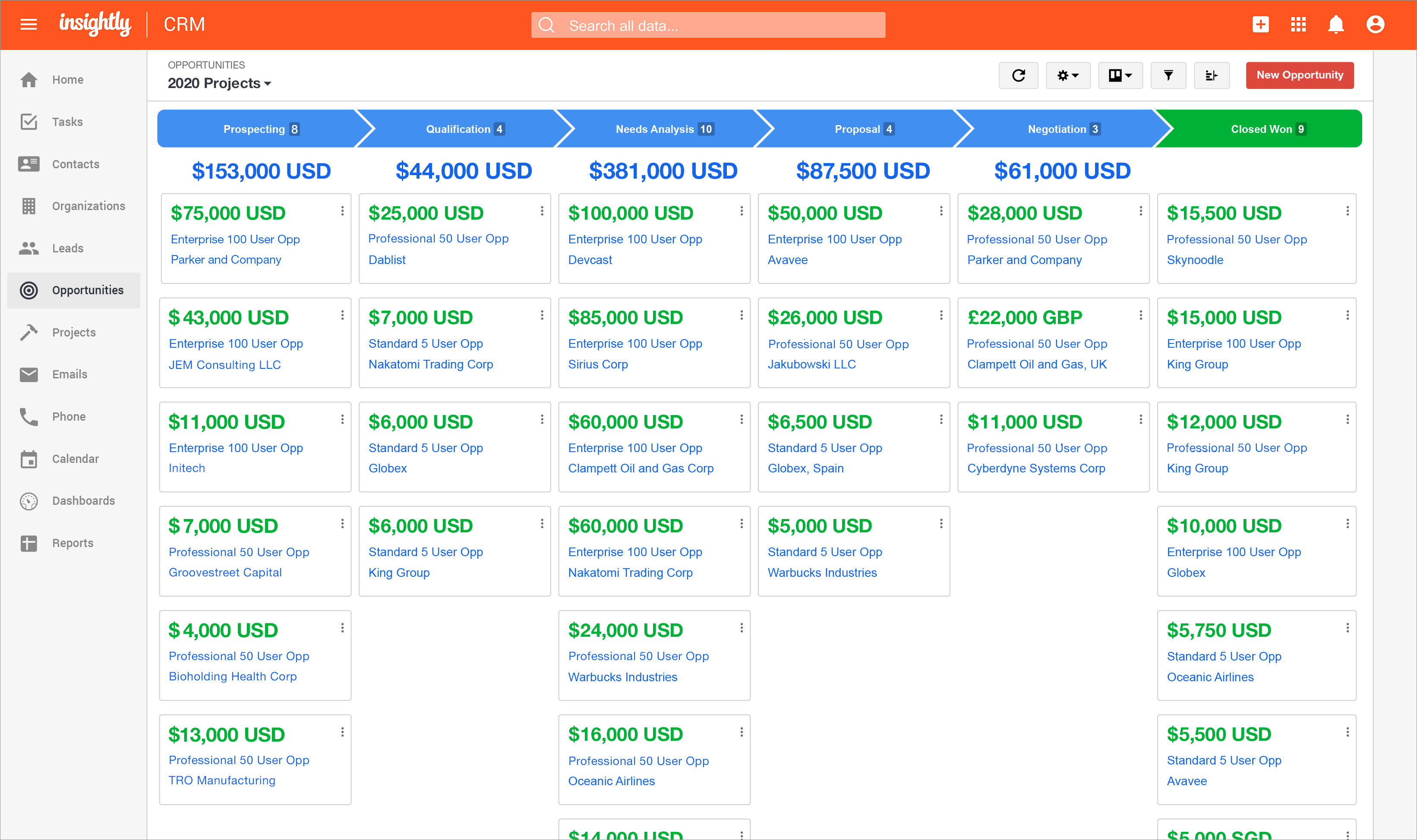
Screenshot of Insightly's lead status and activity tracking, available so that nothing falls through the cracks.Screenshot of the reporting feature, which provides insight into sales and productivity performance.Screenshot of the Insightly Opportunities dashboard.Screenshot of Insightly on mobile.Screenshot of Screenshot of