Chose Copper
It's the perfect bridge between advance for our needs, and simple for our team to actually use it, and learn it quickly.

| Product | Rating | Most Used By | Product Summary | Starting Price |
|---|---|---|---|---|
 Copper | N/A | Copper is a customer relationship management (CRM) built as an integration into Google Apps. | $9 per month per user | |
 Kintone | N/A | Kintone is a customizable digital workplace platform that lets the user manage data, tasks, and communication in one central place. Over 30,000 customers use Kintone’s no-code platform with more than 1.5 million database and workflow applications custom built for their businesses. The no-code drag-and-drop interface can be used to create custom database applications. Whether it’s sales leads, customer quotes, or inventory management, it can be organized in Kintone and viewed from the… | $24 per month per user |
| Copper | Kintone | |||||||||||||||
|---|---|---|---|---|---|---|---|---|---|---|---|---|---|---|---|---|
| Editions & Modules |
|
| ||||||||||||||
| Offerings |
| |||||||||||||||
| Entry-level Setup Fee | No setup fee | Optional | ||||||||||||||
| Additional Details | Up to 15% discount for annual pricing. | All subscriptions have a minimum requirement of 5 users. | ||||||||||||||
| More Pricing Information | ||||||||||||||||
| Copper | Kintone | |
|---|---|---|
| Considered Both Products |  Copper  Moriah Bacus, CAPM Accountability Coach + Project Manager Chose Copper Unlike Copper, I find Hubspot not as intuitive when it comes to their dashboard and customization. Copper offers much better value without having to pay for multiple add-on modules.  Robert Mann CEO Chose Copper Much less expensive and easier to set and use than Salesforce. We did not evaluate other systems.  Ben J. Varghese Manager, Sales Readiness Chose Copper The software is designed to mimic the look of Google products. This makes it easy to use for people already familiar with Google products. It syncs with G Suite apps like Google Contacts and Google Calendar, and it is directly accessible from Gmail. It appears as a sidebar …  Nathan Young Managing Director Chose Copper Copper is cheaper than Hubspot if you have a lower amount of users and still need advanced features. However, the TERRIBLE customer service and DECEPTIVE cancellation policy should make you think twice before trying to save a few bucks.  Jay Werth Partner / Campaign Manager Chose Copper I selected Copper because of its interface with all things Google, specifically the sync feature for calendar and capture of email correspondence. It made sense to use Copper because our corporate communications is built on the Google platform. Bloomerang is an excellent tool …  Kelly Wasden Sr. Account Executive Chose Copper More complete than SugarCRM by a long shot with reporting and ability to seamlessly integrate with ANYTHING at all. Less complicated than Salesforce Lightning from implementation and maintenance but Copper lacks deep customization ability and sheer size. Zoho CRM is a dying CRM …  Chris Kirksey Founder, CEO Chose Copper Copper is right in the middle in terms of price when comparing other CRMs, which is actually pretty awesome because I've used about 10 other CRM's and I've never been happy until I started using Copper. Pipedrive was very competitively priced, but I couldn't stand the UI. …  Sam Lepak Head of Digital Marketing Chose Copper I didn't have much authorization in the selection of Copper, however, I have looked into switching costs and leaving Copper due to their limited workflow automations. Hubspot and Salesforce look more robust and integrated with our other marketing tools. We are too sunk in with …  Erik Viager Manager, Business Development Chose Copper For my company, we chose Copper over Salesforce and HubSpot for a few reasons. First and foremost, G-Suite integration. This was one of the most attractive features we liked about Copper. The integration allows for seamless lead import, automated activity tracking and much …  Scott Entwistle Founder Chose Copper ProsperWorks is just an amazing lightweight CRM. Unless you're a large organization that needs to build out crazy custom reporting and tools that integrate into your CRM, Prosperworks is the best bet. Instead of being an IT project that you need to get a bunch of other people …  Daniel Coburn COO (Chief Operating Officer) Chose Copper It is a very powerful tool to the level of Sugar and SalesForce. With its tight integration, as a Google product, it is seamless and really assists in managing communication with clients. While Zoho offers a great low-cost solution, ProsperWorks definitely hits the mark for … |  Kintone  Farshad Karimi Implementation Manager Chose Kintone More customizable in my opinion and free, though Kintone has drag and drop which is excellent and my favorite part.  Caneel Johnson Database Developer Chose Kintone Previously we used, sequalm access, and something called CSST. None of them were as dynamic or easy to build and update as Kintone.  Shin Kishioka PRESIDENT Chose Kintone Salesforce CMS  Carmen Miller Project Manager Chose Kintone Monday.com — I used this in my previous job and loved it for tracking stages and tasks (and I color-code everything), but at the time it was more clunky on raw data. It may have improved in this since then? Kintone is strong on data and I still color-code everything! …  Becca Rusinko Life Coach Chose Kintone We selected Kintone because it was the best combination of price and function. We needed something that could grow and scale with the organization, and that included looking at future prices. We didn't want to invest in something if we would be priced out five new users later. …  Beth Barker-Hidalgo She/Her/Tawanda Executive Director Chose Kintone Kintone is much more customizable and user-friendly than Access. We also have experience with Service Point - Kintone is again, much more customizable. We would love a two-way interface between Kintone and Service ice Point. That would be a tremendous bonus for capturing & … |
| Copper | Kintone | ||||||||||||||||||||||||||||||
|---|---|---|---|---|---|---|---|---|---|---|---|---|---|---|---|---|---|---|---|---|---|---|---|---|---|---|---|---|---|---|---|
| Sales Force Automation |
| ||||||||||||||||||||||||||||||
| Customer Service & Support |
| ||||||||||||||||||||||||||||||
| Marketing Automation |
| ||||||||||||||||||||||||||||||
| CRM Project Management |
| ||||||||||||||||||||||||||||||
| CRM Reporting & Analytics |
| ||||||||||||||||||||||||||||||
| Customization |
| ||||||||||||||||||||||||||||||
| Security |
| ||||||||||||||||||||||||||||||
| Social CRM |
| ||||||||||||||||||||||||||||||
| Integrations with 3rd-party Software |
| ||||||||||||||||||||||||||||||
| Platform |
| ||||||||||||||||||||||||||||||
| Low-Code Development |
|
| Copper | Kintone | |
|---|---|---|
| Small Businesses |  Salesmate Score 10.0 out of 10 |  Stackby Score 9.0 out of 10 |
| Medium-sized Companies |  Creatio Score 9.7 out of 10 |  Quixy Score 9.9 out of 10 |
| Enterprises | Creatio Score 9.7 out of 10 | Creatio Score 9.7 out of 10 |
| All Alternatives | View all alternatives | View all alternatives |
| Copper | Kintone | |
|---|---|---|
| Likelihood to Recommend | 5.0 (0 ratings) | 9.0 (0 ratings) |
| Likelihood to Renew | - (0 ratings) | 8.3 (0 ratings) |
| Usability | 5.0 (0 ratings) | 7.8 (0 ratings) |
| Availability | - (0 ratings) | 10.0 (0 ratings) |
| Performance | - (0 ratings) | 9.0 (0 ratings) |
| Support Rating | 1.9 (0 ratings) | 9.4 (0 ratings) |
| Implementation Rating | - (0 ratings) | 6.8 (0 ratings) |
| Configurability | - (0 ratings) | 9.6 (0 ratings) |
| Ease of integration | - (0 ratings) | 5.0 (0 ratings) |
| Product Scalability | - (0 ratings) | 7.0 (0 ratings) |
| Vendor post-sale | - (0 ratings) | 8.0 (0 ratings) |
| Vendor pre-sale | - (0 ratings) | 2.0 (0 ratings) |
| Copper | Kintone | |
|---|---|---|
| Likelihood to Recommend |
|
|
| Pros |
Erik Viager Manager, Business Development |
Becca Rusinko Life Coach |
| Cons |
|
|
| Likelihood to Renew | No answers on this topic |
Shin Kishioka PRESIDENT |
| Usability |
|
Shin Kishioka PRESIDENT |
| Reliability and Availability | No answers on this topic |
Farshad Karimi Implementation Manager |
| Performance | No answers on this topic |
Farshad Karimi Implementation Manager |
| Support Rating |
Ben J. Varghese Manager, Sales Readiness |
|
| Implementation Rating | No answers on this topic |
Shin Kishioka PRESIDENT |
| Alternatives Considered |
|
|
| Scalability | No answers on this topic |
Farshad Karimi Implementation Manager |
| Return on Investment |
|
|
| ScreenShots | Kintone Screenshots  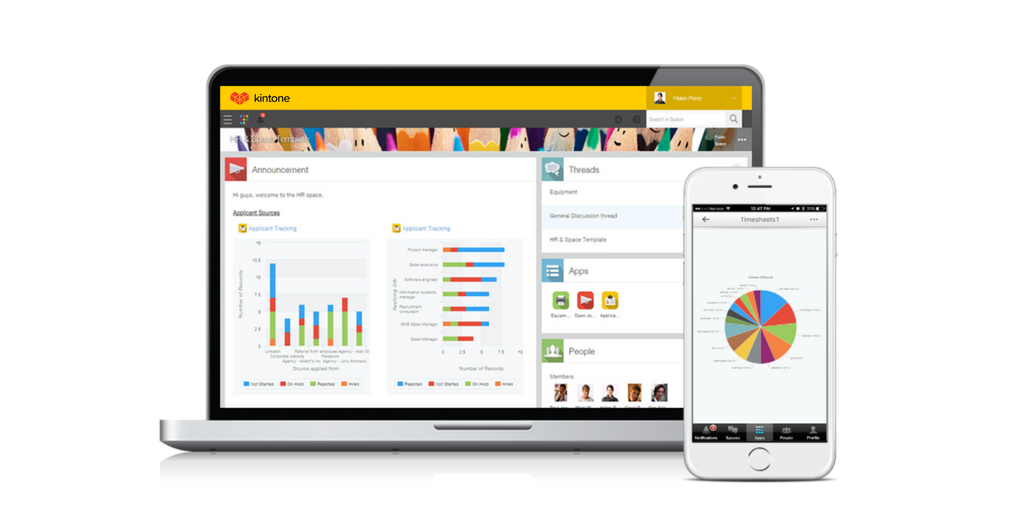   |