Autotask PSA is designed as a complete IT Business Management Platform for MSPs, now from Datto (resulting from the Autotask merger with Datto in 2017).
N/A
Planview ChangePoint
Score 7.5 out of 10
N/A
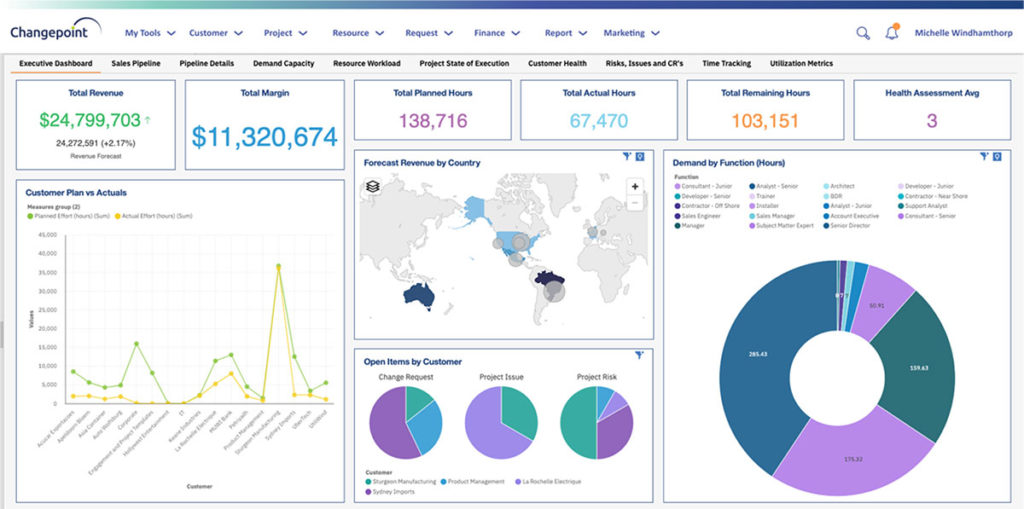
Planview Changepoint is a platform that marries professional services automation (PSA), project portfolio management (PPM) and business analytics to provide managers broad operational visibility and control over their strategic business portfolios.
Atera is an RMM first with PSA features so it falls short of a PSA. The essentials are there for a fledgling MSP, but for more advanced ticket handling and contract management, it falls short. When I used Zendesk at the beginning (about 10 years ago), it was really only a …
Datto Autotask PSA is probably the best all-in-one platform for MSPs. It's targeted and designed specifically for MSPs, whilst most service desk software/PSA is often just general service desk software.
Autotask is more robust than simple ticketing systems. It provides better billing ability that many ticketing systems and works well with existing clients. The invoicing options provided are beneficial to the business and streamline the process. The ticketing system provides …
Chief Operating Officer, and HIPAA Privacy Officer
Chose Autotask PSA
The portion of Autotask that we've used other companies for prior to using Autotask is the Endpoint Management. The Autotask Endpoint Management (AEM) portal integrates perfectly with their PSA/CRM tools. It's alerting features are much better than the above software as there …
It has been many years since we compared Autotask to the competition. We made the decision early on because of the overall solution that Autotask provides. It suits our needs well and we have not had a need to change since.
ConnectWise would be a close second however the overall functionality hasn't been great in the past, I've learned they've implemented a more robust web interface however the client was not stable. Autotask is easy to manage from service requests, reporting and time management.
I've used OTRS and Autotask gives a better overall experience as it isn't just simply a ticketing system it gives greater breadth over what you can accomplish. It allows for better interdepartmental communication rather than just a place for end users and clients to dump more …
Autotask stacks up fairly well against software like Kaseya, ConnectWise, and Tigerpaw. They all have their own strengths and weaknesses, however I feel that ConnectWise and Autotask have improved the most as of the last 10 years. The reason we chose Autotask is because it …
Except for multi-tenancy and permissioning for external users, Autotask beats BMC Remedy in every category for an ITSM Incident/Request Management suite. From allowing legitimate multi-tasking to the streamlined and more-straightforward user experience, Autotask takes the focus …
ServiceNow was faster to use to create tickets in a fast-paced call center style helpdesk. I preferred it to Autotask, but from a business perspective, I felt that Autotask covers a lot more ground than ServiceNow. My Experience with Solar Winds was minimal although it was a …
We tested several solutions ranging from short-term trials to extended 6-month production runs and found the other solutions to lack what we needed. Autotask PSA was a more mature, thought-out, and developed product that had everything we needed in a single solution. Over the …
Planview Changepoint helps us to understand our key customers enabling us to capitalize on every financial opportunity and helps us to forecast demand against the capacities required for new opportunities, and also it automates and monitors contractual terms and conditions. It …
Changepoint was selected for its cost and what it can do. I was not involved in the decision to purchase Changepoint, but it appears to be a good decision.
The system predates me as I was not working for the company when the solution was chosen - I understand this may have been an 'overpromise, underdeliver' scenario. However, we are now moving towards replacing it with Supportworks - and having seen Supportworks in action I …
We believed that Changepoint matched up well, had better support and provided a better pricing structure that worked better for our budget constraints over time. The team was willing to work with us on the design of the tool for our needs and it wasn't going to break the bank …
We selected Changepoint as our PPM tool over ten years ago. We made this selection based upon their 'completeness of vision' and allowing us to develop our PMO processes with a single footprint. Changepoint has been very successful with product enhancements and maintains their …
n/a to me, we used to use spread sheets and a sharepoint site to house all the project related information and documents before we went to Changepoint.
In my opinion, Datto Autotask is exceptionally complicated to set up, manage, and use on a daily basis. I would think the target market for this product would be someone managing a team of 20 - 50 people, possibly more. In my experience, for it to run properly you will need to dedicate at least half an FTE to running this product in an organization of that size per month. I would not recommend it for companies with less than 10 people or for companies that value quick communication with their clients. I would not recommend it for companies using Datto's RMM product. The integration exists, but it is clearly a bolt-on. They were not developed together and they are slow to talk to each other. Frequently you cannot add details from RMM sessions into the PSA without manually copying the ticket number, and if the ticket is more than a week old, then you can't even find it with the ticket number.
Changepoint is well-suited for consulting firms and other companies that charge clients for their time and have a need for significant project-management capabilities along with reporting and invoicing. It is not well-suited for companies that want a more basic solution to time reporting and expense reimbursement. The key questions to ask during the selection process revolve around this basic question: how are you going to use this software? Though it has a lot of functionality, the learning curve is steep and basic functionality is not as easy as one would expect.
AutoTask allows for us to receive and work support tickets very easily. We've setup various 'Issue Types' that in turn are bound to SLAs ensuring that items are worked appropriately as they are received.
The automation that AutoTask allows for with regards to various emails/requests coming through has been great. It allows for us to not have to constantly "watch the queue" as when a critical item arrives the appropriate persons are notified and can work it.
I feel that the management of AutoTask for both user setup, and various automations is done well. We're able to copy settings as needed, and create templates for multiple items.
There are lots of reporting options. Once you figure out how to work the parameters of a report, the system is able to provide detailed and accurate compilations of data. There are also many custom reports than can be setup, as well. In my experience, we have told Changepoint PSA administrators what kind of report we were needed and they set it up for us, available in a 'custom reports' folder.
You can have several things open at once -- 'portals'. These are up at the top of the screen, much like how Google Chrome has tabs at the top. This is useful.
The site could become slow with high volumes of traffic. This may have been due to the way that our infrastructure was setup.
Analytic reporting was not available in the version that we used. We created external reports to slice and dice the data and view it as the business demanded.
Sometimes the decision to renew boils down to an old adage "if it isn't broken don't fix it". Previous to moving to Changepoint, it was obvious that we needed a better project management tool. Projects we completed on time but the time zone difference between the teams and several iterations of back and forth caused a number of communication issues with projects. The difference is night and day.
Datto Autotask PSA is a full featured product that can do almost anything you need. There is a significant learning curve to get started which requires several hours spent in product training. Additionally, several hours / days are needed to get clients imported, contracts configured, and integrations implemented. Once the setup and user training is complete, the product is very functional, but it's imperative to not get overwhelmed when starting out.
The portion of Autotask that we've used other companies for prior to using Autotask is the Endpoint Management. The Autotask Endpoint Management (AEM) portal integrates perfectly with their PSA/CRM tools. It's alerting features are much better than the above software as there aren't a bunch of superfluous and unneeded alerts. Instead, it only alerts for things that you specify that you want. Alerts aside, for the PSA/CRM, I don't have much to compare it to as Autotask was the first PSA we tried. It's hard to imagine a PSA having more features or doing a better job than Autotask.
The system predates me as I was not working for the company when the solution was chosen - I understand this may have been an 'overpromise, underdeliver' scenario. However, we are now moving towards replacing it with Supportworks - and having seen Supportworks in action I genuinely cannot wait to switch from Changepoint and move on...
Our ability to maintain a global IS Scorecard helped us to maintain a focus on completing projects on time and within budget.
Having a single instance of Changepoint with projects aligned to specific portfolios helps senior management to maintain a focus on the investment of IS resources. It is foundational to our governance processes.