dbForge Studio (Edge) vs. Oracle Enterprise Manager

Overview
ProductRatingMost Used ByProduct SummaryStarting Price
dbForge Studio (Edge)
Score 8.0 out of 10
N/A
dbForge Studio is provided by Devart and is a universal front-end client for database management, administration and development. Devart's GUI tool provides utilities to compare, synchronize, and back up databases (e.g. MySQL, Oracle, SQL Server, PostgreSQL, etc.) with scheduling, and includes the possibility to analyze and report MySQL tables data. For example, dbForge Studio for MySQL works with any MariaDB database servers, and supports all MariaDB objects types. This solution enables users…
$9.95
per month
Oracle Enterprise Manager
Score 7.4 out of 10
N/A
Oracle’s Enterprise Manager is an on-premises monitoring and management tool. The console is designed primarily to manage other Oracle products, it but can integrate to manage non-Oracle components as well.N/A
Pricing
dbForge Studio (Edge)Oracle Enterprise Manager
Editions & Modules
Standard (subcription)
$9.95
per month
Professional (subscription)
$19.95
per month
Enterprise (subscription)
$29.95
per month
Standard (subcription)
$99.95
per year
Professional (subscription)
$179.95
per year
Standard
$199.95
Enterprise (subscription)
$229.95
per year
Professional
$349.95
Enterprise
$449.95
No answers on this topic
Offerings
Pricing Offerings
dbForge Studio (Edge)Oracle Enterprise Manager
Free Trial
YesNo
Free/Freemium Version
YesNo
Premium Consulting/Integration Services
NoNo
Entry-level Setup FeeNo setup feeNo setup fee
Additional Details
More Pricing Information
Community Pulse
dbForge Studio (Edge)Oracle Enterprise Manager
Considered Both Products
dbForge Studio (Edge)
Chose dbForge Studio (Edge)
dbForge [Studio for SQL Server] is far superior in its features, capabilities, ease [of] use, menu layout, and sophisticated design.

Chose dbForge Studio (Edge)
Before choosing dbForge Studio I evaluated at least a dozen tools, especially on the Visual Query Builder function. For now, I have identified only one product that has a better Visual Query Builder than dbForge Studio. This other product also manages UNIONs, while dbStudio …
Chose dbForge Studio (Edge)
[dbForge Studio for MySQL is] easy to understand and use because it has a sample UI. We can visibly see database tables and their relationships. We can automate queries according to our use and give access according to their use. Not everyone can delete the table or modify it. …
Chose dbForge Studio (Edge)
I would say that dbForge equals or beats most of the abilities of the other tools I evaluated at the time. dbForge had better support (Devart), and regular feature updates. dbForge has better tools for data comparison and import/export. The price tag is slightly higher, but …
Chose dbForge Studio (Edge)
Prior to dbForge Studio for SQL Server, I have only ever used SQL Server Management Studio to manage SQL Server databases. dbForge software, in my experience, is much easier to use, more intuitive, and hence more productive, speeding up most database-related tasks such as …
Chose dbForge Studio (Edge)

Although we had to pay licensing fees to use dbForge, one of the main reasons we chose dbForge is compliance-related: we did not want to use freeware to analyze our database, since we are a utility company that has personally identifiable information in our databases.

Additionall…

Chose dbForge Studio (Edge)
We haven't tried any other tools that do comparisons like Data Compare does. Our method prior to buying this tool was to manually run queries on each database and compare the output using text compare or by eye.
Chose dbForge Studio (Edge)
While DBeaver ended up being the goto for our development team, everyone else is going to be using dbForge Studio. The UI was hands down much easier to get used to, and the sorting/filtering options make it super easy for anyone to view the data the way they needed it. You …
Chose dbForge Studio (Edge)
We found dbForge Studio for Oracle to be more stable and easy to use than both Toad for Oracle and RStudio, among others. There is still room for improvement, such as the MySQL debugger. In the past, we used MySQL Workbench, but the flexibility and robust tool set of dbForge …
Chose dbForge Studio (Edge)
I did not make the decision to choose dbForge Studio for SQL Server. I personally like dbForge Studio because of my familiarity with the SQL server and the UI.
Chose dbForge Studio (Edge)
  • Much more stable than MySQL WorkBench
  • Has the power tools a db designer wishes for but lacks in free clients like HeidiSQL
  • Is being improved regularly
Chose dbForge Studio (Edge)
We used MySQL Workbench tool before dbForge Studio for MySQL and it did not work well. dbForge Studio for MySQL was a much more complete and flexible solution to resolve our development and administration problems. dbForge Studio for MySQL not only resolved our problems it …
Chose dbForge Studio (Edge)
I chose dbForge Studio for MySQL instead of MS SQL Server because:
1) For the most part I don't like Microsoft products. Their UIs are notoriously bad, and you never know when a product tweak will create incompatibilities that will require an expensive upgrade.
2) Since our …
Oracle Enterprise Manager
Chose Oracle Enterprise Manager
NA
Cannot Disclose
Chose Oracle Enterprise Manager
Datadog is good at collecting metrics, monitoring, and alerting; whereas, with Oracle Enterprise Manager, in addition to all that, we can manage the infrastructure as well as automate certain fixes.
Chose Oracle Enterprise Manager
Foglight is great, but expensive. It has great monitoring like OEM, but can negatively impact database performance. OEM is better than Foglight because it is a native application from OEM and has features that Foglight doesn't have.
Chose Oracle Enterprise Manager
They don't stack up against each other. They complement each other.
Chose Oracle Enterprise Manager
Oracle Enterprise Manager is better than Toad in that it allows you to do various server configurations that Toad doesn't allow.
Chose Oracle Enterprise Manager
Kibana from Elastic is another monitoring tool that claims to provide very similar information to OEM.
It seems to be an information tool rather than a tool that can actually make changes within a database.
I think Kibana is more robust for hardware versus database software so it …
Chose Oracle Enterprise Manager
Being an Oracle shop using Oracle Database and MySQL, management console from Oracle was a better choice than IBM or Microsoft even though we do use Microsoft Azure and storage/servers from IBM (on-prem).
Chose Oracle Enterprise Manager
Have not used any other products.
Chose Oracle Enterprise Manager
OEM is better at monitoring applications, while SolarWinds is better at monitoring the underlying infrastructure such as networks, switches, and routers.
Chose Oracle Enterprise Manager
I am using Nagios Enterprise monitoring tool also, but as compared to Nagios, Oracle Enterprise Manager is best for our company. Nagios is very weak in some aspects.
Chose Oracle Enterprise Manager
I used many other Oracle products (like Database, Middleware, Identity Management, etc.) but I have yet to review them.
Chose Oracle Enterprise Manager
Have not tried via Oracle Enterprise Manager, but CommVault is used by corporate for all backups of storage. However, it is just using Ansible to kick off RMAN jobs.
Chose Oracle Enterprise Manager
Toad for Oracle is more suited for individual users who have a strong focus on database development, and it is not as comprehensive as Oracle Enterprise Manager. While it is quite decent in logical database layer tasks, such as schema objects and SQL, it lacks visibility into …
Chose Oracle Enterprise Manager
OEM Cloud Control base version is free to use if you have licensed Enterprise Edition of one of the Oracle Product. It's sophisticated single point of control, we have used other monitoring products such as Veeam but none of the products have all the features packed together …
Chose Oracle Enterprise Manager
OEM is better and cheaper at managing Oracle databases.
Chose Oracle Enterprise Manager
Since OEM Cloud Control comes free with Enterprise Edition, we have mostly worked on OEM Cloud Control. I did have my fair share of experience with DBArtisan. It's good and lighter than OEM Cloud Control. It sort of removes your need to even go to SQLPLUS command line most of …
Chose Oracle Enterprise Manager
It is much simpler to install and configure as compared to Spotlight and Solarwinds.
Oracle Enterprise Manager measures performance diagnostics accurately and raises alerts and takes preventive actions. Other products can not take preventive actions even if they raise alerts. It …
Chose Oracle Enterprise Manager
I'm not aware of any OEM alternatives. At least, nothing with the kind of features you find in OEM, and nothing that is free.
Chose Oracle Enterprise Manager
Oracle Enterprise Manager suited our requirement as the clients were using multiple products of Oracle. They were using several instance of oracle implemented at different geographical locations each in Europe, UK, Canada, and USA. So Oracle Enterprise Manager was best fit for …
Chose Oracle Enterprise Manager
We have not used any other products to monitor and/or manage our oracle instances. We have always used Enterprise Manager, although we did use a previous version (11g Grid Control), right around the time I arrived at my position. I upgraded to 12c Cloud Control with the …
Chose Oracle Enterprise Manager
SQL Developer DBA module allows user, space management, SQL Tuning, ad-hoc queries, and schema management. Great free product supported and enhanced from Oracle.
Chose Oracle Enterprise Manager
Oracle Enterprise Manager is easy to install, use and extend the capability of. It supports many Oracle products, which is what it is used for in my company. We selected OEM for its ease of use, intuitiveness and robustness.
Features
dbForge Studio (Edge)Oracle Enterprise Manager
Database Development
Comparison of Database Development features of Product A and Product B
dbForge Studio (Edge)
8.0
Ratings
6% below category average
Oracle Enterprise Manager
-
Ratings
Database change management8.00 Ratings00 Ratings
Best Alternatives
dbForge Studio (Edge)Oracle Enterprise Manager
Small Businesses
DBeaver
DBeaver
Score 9.2 out of 10
DBeaver
DBeaver
Score 9.2 out of 10
Medium-sized Companies
DBeaver
DBeaver
Score 9.2 out of 10
DBeaver
DBeaver
Score 9.2 out of 10
Enterprises
DBeaver
DBeaver
Score 9.2 out of 10
DBeaver
DBeaver
Score 9.2 out of 10
All AlternativesView all alternativesView all alternatives
User Ratings
dbForge Studio (Edge)Oracle Enterprise Manager
Likelihood to Recommend
9.8
(0 ratings)
7.7
(0 ratings)
Usability
-
(0 ratings)
7.3
(0 ratings)
Support Rating
8.0
(0 ratings)
7.3
(0 ratings)
User Testimonials
dbForge Studio (Edge)Oracle Enterprise Manager
Likelihood to Recommend
Whenever a user or DBA wants to compare schematics between two environments, dbForge is extremely helpful. This is useful during version or framework upgrades, a database upgrade, patch implementations, service package implementations, or any time to environments would be different. The time it would take to write and execute queries, and then compare is exponentially longer than it takes with dbForge, where this is done and you have an application that allows you to quickly identify incongruities.
Read full review
I wish I had an option to give it a 9.5 :) OEM Cloud Control is very well suited if you have a system with multiple implementations of Oracle Database Enterprise Edition. If you are willing to pay for the huge license cost which is typical with Oracle, then you will love to use OEM Cloud Control to monitor your entire ERP solution including web servers, applications, network, storage, and physical servers. It is not worth the buck if your's is a small implementation. Your DBA's should be able to work without depending on OEM Cloud Control.
Read full review
Pros
  • Compare entire or subset of MySQL tables between databases
  • Configure comparison rules
  • Sync data between compared databases depending on differences
  • Save comparison rules for reuse and sharing
  • Break down differences between missing/new records, or different records
  • See differences highlighted per field
  • Execute sync immediately, or save as an SQL script file
  • Command-line tool that can be used to add comparisons to deploy scripts
Read full review
  • Oracle Enterprise Manager is a "one stop shop" for all of our management needs. This is helpful because it minimizes the management of the management software itself. There are less upgrades and connectivity issues to handle. And there are "plug-ins" for additional products we use like Blue Medora's one for PostgreSQL.
  • Managing administrative jobs can be burdensome in a shop with dozens of servers and databases. OEM Cloud Control makes it easy since you can view all the jobs for all servers in one place. It is easy to filter on jobs with problems or the like so that you can quickly look at the logs and fix the issues.
  • Tuning PL/SQL is much easier using OEM Cloud Control. Most DBAs are familiar with trace files and TKPROF, but not having to do those things at a command line smooths the process out. The graphical interface makes it easier to show developers exactly what the issues are. This makes for less finger-pointing and quicker resolution of performance problems.
  • Proactive management is easier using OEM Cloud Control. Before having the gui, I had a collection of scripts that I would have to install on each database server, then set up cron jobs to run them. When Oracle was upgraded, those scripts might have to be updated on each and every server. OEM Cloud Control has those things built in. You can choose exactly which metrics are important to you. And you can keep performance graphs up all day on a second monitor to let you instantly see when something might cause a problem.
Read full review
Cons
  • [The] installation error I've already reported (ABARTN).xml [could use some improvement]. This has to do with Windows Defender (the default Windows anti-virus) not allowing the installation on the default installation directory of dbForge Studio [for SQL Server], thus the error. [With] the workaround, [I] was to disable the anti-virus for the duration of the installation, then turn it back on when the installation [was] been completed.
  • [I would like to see] better defined licensing models for larger teams (seated vs. name licenses).
Read full review
  • We also use OEM to monitor SQL Server. However, OEM only provided limited features for SQL Server. It would be nice if we can schedule backup jobs for SQL Server in OEM.
  • The ability to run SQL queries. You can't run queries in OEM. I have to go to SQL Developer or SQL PLUS to run. queries.
Read full review
Usability
No answers on this topic
It's great! It does everything and anything you would want it to do. It can monitor things which doesn't comes out of the box by adding plug ins to it, for example, you can even monitor Oracle GoldenGate Replication by adding a plug-in to OEM Cloud Control.
Read full review
Support Rating
Although experience here is limited, as only one question has been asked and answered promptly, the registration and licensing process was very smooth and professional. There are forums online that discuss dbForge issues, as well as a Facts and Questions section on dbForge's website, so product support does seem to exist if needed.
Read full review
I still rate OEM as a must-have tool for central management of Oracle fleet. The pros and cons of the product is prominent. Meanwhile, I also acknowledge that OEM was design about a decade ago. At that time, it did not have the landscape we have today, such as cloud, DEVOPS, machine learning, etc. I hope in future releases, the design will incorporate those features.
Read full review
Alternatives Considered
I would say that dbForge equals or beats most of the abilities of the other tools I evaluated at the time. dbForge had better support (Devart), and regular feature updates. dbForge has better tools for data comparison and import/export. The price tag is slightly higher, but renewals rates are pretty good. It's a quality tool that still is well worth the cost.
Read full review
Kibana from Elastic is another monitoring tool that claims to provide very similar information to OEM. It seems to be an information tool rather than a tool that can actually make changes within a database. I think Kibana is more robust for hardware versus database software so it is more suited to that purpose and does to compare to the Oracle Database monitoring attributes of OEM.
Read full review
Return on Investment
  • We perform better and faster syncing analysis between databases.
  • We update running mysql databases faster and more efficiently.
  • Especially with MySQL Workbench we had immense irritations due to all the crashes during the day. With dbForge Studio we finally had a power tool which is stable and does not crash constantly.
Read full review
  • Positive: Alerting features. Without this we would have to be a 24x7 shop with someone always manning the helm. With the alerting feature we can define levels of alerts and only get the most pressing alerts sent out.
  • ROI: OEM is free, so the ROI is whatever you make of it.
Read full review
ScreenShots

dbForge Studio (Edge) Screenshots

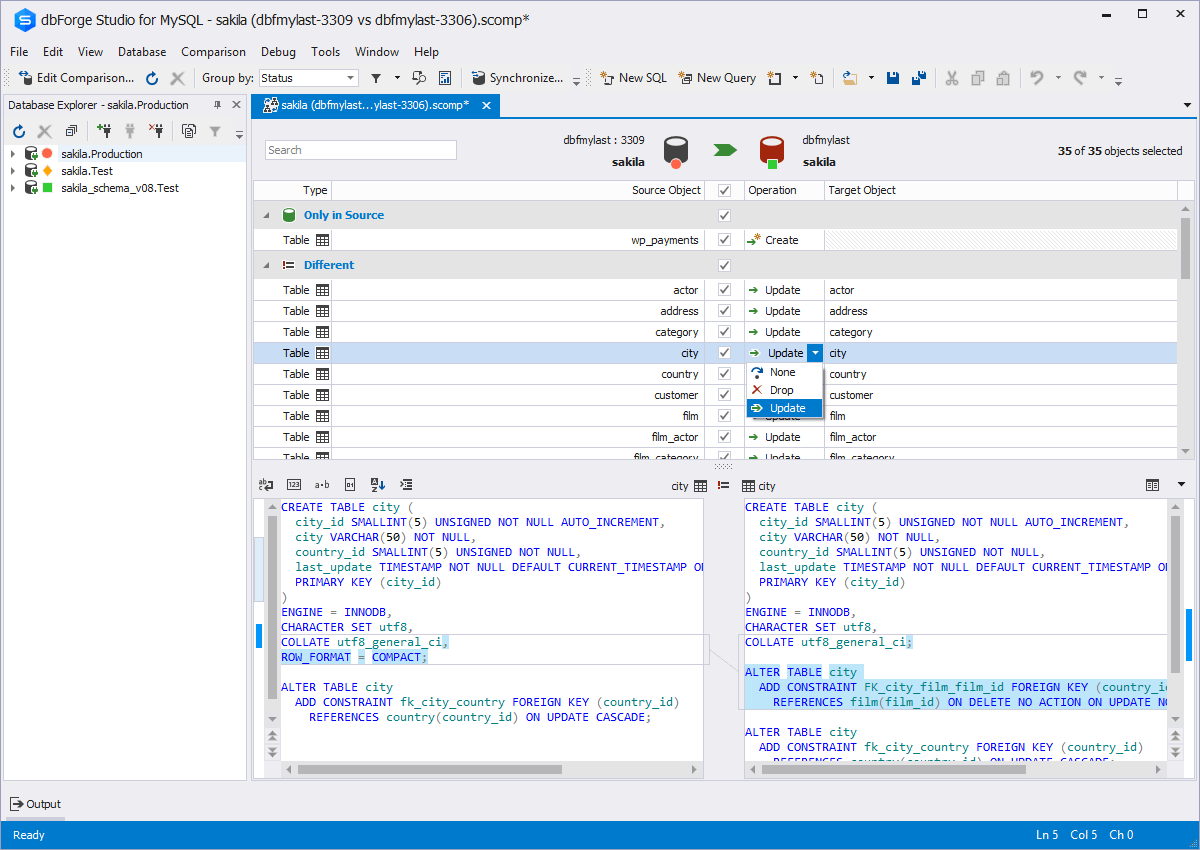
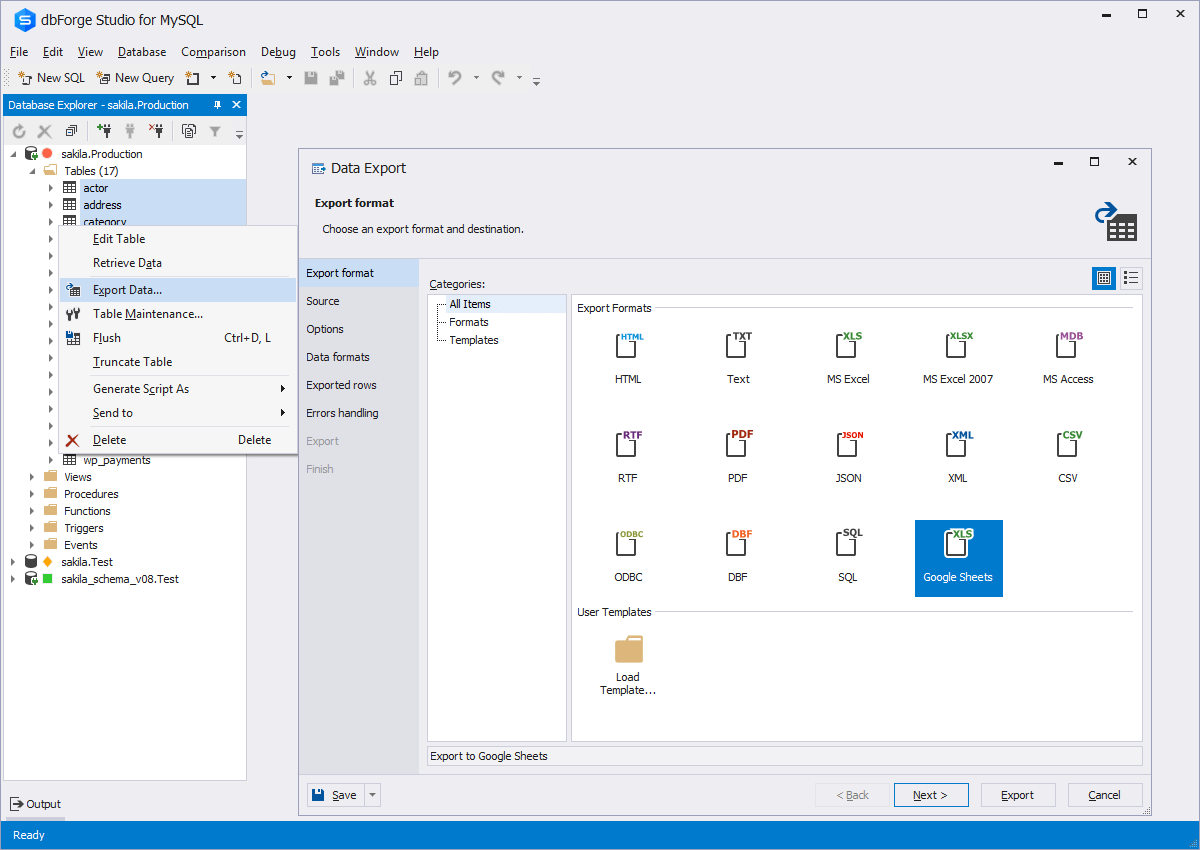
Screenshot of Code CompletionScreenshot of Schema CompareScreenshot of Database DiagramScreenshot of Data ExportScreenshot of Database design & developmentScreenshot of Visual query building