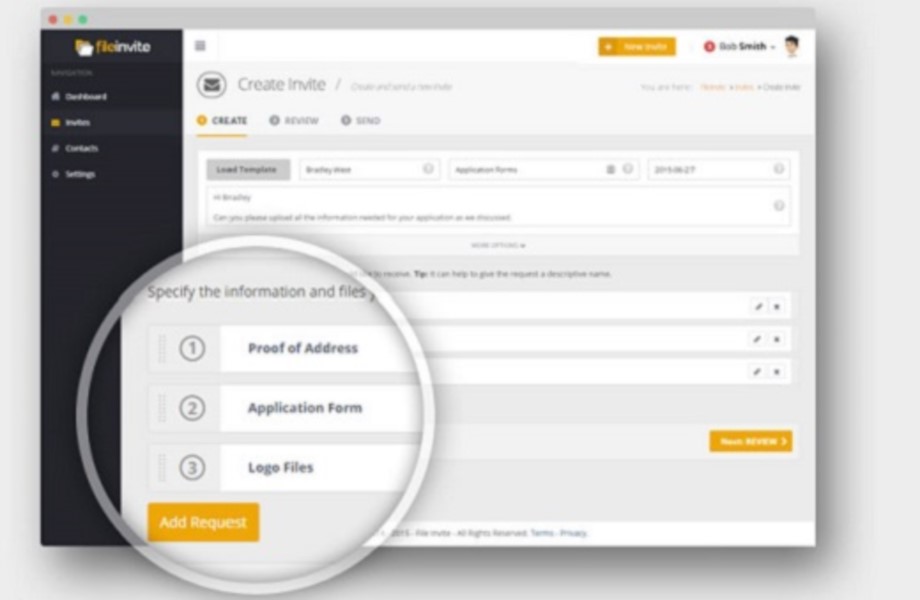
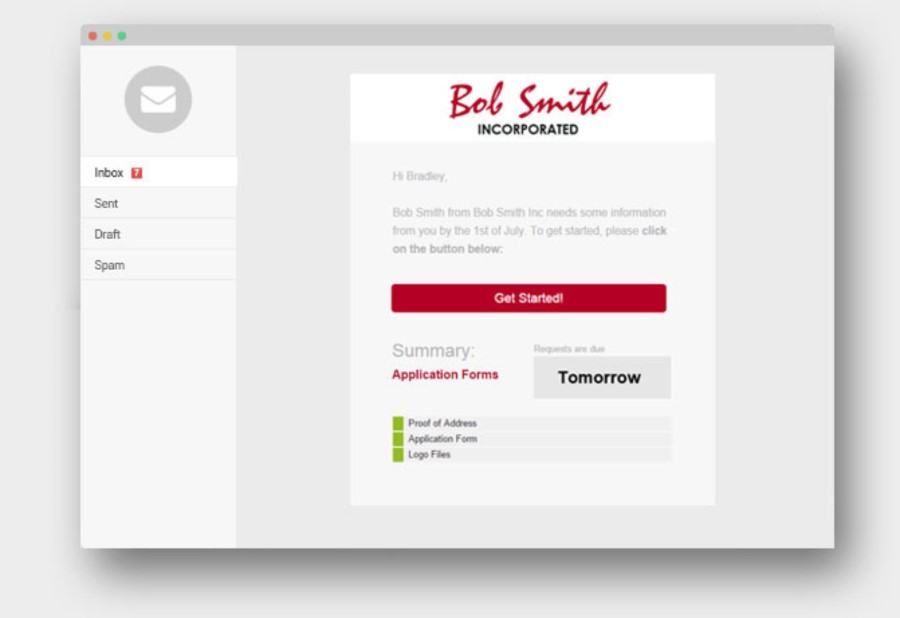
FileInvite automates the process of collecting information and documents from your clients. The vendor says the process is simple, and the interface is secure. All you have to do is create and send a FileInvite with the information you require. The client then uploads the files to a secure portal where you can approve or decline the information that has been submitted. FileInvite also allows you to set up reminders, templates and sync with your cloud storage like Google…
N/A
iManage Work
Score 8.1 out of 10
N/A
iManage Work is a document management solution formerly known as HP Worksite. iManage was divested from Hewlett-Packard in 2015 and is now an independent company, headquartered in Chicago.
N/A
Pricing
FileInvite
iManage Work
Editions & Modules
No answers on this topic
No answers on this topic
Offerings
Pricing Offerings
FileInvite
iManage Work
Free Trial
Yes
No
Free/Freemium Version
No
No
Premium Consulting/Integration Services
No
No
Entry-level Setup Fee
No setup fee
No setup fee
Additional Details
—
—
More Pricing Information
Community Pulse
FileInvite
iManage Work
Considered Both Products
FileInvite
Verified User
Anonymous
Chose FileInvite
Similarly, I found FileInvite to be easier, cheaper, and has more functionality that is useful for me.
FileInvite has a lot of nice features, but the overall cost is the company's downfall. We were able to get a lot of the same features that we need for a lot less with other companies and providers.
There were at least two other solutions that I looked into. Of my list of needs, however, file invite had the majority of them covered, and I know that at least one other solution that I reviewed was significantly more expensive.
MS Sharepoint requires a lot of time to integrate and efforts are expensive compared to iManage product. iManage is quick setup and well integrates with existing on-premise environments and integrates well with major iDP systems for authentications and manage RBAC systems for …
There are a couple of different types of Alternatives:
In terms of e-mail, the default is just to leave everything in Outlook and archive them when the total inbox size gets too large. This doesn't work for our organisation because the emails are not sufficiently backed up and …
Worldox and Worldox Enterprise do a superb job for document management. iManage Work has the edge in that it's cloud hosted, but so is Worldox Enterprise. Worldox forces assimilation by integrating with Office applications and controlling where items are saved to. iManage Work …
I have viewed several other document management system software, but iManage was already installed at my company before I started working here. For us, I think this is the right solution. Companies with a smaller number of employees or smaller document collections could find …
Our forms for summer camper parents vary depending on the needs of the camper (i.e. allergies, nutrition requirements, & program desirability such as horseback riding or preferred cabin mates). This situational form allowance is a breeze with fileinvite, and the setup process is intuitive and very easy to manage as a collaboration across our entire team
iManage is well suited to managing the large volume of documents and emails that are created on a daily basis. Lawyers can get dozens if not hundreds of e-mails a day, and we need something to do with them. Deleting them is often not practical, because you may require the information a year from now. Leaving them in Outlook is also impractical, because a large Inbox will slow Outlook down. Outlook has an archiving feature, but this doesn't really help for collaboration (and your colleagues are likely out of luck if you end up unavailable due to emergency). iManage is less well suited to small organizations (ex: sole practitioners and small firms) because it is does require a significant investment in implementing and maintaining the software. iManage Work is well suited for large law firms, because it is great for collaboration, including between different offices.
The system can be fairly buggy. I have issues with freezing, and a lack of responsiveness each time I use it ( although not for long and does not prevent me from getting what I need to be done, it's just annoying).
It has a slightly larger learning curve to use than other more simplistic records managers
It has been what our firm has always used, and overall everyone seems to be pleased with it. It is user friendly and intuitive and it doesn't appear we have any intention of changing what we use for our purposes.
Aside from a few minor recommendations, the solution is well thought through and very easy to set up. As a matter of fact, the onboarding support by the team was fantastic, and the ongoing availability to help while we were/are learning the platform has been extremely friendly and reliable.
To me iManage is very intuitive and user friendly. The switch from the application vs the Outlook extension was an adjustment, but it was one I made pretty easily once it happened.
It has been pretty smooth so far. There was an issue earlier this week that resulted in corrupted invites whereby the unique secure link failed, but I was able to resubmit the invitations quite simply, and they've assured me the issue was unusual and I won't be alarmed unless it happens again sometime soon.
We had an issue a few years ago where a plug-in of some sort which allowed the viewing of PDFs got updated and then whenever some people previewed PDFs in iManage then Outlook would crash. My outlook crashed over 20 times in a single day once. It was a pretty bad time. I know one of our information technology professionals in another office worked non-stop with iManage to get it resolved, and it seemed like they did take the issue pretty seriously.
There were at least two other solutions that I looked into. Of my list of needs, however, file invite had the majority of them covered, and I know that at least one other solution that I reviewed was significantly more expensive.
MS SharePoint requires a lot of time to integrate and efforts are expensive compared to iManage product. iManage is quick setup and well integrates with existing on-premise environments and integrates well with major iDP systems for authentications and manage RBAC systems for permissions via API calls.
Since our policy is that all client documents are saved into iManage, we have been able to keep an email retention policy for Exchange to 90days to delete. This has saved us significant resources in both Exchange management and hardware to support excessive email storage for archived databases or extremely large databases.
The ability to search documents quickly by text inside the documents allows to review previously created contracts and use similar language that is well suited to a new project over again without having to spend time manually opening and searching ourselves. The software does it for us.
We used to store old files at an offsite storage facility for a monthly fee. We have implemented a new procedure, where we now scan these old paper files into our iManage system, making them text searchable PDFs. Since the software has such robust searching capabilities, this makes the documents much more accessible when needed than requesting an offsite storage delivery and having to manually pull paper files. In addition, we have saved thousands of dollars a month by not storing paper files offsite any longer. If the searching were not so powerful, we would not done this because our old paper storage system worked well for us previously.