
James Roy
Office Manager
Chose Harvest
Harvest is a bit more robust and offers additional related options such as invoicing (which Clockify does not have) though most people invoice through another system anyway.

| Product | Rating | Most Used By | Product Summary | Starting Price |
|---|---|---|---|---|
 Harvest | N/A | Harvest is used to track time, gain insights from past projects, and get paid for work. Dedicated apps and integrations with popular tools like Asana and Slack allow Harvest to fit into a team’s workflow. A selection of visual reports are offered to keep projects running smoothly and an organization's team supported. Harvest also helps to turn a team’s tracked time and expenses into professional nvoices and collect payment quickly with integrated online payments. | $13.75 per month per seat | |
 Time Doctor | N/A | Time Doctor offers in-depth productivity analytics, giving business owners insight on how to improve performance and scale. Going beyond tracking and monitoring, Time Doctor’s suite of tools put data-driven improvement front and center, helping to ensure that teams of all sizes are actively working on the right things while also offering actionable insights to maximize performance and efficiency. Time Doctor tracks the collective hours a team puts in. But it also provides a… | $7 per month per user |
| Harvest | Time Doctor | |||||||||||||||
|---|---|---|---|---|---|---|---|---|---|---|---|---|---|---|---|---|
| Editions & Modules |
|
| ||||||||||||||
| Offerings |
| |||||||||||||||
| Entry-level Setup Fee | No setup fee | $9.99 per user | ||||||||||||||
| Additional Details | 20% discount for annual billing on Pro and Premium plans. | — | ||||||||||||||
| More Pricing Information | ||||||||||||||||
| Harvest | Time Doctor | |
|---|---|---|
| Considered Both Products |  Harvest James Roy Office Manager Chose Harvest Harvest is a bit more robust and offers additional related options such as invoicing (which Clockify does not have) though most people invoice through another system anyway.  Brian Manning President & Co-Founder Chose Harvest Harvest had automated expense tracking features which neither had and more robust time tracking capability around client and project structuring.  Alan Bloxham Project Manager Chose Harvest Upwork works great at tracking time for projects, however it doesn't allow you to track your own time. ADP is the opposite to Upwork, you can track personal time, but there's nothing to track for projects or other clients. Overall, Harvest is better in every way.  Marc Duke Marketing Consultant Chose Harvest Harvest Chrome extension is not as refined as Toggl but it integrates expenses which is a lot better. The reporting element of it is better than Toggl as well. With Toggl you don't have to confirm submission on a week by week basis which can be a little irritating. Toggle does …  Sarah Porter Digital Marketing Manager Chose Harvest Other products that we've used did not show the projects that were being worked on during the employee's workday.  Erin Harris Director of Sales & Marketing Chose Harvest I've only used in-house time tracking/payroll systems or managed my own invoicing system. I have no opinion on how Harvest compares to other programs.  Lynzee Jablonka Senior Account Manager Chose Harvest Like Asana, Harvest is great for project management, though it definitely skews more toward the time tracking rather than the step by step process. Some of our team members write out their to-do list as project tasks in Havest and start the tracker when they're ready to get to …  McKay Salisbury Founder/CEO Chose Harvest Harvest tends to be a little bit more expensive than other options such as Clockify (depending on how many users you have) but it's more robust and includes additional features that, depending on your business, may be necessary. It's very reliable, user-friendly, and easy to …  Lark Ismail Website Support, Managing Director Chose Harvest Freshbooks is a great program and I used to use it before my needs changed and I needed different features. When I switched, Harvest had made the most progress versus other platforms of making time tracking easy. This is important for accuracy versus having team members forget …  Joy Reschke Brand Strategist Chose Harvest We have not evaluated any other services.  Dave Seeman Co-Owner / Mechanical Design Engineer Chose Harvest Harvest has everything you need in one software, excellent support, and a simple and clean interface.  Chris Hecox Business Owner Chose Harvest Harvest is pretty darn good vs. these other options. I recommend trying it out on trial.  Tegan Jenner Senior Data Analyst Chose Harvest Harvest is significantly better than Jira. I think Jira's is not originally intended to be used as a time logging/management system, but we had been previously using it as that. It was much clunkier, and many employees had a difficult time using it as a user interface goes. Harve… Chose Harvest The Harvest UI was much simpler. The others felt like they had too much going on and setting up and maintaining was confusing. Harvest's interface is very straightforward and easy enough for a non-techie to set up for their business. Toggl was the closest competitor and looked …  Brian Alonzo Owner - Web Designer & Developer Chose Harvest We tried Quickbooks Online for project invoices and Harvest far exceeds its ability. QuickBooks did not allow us to easily track time or create easy to use line-item estimates. We have not been able to find a service that can offer everything Harvest can help with. Harvest … |  Time Doctor  Ahmed Elawady Founder & CEO Chose Time Doctor We didn't use any other app like [Time Doctor] till now  Somnath Chaudhari IT ADMINISTRATOR Chose Time Doctor I had used TimeTracker against this but there is no features like Time Doctor to track productivity, unrated hours, screenshot and starts, stops, break hours features, & best thing is reports.  Mark Rueckert Sales Director Chose Time Doctor I've never used another time tracking tool. We have suffered from this tool for a while. And now we are in the process of creating our own tool so we don't have to deal with time doctor ever again. I am not sure what else is out there, but I'd be surprised if you couldn't find …  Hillary Smith Licensed REALTOR® with The Smith Team Chose Time Doctor I have not used other products. I did research and decided to use this one based on my research and the initial reviews I read.  Christian Rodwell Founder Chose Time Doctor I did not see anything else that compared.  Neil Reeve-Newson Senior Account Director Chose Time Doctor Web based apps but they require a tab being open  Timothy Maximilian Scherman Geschäftsführer Chose Time Doctor I like time doctor because I get these really nice and easy to comprehend emails every day where I can see which person worked how much and can easily see if there might be issues or missed time usage.  Hitesh Trivedi Remote Odoo Developer Chose Time Doctor I have not used RescueTime much, but for time doctor I can say it's a good one. I suggest to every client to use time doctor because of the pricing and ease of use.  Shohani Uzzaman Joarder Digital Marketing Manager Chose Time Doctor For time tracking, honestly, I never tried other product as I am quite satisfied with its service.  Sidharth Kavalu Managing Director Chose Time Doctor Although Hubstaff has a much newer and cooler design interface for their website and tracker. I found Time Doctor to be more intuitive and easier to use.  Ezra Okuro Customer LifeCycle Specialist & Founder Chose Time Doctor It was simple to register and had all the key functionalities. it also had many different ways to use it versus other tools.  Svetlana Mojic Dzakula Founder Chose Time Doctor It was intuitive, not too complicated. I liked the free trial period and I got one person for free to use it. I haven't tried any other software, but making research explanations of usage of time doctor was the clearest one.  Turan AYDIN International Manager Chose Time Doctor I do not remember the names of the alternative solutions now. However, here are some of the criteria that we compared:
 Corne de Jong Director of Operations and Finance Chose Time Doctor
 Bojan Vukovic Chief Executive Officer Chose Time Doctor Time Camp  David Southall Managing Director Chose Time Doctor Well just freelancer's in built tracking but freelancer is not very good.  David Holland Owner and Infusionsoft Trainer Chose Time Doctor Accelo. Teamwork PM  Blagojce Josifoski Owner of the Company Chose Time Doctor Does not have screen capture option. |
| Harvest | Time Doctor | |
|---|---|---|
| Small Businesses |  Traqq Score 9.1 out of 10 | Traqq Score 9.1 out of 10 |
| Medium-sized Companies |  TimeClock Plus Score 9.5 out of 10 | TimeClock Plus Score 9.5 out of 10 |
| Enterprises |  Zoho People Score 8.4 out of 10 | Zoho People Score 8.4 out of 10 |
| All Alternatives | View all alternatives | View all alternatives |
| Harvest | Time Doctor | |
|---|---|---|
| Likelihood to Recommend | 9.4 (0 ratings) | 8.0 (0 ratings) |
| Likelihood to Renew | - (0 ratings) | 10.0 (0 ratings) |
| Usability | 9.3 (0 ratings) | 10.0 (0 ratings) |
| Support Rating | 8.4 (0 ratings) | 5.0 (0 ratings) |
| Implementation Rating | - (0 ratings) | 10.0 (0 ratings) |
| Harvest | Time Doctor | |
|---|---|---|
| Likelihood to Recommend |
 Alex Greenwood Principal and Owner |
 Takara Sights Chief Editor and Project Manager |
| Pros |
 Laura Cain Director, Business Operations |
 Ruby Javaid Chief Designer |
| Cons |
Brian Alonzo Owner - Web Designer & Developer |
|
| Likelihood to Renew | No answers on this topic |
|
| Usability |
James Roy Office Manager |
|
| Support Rating |
Marc Duke Marketing Consultant |
Mark Rueckert Sales Director |
| Implementation Rating | No answers on this topic |
|
| Alternatives Considered |
|
 Marc Harty CEO |
| Return on Investment |
Sarah Porter Digital Marketing Manager |
 Chris Basson eLearning and Development Specialist |
| ScreenShots | Harvest Screenshots     | Time Doctor Screenshots     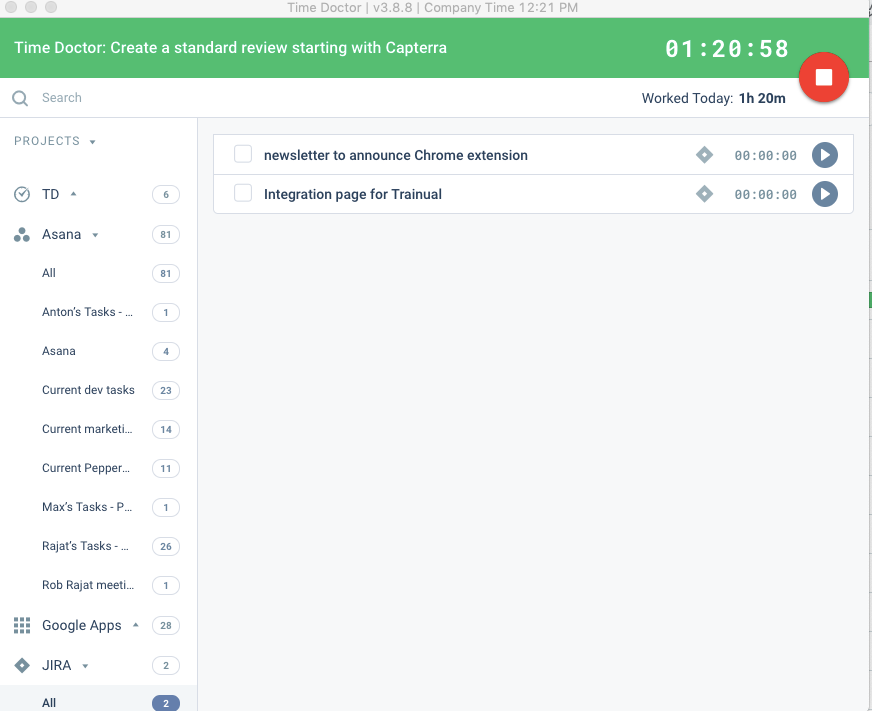 |
