Chose DocuSign
HelloSign was like a breath of fresh air compared to the corporate feel of DocuSign. Their salespeople were not pushy, their pricing is fantastic, and the features are just what we need.

| Product | Rating | Most Used By | Product Summary | Starting Price |
|---|---|---|---|---|
 DocuSign | N/A | DocuSign supports transactions with document sharing and electronic signature, as well as automated and guided data collection and entry, record updating across disparate systems and payment collection upon agreement, as well as analytics and reporting. | $15 per month | |
 Dropbox Sign | N/A | HelloSign is an electronic signature software offering acquired by Dropbox in early 2019. It includes features such as customization for businesses of any size and bank-level security. | $0 |
| DocuSign | Dropbox Sign | |||||||||||||||
|---|---|---|---|---|---|---|---|---|---|---|---|---|---|---|---|---|
| Editions & Modules |
|
| ||||||||||||||
| Offerings |
| |||||||||||||||
| Entry-level Setup Fee | No setup fee | Optional | ||||||||||||||
| Additional Details | — | Additional pricing available for HelloWorks and HelloFax | ||||||||||||||
| More Pricing Information | ||||||||||||||||
| DocuSign | Dropbox Sign | |
|---|---|---|
| Considered Both Products |  DocuSign  Dave Bevington Director of Automation Chose DocuSign DocuSign is so much more widely used and I think reliable. Who knows where HelloSign will be in a few years and I don't think they have nearly the funding to compete with DocuSign. Also, everyone uses DocuSign and it makes clients feel secure knowing the name of software …  Pranav Lal Enterprise Architect Chose DocuSign HelloSign used to have glitches and downtime. It did not have a robust integration that DocuSign offers.  Suzy Vera, MBA Corporate Director of Human Resources Chose DocuSign HelloSign was tedious! I did not like the interface or having to sign in using Google, and the document storage center was cumbersome to navigate and keep straight.  Matthew Lundh Cofounder Chose DocuSign  Mahesh Aluvala Senior Consultant Chose DocuSign The evaluation process was done with a few other options like HelloSign, RightSignature. But DocuSign won the race due to the ability to integrate with custom-built apps and the extended product platform integrations like SFDC,BOX etc. Features like Security, Mobile experience, …  Krystofer Gardner Director Of Operations Chose DocuSign When viewing other competing products they didn't have the superior functionality that DocuSign had, nor the admin control. However, it should be noted that since making the selection, competing products have greatly improved.  Nicolas Costa Ossa Director of Customer Operations & Account Management Chose DocuSign Docusign probably feels more robust and a more corporate feel. They are pretty similar, however.  Kenneth Hess Senior Systems Analyst Chose DocuSign While some of the other e-signature services offer less expensive pricing and more subscription offerings, DocuSign is the assumed industry standard. I've tried a few alternatives but I find that most companies prefer DocuSign as it is the respected leader in this business …  Arvand Sabetian Manager Chose DocuSign Not good at all. |  Dropbox Sign  Laura Yazdi Founder/CEO Chose Dropbox Sign Very similar program. I cannot say how different they are because I have not used DocuSign in some time. Chose Dropbox Sign I don't remember what I thought about DocuSign, but I remember that my decision came down to price for the value - and I believed HelloSign (now Dropbox Sign) was the best.  Haider Sulail Sales Account Manager Chose Dropbox Sign I think all similar platforms can support smaller features, but Dropbox Sign might be easier to use, cost-effective, and friendly for new users and organizations that have no experience using it as an e-signature platform. Once I have a great experience, I would highly …  Jake Thomaier Mortgage Loan Officer Chose Dropbox Sign Dropbox seemed easier to use and cheaper than the others. It was just as functional.  Kelin J. Angulo C. Office Manager Chose Dropbox Sign Save money.  Fernando Contreras Operations Director Chose Dropbox Sign It stacks up pretty well, I do think some of the templates I've seen are a bit lacking with Dropbox sign.  Donald Owens II General Manager Chose Dropbox Sign Dropbox Sign is cheaper. |
| DocuSign | Dropbox Sign | |
|---|---|---|
| Small Businesses |  Foxit eSign Score 9.8 out of 10 | Foxit eSign Score 9.8 out of 10 |
| Medium-sized Companies |  MSB Docs Score 9.4 out of 10 | MSB Docs Score 9.4 out of 10 |
| Enterprises |  Box Score 7.1 out of 10 | DocuSign Score 8.3 out of 10 |
| All Alternatives | View all alternatives | View all alternatives |
| DocuSign | Dropbox Sign | |
|---|---|---|
| Likelihood to Recommend | 4.6 (0 ratings) | 9.0 (0 ratings) |
| Likelihood to Renew | 7.0 (0 ratings) | 8.4 (0 ratings) |
| Usability | 3.9 (0 ratings) | 9.8 (0 ratings) |
| Availability | 10.0 (0 ratings) | 9.1 (0 ratings) |
| Performance | 10.0 (0 ratings) | 9.1 (0 ratings) |
| Support Rating | 10.0 (0 ratings) | 1.7 (0 ratings) |
| Online Training | 10.0 (0 ratings) | - (0 ratings) |
| Implementation Rating | 10.0 (0 ratings) | 9.0 (0 ratings) |
| Configurability | - (0 ratings) | 8.3 (0 ratings) |
| Product Scalability | 10.0 (0 ratings) | 9.1 (0 ratings) |
| Vendor pre-sale | - (0 ratings) | 9.1 (0 ratings) |
| DocuSign | Dropbox Sign | |
|---|---|---|
| Likelihood to Recommend |
|
|
| Pros |
 Michele Roy Special Education Teacher |
|
| Cons |
Kenneth Hess Senior Systems Analyst |
|
| Likelihood to Renew |
|
|
| Usability |
|
Fernando Contreras Operations Director |
| Reliability and Availability |
|
 Paola Cedeno Event and Data Management Specialist |
| Performance |
|
Paola Cedeno Event and Data Management Specialist |
| Support Rating |
 Erik Sheafer Enterprise Development Manager |
|
| Online Training |
| No answers on this topic |
| Implementation Rating |
|
Paola Cedeno Event and Data Management Specialist |
| Alternatives Considered |
 Emily Wallace Talent Acquisition Coordinator |
|
| Scalability |
|
Paola Cedeno Event and Data Management Specialist |
| Return on Investment |
 Matthew McGinnis Managing Partner |
|
| ScreenShots | DocuSign Screenshots   | Dropbox Sign Screenshots   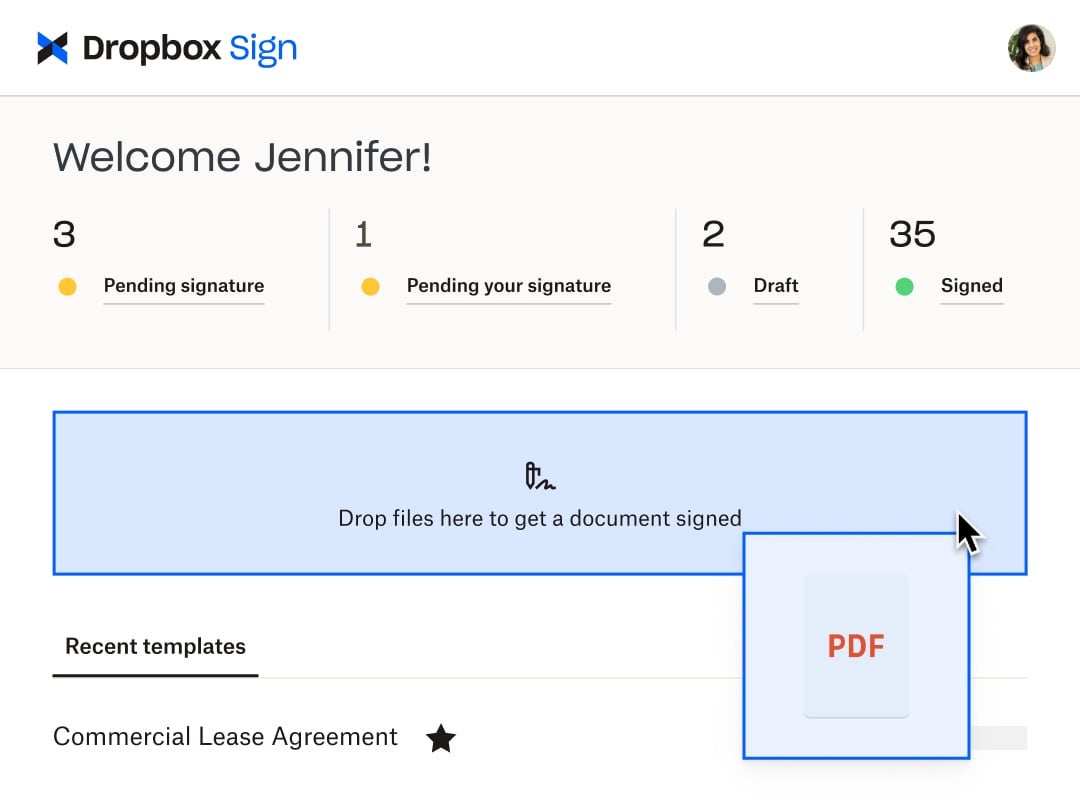   |
