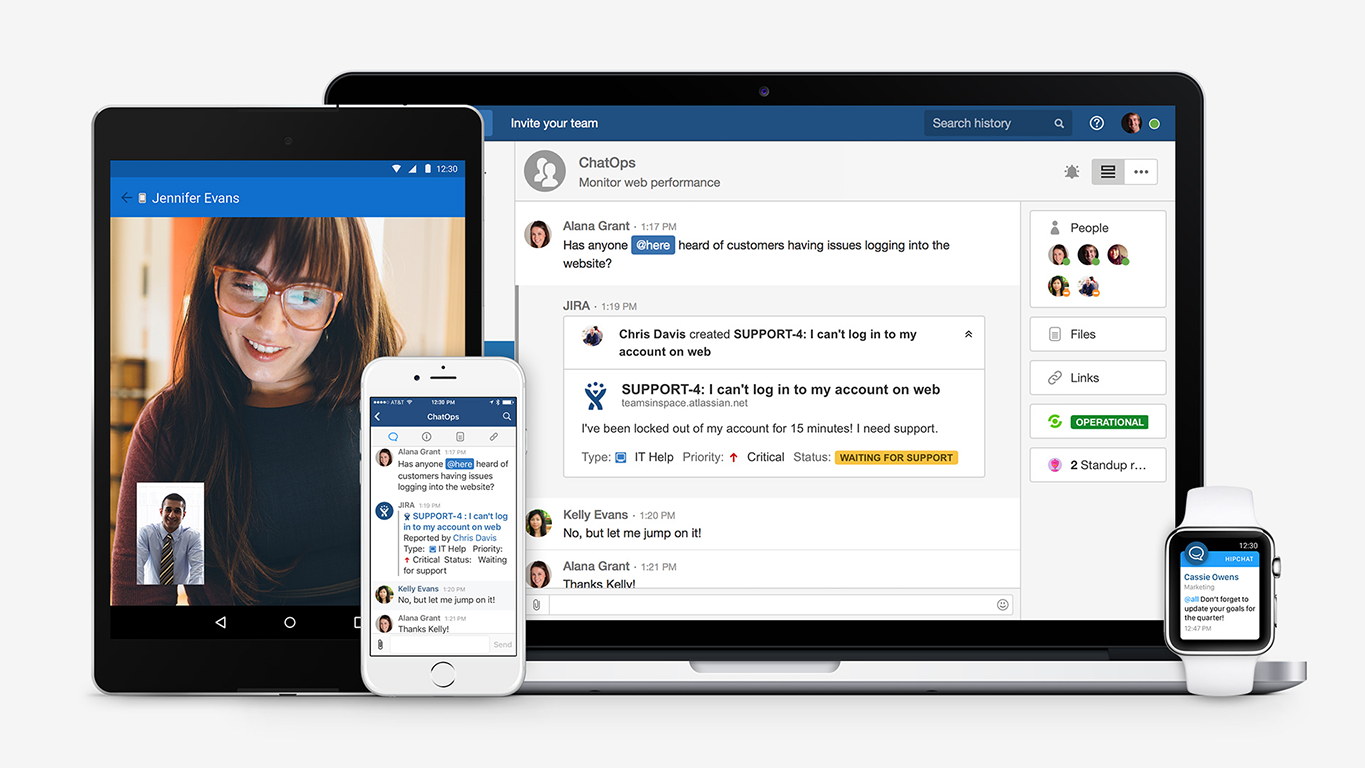
Hipchat was discontinued by Atlassian. Users are being migrated to Slack.
$0
per user
Skype for Business / Lync (discontinued)
Score 8.7 out of 10
N/A
Skype for Business was an online messaging and conferencing tool, now superseded by Microsoft Teams.
N/A
Pricing
HipChat (discontinued)
Skype for Business / Lync (discontinued)
Editions & Modules
HipChat Basic
$0
per user
HipChat Plus
$2
per user
No answers on this topic
Offerings
Pricing Offerings
HipChat (discontinued)
Skype for Business / Lync (discontinued)
Free Trial
Yes
No
Free/Freemium Version
Yes
No
Premium Consulting/Integration Services
No
No
Entry-level Setup Fee
No setup fee
No setup fee
Additional Details
For Server pricing info please visit https://www.hipchat.com/server (Only $1.20/user/month at the highest user tier!)
—
More Pricing Information
Community Pulse
HipChat (discontinued)
Skype for Business / Lync (discontinued)
Considered Both Products
HipChat (discontinued)
Verified User
Anonymous
Chose HipChat (discontinued)
I've used slack and it's much better app in comparison with HipChat. Slack is much faster than HipChat. Slack has strong user community and lot of documentation around how to use it. Product functionality and performance is superb with slack compared to HipChat. Slack has more …
Compared to skype creating groups is easy and fast. Also , file sharing is easy and loads instantly . Emoji and gifs are much more better in HipChat compared to skype .My company's management chose to use HipChat for our organization as they got the license of HipChat for …
We selected HipChat because it was an enterprise solution to our organization. It allowed us to connect our enterprise ticketing software (which was used for everything) to communicate updates/patches and solutions to our clients. HipChat was a great tool because we were able …
HipChat really cannot compete with Slack so it doesn't surprise me that they've purchased the code base from Atlassian. As I mentioned earlier in the review it's screen sharing, video/audio quality and file transfers abilities are almost universally done better by the …
Slack and Google Hangouts have more features and offer meeting functionality. My choice would be Google Hangouts for ceremonies and Slack for messaging.
Slack is better developed then HipChat. It's better and faster for connecting with people. HipChat is also good but needs to be developed. The company has to update their software regularly to reach the level where Slack is now.
While Sametime or Jabber multi people chat requires that someone who's in the chat invite you, HipChat has this nice system of a room where anyone with the right permission can join at any time. Also, the history of a Sametime or Jabber chat tends to be lost in the …
At the time, our organization was using Jabber for communication, which wasn't suited well for teams. HipChat brought a ton of great features when moving from Jabber, such as the ability to make rooms for each of our projects.
Rocket Chat is an open-source Slack clone, which …
Slack is by far a better alternative, and HipChat was only developed as an alternative to Slack. It certainly falls short. The platform is not user-friendly, it is generally a bit buggy, and it doesn’t organize conversation threads in an efficient way like Slack does.
Aside from HipChat we used Slack and Cisco Spark. Cisco Spark doesn't look as outdated as Hipchat but still is very limited with integrations and requires a paid version to take full advantage of it. Mobile version of Cisco Spark is limited and doesn't have many settings. Slack …
HipChat offers a good advantage for organizations looking for a low cost communication tool. The integration is easy and widely supported by many forums. Though, the technical issues are less reliable. Due to technical failures, Slack and Skype take the cake. Slack offers many …
I used HipChat in a company which was pro "open source" and another one which is pro Atlassian. For the "open source" company I was not involved in the decision of selecting HipChat but I know that the integration with Jenkins and other internal tools were drivers for selecting …
We left HipChat because of ongoing support issues and it didn't seem to be exactly, cutting edge. We now use Slack which seems to be much more in line with our organization as a whole. The features we use on slack were not offered at the time on HipChat and I think they had …
We tried a lot of chat clients before choosing HipChat. The Skype for Business UI on the Mac side was 5 years old and terrible. Mac users hated the app including our CTO. Cisco Jabber was expensive to license and maintain; Skype was open to the public which took time away due …
HipChat stacks up really well against Slack. Many of the same features, look and feel and performance. Although we have about half of us on Mac and half on PC and several times we hear complaints of the desktop app not connecting soon after updates are released. Slack also …
I haven't evaluated any similar products. HipChat is really just perfect for the Atlassian user. Before my company used HipChat we were using Google Hangouts.
I only used Cisco Jabber for a few days before the company I work at made the decision to switch to HipChat, so I didn't really have a chance to use that application enough to compare it effectively. With Yahoo Messenger, I used to use it quite a bit, but haven't since Facebook …
Technical Lead Datastore, Site Reliability Engineer
Chose HipChat (discontinued)
Hipchat behaves equally good among several other platforms used at my company (OSX, Windows, Linux). It brings us the possibility to integrate with most of our used tools, and the cost is lower than other options. Chat history and encryption makes it easier to find previous …
HipChat works best in the work environment. It can integrate with other applications that are used on the job and show notifications from them. Others are better suited for personal messaging.
I have used Google Hangouts before. Hipchat is better in that it has a lot more integrations and special features, whereas Hangouts is pretty much purely chat. The downside is not everyone has a HipChat account and therefore Hangouts is easy to start up with your friends …
Skype for Business, now part of Microsoft Teams is just better for us since we were already a Microsoft productivity suite (Office) user. No additional cost when we went from traditional product license model to SaaS. Continuous integration and upgrades with MS 365 make it …
Where Skype for Business, now part of Microsoft Teams fails, Zoom shines. Zoom is able to handle significantly higher number of participants without dropping in quality and/or issues with viewing all participants. Other aspects such as more fine-tuned control of participants is …
Skype/Teams is simply better. There are many more features, better design, more intuitive experience, more integration with other features/apps, and somehow a superior usage performance. I like the fact that it is connected with all other spaces that the organization uses - …
Skype for Business makes it easier to group contacts and receive offline/online notifications. It is a great way to make small-group contacts and discuss things over text and phone. It makes business calls more manageable and more interactive to organize. It's helpful if I need …
Skype for Business's unique features offers many benefits.
When I need to communicate with my colleagues, I rely on the chat function. Its
interface is intuitive and has top-notch sound. Making groups is easy, and
Skype performs better overall and is more reliable in low connectivity areas. Skype also has more options for making changes on the back end(Sound/notifications/invitations, etc) to customize the experience better. An area of improvement for Skype vs Zoom would be their mobile …
Skype is a great tool to increase communication across an organization. I believe Microsoft Teams encourages greater collaboration amongst employees by making conversations and chats easily accessible and also keeping a history of conversations to allow users to pick up where …
Skype enables me to have a conversation with people worldwide via calls or messaging, which is extremely convenient. We can share our work or presentation during the call by sending files, images, and even screen sharing. As a result of its superior video and audio quality, …
For the below reason I will always choose this app over its competitors: Better audio and video quality, Little to no disconnections or freezing when on a call/video conference Integrates well with mailbox/ calendar/ one drive, and SharePoint is easy to use.
We have recently started using the tools which I listed above, these are contemporary with all the additional features required for the world which is looking at the work from home option as the new normal, some functions in our organization are thinking of completely making …
Our school district uses both Zoom and Microsoft Teams. Many of our users prefer Zoom over Teams because they say Zoom is easier. Not considering just the Chat feature, I like the ease of setting up a conference in Teams and sending out the calendar event. The integration of …
Hangouts have the worst user interface I've ever seen on a web application. Skype is a separate purchase, while Office 365 includes Skype as part of the subscription. When it comes to competing with Skype, Hangouts needs an overhaul of the UI. We've made the switch to Microsoft …
Most of the above applications are more suited to the newer age smaller companies that can experiment and switch. Our primary use case for Skype for [Business] was an enterprise software for large-scale communication using Microsoft's suite of products and authentication at a …
Hangouts has worst UI ever. It requires an additional purchase where skype comes free with office 365. Hangouts doesnt have dedicated PC or Mac app. It works only on browser due to which notifications are hit and miss. Skype has dedicated PC app but no web app. Hangouts needs a …
This app integrates the features and functionality of Slack and Zoom into one app. This, when coupled with other MS platforms like Outlook, OneNote, OneDrive, and others makes this app a very compelling option when compared to others.
Skype for Business comes as part of the entire Microsoft package and thus gives confidence over other products in a way that it is part of entire Eco-system. Other individual tools needs organisation permission because they are not part of eco system and thus can have impact on …
Skype for Business (formerly Lync) at one time was the industry standard for communication and video calls. But times change, features adapt, and companies move on to new software focuses. That is what happened with Skype. If you use Skype for Business (formerly Lync), it …
Skype for Business existing before all these other softwares were present. So legacy is maintained by Skype. Main feature that stacks up Skype against all of the mentioned apps is security provided by Skype for Business apps. As we all know Zoom was not at all safe to use as lots …
We have switched to Teams, and it does offer a lot more so I think that it was the right choice, but Skype [for Business (formerly Lync)] was a very functional tool. The main issues were the bandwidth issues. The work computers aren't particularly high in RAM or processing …
Skype for Business was originally used as the de facto enterprise messaging app for our organization, but we have since changed to Microsoft Teams as it allows more built-in collaboration tools such as teams and integration to other apps like Outlook, SharePoint, Jira, …
HipChat was discontinued by Atlassian because it wasn't as versatile as Slack and couldn't handle Video/Audio calls as well as Zoom. It lacked the screen sharing capabilities of Skype and ScreenHero (now owned by Slack). It wasn't great at any particular area and its competitors were obviously better in those areas. This lack of versatility negatively impacted it's adoption at GLG, and I'd imagine the rest of world as well. HipChat excels at instant messaging communication (which is the one thing they got right) and although you could make specific rooms to chat about certain topics, Slack was already doing this way better. Overall it's impossible to recommend this software today. If I recall it was very expensive compared to better and more feature rich competitors. If you're seeking a bare bones method of communication you may consider the free version of it, but outside of that scenario, you are almost certainly better off going with a different product.
Skype is useful for collaborations across distances, including work from home, as well as a more convenient way to communicate with a large group of people. Skype is also useful to communicate with specific parties quickly, rather than relying on cellular service in areas where not as available. Skype is less useful if the team does not use computers , tablets, smartphones, etc in daily workflow as it would rarely be used.
HipChat is very stable and reliable. I have never had issues with not being able to connect or being able to communicate with others on HipChat.
HipChat integrates quite well with other applications, such as Jira and Stash. This is a main selling point for my team. It provides a convenient feed of actions on a JIRA story or Stash pull request.
HipCat does a good job of allowing 1-1 and group chats. It is simple to start a new conversation and it is easy to hold a group conversation and keep track of who is in the room.
I like how HipChat has away/here/on mobile statuses. This makes it easy to see if a person is available to be contacted.
Mobile app is not very responsive on iOS. Sometimes connection to Hipchat servers is taking too long even on good networks.
Both mobile and desktop versions have no alphabetical or recent sorting for groups and chat rooms.
Video and audio calls are pretty useless, they're slow and not always work.
The whole user interface is simple but very outdated - apparently Atlassian didn't focus too much on Hipchat even though they tried in the last 2 years.
Probably the biggest area is the video element as it has historically struggled in this area.
The need to be forced to federate with another organisation by providing yours and enabling the other organisation settings is a bit tedious but once done, allows for simple collaboration between third-parties.
Functionality wise, as it's an older product and being superseded by MS Teams, it feels as if it's run its course but was very good for what it does/did at the time.
I honestly feel that with most people using iPhone nowadays, it's easy to just call or use FaceTime if you need to be in touch with a client. Unless you need to have a conference call, there are plenty of ways to get in touch with a client otherwise besides using a somewhat inefficient program.
i like how its easy to login , create rooms or start private conversations . The best feature i like describing usability is searching history of conversation in either a room or private conversation just by typing single word .Easy file uploading and downloading .Mention feature is very easy to use which shows all the names starting with given letter .
Very easy to use. Even though Microsoft Teams has a lot of features and integrations, as a user I feel completely comfortable on finding what I need, getting information about the app extensions and using them. It's a very comprehensive tool, intuitive design and does not make me feel tired to be using it. I am glad with the current experience.
HipChat support was one of the best I've encountered. When we faced difficult tasks in terms of updates to infrastructure (where HipChat sits on top) or updates to the application itself, HipChat support was very responsive to our questions, concerns, and comments. HipChat also had some really good online documentation. We were able to find step-by-step guidelines and documentation when implementing new features or installing new updates/patches.
I have only had to reach out to the Support team at Skype for Business once with an issue, and I was pleasantly surprised and encouraged by the quickness and thoroughness of their response. The wait time was short and my question was dealt with politely and clearly, so I would say the support team has it together.
Skpe for business is utilized company wide in regards to my company. Everyone not only uses it, but uses it often. It is an effective way of communicating. It also integrates very nicely with outlook and all conversation history is pushed to a folder within the outlook system. We also have it so that if someone misses a message, they are sent an email reminder saying that there is a message that went unread.
I've used Slack and it's much better app in comparison with HipChat. Slack is much faster than HipChat. Slack has strong user community and lot of documentation around how to use it. Product functionality and performance is superb with Slack compared to HipChat. Slack has more emojis and icons which brings them closer to how people use their cell phones in text conversations.
Skype for Business, now part of Microsoft Teams is just better for us since we were already a Microsoft productivity suite (Office) user. No additional cost when we went from traditional product license model to SaaS. Continuous integration and upgrades with MS 365 make it even easier to use and therefore stickier.
Actually I never shared of HipChat using with more than 25 persons in team simultaneously, but I believe it can be scaled for much largest collaboration teams. At least it works flawlessly for us, with transparent integration with Jira, and I am not see any reasons for some troubles for work at big scale.
HipChat has increased the effiency with which I am able to communicate with my coworkers, particularly those who work out of other offices. Having a light, portable messaging solution has been beneficial for checking in on small things without the need to send emails or schedule phone calls.
In the move to WFH for the over 90000 employees of the firm in 13 different timezones, Skype for [Business], as the primary communication tool has been the most critical factor in ensuring there's not a communication breakdown.
An average of 7 calls a day and around 50-60 text messages are sent via Skype for [Business]. These communications are critical for [the] continued delivery of our services.
Video/voice calling and screen sharing features of Skype have played a great role in simulating a shared workspace scenario in the virtual mode as best as possible.