iSpring Suite vs. Kajabi

Overview
ProductRatingMost Used ByProduct SummaryStarting Price
iSpring Suite
Score 8.1 out of 10
N/A
iSpring Suite helps users build courses that are mobile-ready and adaptive. It’s integrated with PowerPoint, so users can create the…N/A
Kajabi
Score 8.6 out of 10
N/A
Kajabi is a web hosting platform for online learning or membership websites, featuring landing pages and support for email marketing, video hosting, and codeless web building tools.
$89
per month
Pricing
iSpring SuiteKajabi
Editions & Modules
No answers on this topic
Kickstarter
$89
per month
Basic
$149.00
per month
Growth
$199.00
per month
Pro
$399.00
per month
Offerings
Pricing Offerings
iSpring SuiteKajabi
Free Trial
YesYes
Free/Freemium Version
YesNo
Premium Consulting/Integration Services
NoNo
Entry-level Setup FeeNo setup feeNo setup fee
Additional DetailsAcademic, non-profit, government and volume discounts are available.30% discount for annual pricing.
More Pricing Information
Community Pulse
iSpring SuiteKajabi
Considered Both Products
iSpring Suite
Chose iSpring Suite
The ability to update data independently is the best feature. It saves a lot of time.

Chose iSpring Suite
Our primary course and quiz creator was using Google Forms - iSpring Suite is several times better. Easier to use and makes more engaging content instead of bland questions that are easily ignorable by the user.
Chose iSpring Suite
Compared to other applications, iSpring Suite is based on PowerPoint and therefore on a familiar way of working for creating content for knowledge transfer. This basis facilitates a very simple and uncomplicated transition to the new tool for new users. New users are quickly …
Chose iSpring Suite
If you know PowerPoint, you know iSpring Suite. Not only is there a big learning curve with the other software, it also meant to us to start from scratch with our PowerPoints, which would have taken weeks to do. I can't state enough how big of a deal it is that it's all within …
Chose iSpring Suite
So much simpler. Integrates well with PowerPoint so there is little learning curve. Articulate is more powerful but that level of detail is not required for most applications. The learning curve with Articulate is much larger.
Chose iSpring Suite
We have chosen iSpring Suite over Articulate partially due to cost but also iSpring Suite does not distort the PowerPoint templates we have made as it does not import them into itself rather it becomes a part of PowerPoint.
Chose iSpring Suite
iSpring Suite is the only product I've used since I've been in my current role and I'm glad for that. It was so easy to learn and so easy to become proficient with that it makes hard for me to even imagine a product exists that will work better for me.
Chose iSpring Suite
When comparing features, price point and ease of use, there was no question which I was choosing. iSpring Suite offered more features and was the easiest to use. Additionally, it was one of the most cost conscious choices. It was a no brainer!
Chose iSpring Suite
iSpring Suite is far superior.
Chose iSpring Suite
This is our first software purchased on this aspect.
Chose iSpring Suite
Captivate was, I feel, for my experienced users and for a more professional level of course that our organisation did not require at this time. It was too daunting to learn it all to create simple courses fast Easy Generator - too expensive for our needs. iSpring Suite has a …
Chose iSpring Suite
In my opinion, Proprofs is not user friendly, and their support has not been helpful in the past especially with interfacing with other applications.
Chose iSpring Suite
lower cost, instant usability.
Chose iSpring Suite
We need Powerpoint compatibility because we can develop the training modules faster. Compared to all the authoring tools we have tried, iSpring is the most Powerpoint-friendly.
Chose iSpring Suite
I think iSpring Suite is just soooo much easier to learn and use than Captivate. It just adds a plugin to PowerPoint and is very intuitive to use. I found Captivate difficult to figure out, and a lot more expensive.
Chose iSpring Suite
We find Adobe Captivate looks outdated, is clunky, has a terrible user interface and is not flexible.
Chose iSpring Suite
iSpring Suite is wayyyy easier to use and does all I need.
Chose iSpring Suite
For us, it's really important to have the freedom to innovate by freeing our creativity through the functions offered by iSpring Suite. Other solutions don't offer the same flexibility as iSpring Suite, and for us this was an important factor in our choice of the Ispring …
Chose iSpring Suite
I did my research a while ago and liked the ease with which it integrated into the PowerPoint presentations as I have a lot already prepared. Will be able to update them all in time to the new format.
Chose iSpring Suite
We've used Techsmith's "Camtasia" product, but only for video creation. It has a more powerful interface and feature-set, but none of the other tools that are in iSpring Suite.
Chose iSpring Suite
Is less words the offline system presents only these having to generate the scorm files which had conflicts and upload them and test them and test and test and test, while the creation of the scorm offers a feasibility to preview the scorm without the need to upload it to the …
Kajabi
Chose Kajabi
Absorb LMS didn't have the ability to quickly and efficiently import courses without a lot of necessary customization. We also didn't think the price point was very good compared to other LMS and to Kajabi. Ultimately we settled with Kajabi due to all of the functionality we …
Chose Kajabi
Kajabi is more adjusted for learning needs. While Tilda and Wix can help to create very customizable designs for landing pages and great checkout experiences, Kajabi is more convenient for creating learning sequences. The best way is to use all these platforms together, so they …
Chose Kajabi
I enjoyed Podia but it lacked the email marketing systems and diverse systems like webinars, abandoned cart, and scheduling that kajabi has.
Chose Kajabi
Kajabi simplifies and brings things together all in one platform. I can do nearly everything I did before using multiple platforms, but with Kajabi it's all together. Makes my life easy and streamlined!
Chose Kajabi
We technically have both. Kajabi is very glitchy and unreliable when it comes to webinar sign ups, so we incorporated EverWebinar as well for it's reliability and consistency with regards to hosting webinars, hosting replays, hosting evergreen webinars and handling the sign ups …
Chose Kajabi
Kajabi is easier to use than Ontraport and Keap. Keap does have a lot more features that we just don't need at this time. ActiveCampaign and Mailchimp don't have the features Kajabi does. ConvertKit I used when it was first coming out and it didn't have much in the way of …
Chose Kajabi
Kajabi is way more affordable since you pay a monthly rate rather than a per-user rate. Also you can host your website in one place so the functionality and convenience is top tier. and again Kajabi has the best customer service as well as resources to help you be successful.
Chose Kajabi
Before Kajabi we used ActiveCampaign, we decided to switch to Kajabi because of the ease of use of the software, ActiveCampaing is packed with features and because there are so many features, you don't know what you don't know. There are probably 10 different ways to get to the …
Chose Kajabi
When researching where to host my online course, I looked at several online course platforms: Teachable, Thinkific, Udemy, Wishlist Member, and Ally Access. I chose Kajabi because it was the easiest platform to customize and it was the most user-friendly for my clients. Also, …
Chose Kajabi
Clickfunnels is a great tool for funnel automation, landing pages, and lead generation but when it comes to product delivery for content creators it lacks functionality as it reality it was not meant for that purpose.
Originally, we used Clickfunnels for our funnels but we found …
Chose Kajabi
Leadpages is a powerful landing page builder. For this task, we wanted to try and simplify our tech stack. It can be frustrating having to try and integrate multiple tools together. Sometimes the outcome is seamless and this can require a lot of time to set up, leading to lower …
Chose Kajabi
While other platforms may be better for certificates and social learning groups, Kajabi is the clear winner for building sales funnels, offers and providing excellent learning experience around video courses. Other platforms do a good job with more classroom style environments, …
Chose Kajabi
We started with password protected pages on Wordpress. That was fine while we were a very small company but wasn't very professional moving forward. So we then transitioned to Thinkific. At that point, we started building bigger courses. But the problem was that Thinkific's …
Chose Kajabi
Kajabi is a cleaner, more integrated platform which is why I chose Kajabi for my business. With Kajabi, I can host my courses entirely, my checkout pages, and my landing pages. Kajabi is definitely more expensive than using any of these solutions alone, but since Kajabi …
Chose Kajabi
Before using Kajabi, we hosted our programs and courses on Squarespace. Being a website platform Squarespace didn't provide the functionality or features we needed to create a student-friendly experience. While Squarespace gave us our start, Kajabi helped us grow and scale our …
Chose Kajabi
When we selected Kajabi around 2005, we were influenced by the fact that Brendon Burchard used it for his online courses.
Having looked at other offerings now available, we are still happy that it suits our needs.
Chose Kajabi
We chose Kajabi because it can do so much. We didn't end up going all-in on Kajabi - our email is still with ConvertKit and our site is still on WordPress, but we're very happy with having our checkouts, courses, and membership content on Kajabi. We create some of our landing …
Chose Kajabi
It blows them out of the water. There really is no comparison at all. Each of the others listed have some benefits, but none offering an end user experience the way that Kajabi does. HighLevel would be the closest, but they still have a ways to go.

Not offered in the listings …
Best Alternatives
iSpring SuiteKajabi
Small Businesses
iSpring Learn
iSpring Learn
Score 9.6 out of 10
TalentLMS
TalentLMS
Score 8.6 out of 10
Medium-sized Companies
iSpring Learn
iSpring Learn
Score 9.6 out of 10
Absorb LMS
Absorb LMS
Score 9.2 out of 10
Enterprises
Articulate 360
Articulate 360
Score 9.3 out of 10
Absorb LMS
Absorb LMS
Score 9.2 out of 10
All AlternativesView all alternativesView all alternatives
User Ratings
iSpring SuiteKajabi
Likelihood to Recommend
9.1
(0 ratings)
9.5
(0 ratings)
Likelihood to Renew
9.1
(0 ratings)
9.0
(0 ratings)
Usability
8.3
(0 ratings)
8.0
(0 ratings)
Support Rating
9.3
(0 ratings)
10.0
(0 ratings)
Implementation Rating
9.1
(0 ratings)
8.0
(0 ratings)
User Testimonials
iSpring SuiteKajabi
Likelihood to Recommend
iSpring is well-suited for various industries that want to provide training platforms, lessons, lectures, and other learning modules. In these scenarios, iSpring allows individuals to curate content necessary for sharing information of all types and to deliver material in a way that best meets the targeted audience.
Read full review
It works great for us in the education space and delivering our curriculum to our clients. It's nice to have some of the extra access features and to have the community feature, so that works great for us. At the same time, Kajabi lacks some of the specificity we need, and I don't believe it is technically geared directly to the education space, so we will likely switch providers in the next couple of years to something that is more robust and relevant to our business model.
Read full review
Pros
  • Great range of images to use to show real people in the slides across the slideset because of the number of different actions they are doing
  • Support is easy to access and always helpful with easy to understand advice as well as links to further knowledge
  • Recording narration and editing within the iSpring Suite presentation makes it easy to use this function as a novice.
Read full review
  • With a featured button as opposed to just a hyperlink, it is incredibly simple to link to a page within an email.
  • The marketing strategy's functionality and the ability to customize emails allow me to communicate with every client.
  • Course creator to create digital products from your content.
Read full review
Cons
  • The software is in constant revision, so if you search for help online, be sure you are researching the correct revision. There is a lot of debris information about iSpring Suite online.
  • The Presentation and Publishing features are somewhat intimidating at first. Be sure you pay attention to every detail. The training I develop is pretty standardized, so I was able to write instructions for myself to follow to ensure each instance was set up the same way each time.
  • There are a lot of 'extras' I never use, such as characters and interactions, so be sure your style of training development is aligned with what iSpring has to offer.
Read full review
  • They've improved leaps and bounds, but their CRM is still subpar
  • They have great uptime, but it could be better
  • Affordability - I went in hoping to use their CRM feature and cut costs, but their CRM is lacking
  • They offer a shopping cart, but in terms of being able to customize and payment option, they have a ways to go.
Read full review
Likelihood to Renew
Not sure if management wants more eLearning.
Read full review
We are committed to it and once we get "really good" at using it, I think it is a excellent platform and links well to Hubspot. At present, we are still just barely scratching the surface with our use of its features
Read full review
Usability
iSpring Suite is a perfect tool overall to create contents in collaboration with colleagues. There are some difficulties though in usability but the usability is OK in total. We are fully satisfied with the customer support. There are simple online tutorials and a team of competent support colleagues. The support content is sometimes not simply accessible, you need to search for them longer.
Read full review
The back-end system can be used efficiently and has flexibility. It doesn't have a lot of unnecessary functions or un user-friendly features. We have had no issues using the system and would continue to use it with the current functions and features. I would rate it as user-friendly yet flexible
Read full review
Support Rating
Great software is only exceeded by their fantastic support. Prompt responses, complete with clearly outlined steps to follow, are just the beginning. There are tremendous resources and continual webinars to challenge what we think we know about the iSpring Suite. I often use PowerPoint to lay out marketing slides, add music and narration, then publish them as an MP4 video. I can count on iSpring support to assist me when I need help.
Read full review
The Kajabi Support people are helpful, fast and knowledgeable. I usually call in a panic - because I have lost something, messed something or am on a deadline. Sometimes we speak, or we do a chat. Always my angst is eliminated. I often thank the person for being "so patient" with me. LOL
Read full review
Implementation Rating
No answers on this topic
These platforms are big complex pieces of software. Mor recently - Kajabi provides a done for you example which you can borrow and customise - but those were not available when we started.
Read full review
Alternatives Considered
iSpring Suite is the only product I've used since I've been in my current role and I'm glad for that. It was so easy to learn and so easy to become proficient with that it makes hard for me to even imagine a product exists that will work better for me.
Read full review
Kajabi is more adjusted for learning needs. While Tilda and Wix can help to create very customizable designs for landing pages and great checkout experiences, Kajabi is more convenient for creating learning sequences. The best way is to use all these platforms together, so they can support the optional customer journey from landing page to learning on the course.
Read full review
Return on Investment
  • The ROI on this product has been great
  • It has enhance my reputation personally within the organization. This has led to other departments requesting me by name to head up eLearning development projects, even delaying their own deadlines to ensure that I am involved.
  • Other than a few duds (I let some inexperienced vocal talent slip thru in the heat of multiple conflicting deadlines), learner feedback has skyrocketed over that developed before I became involved and standardized the effort on iSpring
Read full review
  • Saved around $100 a month thanks to combining several online platforms into one
  • Saved dozens of hours not having to upload videos and images thanks to the Google Drive integration and URL Import
  • Building pages takes a little longer than other page builders due to how many clicks it takes to exit and enter editing settings.
Read full review
ScreenShots

iSpring Suite Screenshots

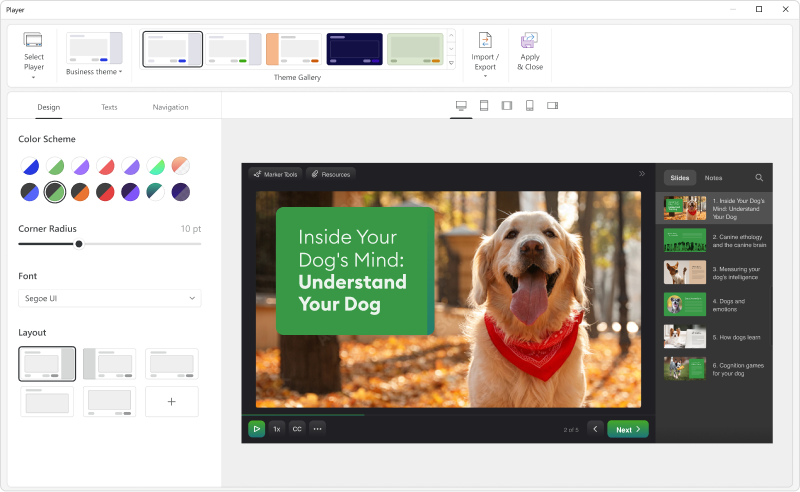
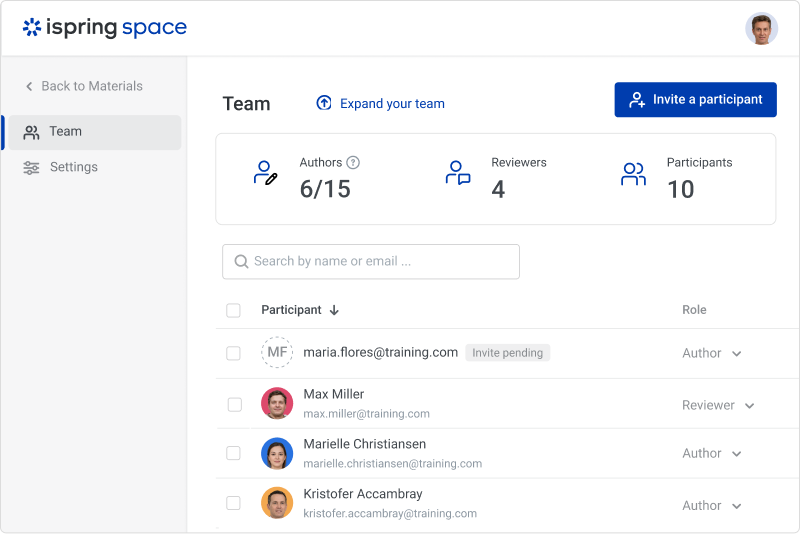
Screenshot of iSpring SuiteScreenshot of the customizable course player — the layout can be changed as desired.Screenshot of a role-playScreenshot of course interactionsScreenshot of the online collaboration toolScreenshot of Video lessons and screencasts