
TrustRadius: an HG Insights company

iSpring Suite

Score8.2 out of 10

174 Reviews and Ratings

What is iSpring Suite?

iSpring Suite helps users build courses that are mobile-ready and adaptive. It’s integrated with PowerPoint, so users can create the content in the familiar PPT interface without spending time on specific training. The toolkit supports the creation of professional courses, video lectures, role-play simulations, and a range of assessments that display and work on any device.

With the iSpring Suite Max package, users have even more capabilities for creating eLearning content. It comes with a content library that includes 110,000+ eLearning assets and slide templates, and iSpring Cloud, a web service for collaboration on content.

In iSpring Cloud, users can collect feedback on content from stakeholders in real time. There’s also an additional authoring tool there that allows users to create courses with media and quizzes in the longread format.

iSpring Suite supports all classic and new eLearning standards: SCORM 1.2, SCORM 2004, AICC, cmi5, and Tin Can (xAPI). So, the content works in any learning management system.

iSpring Suite enables users to:

  • Create content for any training scenario. Make onboarding courses, assessments for certification, and simulations for sales training with a single toolkit.

  • Save costs on hiring an entire range of roles. The toolkit is designed to enable one person can create quizzes, and record videos.
  • Launch eLearning programs faster. Make the authoring process go faster with ready-to-go templates, characters, and backgrounds, and finalize projects more rapidly with an online space for collaboration.

Categories & Use Cases

Media

iSpring Suite
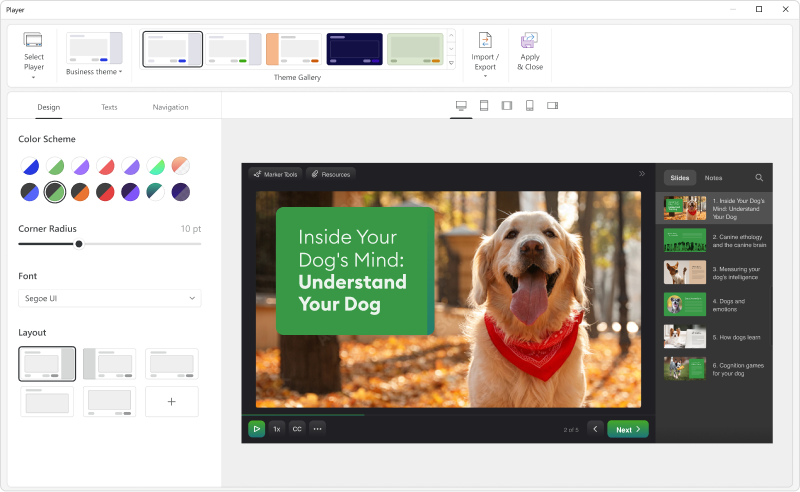
the customizable course player — the layout can be changed as desired.
a role-play
course interactions
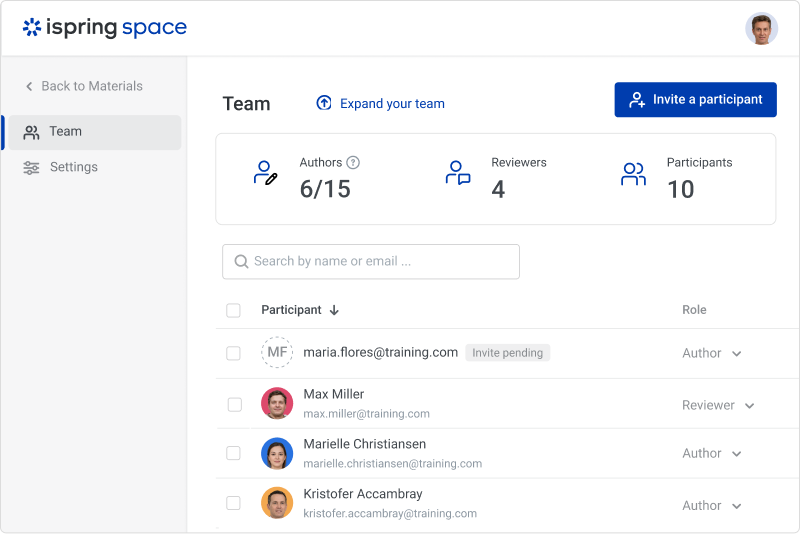
the online collaboration tool
Video lessons and screencasts
Quizzes for training and assessment

1 / 7

Intuitive Powerpoint-based course creation

Use Cases and Deployment Scope

I have created several cyber security trainings for our employees in multiple languages using iSpring Suite and found it quite intuitive and easy to use.

Pros

  • smooth integration into PowerPoint
  • text-to-speech function for easy creation of multilingual courses
  • SCORM export for publishing in an LMS (e.g. Moodle)
  • different quiz formats for interactive user experience
  • good quality of answers to support requests and good responsiveness of the iSpring Suite support team

Cons

  • it is a bit tricky to find out where the quiz you are editing is stored
  • while an iSpring Suite dialog is open, you cannot switch back to PowerPoint to lookup something

Return on Investment

  • we now rather create our own course material instead of buying standard SCOM courses
  • cost savings possible, if you primarily create own courses and do not have many authors

Usability

Other Software Used

Moodle

Good tool and TOP customer service

Use Cases and Deployment Scope

[...] uses iSpring Suite to support eLearnings. The training courses can be created efficiently and easily. It offers many options for customising presentations

Pros

  • Creation of a quiz
  • Individual design of presentations
  • Insertion of sound recordings, video, web elements possible

Cons

  • Quiz MUST be passed and presentation must not be shown as completed if not passed

Return on Investment

  • With iSpring Suite, we can comply with prescribed guidelines for eLearning and training courses for employees

Usability

Great tool for our training needs

Use Cases and Deployment Scope

We use iSpring Suite to enhance our Powerpoint Training Modules

Pros

  • Provides excellent Quiz and Assessment capabilities

Cons

  • the use of AI and avatars as presenters

Return on Investment

  • Enables us to construct training modules internally savings us thousands of dollars on outsourcing this function.

Usability

Other Software Used

Microsoft Powerpoint

iSpring Suite helped us scale our learning programs

Use Cases and Deployment Scope

iSpring Suite has been an ally of our company and me for the last six years. The flexibility of the features allowed us to create engaging and dynamic content to spearhead all internal development programs. Thanks to the presentations, simulations, quizzes, and animations that come with iSpring Suite tools, we have graduated wave after wave of leaders ready to lead teams and transmit the knowledge we provide. Even our clients see the quality of our content and request that we create material for internal training with it.

Pros

  • Self scoring quizes
  • Inmediate feedback on answers
  • Randomizing questions order

Cons

  • transparent backgrounds bug when exported
  • some fonts not compatible

Return on Investment

  • facilitare asicronous learning
  • generate reporting that we can use to acredit certifications and auditing evidence.

Usability

Easy and Intuitive eLearning tool with great after sales support

Use Cases and Deployment Scope

We use iSpring Suite to create and modify eLearning solutions for our business.

Pros

  • Text to voice
  • Powerpoint to to scorm conversion
  • simple eLearning authoring

Cons

  • some functionality could be a little easier to find

Return on Investment

  • Substantial reduction in time spent dealing with paper records
  • Big time and effort savings gained for contractors who need inductions
  • Higher uptake of training courses within the business

Usability