Chose LeadFuze
none.

| Product | Rating | Most Used By | Product Summary | Starting Price |
|---|---|---|---|---|
 LeadFuze | Small Businesses (1-50 employees) | Find any business professional's contact information. Search entire market segments, or for specific individuals or accounts. Used by salespeople, recruiters, and marketers to help them build their ideal list of leads and candidates. LeadFuze aggregates the world’s professional data to continue to deliver fresh leads. It's prospecting, automated! | N/A | |
 Salesflare | Small Businesses (1-50 employees) | Salesflare headquartered in Antwerp offers their small business intelligent CRM, providing automated event tracking and related features designed to aid the operations of SMBs. | $39 per month per user |
| LeadFuze | Salesflare | |||||||||||||||
|---|---|---|---|---|---|---|---|---|---|---|---|---|---|---|---|---|
| Editions & Modules | No answers on this topic |
| ||||||||||||||
| Offerings |
| |||||||||||||||
| Entry-level Setup Fee | No setup fee | No setup fee | ||||||||||||||
| Additional Details | The LeadFuze team offers to write your cold email copy for you on our Professional and Rainmaker subscriptions for no additional cost. We have sent over 2 million cold emails and know what works and you can take advantage of this expertise with this offer. | Discount available for annual billing. | ||||||||||||||
| More Pricing Information | ||||||||||||||||
| LeadFuze | Salesflare | |
|---|---|---|
| Considered Both Products |  LeadFuze  Zack Martin Owner Chose LeadFuze MUCH more economical solution compared to Zoominfo. The platform is always being updated and made better and better. This is a perfect solution for businesses of any size.  Mark Stafford Founder Chose LeadFuze Lead Fuze focuses on the data from LinkedIn users. It is much easier to set up a campaign in Lead Fuze and then connect it to automation. With LI Sales Navigator, you have to do more work and I'm not convinced that it provides the best data, though I can't prove that. LI Sales …  Gary Shouldis Founder & CEO Chose LeadFuze While we still use Autoklose for automated email outreach, we switched to using LeadFuze for list curation for our lead generation programs. While both tools are good we found LeadFuze to offer a much larger database as well as more filter options to build the exact curation …  Clive Elleforde Chief Revenue Officer Chose LeadFuze Pearlfinders is up to date and comprehensive with its reports and refreshes its data every qtr. They provide much easier targeted data and also on specific projects that are hot. It's more about deeper rich content that just lead gen. It provides a reason to call, not just a …  Dror Hodeda Founder Chose LeadFuze LeadFuze has more filters than other software I've been using such as FindThatLead and Snovio and that gives me the chance to drill down even further into specific niches. Also, the system is really more user friendly and simple to use even more than other software I used in …  Adam Goodman Founder/CEO Chose LeadFuze I found LeadFuze a few years ago and have always looked to them first given the great product and customer service. I go in and out of active membership depending on what my consulting projects demand. Great value given the price point.  Paul Crosby PMP Chief Financial & Marketing Officer Chose LeadFuze LeadFuze provides faster results with a better interface.  Douglas Ferguson President Chose LeadFuze I haven't used other tools so I can't say.  Shehryar Shaukat ¦ B2B ¦ SAAS ¦ Aggressive Growth Chief Marketing Officer Chose LeadFuze Leadfuze has unlimited data, which simply makes it a no-brainer, especially for SaaS companies, looking to target various verticals through email campaigns. Propsect.io is simply a Chrome extension and doesn't have the extensive filters like Leadfuze. Salesforce is simply damn …  Scott Carson President Chose LeadFuze LeadFuze is just the best, plus the customer service is second to none. Whenever I have a need or question I can get their staff on the phone to help answer my questions and queries. That's important in helping us move quickly and not waste time sitting around waiting for …  Jonathan Rockett Founder/Owner Chose LeadFuze I've looked into GetProspect for mining validated emails, but it didn't have two of the features that ultimately lead me to LeadFuse - the Technology Used filter and the Google AdWords Spend filter... As a marketing agency, these are great for prospecting my own client leads, …  Jessica Schwindt VP of Client Success Chose LeadFuze Data.com, Discoverorg. So far I do like LeadFuze the best.  Gareth Ellis Business Owner Chose LeadFuze Leadfuze makes it easy to automate the processing of prospects in volume, and is much less expensive than Navigator, which won't allow for email follow-ups, as well as building more sophisticated outreach campaigns using automation.  Doug Ellenberger Wabash Valley Lean Network Chose LeadFuze I was using a cobbled up, barely legal way of getting leads. LeadFuze is more cost effective, quicker and legal!!!  Jared Spencer Director of sales Chose LeadFuze LeadFuze was the best value for dollar.  Scott Martinis CEO/Founder Chose LeadFuze I tried Aeroleads, Seamless.AI, and LeadIQ before this. Those platforms can be good, but the problem is it requires you to manually click through Sales Navigator at some level. They also either have limits or require a lot more clicking.  Scott Scales Health Insurance Specialist Chose LeadFuze We have not used another system like LeadFuze because it has provided exactly what we need at a price that we can justify.  Jesse Hernandez Head of Growth Chose LeadFuze I've used a few manual scraping solutions but LeadFuze simplifies the entire process and is a great all-in-one solution  Bobby Shields Sales and Marketing Manager Chose LeadFuze ZenProspect is much, much more expensive (or was before it got acquired...). |  Salesflare  Nicolette (Nicki) Straza Founder/Senior Consultant Chose Salesflare Salesflare has BOTH the dedicated web platform and the integrated side-bar in my google inbox that acts intuitively to mine for contacts in my emails and linkedIN. Monday.com requires all manual input and though well laid out and has some fun pizzaz, is less helpful. Salesflare …  Steve Newell Founder/CEO Chose Salesflare Salesflare is much more intuitive to use and it is easier to customize.  Aononna Tazin Customer Relationship Management Specialist Chose Salesflare The learning curve and ease of use are virtually non-existent, and the interface is straightforward. Other products we've tried or evaluated have been too complicated and customizable. It's easy to start using Salesflare right away. Salesflare can be thought of as a better …  Olivier Lambert Founder Chose Salesflare The ease of use and learning curve is slim to none.  David Henzel Owner Chose Salesflare Much cheaper and has almost the same functionality, plus Salesflare has an integrated task section.  Gilles De Clerck Growth Strategist Chose Salesflare You can think of Salesflare as a smarter Pipedrive. It rocks the same kind of intuitive user experience that is very low-barrier to get going with, but turns it up a notch when it comes handling, enriching and automating data. I've also find it more flexible to integrate with …  Kris Sharma Founder Chose Salesflare The Salesflare CRM is much easier to use and more intuitive  Jói Sigurdsson CEO (Chief Executive Officer) Chose Salesflare Other products we've tried or evaluated have been too complex and/or been "too customizable" in that they do not offer an easy and intuitive path to enabling your sales team right out of the box.  Kevin Miller Owner Chose Salesflare Salesflare does its own thing compared to the others I've tried. It's unique even though it shares many of the main features a CRM should have. Salesforce Lightning is amazing and feature-packed but can often get overwhelming depending on your use case. I never experience any … Gary Shouldis Founder & CEO Chose Salesflare Pipedrive was another option but I chose Salesflare for the seamless integration into my regular everyday workflow as well as its ability to integrate with just about any app you can think of. It plays nice with all of my other apps and makes using a CRM actually fun. I love … |
| LeadFuze | Salesflare | ||||||||||||||||||||||||||||||
|---|---|---|---|---|---|---|---|---|---|---|---|---|---|---|---|---|---|---|---|---|---|---|---|---|---|---|---|---|---|---|---|
| Sales Force Automation |
| ||||||||||||||||||||||||||||||
| Customer Service & Support |
| ||||||||||||||||||||||||||||||
| Marketing Automation |
| ||||||||||||||||||||||||||||||
| CRM Project Management |
| ||||||||||||||||||||||||||||||
| CRM Reporting & Analytics |
| ||||||||||||||||||||||||||||||
| Customization |
| ||||||||||||||||||||||||||||||
| Security |
| ||||||||||||||||||||||||||||||
| Social CRM |
| ||||||||||||||||||||||||||||||
| Integrations with 3rd-party Software |
| ||||||||||||||||||||||||||||||
| Platform |
|
| LeadFuze | Salesflare | |
|---|---|---|
| Small Businesses |  Lead411 Score 9.1 out of 10 |  Salesmate Score 10.0 out of 10 |
| Medium-sized Companies | Lead411 Score 9.1 out of 10 |  Creatio Score 9.7 out of 10 |
| Enterprises |  Dialpad Sell Score 9.5 out of 10 | Creatio Score 9.7 out of 10 |
| All Alternatives | View all alternatives | View all alternatives |
| LeadFuze | Salesflare | |
|---|---|---|
| Likelihood to Recommend | 9.3 (0 ratings) | 9.0 (0 ratings) |
| Likelihood to Renew | 4.0 (0 ratings) | - (0 ratings) |
| Usability | 9.6 (0 ratings) | 9.0 (0 ratings) |
| Support Rating | 7.3 (0 ratings) | 9.0 (0 ratings) |
| Implementation Rating | 9.1 (0 ratings) | - (0 ratings) |
| LeadFuze | Salesflare | |
|---|---|---|
| Likelihood to Recommend |
Gary Shouldis Founder & CEO |
Gilles De Clerck Growth Strategist |
| Pros |
Doug Ellenberger Wabash Valley Lean Network |
Steve Newell Founder/CEO |
| Cons |
|
Gilles De Clerck Growth Strategist |
| Usability |
|
 Tomer Aharon Co-Founder |
| Support Rating |
Clive Elleforde Chief Revenue Officer |
 Sampath S Head of Growth |
| Alternatives Considered |
Mark Stafford Founder |
Aononna Tazin Customer Relationship Management Specialist |
| Return on Investment |
Jonathan Rockett Founder/Owner |
Gary Shouldis Founder & CEO |
| ScreenShots | LeadFuze Screenshots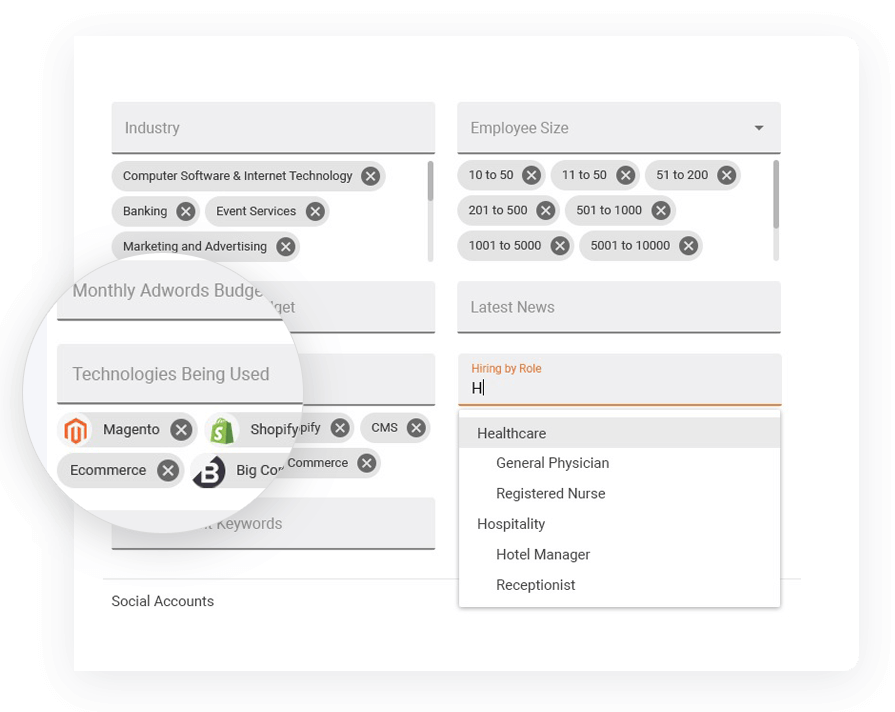 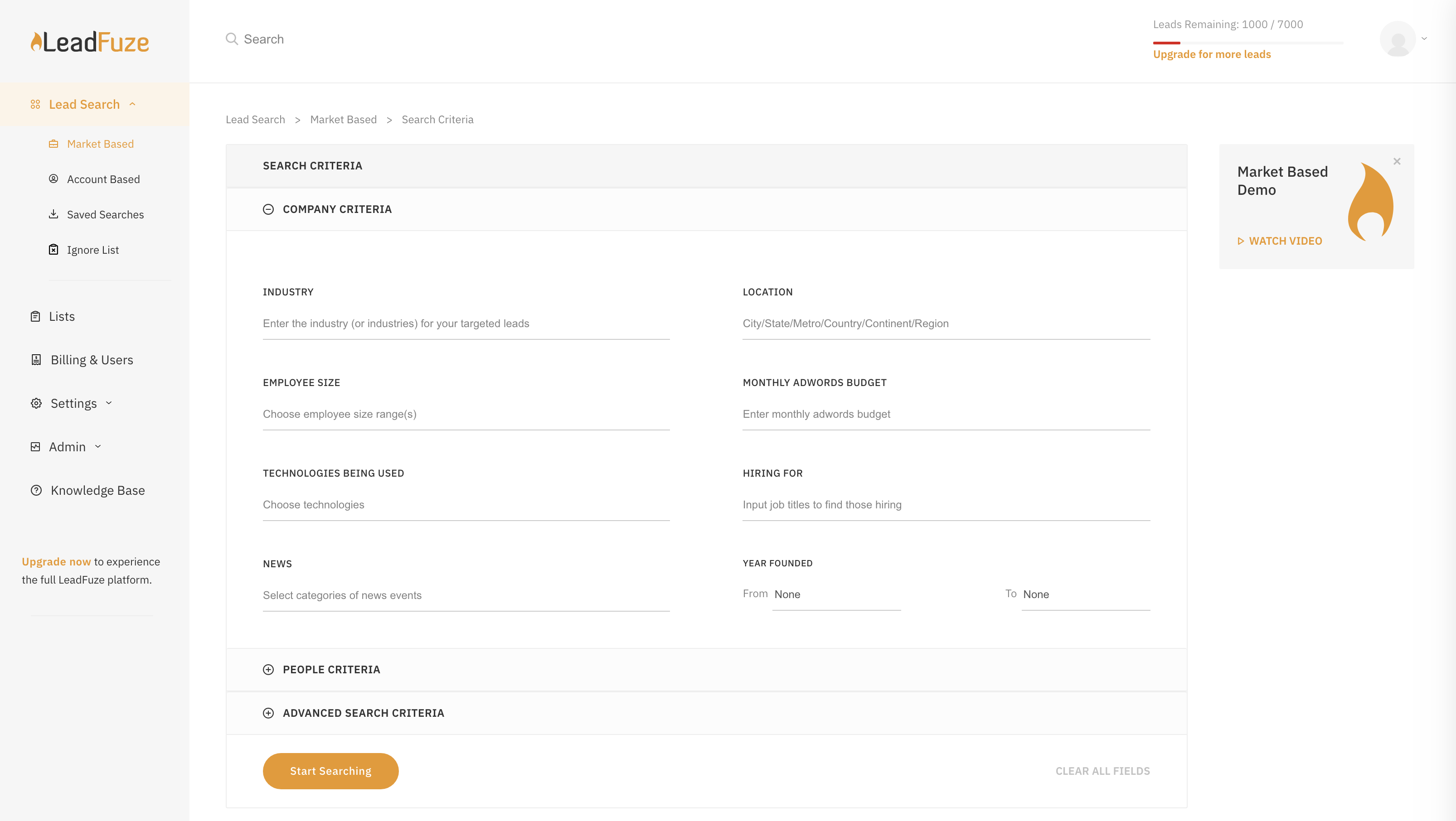 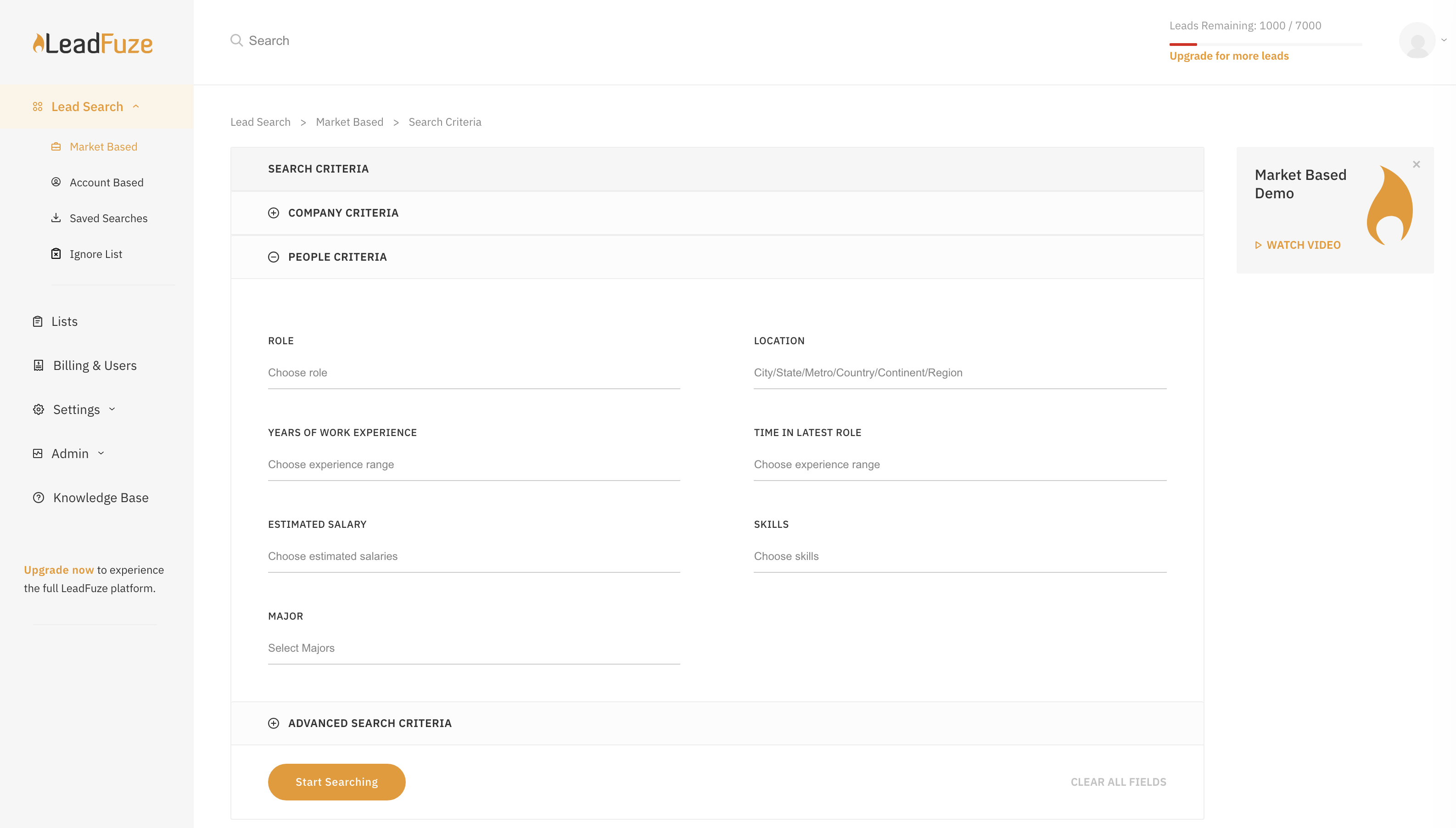  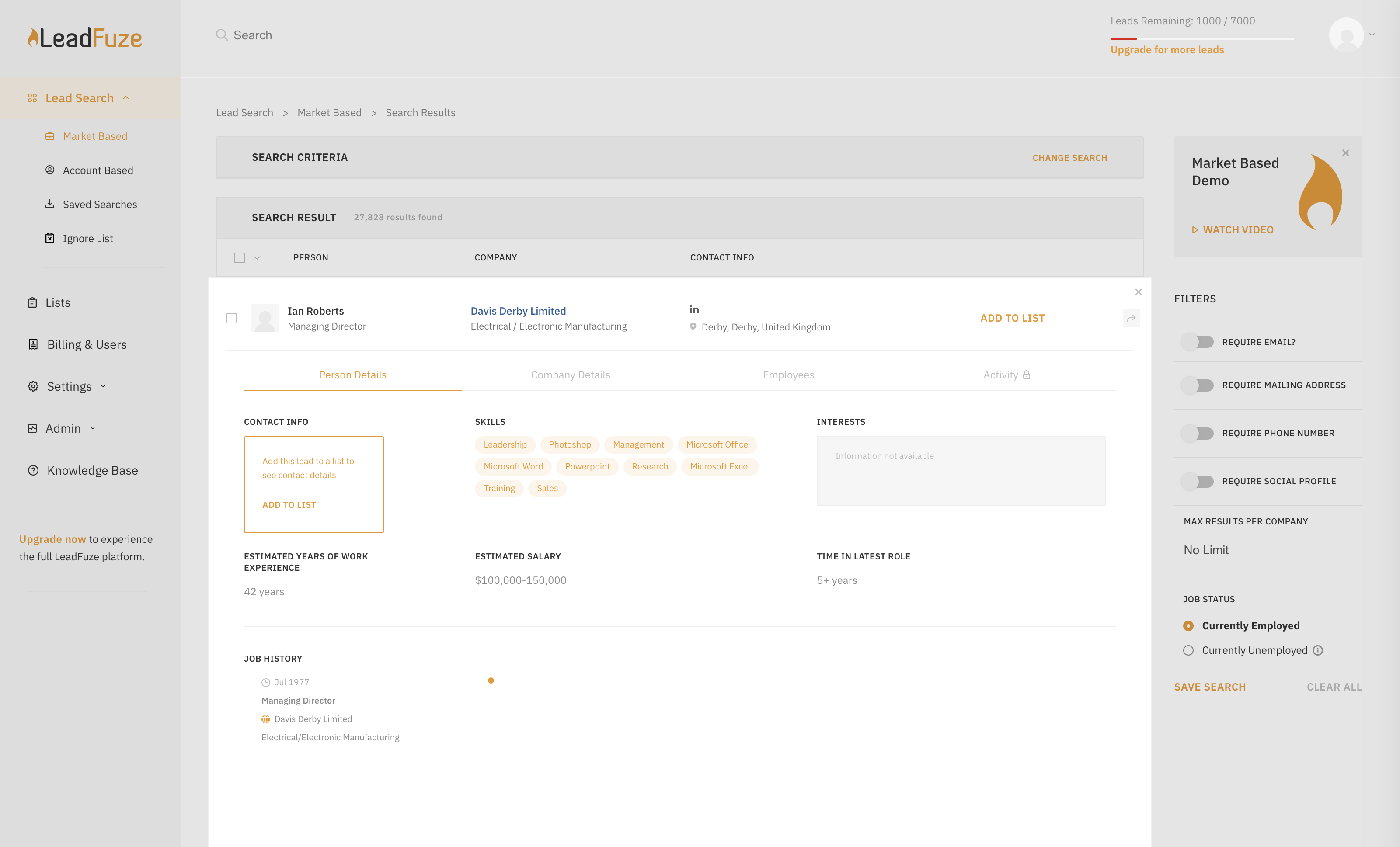  | Salesflare Screenshots      |