LinkedIn Sales Navigator vs. SalesIntel

Overview
ProductRatingMost Used ByProduct SummaryStarting Price
LinkedIn Sales Navigator
Score 8.7 out of 10
N/A
LinkedIn Sales Navigator is a sales intelligence software solution offered by LinkedIn.
$79.99
per month
SalesIntel
Score 7.2 out of 10
N/A
SalesIntel is a revenue intelligence platform that helps marketing, sales, and revenue operations teams improve pipeline efficiency. SalesIntel attempts to do this in four steps: Identify ideal customers (ICP) from among 22 million accounts profiled by 300 million unique technology install data points. Second, surface accounts that are actively in-market for the user's product or service by using best-in-breed intent, company news, and web-visitor data.…N/A
Pricing
LinkedIn Sales NavigatorSalesIntel
Editions & Modules
Professional
$79.99
per month
Team
$134.99
per license
Enterprise
Contact sales team
No answers on this topic
Offerings
Pricing Offerings
LinkedIn Sales NavigatorSalesIntel
Free Trial
NoYes
Free/Freemium Version
NoNo
Premium Consulting/Integration Services
NoNo
Entry-level Setup FeeNo setup feeNo setup fee
Additional Details
More Pricing Information
Community Pulse
LinkedIn Sales NavigatorSalesIntel
Considered Both Products
LinkedIn Sales Navigator
Chose LinkedIn Sales Navigator
Looking for a job - hands down - LinkedIn is the best resource. LI Learning is great for adding to your knowledge base.

Chose LinkedIn Sales Navigator
In my opinion, ZoomInfo and LinkedIn Sales Navigator serve different purposes. ZoomInfo is more for providing accurate contact information, while LinkedIn Sales Navigator is more for identifying the exact contacts you want to market to. Being built on top of the LinkedIn …
Chose LinkedIn Sales Navigator
LinkedIn Sales Navigator has direct access to LinkedIn data, so its data is first-hand and very accurate compared to others. The tools are used for various purposes, but overall, we can utilize Sales Nav to identify individuals and then utilize the other tools to build lists …
Chose LinkedIn Sales Navigator
LinkedIn Sales Navigator is part of the professional platform-LinkedIn that allows a good amalgamation and integration of the software. In the end all the professionals are on LinkedIn makes sense to invest and use the amazing Sales Navigator to grow the business. I like the …
Chose LinkedIn Sales Navigator
We preferred LinkedIn Sales Navigator because of its brand recognition, brand value and preference among our sales and marketing leadership to use the product. The price was a bit on the higher side but we still chose it over competitors because we were getting lot more value …
Chose LinkedIn Sales Navigator
LinkedIn Sales Navigator is much more valuable than Dice or Cognism, as we do most of our prospecting on LinkedIn. Therefore, it means we can build lists of our prospects based on activity, connections, and buying intention. With Cognism and Dice, you cannot do this as they do …
Chose LinkedIn Sales Navigator
LinkedIn Sales Navigator is the best at finding leads, in my opinion. However, it's not the best at finding contact information. You need a combination of ZoomInfo + LinkedIn Sales Navigator + Outreach in order to actually contact leads. Apollo.io does all of that for you in …
Chose LinkedIn Sales Navigator
I personally do not like the UI of Zoominfo and above all, it requires a lot of manual work to get the details of the prospect/company.
Chose LinkedIn Sales Navigator
Not even close. LinkedIn Sales Navigator is exponentially better.
Chose LinkedIn Sales Navigator
Sales navigator is a good platform however there aspects where Apollo.io and Lusha enrich the prospecting quality, When you used together does give you the best possible results
Chose LinkedIn Sales Navigator
LinkedIn Sales Navigator's search functionality is far superior to any of its competitors The lead quality is also far rich in terms of having the right information in CRM LinkedIn Sales Navigator does not have a very good Sales Intelligence feature - like the ones present …
Chose LinkedIn Sales Navigator
I was able to replicate and reprofile leads based on the needs of my company. It made my sourcing task easier and allowed me to contact these leads right away. Real-time interaction
Chose LinkedIn Sales Navigator
linkedin has way better data cleanup and relevant contact information. It provides a great insight into how to target personally your prospects, and gives great engagement highlights. ZoomInfo is sometimes outdated, the prospect has moved companies or is no longer employed …
Chose LinkedIn Sales Navigator
Benefit is I can do both the lead generation process and prospecting as well. I will reach out to the prospect through email message. Sales navigator is a user-friendly platform and easy to understand. We can save leads and accounts as well which are maintained in a separate …
Chose LinkedIn Sales Navigator
We still use zooming. I think Zoominfo is better for prospecting new contacts but LinkedIn Sales Navigator is better for ensuring you have accurate and up to date information as well as a more personalized outreach.
Chose LinkedIn Sales Navigator
Simply put, by having a world-class sales team/engine you also need best in class software to make it happen. LinkedIn Sales Navigator is at the top of our list for that reason alone. We tried a few others back in the earlier days from what I understand, and every one of them …
Chose LinkedIn Sales Navigator
Just the fact that LinkedIn is THE professional social network just gives you so much more access to company and prospect insights. All the information I could possibly need is right there in the system itself so I'm not having to rely on integrations and possibly outdated or …
Chose LinkedIn Sales Navigator
LinkedIn Sales Navigator has no competition when it comes to quickly finding and validating a prospects job function, tenure, and overall job history. It still has a long way to go in terms of stacking up against some of the other companies on the list in regards to: data …
Chose LinkedIn Sales Navigator
We went with LinkedIn Sales Navigator because of their reputation and international presence. LinkedIn Sales Navigator also acts as a social media platform, allowing us to post our news articles and successes.
Chose LinkedIn Sales Navigator
I don't believe that I've used other similar type tools. There is a software called Norbert that allows me to look up email addresses using the domain handle and the person's name, but I don't think that anything in particular can really compare to the number of people on the …
Chose LinkedIn Sales Navigator
I've had the chance to evaluate ZoomInfo, use Seamless, and RainKing. All of them work better used with LinkedIn Sales Navigator. It's not an either or choice. The best way to use Sales Navigator is with another lead identification system.
Chose LinkedIn Sales Navigator
I have used ZoomInfo in the past, ZoomInfo has a lot of great information, the data is delayed and sometimes inaccurate. LinkedIn Sales Navigator is more real-time as people are updating their profiles. Whereas ZoomInfo is a data scraping tool so it might be 6 months of old …
Chose LinkedIn Sales Navigator
The data is more up to date on LinkedIn Sales Navigators and it allows you to reach out to people from the tool using InMails. Recommendations are usually of good quality. The downside is you don't get a few personal details like email addresses or phone numbers to reach out to …
Chose LinkedIn Sales Navigator
LinkedIn Sales Navigator has been like a global access platform for all the business and professional networking thus making it easy to know the members of the certain organization, skills and how they are positioned within the management and if they have the power in making …
SalesIntel
Chose SalesIntel
The SalesIntel interface is much more cleaner and easier (at least for me) to navigate. Sometimes too much on-screen information can seem overwhelming. And not to mention, the multiple times a search is returned with 0 results, is beyond frustrating. Sometimes some of the …
Features
LinkedIn Sales NavigatorSalesIntel
Prospecting
Comparison of Prospecting features of Product A and Product B
LinkedIn Sales Navigator
7.5
Ratings
3% below category average
SalesIntel
8.0
Ratings
3% above category average
Advanced search7.90 Ratings8.00 Ratings
Identification of new leads7.50 Ratings7.00 Ratings
List quality7.60 Ratings7.00 Ratings
List upload/download6.90 Ratings8.00 Ratings
Ideal customer targeting7.80 Ratings9.00 Ratings
Load time/data access7.40 Ratings9.00 Ratings
Sales Intelligence Data Standards
Comparison of Sales Intelligence Data Standards features of Product A and Product B
LinkedIn Sales Navigator
7.1
Ratings
9% below category average
SalesIntel
8.0
Ratings
3% above category average
Contact information7.30 Ratings7.00 Ratings
Company information7.10 Ratings8.00 Ratings
Industry information6.90 Ratings9.00 Ratings
Data Augmentation & Lead Qualification
Comparison of Data Augmentation & Lead Qualification features of Product A and Product B
LinkedIn Sales Navigator
7.1
Ratings
4% below category average
SalesIntel
7.0
Ratings
6% below category average
Lead qualification process5.70 Ratings8.00 Ratings
Smart lists and recommendations7.10 Ratings00 Ratings
Salesforce integration6.30 Ratings00 Ratings
Company/business profiles8.50 Ratings6.00 Ratings
Alerts and reminders7.50 Ratings00 Ratings
Data hygiene6.40 Ratings7.00 Ratings
Automatic data refresh6.50 Ratings00 Ratings
Tags6.30 Ratings5.00 Ratings
Filters and segmentation9.10 Ratings9.00 Ratings
Sales Intelligence Email Features
Comparison of Sales Intelligence Email Features features of Product A and Product B
LinkedIn Sales Navigator
6.2
Ratings
18% below category average
SalesIntel
-
Ratings
Sales email templates6.60 Ratings00 Ratings
Append emails to records5.70 Ratings00 Ratings
Best Alternatives
LinkedIn Sales NavigatorSalesIntel
Small Businesses
Lead411
Lead411
Score 9.1 out of 10
Lead411
Lead411
Score 9.1 out of 10
Medium-sized Companies
Lead411
Lead411
Score 9.1 out of 10
Lead411
Lead411
Score 9.1 out of 10
Enterprises
TechTarget Priority Engine
Score 9.8 out of 10
TechTarget Priority Engine
Score 9.8 out of 10
All AlternativesView all alternativesView all alternatives
User Ratings
LinkedIn Sales NavigatorSalesIntel
Likelihood to Recommend
7.9
(0 ratings)
8.0
(0 ratings)
Likelihood to Renew
8.0
(0 ratings)
-
(0 ratings)
Usability
6.2
(0 ratings)
-
(0 ratings)
Support Rating
9.0
(0 ratings)
-
(0 ratings)
Implementation Rating
8.0
(0 ratings)
-
(0 ratings)
User Testimonials
LinkedIn Sales NavigatorSalesIntel
Likelihood to Recommend
As a new scale-up business, we are heavily focused on winning new business; businesses like ours cannot function without it, as we would not be able to build target profiles, create new business lists, and establish product-market fit. It's a key tool in our sales and GTM strategy.
Read full review
SalesIntel is well suited for those times when you have not been able to reach the DM through the normal channels. SI will often include personal email addresses as well as direct line or mobile phone numbers. The platform also provides information and other pertinent press releases and updates. Such as, new funding, potential mergers, and other relevant company announcements
Read full review
Pros
  • Search Functionality: LinkedIn Sales Navigator has one of the most powerful search functions. The filters are not unnecessary and some are very well thought of. You can drill down to finding a needle in a haystack of 20000 employee company when it comes to using LinkedIn Sales Navigator if done in the right manner.
  • Smart Links: Gone are the days of attached Decks. One can simply create their deck online using this feature on LinkedIn Sales Navigator, or even upload an existing ppt. A smart link is shareable as well as trackable for opens and clicks.
  • Fewer Clicks: With a single click, I can filter out decision-makers in any company. With a single click, I can import contacts from LinkedIn Sales Navigator to Salesforce. Lesser clicks are actually less stressful if you think.
Read full review
  • I like the ability to be very granular in my search for information to expand my pipeline.
  • The platform is easy to use and exporting lists is by far one of the best features for how I currently use it.
  • It integrates well with several CRM platform and there are some options for exporting and downloading lists.
Read full review
Cons
  • Inbox needs work - too much confusion around your LinkedIn inbox and Sales Nav inbox
  • Sorting - need a better, faster way to sort by for prospect lists and account lists
  • Only voluntarily shared information. No cross checking or using API’s like a ZoomInfo
Read full review
  • I have found contact information that was inaccurate. Since the information is human verified, there should be some type of on-going audit to catch those.
  • It would be nice to have some type of rating system along with the human verified options for the information. Perhaps a 5 star rating that aligns with how recent the info has been verified.
  • it would be nice to have the option to upload my current CRM list for SalesIntel to verify my list is accurate.
Read full review
Likelihood to Renew
This question is a no-brainer. The tool is the industry standard for anyone tied to sales and marketing. The name "LinkedIn Sales Navigator" is synonymous with streamlining relevant customer and account data in an easy to use format that is actionable and intelligent. The focus on continuous improvement and richer means of communicating with customers and prospects is evident each time new features are rolled out. The social component of the tool even includes a gamification component to ensure that peers remain relevant among each other, which is refreshing and enjoyable for those who engage the tool on a daily basis.
Read full review
No answers on this topic
Usability
It lets you pull people with specific titles in specific areas and with the criteria you choose--job changes, mutual connections based on schools, roles, and companies, etc. It is easy to upload these lists into other software or download and save them to a drive.
Read full review
No answers on this topic
Support Rating
I would recommend LinkedIn Sales Navigator entirely. It has been the most user-friendly tool to use starting off in a sales role. I genuinely enjoy the navigation of the tool and how easy it is to save lists and see job changes within those lists. Generating leads and finding the most up to date information on prospects is all housed within this tool.
Read full review
No answers on this topic
Implementation Rating
I am unsure of the rollout, as I was not involved. I was an early adopter, and I have had a lot of success with the tool personally at multiple organizations, but I have no idea whether the implementation process encountered any errors. I can personally say that it works, and that I have not encountered significant issues with the tool since adoption, although a few issues like messages showing up as being unread even though they have been opened have been an on-again/off-again issues throughout the past few years. Overall, the company is doing a great job, and our implementation seems to have been effective.
Read full review
No answers on this topic
Alternatives Considered
In my opinion, ZoomInfo and LinkedIn Sales Navigator serve different purposes. ZoomInfo is more for providing accurate contact information, while LinkedIn Sales Navigator is more for identifying the exact contacts you want to market to. Being built on top of the LinkedIn social network, it is ideal for nabbing the same person you need from each organization.
Read full review
The SalesIntel interface is much more cleaner and easier (at least for me) to navigate. Sometimes too much on-screen information can seem overwhelming. And not to mention, the multiple times a search is returned with 0 results, is beyond frustrating. Sometimes some of the bigger or more known companies' reps can have a little bit of an ego and are less than humble, which can be a turn off for perspective buyers.
Read full review
Return on Investment
  • Helped warm up a few leads that I was having trouble getting in touch with via phone and email
  • Allowed me to better identify the key stakeholders at companies I was targeting
  • Kept me up to date on what was happening with my prospects and their companies.
Read full review
  • The ROI is impacted by the intangibles of using the platform. As our team goes through the learning curve, we establish better collaboration skills and celebrate the 'aha' moments. SalesIntel is feature rich and we've just scratched the surface.
  • One of the coolest added features is the ability to request information on demand. Once I've established a company qualifies for what we offer, even if I cannot locate human verified contact information for DM's, I can request info for the specific titles that I need to speak with about our solution.
Read full review
ScreenShots

SalesIntel Screenshots

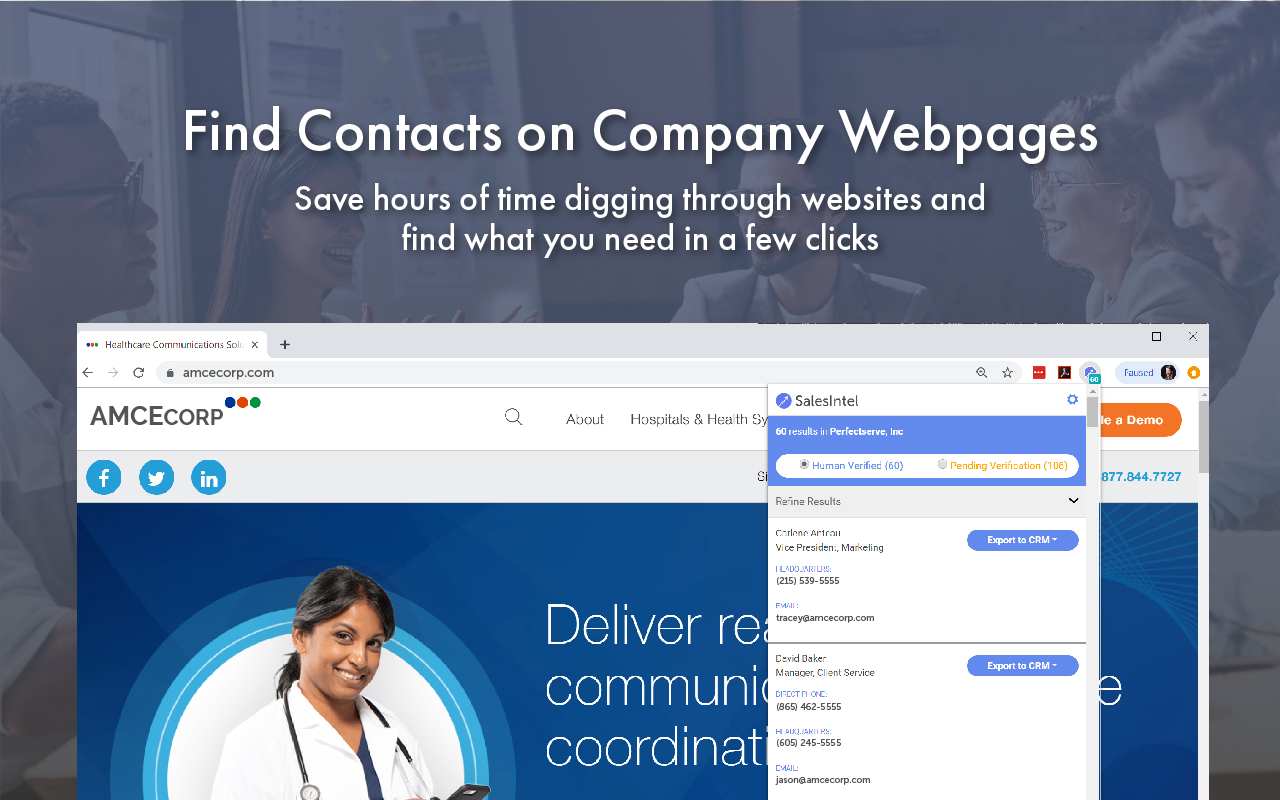
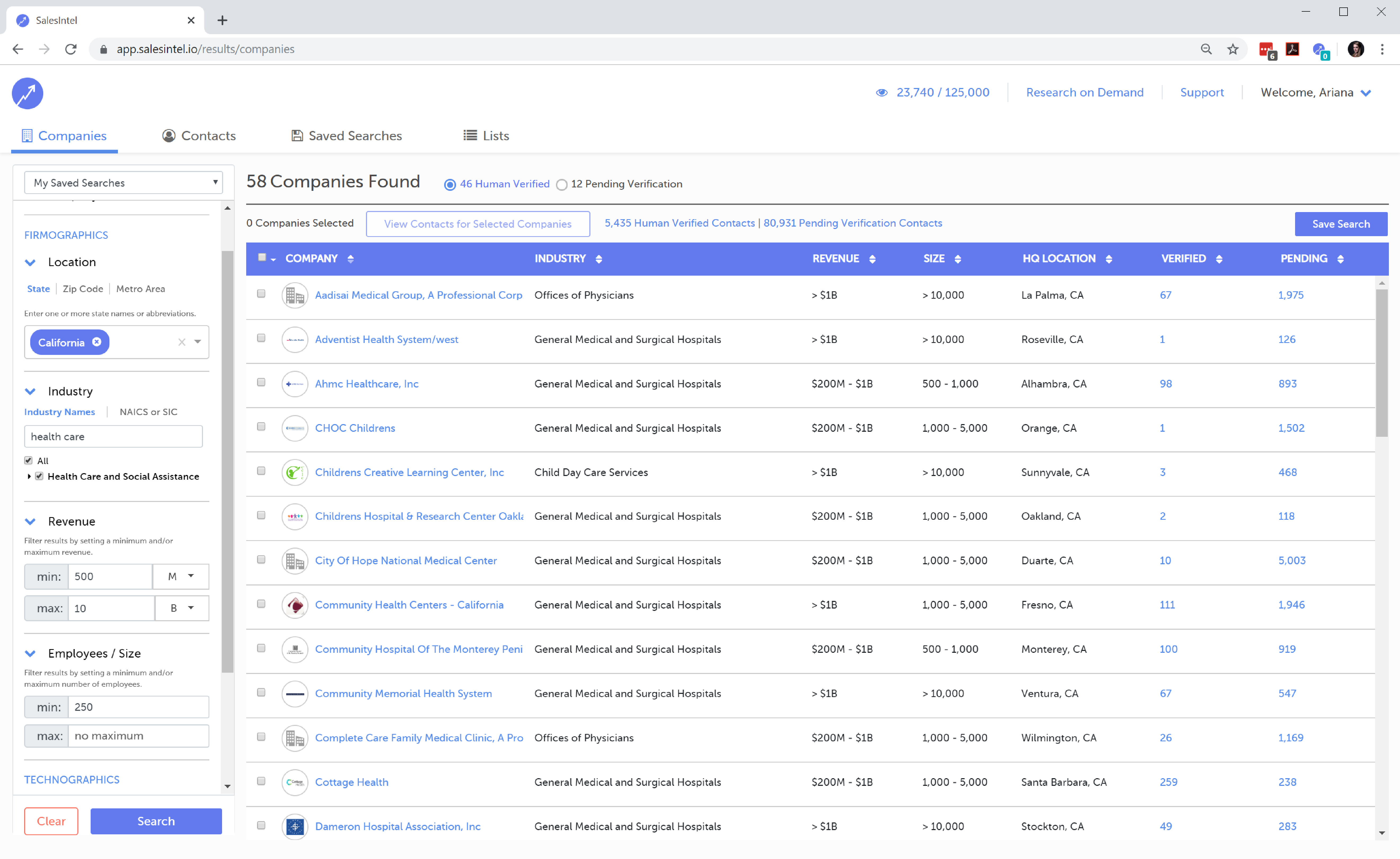
Screenshot of SalesIntel's Chrome extension, RevDriver, gives access to all 4.5 million contacts, with human-verified contact data right from SalesIntel to reach them directly.Screenshot of RevDriver helps immediately find the contact information on a person’s LinkedIn Profile or target company’s website. The extension is used to access 4.5 million human-verified contacts.Screenshot of Multiple filters and other options such as Firmographics (Location, Annual Revenue and Employee Size) to find net new contacts and accounts for the organization. Used to find exactly who to target for email campaigns, events, etc.Screenshot of Multiple filters and other options such as Technographics to find net new contacts and accounts for the organization. This is used to find exactly who to target for email campaigns, events, etc. Features over 41 Million technographics data points and 1.2+ million human-verified companies.Screenshot of Contacts can be exported directly to a CRM or email marketing platform. SalesIntel will even check and auto-dedupe any records that might be in the system.Screenshot of Multiple filters to identify target contacts and build lists for email marketing and events. Buying Intel and Company Intel can be used to find net new contacts and accounts for the organization.