Site24x7 from ManageEngine is a full-stack application, website, server, cloud and network monitoring tool. Site24x7 offers code-level diagnostics and customizable error thresholds, end-to-end monitoring with topology visualization tools, and mobile accessibility.
$9
10 monitors
Nagios Core
Score 8.6 out of 10
N/A
Nagios provides monitoring of all mission-critical infrastructure components. Multiple APIs and community-build add-ons enable integration and monitoring with in-house and third-party applications for optimized scaling.
N/A
Pricing
ManageEngine Site24x7
Nagios Core
Editions & Modules
Starter
$9.00
10 monitors
Pro
$35.00
40 Monitors
Classic
$89.00
100 Monitors
Elite
$225.00
250 Monitors
Enterprise
$449.00
500 Monitors
Enterprise Plus Web
$899.00
2500 Monitors
Single License
Free
Single License
Free
Offerings
Pricing Offerings
ManageEngine Site24x7
Nagios Core
Free Trial
Yes
Yes
Free/Freemium Version
Yes
Yes
Premium Consulting/Integration Services
No
No
Entry-level Setup Fee
$1 monitors
No setup fee
Additional Details
Each Pack will also support additional benefits such as Network interfaces, Applogs, Alert credits etc. You can also, purchase add-ons to create custom pricing options. Please visit the vendor's pricing page, for more information.
—
More Pricing Information
Community Pulse
ManageEngine Site24x7
Nagios Core
Considered Both Products
ManageEngine Site24x7
Verified User
Anonymous
Chose ManageEngine Site24x7
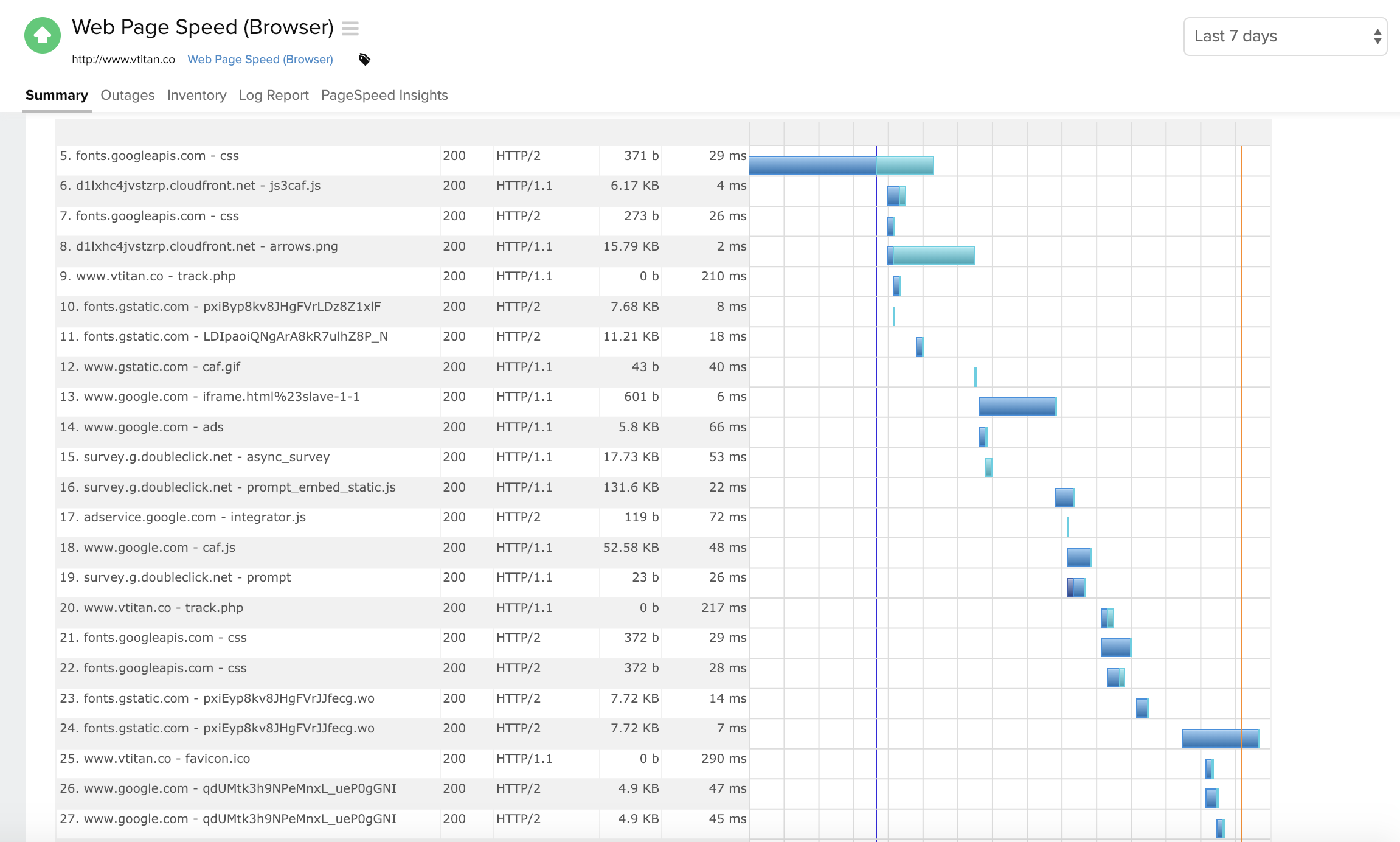
Site24x7 [All-in-One Monitoring] has some similarities to ThousandEyes. Especially in the troubleshooting aspect where both offer Web performance waterfall charts to analyze the issue better. Both have cloud-based servers globally that allow to determine performance on the …
Manage engine had OPs manager for alerting and security monitoring alerts, but is just not as robust an offering as [Site24x7 All-in-One Monitoring] (RUM.APM features etc..). Originally we had used Nagios on low, to no-cost linux platform, but Nagios will require license also, …
Initially, it came down to price. But, if you don't mind having a cloud monitoring solution (versus on-prem) then in my opinion Site24x7 is much easier to setup/manage/configure/use than other options I have managed in the past. Adding monitors takes seconds and I spend almost …
The biggest difference between Site24x7 and products like PRTG, Nagios, or Icinga, is that Site24x7 is hosted off the network, completely externally. The others do a great job on network alerts-- and some can even be configured to send SMS or phone calls with the right …
Each solution excels in their own areas. Site24x7 provides the easiest and most cost-effective transactional monitoring from the previous and existing solutions which we use. However, Solarwinds Orion suite, which includes the virtualization manager, gives us full-stack …
I haven't had a lot of experience evaluating Datadog but from the research and basic demo that we got I understand that it is significantly more expensive, but it does seem to have more AI features and can assist in predicting when/if applications or essential services may go …
site24x7 is really unique, I have been using it for many years and always recommend it in my classes. It is ideal for monitoring all web, apps, servers together in one place. Never let a website go down again.
I selected this [roduct because I needed something really quick to deploy and that we could easily integrate with our environment without having to deal with firewall setup and other stuff.
Simply put, Alertsite from Smartbear is a great product, with top-notch functionality. However, the cost of the platform when using multi-step transactions is incredibly pricey and the cost does not scale well when you want to increase your monitoring. Site24x7 alleviates the …
While Applications Manager and CA CEM can give a deep understanding of the services and applications, neither can compare with the shear speed at which Site24x7 can provide for the web performance of sites and how customer satisfaction is associated as well!!!
Unlike SL1 and IBM NOI, you do not need to buy licenses or pay for support. You can begin deployment immediately. You don't need to purchase expensive equipment or study confusing manufacturer's manuals. Zabbix can also be used freely, but it is not so common and you may need …
Nagios Core can do literally anything you need it to thanks to the amazing developer community and their ability to program custom addons. Need to monitor servers all over the world.The main advantage of Nagios Core is that it allows you to be aware of the status of each host …
Because we get all we required in Nagios [Core] and for NPM, we have to do lots of configuration as it is not as easy as Comair to Nagios [Core]. On NPM UI, there is lots of data, so we are not able to track exact data for analysis, which is why we use Nagios [Core].
As a backup NMS, it is better to invest to Nagios since it costs less than any other competitors which [provide] the same level of service. Maybe PRTG gives more features but you don't need all [those] features for your daily use so Nagios gives you what you need when it comes …
We chose Nagios Core over Zabbix and Zenoss because it was easier to get up and running and configure than the other two products. They required network scanning for assets and then required you to enter every little detail about the host. With Nagios Core, we just entered our …
Nagios is a great tool for the price. Lots of bang for your buck if you know what I mean. The tool installs easily and has a very lightweight footprint. This also allows for great batch installation and configuration. Tags can be applied and pushed throughout the org. …
Centreon has some added benefits to Nagios, mostly in how configurations are made and data is presented. Nagios is perhaps more reliable because of its simplicity. They are both based off of Nagios, so they are similar in many ways, but Centreon adds some of their own …
I have been using Nagios for 10+ years, so I am very familiar with it. The learning curve with SolarWinds was more difficult for me to pick up than Nagios and it wasn't as easy (at first) to duplicate, edit, etc. in SolarWinds. I genuinely think Nagios is a great product for …
Nagios may not have as much metrics reporting or as many visualizations as the other products, but outdoes the others in ease of configuration and the ability to deliver multi-faceted alerting across a variety of applications, with the help of plugins or with the user …
The cost is considerably better. Others are probably more complete and even overkilled if all you're looking for is simple SNMP alerting and reporting. If you're looking for integrated analytics or more complex reporting/alerting, there might be better options. Nagios also …
Nagios is opensource and free compared to any other competitors out there. The support forums are great. You can fully scale Nagios from small to large environments.
Commercial tools where expensive and not as capable for our needs. Many had other functions that where not as useful for monitoring, such as automation, scripting, software installation. Many of which we had migrated to purpose-built tools that served our needs better.
We have actually tried several. Nagios does what it was designed to do well. Some of the other products we have do more than Nagios, but they were designed to do more detailed and specific things. Many we have found do a good bit less than Nagios does. Nagios is a nice …
I have used both Zabbix and Nagios. Nagios is by far easier to use and configure. I like the layout better and love using it every day. It is my product of choice.
We have tested several other monitoring products which were able to monitor the basic matrix (Memory, DiskUsage, CPU%, UpTime, Running Service Status, Port 80 Up/Down). Although some offered far better UIs, they lacked the ability to monitor ANYTHING. Zabbix, being the only …
Nagios is a good start, but as soon as an alert is triggered, you have to go searching and digging. It's better as a trigger and integrated with more robust, intelligent monitoring tools.
Nagios is an easy to use intuative tool that gives a great return on investment. It has better monitoring features that IT needs than competitors and won't break the bank. Support for this tool is first class and the techs will help you to get the most out of the product.
Nagios is more configurable than competitors and we originally wanted something we could spin up quick for some simple checks. As our needs grew, our understanding and use of Nagios grew, and it was a natural choice. Having personally used other monitoring solutions, I prefer …
I have tried other tools (PRTG etc) in the past, and switched from US monitor to [Site24x7 All-in-One Monitoring], for all the built-in features and ability to implement by using with or without the agents deployed (ip discovery LAN). This is one tool that encompasses the entire organization and allows that single pane of glass feel (NOC screen view) for an accurate virtual snapshot of your entire organization, either cloud and/or LAN.
Nagios is simply a very configurable and rock solid monitoring engine. For these reasons I would recommend it to any IT professional in any medium to large organization where creating custom checks and programming ones custom needs into the configuration is practical. I would be more hesitant to recommend it as a first monitoring solution for a small business which is usually accompanied by a less experienced and/or more time constrained admin.
Alerts: Site24x7 can be configured to send alerts in all sorts of ways, from email, to text messages, to even direct automated phone calls.
Internal monitoring: An agent installed on one or more machines can monitor internal connectivity to other network devices. This means if connectivity to a server goes down, we often know about it before users alert us.
External monitoring: Site24x7 also watched our websites and sends alerts if they're unreachable. It uses multiple locations to do so, which means if there's a partial network outage in some part of the country, we know who is affected.
It's built by engineers for engineers so setting it up and configuring it is relatively complicated. It could really use a simplified configuration approach, or a GUI to set it up instead of editing config files.
I'd like to see the option to have service notification settings inherited from the host setting notifications. They have to be set up separately but they are often the same, so it would be nice to have less redundancy.
We're currently looking to combine a bunch of our network montioring solutions into a single platform. Running multiple unique solutions for monitoring, data collection, compliance reporting etc has become a lot to manage.
The Nagios UI is in need of a complete overhaul. Nice graphics and trendy fonts are easy on the eyes, but the menu system is dated, the lack of built in graphing support is confusing, and the learning curve for a new user is too steep.
I have only had to use support once, so I can't go into much detail about their support team. The one time I did use it the response was fast but the resolution took some time.
I haven't had to use support very often, but when I have, it has been effective in helping to accomplish our goals. Since Nagios has been very popular for a long time, there is also a very large user base from which to learn from and help you get your questions answered.
Site24x7 [All-in-One Monitoring] has some similarities to ThousandEyes. Especially in the troubleshooting aspect where both offer Web performance waterfall charts to analyze the issue better. Both have cloud-based servers globally that allow to determine performance on the Internet. Site24x7 has more features available so we selected it instead.
We have tested several other monitoring products which were able to monitor the basic matrix (Memory, DiskUsage, CPU%, UpTime, Running Service Status, Port 80 Up/Down). Although some offered far better UIs, they lacked the ability to monitor ANYTHING. Zabbix, being the only contender worthy of competing, is a good alternative to Nagios. We also tried Zenoss Core & OpenNMS which were good enough for non-Linux engineers to get started with. OP5 was another service-oriented monitoring solution we evaluated. Apart from Nagios, Consul is heavily used to monitor & register the micro-service systems & end-point URLs. Due to the time invested (9+years) in Nagios, we were able to get more components installed/configured easily than alternatives.
Positivity wise, we're spending a third of what we were on our website monitoring, this has allowed us to focus funding elsewhere (namely SolarWinds).
We have enhanced our core monitoring by now also being able to provide better coverage, whereas we were handicapped with our previous supplier due to the scaling costs of multi-step transactions.
The general feeling from our IT staff is that the platform is not great, which obviously reduces confidence in the ability for the platform to provide accurate monitoring data for our websites.
With it being a free tool, there is no cost associated with it, so it's very valuable to an organization to get something that is so great and widely used for free.
You can set up as many alerts as you want without incurring any fees.