TrustRadius: an HG Insights company

ManageEngine Site24x7

Score9.8 out of 10

36 Reviews and Ratings

What is ManageEngine Site24x7?

Site24x7 from ManageEngine is a full-stack application, website, server, cloud and network monitoring tool. Site24x7 offers code-level diagnostics and customizable error thresholds, end-to-end monitoring with topology visualization tools, and mobile accessibility.

Media

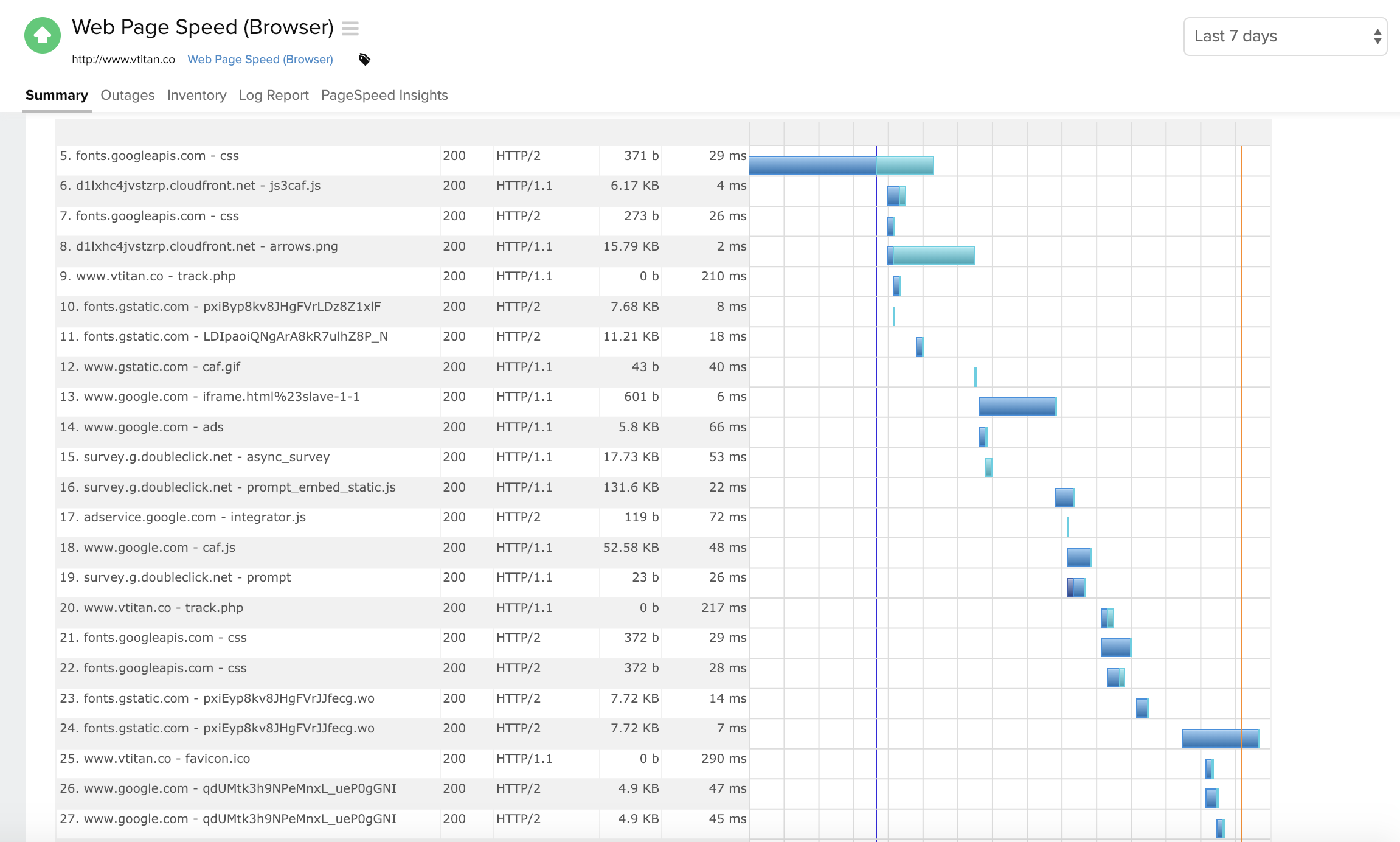
Component wise metric breakdown in a Webpage Speed (Browser) monitor
Summary page for a windows server monitor
Response time and outages summary for a DNS server monitor
Summary page for traces run on a Java application
Desktop and mobile view of a Website monitor
Homepage view

1 / 6

Top Performing Features

  • Remote monitoring

    Monitoring of network operational activities through the use of remote devices known as monitors or probes

    Category average: 7.4

  • Automated alerts and notifications

    System generates alerts and notifications to provide timely intervention if required

    Category average: 7.5

  • Data visualization

    Ability to produce visualizations to simplify understanding of data

    Category average: 8.2

Areas for Improvement

  • Network device monitoring

    Monitor the real-time performance and health of devices on your network

    Category average: 5.5

  • Policy-based automation

    Policy-based management is an administrative approach used to simplify the system management by drafting rules to deal with common situations

    Category average: 7.8

  • Antivirus and malware management

    Detection of security risks like malware and viruses

    Category average: 5.4

My Favorite Site Monitoring Tool

Pros

  • Certificate monitoring
  • Drive space and uptime warning notifications
  • Cloud resource auto discovery options to keep new systems monitored immediatly
  • Scripting language options (AWS cli, PowerShell, bat, API, python, C, etc..)

Cons

  • Ability to edit an existing maintenance schedule, vs creating a new one each time
  • Grouping of emails to SMS and non SMS alerts to save on false alerts
  • Setup of Realtime user monitor was not as functional as expected with regard to adding 3rd party scripts.

Most Important Features

  • Website app uptime is critical
  • Load balance auto scale monitoring is great to see when app requires more autogenerated systems
  • Disk drive and network activity monitoring and alerting is vital for system health via proactively alerts.

Return on Investment

  • A cost effective solution for any size orginization
  • NO upfront cost or significant capital for adding physical equipment to acquire and maintain
  • Economy of scale, can fit any organizations budget, by simply adding monitor /agent packages on the fly (online purchase instantly available)

Other Software Used

Amazon CloudWatch, PRTG Network Monitor, SolarWinds Engineer's Toolset

Easy to use and affordable monitoring

Pros

  • Can monitor almost any service you can think of.
  • Monitoring from datacenters all over the world.
  • Understandable and easy to use GUI.
  • Very lightweight agent.
  • Fair pricing.

Cons

  • I wish the advanced monitors were not so expensive.
  • It is a cloud solution, so it is necessary to open up outbound ports in all security zones.
  • If you lose outbound internet service, all your internal servers will throw alarms and life gets extremely noisy.

Return on Investment

  • We know exactly where we stand with our SLA obligations and are able to make informed decisions.
  • Rapidly respond to outages, again allowing us to positively affect our downtime and SLA numbers.

Alternatives Considered

Nagios XI and SolarWinds Remote Monitoring & Management (RMM)

Site24x7 is fine, and does what it needs to

Pros

  • Alerts: Site24x7 can be configured to send alerts in all sorts of ways, from email, to text messages, to even direct automated phone calls.
  • Internal monitoring: An agent installed on one or more machines can monitor internal connectivity to other network devices. This means if connectivity to a server goes down, we often know about it before users alert us.
  • External monitoring: Site24x7 also watched our websites and sends alerts if they're unreachable. It uses multiple locations to do so, which means if there's a partial network outage in some part of the country, we know who is affected.

Cons

  • Analysis: Site24x7 sends a report when a site is back up, with an "analysis" of the outage. The idea is to help pinpoint the cause, but it's almost always useless.
  • Overalerting on larger outages: Site24x7 sends an alert on every site that we have configured when they go down. A hierarchical setup would be better, or some way for it to recognize that if more than two sites are down simultaneously, it only needs to send one alert with that information. Getting 12 text messages at 1 AM is not fun.
  • Complex setup: It takes a long time to set up everything for monitoring. Automation would be nice.

Return on Investment

  • Reduced downtime: We've reduced downtime because the alerts from Site24x7 get us working on a problem immediately.
  • Less required manpower: We do not need additional staff overnight or an outside contractor to monitor the network since we get alerts ourselves.
  • False alerts: We do occasionally get false alerts, which causes time spent after hours tracing a problem that does not exist.

Alternatives Considered

PRTG Network Monitor, Nagios and Icinga

Other Software Used

ManageEngine Firewall Analyzer, PRTG Network Monitor, Zoom

Site24x7 - helps us keep on top of the servers we manage

Pros

  • The phone app is great - we often get alerts on that BEFORE we get the SMS message.
  • Root cause analysis and the traceroute when something goes wrong.
  • Generally an all round great product

Cons

  • To be honest, I can't think of anything!

Return on Investment

  • For the price it is just too good to NOT use - we have many happy customers.

Other Software Used

New Relic

Site24x7: A budget platform with Limited Functionality and Support. Room for Improvement!

Pros

  • Very clean website UI. Tests are well categorized and navigation is very simple.
  • The accompanying mobile app is very useful when on the go as it can also notify you of any issues.
  • The cost of the platform is very cheap and the cost also scales at a low amount.
  • No on-premise footprint. All cloud-based.

Cons

  • The support element, unfortauntely, leaves a lot to be desired. Issues logged tend to take anywhere from a week to two weeks to resolve and despite chasing and escalating, there is no reduction in the time taken and in some instances, no resolution.
  • The transaction recording technology based on selenium is poor. Its very basic and leaves a lot to be desired when trying to insert advanced checks.
  • There is no playback functionality attached to the web browser recorder. You have to rely on screenshots and only after you have uploaded the recording.
  • Having also sampled the cloud and server monitoring aspects they also provide, we found the features to be very lacking and not suitable for a medium to large enterprise company.

Return on Investment

  • Positivity wise, we're spending a third of what we were on our website monitoring, this has allowed us to focus funding elsewhere (namely SolarWinds).
  • We have enhanced our core monitoring by now also being able to provide better coverage, whereas we were handicapped with our previous supplier due to the scaling costs of multi-step transactions.
  • The general feeling from our IT staff is that the platform is not great, which obviously reduces confidence in the ability for the platform to provide accurate monitoring data for our websites.

Alternatives Considered

AlertSite, Pingdom and Uptrends

Other Software Used

PRTG Network Monitor, Nagios, Oracle Enterprise Manager