Microsoft Teams combines video conferencing software with team collaboration tools. The communications platform allows MS Office users to conduct conference calls and share files via SharePoint, and join or initiate a group chat.
$4.80
per month per user
RemoteMeeting
Score 8.0 out of 10
Small Businesses (1-50 employees)
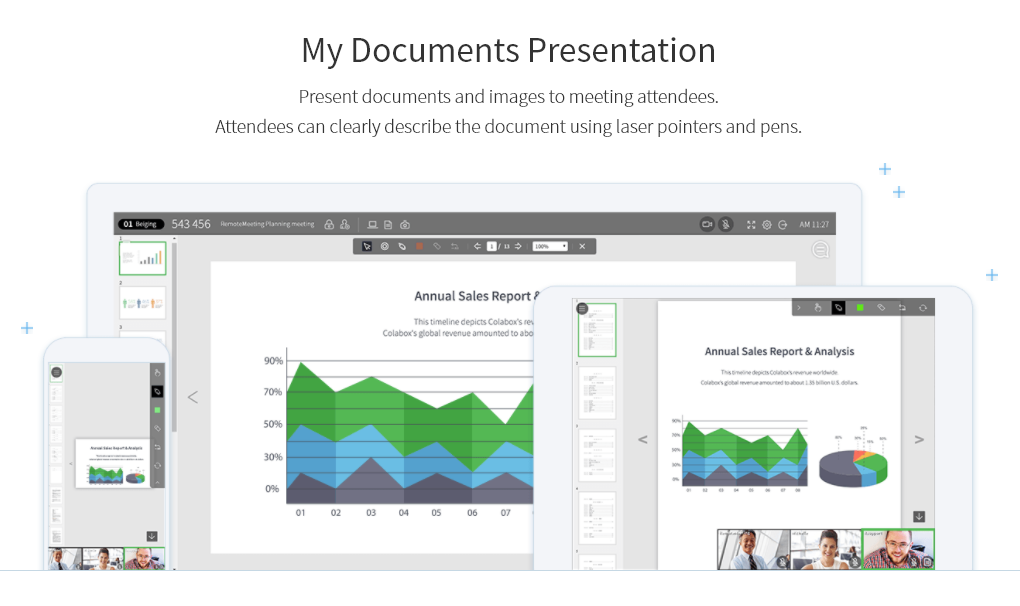
A web-based video conferencing tool. Supports mobile, browser and AI minutes. RemoteMeeting is a video conferencing solution. Use a browser to start and join video conferences. No need for a dedicated application. Present a desktop, share documents and interactively mark on them. Create automated meeting minute as record them for later review. RemoteMeeting can detect the speaker automatically and pin it in the main screen for a more immersive…
$0.20
per usage
Pricing
Microsoft Teams
RemoteMeeting
Editions & Modules
Microsoft Teams Essentials
$4.80
per month per user
Microsoft Teams Enterprise
$5.25
per month (paid yearly) per user
Microsoft Teams Enterprise
$5.25
per month per user
Microsoft 365 Business Basic
$7.20
per month per user
Microsoft 365 Business Standard
$15
per month per user
RemoteMeeting Pay-per-USE
$0.20 / min
per usage
RemoteMeeting Pay-per-USER
$17.99 / month
per user
Offerings
Pricing Offerings
Microsoft Teams
RemoteMeeting
Free Trial
Yes
Yes
Free/Freemium Version
Yes
No
Premium Consulting/Integration Services
No
No
Entry-level Setup Fee
No setup fee
No setup fee
Additional Details
Discounts are available for non profit organizations.
** Server deployment option available upon request.
More Pricing Information
Community Pulse
Microsoft Teams
RemoteMeeting
Features
Microsoft Teams
RemoteMeeting
Project Management
Comparison of Project Management features of Product A and Product B
Microsoft Teams
7.0
191 Ratings
10% below category average
RemoteMeeting
-
Ratings
Task Management
7.4146 Ratings
00 Ratings
Gantt Charts
6.175 Ratings
00 Ratings
Scheduling
6.4161 Ratings
00 Ratings
Workflow Automation
7.1100 Ratings
00 Ratings
Mobile Access
8.1183 Ratings
00 Ratings
Search
6.5168 Ratings
00 Ratings
Visual planning tools
7.3117 Ratings
00 Ratings
Communication
Comparison of Communication features of Product A and Product B
Microsoft Teams
7.8
200 Ratings
2% below category average
RemoteMeeting
-
Ratings
Chat
8.7199 Ratings
00 Ratings
Notifications
7.7198 Ratings
00 Ratings
Discussions
8.3186 Ratings
00 Ratings
Surveys
8.1111 Ratings
00 Ratings
Internal knowledgebase
8.0121 Ratings
00 Ratings
Integrates with GoToMeeting
6.547 Ratings
00 Ratings
Integrates with Gmail and Google Hangouts
5.743 Ratings
00 Ratings
Integrates with Outlook
9.1156 Ratings
00 Ratings
File Sharing & Management
Comparison of File Sharing & Management features of Product A and Product B
Microsoft Teams
7.6
185 Ratings
4% below category average
RemoteMeeting
-
Ratings
Versioning
8.2129 Ratings
00 Ratings
Video files
7.2157 Ratings
00 Ratings
Audio files
8.1159 Ratings
00 Ratings
Document collaboration
9.1172 Ratings
00 Ratings
Access control
8.5155 Ratings
00 Ratings
Advanced security features
7.0116 Ratings
00 Ratings
Integrates with Google Drive
5.353 Ratings
00 Ratings
Device sync
7.6131 Ratings
00 Ratings
Performance & Compatibility of Online Events Software
Comparison of Performance & Compatibility of Online Events Software features of Product A and Product B
Microsoft Teams
-
Ratings
RemoteMeeting
8.0
1 Ratings
1% above category average
High quality audio
00 Ratings
8.01 Ratings
High quality video
00 Ratings
8.01 Ratings
Low bandwidth requirements
00 Ratings
8.01 Ratings
Mobile support
00 Ratings
8.01 Ratings
Screen Sharing
Comparison of Screen Sharing features of Product A and Product B
Microsoft Teams
-
Ratings
RemoteMeeting
8.0
1 Ratings
1% above category average
Desktop sharing
00 Ratings
8.01 Ratings
Whiteboards
00 Ratings
8.01 Ratings
Online Meetings / Events
Comparison of Online Meetings / Events features of Product A and Product B
Microsoft Teams
-
Ratings
RemoteMeeting
8.0
1 Ratings
3% below category average
Calendar integration
00 Ratings
8.01 Ratings
Meeting initiation
00 Ratings
8.01 Ratings
Integrates with social media
00 Ratings
8.01 Ratings
Record meetings / events
00 Ratings
8.01 Ratings
Slideshows
00 Ratings
8.01 Ratings
Online Events Collaboration
Comparison of Online Events Collaboration features of Product A and Product B
Microsoft Teams
-
Ratings
RemoteMeeting
8.0
1 Ratings
2% below category average
Live chat
00 Ratings
8.01 Ratings
Audience polling
00 Ratings
8.01 Ratings
Q&A
00 Ratings
8.01 Ratings
Online Events Security
Comparison of Online Events Security features of Product A and Product B
Positive: The virtual workspace created for a work team within the same company, for the resemblance of information and communications in one place.Negative: The access for members of a non-profit organization who have external emails from the host but need the same access as an internal person since their volunteer work is part of the very core of the federation.
RemoteMeeting is a virtual conference room system that offers a simplified user experience with a modern and intuitive design and speed of just one click, it is a meeting tool that always has a room available for my team from anywhere and any device With powerful meeting modes for any occasion, it fully suits our daily virtual communication needs to connect with colleagues, customers, employees and vendors with the ease of just screen sharing with the unique and enjoyable collaboration experience.
RemoteMeeting works in an extraordinary way to initiate meetings through videoconferences in real time sharing screen audio and video provides dynamic meetings in 3D With avatar profiles that make the experience of the participants much more enjoyable.
For team collaboration RemoteMeeting has fallen like a glove, it is a platform that allows high-level business videoconferences to be carried out with security and excellent wireless connection.
The feature of notifications in the mobile application could be improved. Sometimes notifications of different teams are not visible and are only visible when the application is opened.
It uses lots of computational resources while running and thus, slows down the system sometimes.
It allows a few channels per team. The number of channels could be increased for better productivity.
RemoteMeeting is a modern and high-level video conferencing solution that provides a quality service, it is a tool where meetings are not boring, so it offers positive and satisfactory results, it provides flexible and intuitive features with solutions that fit our needs. user, ease, visually pleasing interface, safety and quality.
Microsoft Teams is included with our Office 365 subscription and we have no intention of migrating off of Office 365 and Microsoft products. Since Microsoft Teams is included for free with our Office 365 subscription, and since we enjoy all the features, benefits, and functionality, there is no question that our team will continue to use the product
User experience has been much better than the previous Skype for Business app. It has an easy-to-use interface with persistent chats. The search feature is very fast and useful. MS Teams has mostly focused on Collaboration and team building features which are very useful for organizational communications. Since Teams is accessible from multiple platforms like Laptop, Desktop, Mobile phones, etc it has been very convenient from a Mobility perspective.
Using Microsoft Teams has resulted in much faster business communications with both co-workers and consultants. There has been little need for support with this software as the interface is very intuitive and the product is overall very well designed. We did encounter an issue with the built-in phone service, however, this was quickly resolved by the support team.
Our company and IT department previously used Skype for our communication needs. Skype was not dependable in my opinion, because it seems each time I used it during a call and/or a meeting, I and several other team members would get disconnected more than once. This caused a great interruption of our meeting, caused team members to have to ask others to repeat themselves and caused a general lack of interest in employee attendance during meetings.
The results we have obtained with RemoteMeeting have been unparalleled, it is an online meeting solution that improves the way we share screen perfectly from anywhere because it provides collaboration tools for more efficient meetings from offering virtual backgrounds, face focus to automatically detect the face on the screen, separate video and information display for multiple monitors, simplicity security and speed is a perfect tool.
Honestly, this tool is worth every penny. Yes, it's not free and you pay for the quality of services and the license. But the ROI and the benefits are all there. Also, the renewal, negotiation, and contract terms are all very well explained by our Microsoft account manager, and she's a charm.
I used Skype for Business to take calls, hold conferences, and provide remote assistance to users. Microsoft Teams, on the other hand, is superior to Skype for Business in my opinion. My job entails a lot of screen sharing.
RemoteMeeting has a positive impact on my organization by offering simplified meetings that significantly increase the collaboration and productivity of my work team, offering cloud-based virtual meeting solutions that improve customer relations, reduce work time and additional costs, as well as Provide progress in projects and efficiency.
It is a video conferencing solution that improves the way we communicate with colleagues, customers, employees, partners and suppliers with a simplified experience with privacy protection, making all participants feel comfortable and safe in meetings, since we use RemoteMeeting. Work flow has increased by 15%, sales have increased and work teams develop a better relationship with each other.