AvePoint Confidence Platform vs. MSP360 Backup for M365/Google

Overview
ProductRatingMost Used ByProduct SummaryStarting Price
AvePoint Confidence Platform
Score 7.1 out of 10
N/A
The AvePoint Confidence Platform is used to transform the chaos of digital workplace technology and data into a secure, enriched, and controlled experience that improves productivity, improves decision making, and lowers cost of ownership.N/A
MSP360 Backup for M365/Google
Score 0.0 out of 10
Mid-Size Companies (51-1,000 employees)
MSP360 Backup for Microsoft 365 and Google Workspace offers cloud-to-cloud data protection and recovery. The solution boasts a simple setup and maintenance that supports all core M365/GW components.
$24
per year
Pricing
AvePoint Confidence PlatformMSP360 Backup for M365/Google
Editions & Modules
No answers on this topic
MSP360 Managed Backup for Microsoft 365 and Google Workspace
$1.10
per month per user
MSP360 Backup for Microsoft 365 and Google Workspace
$3
per month per user
MSP360 Backup for Microsoft 365 and Google Workspace
$24
per year per user
Offerings
Pricing Offerings
AvePoint Confidence PlatformMSP360 Backup for M365/Google
Free Trial
NoYes
Free/Freemium Version
NoNo
Premium Consulting/Integration Services
NoYes
Entry-level Setup FeeNo setup feeNo setup fee
Additional DetailsThere is "Cyber Starter Pack Offer" for new customers.
More Pricing Information
Best Alternatives
AvePoint Confidence PlatformMSP360 Backup for M365/Google
Small Businesses
Egnyte
Egnyte
Score 9.5 out of 10
Cove Data Protection
Score 9.8 out of 10
Medium-sized Companies
IBM InfoSphere Information Server
Score 8.0 out of 10
Druva Security Cloud
Score 9.7 out of 10
Enterprises
IBM InfoSphere Information Server
Score 8.0 out of 10
Druva Security Cloud
Score 9.7 out of 10
All AlternativesView all alternativesView all alternatives
User Testimonials
AvePoint Confidence PlatformMSP360 Backup for M365/Google
Likelihood to Recommend
AvePoint Inc.
AvePoint's Confidence Platform is very well suited for all businesses, specifically those on a budget, who are looking to secure, harden, and manage their Microsoft 365 environment. Their stack includes products to migrate data, back up data, secure and maintain data, apply custom policies around data management, and get valuable insights into how your data is being used. I cannot think of a scenario where their products would not be well suited for a company, because data management is critical.
Read full review
MSP360
No answers on this topic
Pros
AvePoint Inc.
  • Multiple backups a day
  • Able to bring own storage
  • Set and forget
Read full review
MSP360
No answers on this topic
Cons
AvePoint Inc.
  • It can be a bit tricky to set up the repositories initially.
  • Can sometimes err out with telling you why.
Read full review
MSP360
No answers on this topic
Usability
AvePoint Inc.
Overall, I think AvePoint's Confidence Platform, and specifically, their backup solution and data migration solution, are very user friendly, even for a novice. Their knowledge base for the products is extensive, and provides detailed instructions for almost everything you will be doing within their platform. They also have a very knowledgeable support staff, and their products are tailored to make your company more secure.
Read full review
MSP360
No answers on this topic
Alternatives Considered
AvePoint Inc.
AvePoint Cloud Backup for Office 365 stacks up against Datto Backupify well. Although I feel that Datto's Backupify was a bit easier to configure and setup, and process backups. Probably because I have experience with it, but overall I do feel that it is easier to use than AvePoint.
Read full review
MSP360
No answers on this topic
Return on Investment
AvePoint Inc.
  • Secure our data
  • Migrate data very Fast
Read full review
MSP360
No answers on this topic
ScreenShots

MSP360 Backup for M365/Google Screenshots
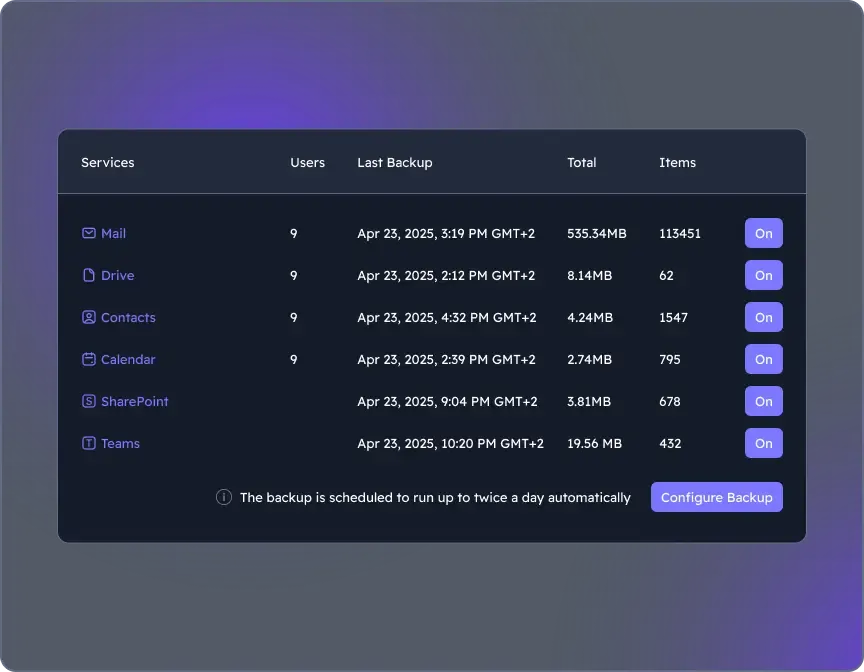
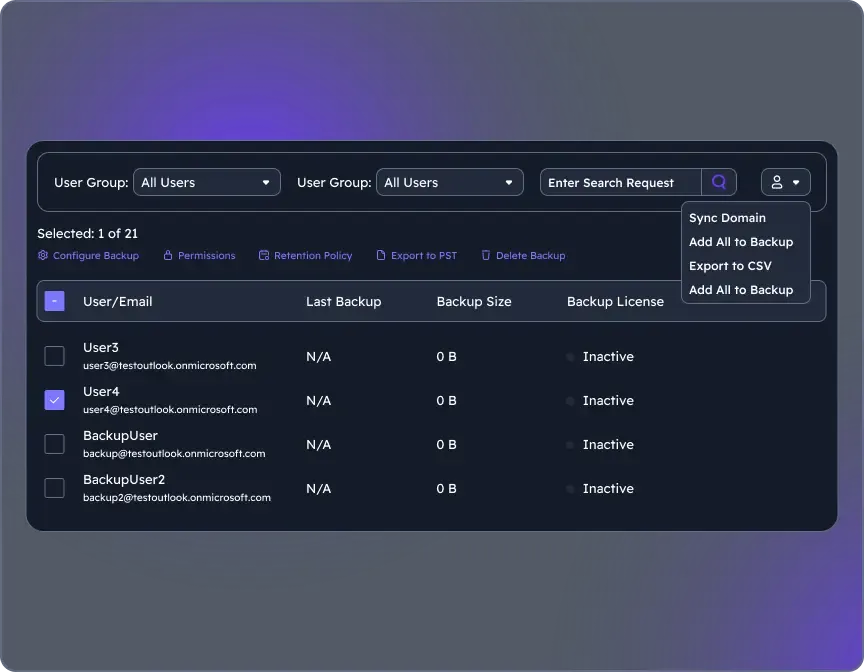
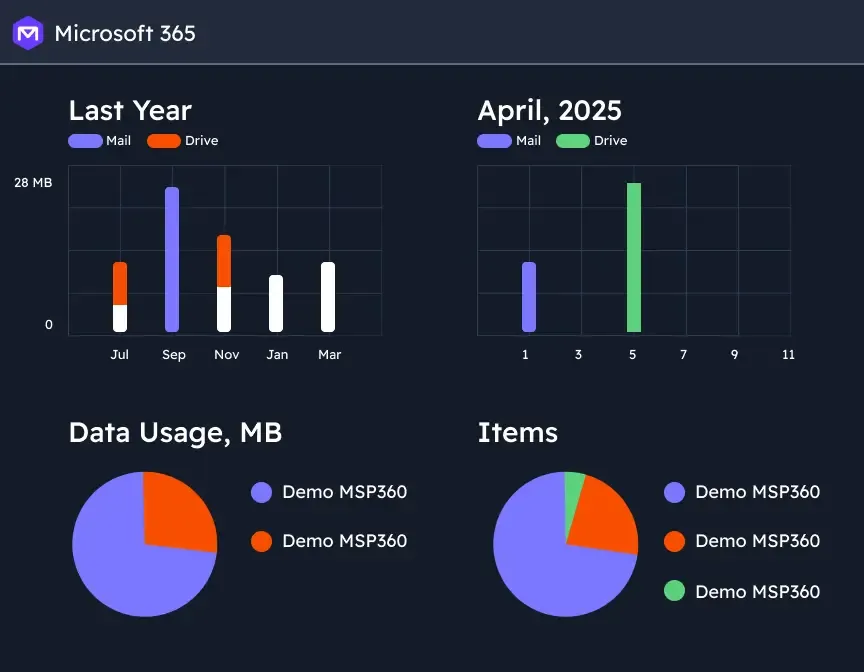
Screenshot of where to choose M365 components to back up through the Microsoft 365 Backup dashboard.Screenshot of the user management interface. To add new users/groups (Office 365 groups) to users' grid and synchronize changes for existing users, on Users click the action menu, then select Sync Domain. Users will be added to the grid automatically.Screenshot of backup reports, with insights. Backup statistics provide visibility into usage, success rates, and storage trends, supporting audit-readiness, retention optimization, and planning.