The LinkRunner AT Network AutoTester offers user-configured AutoTests for a wide range of tasks. This network tester’s cable test and switch identification facilitate problem isolation. The device is supported by netAlly after NETSCOUT divested its handheld troubleshooting devices in 2018. The LinkRunner device replaces the former and now obsolete OneTouch AT network troubleshooting technology acquired from Seattle-based Fluke Networks by NETSCOUT in 2015.
N/A
PingPlotter
Score 9.3 out of 10
N/A
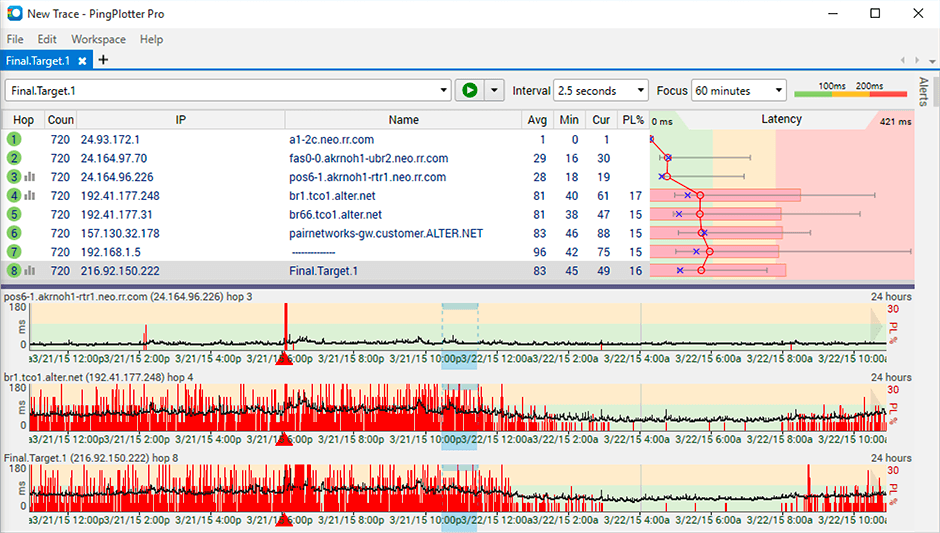
PingPlotter is a graphical traceroute and ping tool that visualizes network performance in a way that makes identifying the source of problems quicker and easier for everyone from online gamers and video streamers to VoIP admins and IT pros. Features for remote deployment, network monitoring, scripting, and a web interface are included along with several additional capabilities.
$0
per user
Pricing
LinkRunner AT Network AutoTester
PingPlotter
Editions & Modules
No answers on this topic
PingPlotter Free
$0.00
per user
PingPlotter Free
$0.00
per user
PingPlotter Standard
$6.99
per user per month
PingPlotter Professional
$29.00
per user per month
PingPlotter Standard
$39.99
per user
PingPlotter Professional
$349.00
per user
Offerings
Pricing Offerings
LinkRunner AT Network AutoTester
PingPlotter
Free Trial
No
Yes
Free/Freemium Version
No
Yes
Premium Consulting/Integration Services
No
No
Entry-level Setup Fee
No setup fee
No setup fee
Additional Details
—
—
More Pricing Information
Community Pulse
LinkRunner AT Network AutoTester
PingPlotter
Considered Both Products
LinkRunner AT Network AutoTester
Verified User
Anonymous
Chose LinkRunner AT Network AutoTester
There is little to no competition in this field. If you need to do any type of advanced network monitoring/identification (or use 10G) then you're going to own a Fluke. While Ideal does have a couple of devices that appear to be the closest competitor, the differences are …
I feel that the LinkRunner autotester is just a simple device with an extremely easy to use and understand interface. It does the job that is required without the need of a bunch of additonal bloat that is never used. I find it to be the best tester on the market.
I've tried more products that are not in the list but PingPlotter is the easiest to use and the better one so far because of the interface and function.
PingPlotter has better visualizations and a stronger ability to capture historical data than other tools I've used. This makes it easier to find the root cause by looking back in the log data to find where latency or packet loss occurred.
A balance of a generic tool vs a network equipment product is necessary when investigating network incidents or disruptions. Need to train the engineer to use both tools to perform their analysis and to dive down to the issues as fast as they can. Experience with the tools will …
PingPlotter stacks up very well to Solarwinds NPM and can provide many of the same benchmark tests that Solarwinds can. PingPlotter is most certianly much better at doing Traceroutes than NPM, and you can run a lot of the same reports.
PingPlotter is a basic version of Auvik, although it is easier to setup and there is less intrusion in the customers network. This allows us to use PingPlotter as a prospecting tool and allows to accurately gather network information very quickly. Basic troubleshooting is great …
I have tried a few free products and some paid ones but never really did what I wanted. I just needed a simple, always-on link monitor specifically with a traceroute element and this is what PingPlotter delivers. The others were either overly complex or too expensive, some just …
All network administrators would be able to find a use for this tool in their environment. It allows people from outside of the networking industry to capture data required for a quick diagnosis. Things that typically would require me to be onsite for diagnosis can now be handed to Tier 1 techs for data collection and reporting. Since moving toward cable certification, we've experienced an almost unbelievably low level of cable failure. When it does happen, though, there is no guessing. Our Fluke units tell us what the problem is and where.
The best scenario and best results are seen when the path does not reuse the same device for the "next hop". It is less well suited in situations where the path is being tricked by the re-use of devices for the next interface. This is seen required in many networks where the proper type of connection is not on an end device and the core device is used to provide a fiber to copper sort of "pass-through" connection.
Its a little confusing to see which targets are currently running pings and which ones are displayed in the plots.
Starting and stopping pings requires a right click and that would be better with a play/pause button I think.
Ability to drag and drop the graphs to reorder them.
more columns to show which targets are running and which are displayed. Currently this is done with symbols so you cant sort by just the running targets for example I've found.
The network tester is one of the easest devices I have ever used. It does have capabilities that other testers simply don't have. Being able to identify the switch port it is plugged into, the address of the switch, the switch name, along with the VLAN has helped on so many occasions
I installed it and it just started working. I realized I could then tweak it to show what I needed but didn't have to spend a long time configuring it before use, editing YAML files etc. Maybe that's fine for a network professional, but I only need this software if something goes wrong, and then need it to work quickly out of the box.
I have not had much contact with the PingPlotter support, only one time have I went to them and it was a positive experience. The questions I had were answered quickly and professionally. I have no issue with the experience I had with the Support team. This was from before and after the purchase of the product.
I feel that the LinkRunner autotester is just a simple device with an extremely easy to use and understand interface. It does the job that is required without the need of a bunch of additonal bloat that is never used. I find it to be the best tester on the market.
PingPlotter has better visualizations and a stronger ability to capture historical data than other tools I've used. This makes it easier to find the root cause by looking back in the log data to find where latency or packet loss occurred.