TrustRadius: an HG Insights company

PingPlotter

Score9.3 out of 10

32 Reviews and Ratings

What is PingPlotter?

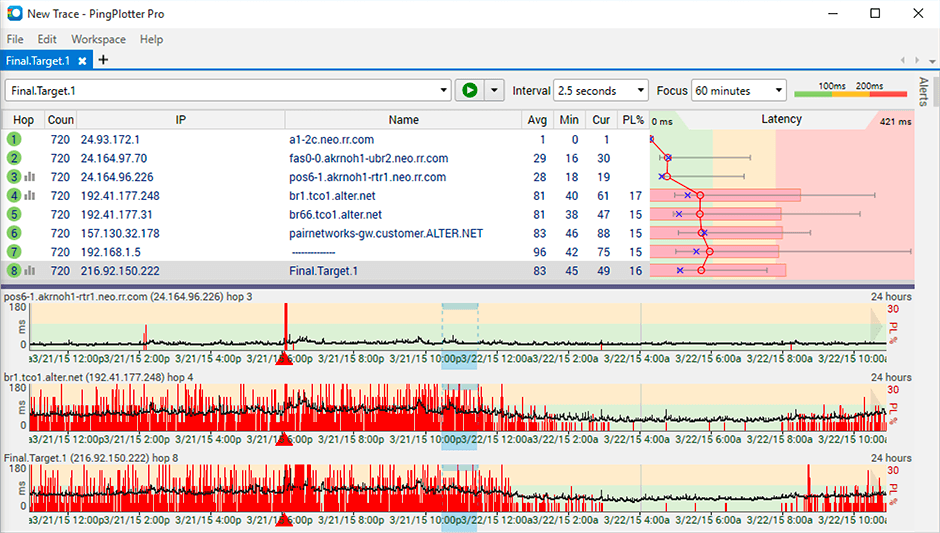
PingPlotter is a graphical traceroute and ping tool that visualizes network performance in a way that makes identifying the source of problems quicker and easier for everyone from online gamers and video streamers to VoIP admins and IT pros. Features for remote deployment, network monitoring, scripting, and a web interface are included along with several additional capabilities.

Media

PingPlotter
PingPlotter
PingPlotter

1 / 3

Top Performing Features

  • Automated network device discovery

    Automated network device discovery allows all devices in the environment to be found and tracked

    Category average: 8.3

  • Alerts

    Alerts warning of critical infrastructure component failure can be sent via email or SMS or other channel

    Category average: 9

  • Network monitoring

    Monitoring network device availability and performance indicators like bandwidth, packet loss, CPU, WAN links, etc.

    Category average: 8.9

Areas for Improvement

  • Baseline threshold calculation

    Calculation of baseline thresholds so to establish warning thresholds

    Category average: 8.3

  • Customizable reports

    Ability to schedule, generate, and deliver custom performance and availability reports

    Category average: 7.2

Who Buys & Uses PingPlotter

PingPlotter is a Great Tool.

Use Cases and Deployment Scope

I needed something to give me more insight into my network connectivity at a glance (LAN/WAN and over VPN) and this does that very well, and without a lot of set up or maintenance... Just plug in a destination to monitor and it just does it. Being able to see a long history makes it even more valuable.

Pros

  • Endpoint monitoring
  • Ping monitoring
  • Jitter monitoring
  • Charting/logging

Cons

  • The only thing that was a slight gotcha was the ability to add notes. The ability to leave notes in the timeline was not evident and I only found out about them after finding some unidentified markers. It might help if that functionality were more evident.

Return on Investment

  • Continuous monitoring has given me a way to be proactive with potential connectivity issues across the network

Usability

PingPlotter Helps Resolve Packet Loss

Use Cases and Deployment Scope

Simple to setup, nice interface and works like a charm. Overall at great tool for diagnostics and baselining a network. Help with network diagnostics is a great add for any tool. Takes the mystery out of determining what the results mean. The baseline is critical to know when your network has changed and when that started.

Pros

  • Baselining
  • Diagnostics
  • Interface is simple

Cons

  • Alerting by SMS or Email
  • consolidation of other pingplotter instances for comparison
  • submission of results for assistance

Return on Investment

  • quicker resolution time
  • tracking allowed for justification of new equipment
  • Isolation of subnet issues created focus for those networks

Usability

Alternatives Considered

Netmon

Other Software Used

Kaseya NOC Services, Syncron Inventory, Cisco 550X Series Stackable Managed Switches

Great tool for easier network diagnostics and monitoring

Use Cases and Deployment Scope

I use PingPlotter to diagnose networks and identify communication issues. It's a great tool to locate patterns and issues and evaluate network health. In large scale deployments, pinpointing a point of fault in a large multi-layered network can be a nightmare and constant monitoring tools are not that easy to come by. Thankfully PingPlotter saved the day and allowed us to have a very good overview of what's happening with the time stamps and ultimately locate the issues and faults.

Pros

  • monitoring connection health
  • locating points of fault
  • monitoring performance patterns and degradation causes

Cons

  • information filtering. PingPlotter can take it a step further by providing summaries and outliers and detecting patterns
  • further diagnostics assistance, by detecting potential faults and suggesting the potential underlying issues

Return on Investment

  • It improves the time taken to resolve the issue therefore client happier (in the simplest of terms)
  • cost saving by reducing hours needed for a task

Usability

PingPlotter early usage working well

Use Cases and Deployment Scope

I'm using PingPlotter to trace network issues when WFH. Video conferencing is unstable and I'm trying to work out where in the chain the issues are. PingPlotter is able to give me some excellent insight and I can see significant packet loss in BT servers a few hops into the journey. What to do about that is another matter, but PingPlotter is doing a great job of showing me where the issues are!

Pros

  • Simple to use
  • Decent UI
  • Quick and lightweight app

Cons

  • further explanation of the graphs would be useful. The lines are not always intuitive

Return on Investment

  • Greater productivity. Not quantified yet

Usability

Great tool to troubleshoot Work From Home connectivity issues.

Use Cases and Deployment Scope

I was having issues with a WFH (work from home) setup and used PingPlotter to track the issue to a router. PingPlotter let me see the effects of my configuration changes and showed me exactly when the problems occured so I could correlate the issues in equipment logs.

Pros

  • plots latency
  • shows connectivity route
  • timestamps

Return on Investment

  • Inexpensive tool for troubleshooting connectivity issues.

Usability