Planview AgilePlace vs. Planview ProjectPlace

Overview
ProductRatingMost Used ByProduct SummaryStarting Price
Planview AgilePlace
Score 9.9 out of 10
N/A
AgilePlace is a project management solution built around flexibility, data-driven analytics, and workflow automation. The software was acquired by Planview in December 2017 to expand that company's capabilities.
$19
per user, per month
Planview ProjectPlace
Score 8.4 out of 10
N/A
Projectplace is a collaborative work management solution. The vendor says the product is built with teams of all sizes and complexity in mind, from virtual teams of five to entire global enterprises with tens of thousands of active users. It is also designed to incorporate waterfall and agile workflows.N/A
Pricing
Planview AgilePlacePlanview ProjectPlace
Editions & Modules
Teams
$19
per user, per month
Scaled Teams
$29
per user, per month
Custom
Contact Sales for Quote
per user, per month
No answers on this topic
Offerings
Pricing Offerings
Planview AgilePlacePlanview ProjectPlace
Free Trial
YesYes
Free/Freemium Version
NoNo
Premium Consulting/Integration Services
NoNo
Entry-level Setup FeeNo setup feeNo setup fee
Additional DetailsAll editions include unlimited boards.
More Pricing Information
Community Pulse
Planview AgilePlacePlanview ProjectPlace
Considered Both Products
Planview AgilePlace
Chose Planview AgilePlace
AgilePlace is better than JIRA when it comes to ease of use and intuitiveness of the tool. Card based model and ability to customize/tailor the way you want makes AgilePlace is a great tool. Look and feel as well as colored cards, makes the board layout much more easier to …
Chose Planview AgilePlace
All these tools are different and have different uses. Depending upon SDLC your organization uses, you would use any of these tools. They all have their plusses and minuses.
Chose Planview AgilePlace
We use both tools together as they have different benefits and provide value in various ways.
Chose Planview AgilePlace
I personally much prefer AgilePlace over Jira. It is much easier to organize your work and keep track of a wide variety of different types of work.
Chose Planview AgilePlace
Another poorly designed question that forces me to choose a random response from the list of products, in order to allow me to move on in this survey.
Chose Planview AgilePlace
Much easier to use for simple projects.
Chose Planview AgilePlace
Originally, we had evaluated two other tools next to Planview LeanKit: Kanbantool and Kanbanflow. The latter was a close contestant for productive use, as it was also very customizable and a joy to work with and look at. It also had lower user fees and a mobile integration.

In …
Chose Planview AgilePlace
I use Trello a bit for personal use. It's much less powerful than LeanKit, but it's also a better design and simpler to use. ServiceNow has some kanban board stuff built-in, but I wasn't super impressed with it. JIRA seemed to be even more complex than LeanKit for the short …
Chose Planview AgilePlace
LeanKit functionality and usability make it a perfect tool for agile project management.
Chose Planview AgilePlace
LeanKit seems to be more baked and more mature. The others listed are a little more siloed.
Chose Planview AgilePlace
I think that LeanKit is very similar to Asana's Kanban feature and Trello, but is much less sleek looking than Asana. Asana's clean and sleek UI makes me enjoy project management much more than LeanKit. It might sound silly that the UI makes so much of a difference to me, but …
Chose Planview AgilePlace
Leankit was already in use when I joined the organization.
Chose Planview AgilePlace
Our company uses LeanKit, Pivotal Tracker, and Trello. It all depends on what team you're on. There's even a team that just does KanBan on a whiteboard. In the end, I would tank LeanKit above Pivotal Tracker, but below Trello. The differences are relatively subtle between …
Chose Planview AgilePlace
Both VersionOne and Trello are good products. VersionOne is for the real hardcore Agile shops who want to track and report on everything related to the Agile process. Trello is a tool that works for Agile, but really is just a simple list making/tracking tool. Both tools serve …
Chose Planview AgilePlace
[We selected LeanKit over alternatives because it is an] All in one solution.
Chose Planview AgilePlace
I have used Trello, which is not as robust for tracking and customizing workflows as
LeanKit is. It does not scale well to big teams. JIRA is the standard project management software but does not support Kanban well.
Chose Planview AgilePlace
Nearly all the other tools I evaluated against are free, so that's one area where LeanKit is not as competitive. LeanKit does allow the experience to be much more customizable, though.
Chose Planview AgilePlace
Being from QA I prefer Spiratest and QC for the fact my team can do all our work in one program and it is linked. But the tech department as a whole prefers Leankit as it is the tool of choice based on ease of use and overall performance.
Chose Planview AgilePlace
While LeanKit was not designed for project and task management, we selected it because of its collaborative nature as a project and task management platform for our marketing team. It was also selected because our engineering and product management teams were using Leankit. We …
Planview ProjectPlace
Chose Planview ProjectPlace
Though Monday.com is a great tool, but Planview ProjectPlace beats it by a fraction when it comes to ease of use and navigations. On top of that, ability to connect Projects in Planview ProjectPlace to Planview Portfolios open up whole new horizons for the Projects, like …
Chose Planview ProjectPlace
Collaboration both internally and externally is much easier or sometimes not possible with other tools
Chose Planview ProjectPlace
Notion is an open book that allows you to create whatever you want... nice but having some bumpers makes creating and implementing a solution a bit easier. ProjectPlace is simple to get started and use. You might miss out on a cool feature or two, but I think the lack of a …
Chose Planview ProjectPlace
We utilize all of these products for different use cases.
Chose Planview ProjectPlace
We use Projectplace because it is connected to Planview Portfolios. The functionalities within ProjectPlace enable collaboration with different teams.
Chose Planview ProjectPlace
Both Planview Project Place and Planview PPM Pro have their own strengths. We use both; PPMPro is our portfolio tool, while Project Place is a project delivery application.
Chose Planview ProjectPlace
Planview ProjectPlace has worked globally for our Company. We are many teams across the globe. Utilizing Project Place keeps everyone on task no matter where they are in the world. We selected ProjectPlace because of it's ease of use and functionality. To be able to see in …
Chose Planview ProjectPlace
Organization went with ProjectPlace so we followed suit.
Chose Planview ProjectPlace
Part of the enterprise solution.
Chose Planview ProjectPlace
Once everyone was trained it was easy to keep the info updated
Chose Planview ProjectPlace
Using with PPM Pro had more reporting features
Chose Planview ProjectPlace
It's better in some ways, not as good in others. I like it's ability to connect multiple workspaces together for a Team.
Chose Planview ProjectPlace
Smartsheet and Microsoft Project
Chose Planview ProjectPlace
We use both and integrate the two.
Chose Planview ProjectPlace
Reporting and Portfolio Management won out for ProjectPlace.
Chose Planview ProjectPlace
It offers a simpler alternative that's easier to manage by the less tech-savvy people. I also think that Planview Projectplace has managed to keep the product updated compared to other project management tools. Miro is perhaps the one that comes to mind, but while evaluating, …
Chose Planview ProjectPlace
I like both Trello and Planview Projectplace. I think that Planview Projectplace lends itself to being used for larger companies and more in-depth tasks. I like Trello more really because of its ease of use and user interface.
Chose Planview ProjectPlace
The ease of access and configuration helped us to go with Planview Projectplace.
Chose Planview ProjectPlace
Projectplace has many similar features in terms of conversations, document storage, and timesheet tracking. However, I think where it offers improved performance is in use of Kanban boards to promote more agile project environments over a waterfall type environment. I also …
Chose Planview ProjectPlace
I think it is fine but has been a much more difficult integration that originally anticipated.
Chose Planview ProjectPlace
Most of these others don't have many of the features that are available in Planview Projectplace. The agile methodology is in a true sense covered by Planview Projectplace, not by Asana nor Wrike. In confluence, one has to link up with Jira for full functionality, but in …
Chose Planview ProjectPlace
There are not really any other products that we have tried out because this one works for us and our team, but I am not sure if other teammates have.
Features
Planview AgilePlacePlanview ProjectPlace
Project Management
Comparison of Project Management features of Product A and Product B
Planview AgilePlace
7.4
Ratings
3% below category average
Planview ProjectPlace
7.7
Ratings
1% above category average
Task Management10.00 Ratings8.40 Ratings
Resource Management9.90 Ratings6.70 Ratings
Gantt Charts10.00 Ratings7.70 Ratings
Scheduling9.90 Ratings7.70 Ratings
Support for Agile Methodology9.30 Ratings8.70 Ratings
Support for Waterfall Methodology4.00 Ratings7.80 Ratings
Document Management6.50 Ratings8.90 Ratings
Email integration7.30 Ratings6.40 Ratings
Mobile Access2.10 Ratings7.70 Ratings
Timesheet Tracking6.40 Ratings6.00 Ratings
Change request and Case Management7.20 Ratings00 Ratings
Visual planning tools7.30 Ratings00 Ratings
Team Collaboration00 Ratings8.70 Ratings
Agile Development
Comparison of Agile Development features of Product A and Product B
Planview AgilePlace
8.8
Ratings
7% above category average
Planview ProjectPlace
-
Ratings
DevOps Tool Integrations8.10 Ratings00 Ratings
Dependencies and Blockers9.60 Ratings00 Ratings
Best Alternatives
Planview AgilePlacePlanview ProjectPlace
Small Businesses
GitLab
GitLab
Score 8.7 out of 10
Stackby
Stackby
Score 9.0 out of 10
Medium-sized Companies
GitLab
GitLab
Score 8.7 out of 10
InEight
InEight
Score 8.3 out of 10
Enterprises
GitLab
GitLab
Score 8.7 out of 10
InEight
InEight
Score 8.3 out of 10
All AlternativesView all alternativesView all alternatives
User Ratings
Planview AgilePlacePlanview ProjectPlace
Likelihood to Recommend
10.0
(0 ratings)
8.1
(0 ratings)
Likelihood to Renew
8.6
(0 ratings)
9.2
(0 ratings)
Usability
8.2
(0 ratings)
10.0
(0 ratings)
Availability
8.3
(0 ratings)
9.1
(0 ratings)
Performance
8.0
(0 ratings)
9.1
(0 ratings)
Support Rating
10.0
(0 ratings)
8.0
(0 ratings)
Implementation Rating
7.7
(0 ratings)
9.1
(0 ratings)
Configurability
7.0
(0 ratings)
6.4
(0 ratings)
Ease of integration
8.0
(0 ratings)
9.1
(0 ratings)
Product Scalability
8.0
(0 ratings)
9.1
(0 ratings)
Vendor post-sale
9.3
(0 ratings)
6.4
(0 ratings)
Vendor pre-sale
9.3
(0 ratings)
6.4
(0 ratings)
User Testimonials
Planview AgilePlacePlanview ProjectPlace
Likelihood to Recommend
AgilePlace is a great way for teams, or individuals, to bring visibility to the work in process and in their backlog. The color coding and icon use helps to quickly analyze the type of work or status of the work. The product team is doing a good job at listening to their user's feedback and implementing improvements. Where it falls short is when reporting needs to occur.
Read full review
Planview ProjectPlace is a vibrant platform that manages all activities and schedules different roles based on their urgency, importance, and requests. Further, Planview ProjectPlace outlines the need for proper documentation with the aim of accurate referencing. Tasks are credibly shared, and proper reporting is enhanced to transform firms' work environment. ; Lastly, Planview ProjectPlace brings sustainable email integration for enterprises.
Read full review
Pros
  • Okta Integration: We love using SSO for all our SaaS apps, and as new team members join, they can be automatically joined to the appropriate LeanKit boards.
  • Filtering and viewing: Can filter and refine by several fields as well as custom fields. Assigned Users, Tagged, Card Type, Date, etc
  • Their analytics and reporting can be helpful for PMs, especially if they have several teams they oversee.
Read full review
  • Easy of use. Modules are well define.
  • Navigation: Users can use the tool's search functionality to find what they are looking for easily. The home page is configurable to the users' needs.
  • The knowledge center is a key function to understand the tool capabilities.
Read full review
Cons
  • The formatting of what they call "cards" could be better. They can be clunky if you have a lot of text in just one.
  • Needs better support for media, attachments.
  • Not the most pretty interface in my opinion, though it works.
Read full review
  • Under the time tracking, it would be nice to have a set template that would load each week and not have to click a button to load the previous week's template.
  • Somehow making it more intuitive.
  • Having to add in each service line and each detail that I cover for every service line each week is a bit ridiculous.
Read full review
Likelihood to Renew
we are happy with the tool and the service and continuos improvement of the tool so there is no need yet to change to another one.
Read full review
I have loved using Projectplace the last few years, however with recent budget issues, we likely need to cut costs in this area, and Projectplace is on the higher price point for project management platforms. There are also a lot of features in Projectplace that our team doesn't utilize/doesn't apply to our workflow needs.
Read full review
Usability
LeanKit isn't the best designed Kanban system I've seen, but overall it's pretty usable. The boards I've used are pretty complex, so it can be difficult to find things. I found that searching and filtering for specific cards was somewhat of a challenge. Dragging a card from one lane to another is kind of a fun way to get things done though.
Read full review
Easy to use platform and provides the user with an amazing experience and straightforward tools that empower and help execute tasks with fast performances that allow quick and easy service delivery. Easy on implementation and get started immediately with enterprise-ready Planview Projectplace and start to connect with teams and departments at once.
Read full review
Reliability and Availability
Not experienced any outage
Read full review
No downtime-issues since the implementation. It has been very stable
Read full review
Performance
Larger boards take longer to load
Read full review
No answers on this topic
Support Rating
Every time I have reached out to the AgilePlace support team I have received a timely response in addition to professional & personal feedback. Their consultants are knowledgeable and the management team is happy to jump in and help when needed.
Read full review
I do not think Planview Projectplace is as polished and refined as other project management tools, nor is it as simple and easy to use as other free tools. Integration with the tools we required was difficult to impossible with our staff and toolset. The overall design seemed dated, and we preferred the look and feel of Jira.
Read full review
Implementation Rating
Very easy.
Read full review
create an extensive change management process to help folks embrace the change
Read full review
Alternatives Considered
Originally, we had evaluated two other tools next to Planview LeanKit: Kanbantool and Kanbanflow. The latter was a close contestant for productive use, as it was also very customizable and a joy to work with and look at. It also had lower user fees and a mobile integration. In the end, we picked Planview LeanKit because of several reasons: Aesthetics: The look was much more clean and professional. Reporting: It was obvious from the start that we could use Planview LeanKit as a tool for improvement. API: We needed to integrate the Kanban into our central systems and Planview LeanKit API was (and still is) a way to do it. Card Headers: This sounds like a simple thing, but the headers above the titles fit our work perfectly and looked perfect, which helped the decision.
Read full review
It offers a simpler alternative that's easier to manage by the less tech-savvy people. I also think that Planview Projectplace has managed to keep the product updated compared to other project management tools. Miro is perhaps the one that comes to mind, but while evaluating, we saw fewer issues with Planview Projectplace. Overall, the decision came down to the project manager, that had previous experience and recommended the product. For me, using a product from a smaller company is better because I know that there will be a focus on improving it, unlike, for example, Microsoft products that can be discontinued at any moment.
Read full review
Scalability
Good use cases for small/large teams
Read full review
It is a bit more difficult to fluently use in large scale implementations
Read full review
Return on Investment
  • Our team meetings are more direct and quick to get through thanks to the better visibility of the workload
  • Easily being able to move cards between team lanes gives instant visibility to where the responsibility for the next step is needed.
Read full review
  • [We have the] ability to support remote work through projects that scale across multiple groups
  • We have large-scale quarterly projects, so the ability to save and duplicate project templates are helpful for us to keep track of tasks down to the specific card

Read full review
ScreenShots

Planview AgilePlace Screenshots

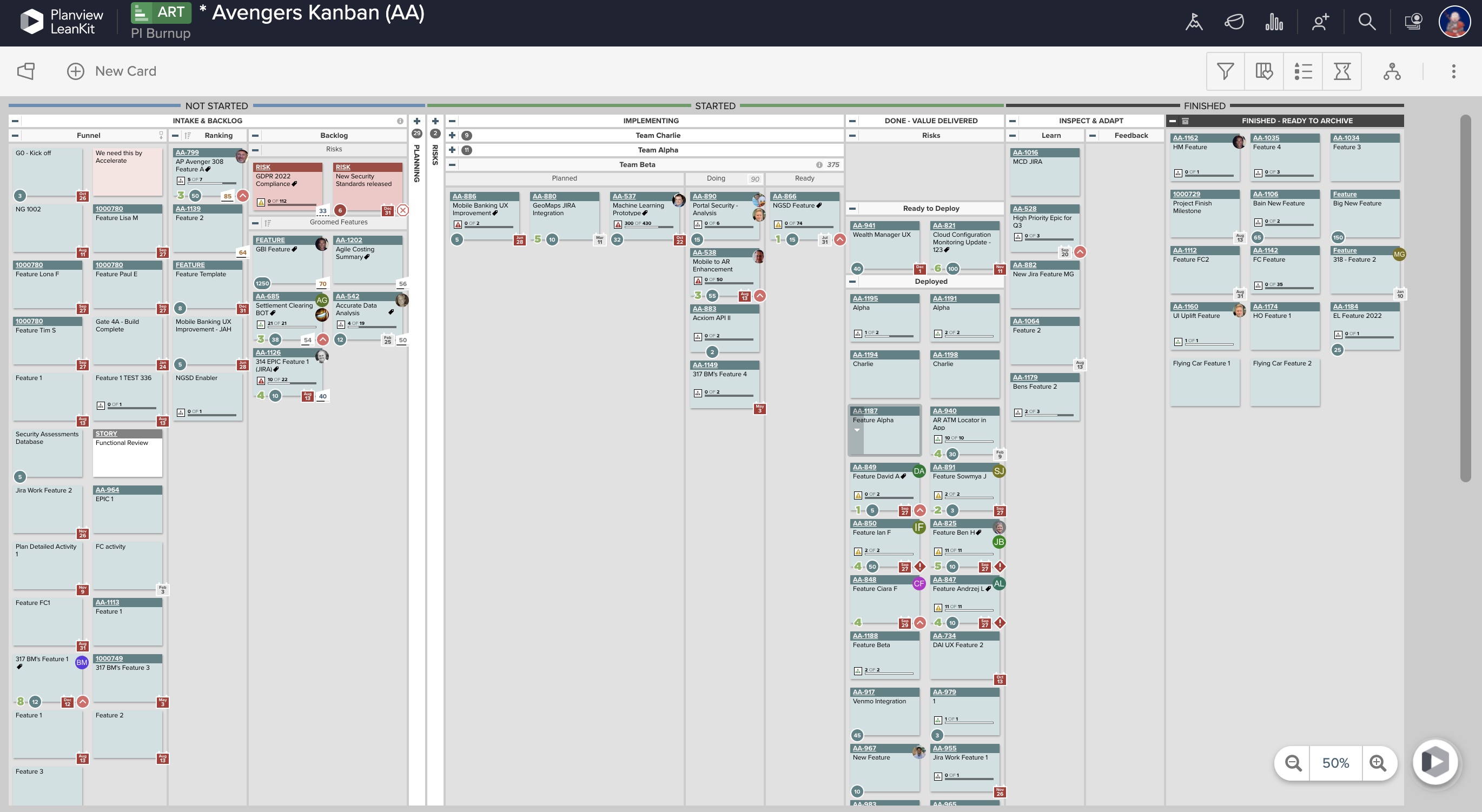
Screenshot of Real-Time Analytics: Utilize board health metrics involving bottlenecks, WIP, and throughput to guide the optimization of workflows, improve velocity, and better prioritize efforts for more predictable delivery. Lean and Agile metrics can be used to assess team performance and promote continuous improvement.Screenshot of PI Planning: Offers enterprise Kanban boards to visualize the work of teams regardless of the methodologies they apply or workflows they follow, and insights into progress and create opportunities for better alignment.Screenshot of Dependency Visualization and Management: Surfaces risks to plans resulting from cross-team dependency conflicts, blockers, and capacity constraints, and helps drive proactive measures to enable teams to deliver on time.Screenshot of Team Planning and Coordination: Boards can be used to breakdown work, build and manage plans, and execute against strategy to deliver more value to customers, faster.

Planview ProjectPlace Screenshots

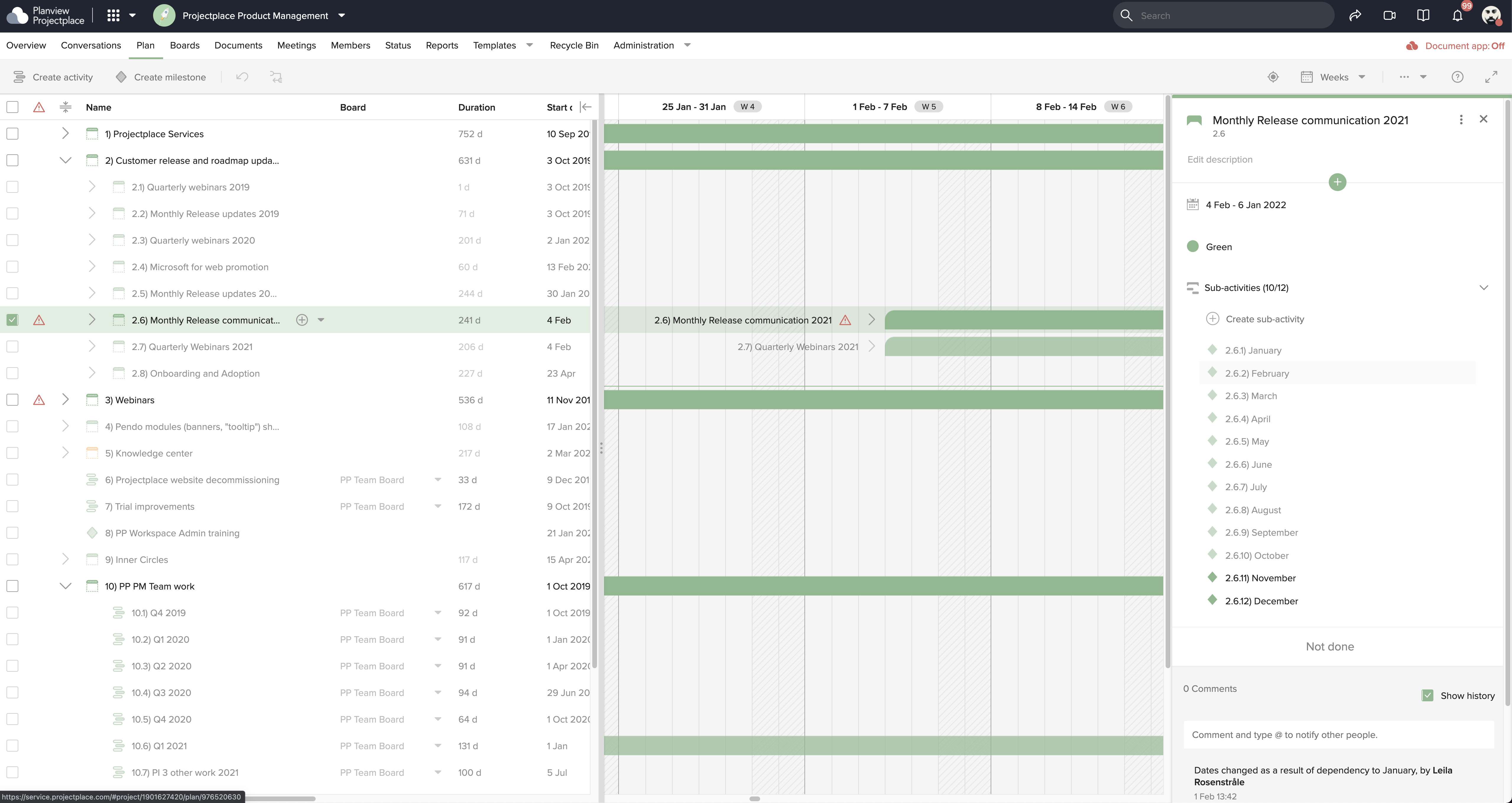
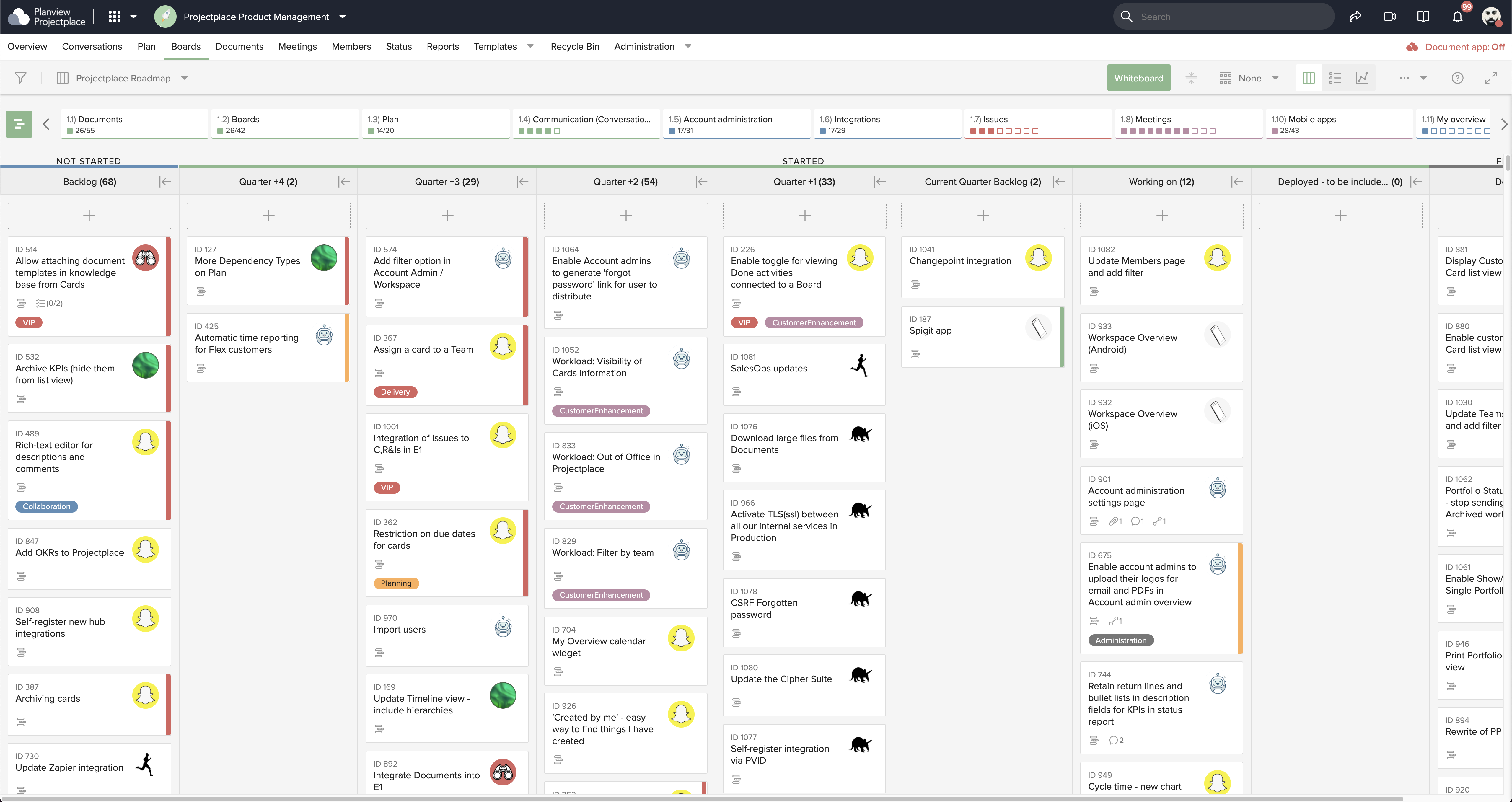
Screenshot of Collaborative Workstream: Streamlined interaction between activities, boards and cards. Users can plan and follow up in the Gantt while their teams execute and collaborate for optimum productivity on the Kanban boards.Screenshot of Document Management: This helps to ensure changes to documents are visible in real-time. Version control ensures that team members see the latest document versions with access to document history.Screenshot of Gantt Charts: These support planning and visualizing every step of enterprise work and projects with Projectplace Gantt Charts. Track progress to make sure you'll meet your deadlines and know when things are not happening on time.Screenshot of Kanban Boards: This enables teams to execute and collaborate for optimum productivity, and includes activity notifications, messaging and visualizations of progress of day-to-day tasks.Screenshot of Workload View: A visualization of the workload of members in all workspaces, used to determine whether a team member is overloaded with work, or has room to do more.Screenshot of Workspace Overview: This offers an overview of all work and tasks that have been assigned across all workspaces. Personal tasks can be added that help offer a more complete picture of what's left to do.