Planview ChangePoint vs. Workday Professional Services Automation

Overview
ProductRatingMost Used ByProduct SummaryStarting Price
Planview ChangePoint
Score 7.5 out of 10
N/A
Planview Changepoint is a platform that marries professional services automation (PSA), project portfolio management (PPM) and business analytics to provide managers broad operational visibility and control over their strategic business portfolios.N/A
Workday Professional Services Automation
Score 9.0 out of 10
N/A
Workday Professional Services Automation automates the Opportunity to Cash process, connecting HCM and ERP data to match the right talent to projects, reducing manual errors and revenue leakage.N/A
Pricing
Planview ChangePointWorkday Professional Services Automation
Editions & Modules
No answers on this topic
Offerings
Pricing Offerings
Planview ChangePointWorkday Professional Services Automation
Free Trial
NoNo
Free/Freemium Version
NoNo
Premium Consulting/Integration Services
NoNo
Entry-level Setup FeeNo setup feeNo setup fee
Additional Details
More Pricing Information
Community Pulse
Planview ChangePointWorkday Professional Services Automation
Considered Both Products
Planview ChangePoint
Chose Planview ChangePoint
Planview Changepoint helps us to understand our key customers enabling us to capitalize on every financial opportunity and helps us to forecast demand against the capacities required for new opportunities, and also it automates and monitors contractual terms and conditions. It …
Chose Planview ChangePoint
Financial Force - in 2016, was not suitable for our business.
Open Air - in 2016, was not mobile and had not been managed well after the acquisition.
Chose Planview ChangePoint
Changepoint was selected for its cost and what it can do. I was not involved in the decision to purchase Changepoint, but it appears to be a good decision.
Chose Planview ChangePoint
The system predates me as I was not working for the company when the solution was chosen - I understand this may have been an 'overpromise, underdeliver' scenario. However, we are now moving towards replacing it with Supportworks - and having seen Supportworks in action I …
Chose Planview ChangePoint
We believed that Changepoint matched up well, had better support and provided a better pricing structure that worked better for our budget constraints over time. The team was willing to work with us on the design of the tool for our needs and it wasn't going to break the bank …
Chose Planview ChangePoint
I have not used any other similar products so I cannot compare them. Changepoint was selected before I joined the company.
Chose Planview ChangePoint
We selected Changepoint as our PPM tool over ten years ago. We made this selection based upon their 'completeness of vision' and allowing us to develop our PMO processes with a single footprint. Changepoint has been very successful with product enhancements and maintains their …
Chose Planview ChangePoint
n/a to me, we used to use spread sheets and a sharepoint site to house all the project related information and documents before we went to Changepoint.
Workday Professional Services Automation
Chose Workday Professional Services Automation
The user interface on Workday is much better designed and much more intuitive than Salesforce. There isn't a wide collage of different sections that confuse you on what to do. There are listed actions in the form of buttons that accurately describes what you can do. Salesforce, …
Chose Workday Professional Services Automation
Workday Professional Services Automation is a happy medium between the other competitors. It is just enough to help you run your business, but simple to use that even smaller businesses can take advantage without a huge and taxing price tag. Its expandable and has been very …
Chose Workday Professional Services Automation
I liked using workday, but I'm sure there are limitations. I currently use ADP Total Source and it offers a lot of the same benefits, but also has an app and feeds directly into tax programs to add in your tax information.
Chose Workday Professional Services Automation
Workday Professional Services Automation is an effective and stable project management product with all the necessary capabilities for successful marketing and development projects easy management, resource planning, and effective for all data size analytics generation. The …
Chose Workday Professional Services Automation
Workday Professional Service Automation brings people, financials, billing, and operational data into one single system and empowers one to configure and modify processes to fit the changing needs with no coding required and lets you continue creating plans, executing them, and …
Chose Workday Professional Services Automation
These other applications I used in my opinion are lower rated than Workday. Workday works very very well and even better than the other applications mentioned. Has way more variety of service, is faster and updated technology wise and works very well with large companies.
Chose Workday Professional Services Automation
Workday is quite different from ADP Totalsource. I think it is more extensive and can be tailored to individual company’s needs (more customizable, to an extent) whereas ADP Totalsource is better for a small company that wants more hands on help and extra services and benefits. …
Chose Workday Professional Services Automation
I did not evaluate the purchase of Workday software. We use ADP for clocking in and out, to see our timecards, and our tax forms are also through ADP. We use Chrome River for our expense reporting. We use Workday to request time off and have visibility into our PTO and …
Chose Workday Professional Services Automation
I much prefer a workday! Love the UI and the functionality. ADP was quite frankly a nightmare and Peoplesoft took some definite getting used to.
Chose Workday Professional Services Automation
ODOT uses Workday Professional Services Automation and it allows employees to have access to their information whenever they need it. It allows you to create a profile and submit any address or phone number changes so HR has access to the most accurate and updated information.
Chose Workday Professional Services Automation
I was not on the selection team for Workday Profession Services Automation; it was the HR system used by our parent company. However, I have had several opportunities to work with Workday in other HR roles, and have also worked extensively with Oracle products. Workday …
Chose Workday Professional Services Automation
I have used internal applications in the past that were hard to manage and not user-friendly. Workday Professional Services Automation application is far better. It is more professional and reliable.
Best Alternatives
Planview ChangePointWorkday Professional Services Automation
Small Businesses
HaloPSA
HaloPSA
Score 9.2 out of 10
HaloPSA
HaloPSA
Score 9.2 out of 10
Medium-sized Companies
Planview AdaptiveWork
Score 7.4 out of 10
Planview AdaptiveWork
Score 7.4 out of 10
Enterprises
Planview AdaptiveWork
Score 7.4 out of 10
Planview AdaptiveWork
Score 7.4 out of 10
All AlternativesView all alternativesView all alternatives
User Ratings
Planview ChangePointWorkday Professional Services Automation
Likelihood to Recommend
7.5
(0 ratings)
8.2
(0 ratings)
Likelihood to Renew
7.6
(0 ratings)
-
(0 ratings)
Usability
8.0
(0 ratings)
6.0
(0 ratings)
Support Rating
-
(0 ratings)
5.0
(0 ratings)
User Testimonials
Planview ChangePointWorkday Professional Services Automation
Likelihood to Recommend
Changepoint is well-suited for consulting firms and other companies that charge clients for their time and have a need for significant project-management capabilities along with reporting and invoicing. It is not well-suited for companies that want a more basic solution to time reporting and expense reimbursement. The key questions to ask during the selection process revolve around this basic question: how are you going to use this software? Though it has a lot of functionality, the learning curve is steep and basic functionality is not as easy as one would expect.
Read full review
Workday Professional Services Automation is a great product for large companies that have standardized, repetitive processes. The ability to automate tactical HR tasks is essential for business productivity, and Workday Professional Services Automation delivers well in this area. However, when a non-standardized process occurs, it is difficult to modify the system in a way that doesn't create confusion for the end-user, resulting in a less than desirable HR experience. For example, when my small company was acquired, our parent business utilized the software for transferring employees from the acquired business to the parent business to ensure they could sign up for health benefits, payroll, etc on Day 1; but, because every form is interrelated, the in-house Workday team was either unable or unwilling to change their workday "standard" fields for offer letters. As VP of HR for the acquired team, I had to meet one-off with each acquired employee to reassure them that certain clauses in the standard offer letter would not apply, explain why their personal email addresses were being used instead of their business ones, and assure them that they were being fully vested/transferred employees and were not considered "new employees" like the offer letter stated, etc.
Read full review
Pros
  • There are lots of reporting options. Once you figure out how to work the parameters of a report, the system is able to provide detailed and accurate compilations of data. There are also many custom reports than can be setup, as well. In my experience, we have told Changepoint PSA administrators what kind of report we were needed and they set it up for us, available in a 'custom reports' folder.
  • You can have several things open at once -- 'portals'. These are up at the top of the screen, much like how Google Chrome has tabs at the top. This is useful.
Read full review
  • Keeps all of your personal information safe and private
  • Has all the documents needed for the time being with the company
  • Has extra important information about the company for your knowledge
Read full review
Cons
  • The site could become slow with high volumes of traffic. This may have been due to the way that our infrastructure was setup.
  • Analytic reporting was not available in the version that we used. We created external reports to slice and dice the data and view it as the business demanded.
Read full review
  • Would like to be able to use it for clocking in and out
  • The dashboard user interface could be improved to include more pertinent information
  • Would be nice to hide features that we use other applications for (i.e. org chart, pay, expenses)
Read full review
Likelihood to Renew
Sometimes the decision to renew boils down to an old adage "if it isn't broken don't fix it". Previous to moving to Changepoint, it was obvious that we needed a better project management tool. Projects we completed on time but the time zone difference between the teams and several iterations of back and forth caused a number of communication issues with projects. The difference is night and day.
Read full review
No answers on this topic
Usability
It could be more intuitive and user friendly.
Read full review
Its getting more streamlined with update but still has many tools that are unexplained/ not defined well
Read full review
Support Rating
No answers on this topic
With workday support options, I would like to see a more immediately responsive response option. Possibly a chat or a responsive email response team would be helpful.
Read full review
Alternatives Considered
The system predates me as I was not working for the company when the solution was chosen - I understand this may have been an 'overpromise, underdeliver' scenario. However, we are now moving towards replacing it with Supportworks - and having seen Supportworks in action I genuinely cannot wait to switch from Changepoint and move on...
Read full review
Workday Professional Services Automation is a happy medium between the other competitors. It is just enough to help you run your business, but simple to use that even smaller businesses can take advantage without a huge and taxing price tag. Its expandable and has been very well received at the companies I've worked at that use it.
Read full review
Return on Investment
  • Our ability to maintain a global IS Scorecard helped us to maintain a focus on completing projects on time and within budget.
  • Having a single instance of Changepoint with projects aligned to specific portfolios helps senior management to maintain a focus on the investment of IS resources. It is foundational to our governance processes.

Read full review
  • While I don't use the program at a high-level I can see the time-saving effectiveness for administrators.
  • By giving a self-serve interface I feel in control of my pay/benefit management.
  • Less time spent on HR administration frees up bandwidth for helping colleagues.
Read full review
ScreenShots

Planview ChangePoint Screenshots

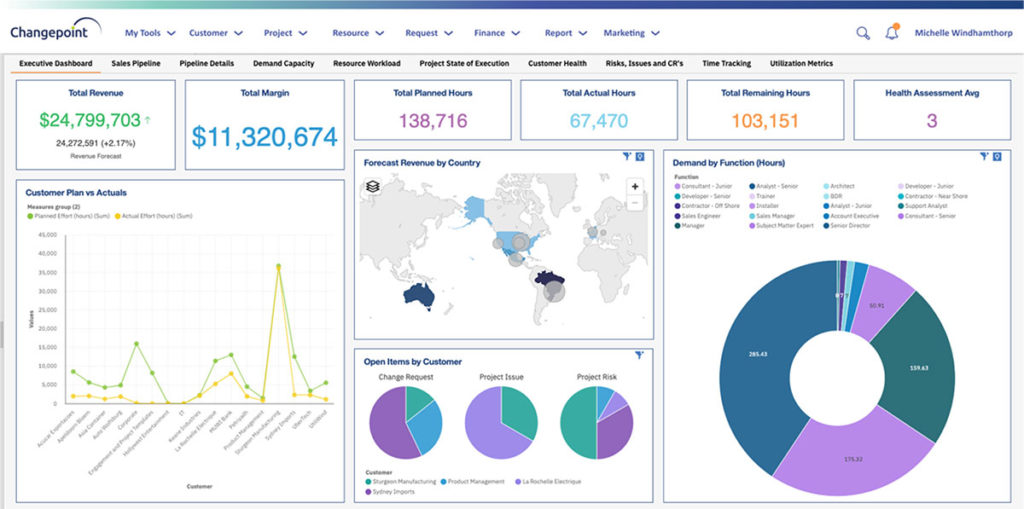
Screenshot of End-to-end view to drive financially successful customer-facing projects.Screenshot of A flexible approach to tracking elaborate contractual terms and conditions.Screenshot of Quote-to-cash success with structured processes.Screenshot of Build project rigor and standardization for services delivery.Screenshot of Improve resource utilization on the work that best meets the needs of customers.Screenshot of Ensure process adherence to drive financial success.

Workday Professional Services Automation Screenshots

Screenshot of Workday Professional Services Automation Create QuoteScreenshot of Workday Professional Services Automation CRM DashboardScreenshot of Workday Professional Services Automation Opportunity DashboardScreenshot of Workday Professional Services Automation Services Catalog