QuickBooks Online is a SaaS version of the QuickBooks product. It contains all of the features found in the local version. Higher-priced plans include greater automation, payment management, inventory and time tracking, and analytics features.
$38
per month
Spreadsheet Server
Score 9.4 out of 10
N/A
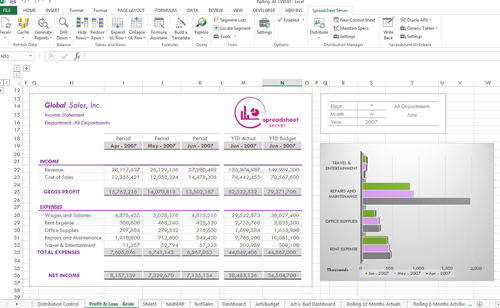
The Spreadsheet Server platform is designed to work as a Microsoft add-in to provide live reporting data and analysis from the user’s ERP solution into Excel. The vendor aims to help users eliminate the hassle of re-keying or downloading any data into spreadsheets make that spreadsheet an integral part of their business environment.
N/A
Pricing
QuickBooks Online
Spreadsheet Server
Editions & Modules
Simple Start
$38
per month
Essentials
$75
per month
Plus
$115
per month
Advanced
$275
per month
No answers on this topic
Offerings
Pricing Offerings
QuickBooks Online
Spreadsheet Server
Free Trial
Yes
No
Free/Freemium Version
No
No
Premium Consulting/Integration Services
No
No
Entry-level Setup Fee
No setup fee
No setup fee
Additional Details
—
Prices can be different for any company interested in Spreadsheet Server depending on size and who should be involved. Feel free to contact us for a free demo to see if it is the right reporting tool for you.
More Pricing Information
Community Pulse
QuickBooks Online
Spreadsheet Server
Considered Both Products
QuickBooks Online
Verified User
Anonymous
Chose QuickBooks Online
I think of the two products this has less hassle as it is pretty straight forward and streamlined. Unfortunately, as much as we use the payroll version I cannot give that product the same raving reviews as QuickBooks Online. I really wish Payroll was not as complicated as it …
We use QuickBooks Online since it is user friendly and it has the ability to accommodate small businesses with more complex accounting needs. Price is not that expensive although the users that you can add are limited, if we need to add a user we need to remove the other users.
QBO works much better for our needs and our business. Netsuite had a few too many layers for our business, it was a little harder to use. QBO makes everything simple you don't need to be an accountant to use it. We are happy with the product and will most likely continue to …
Melio was a little easier to use, but could be clunky while syncing to QB, and also got expensive as they added charges for every transaction as well as syncing.
As an accountant, QuickBooks Online uses the language I learned in school and throughout my career. Xero tries to simplify it, while actually making it more difficult to understand.
I truly hated Sage as a bookkeeper. I know that accountants don't have the same experience, but from a day to day perspective, it was not user friendly.
Easier to use and setup. More accountants are familiar with it so that also made the selection easier. Other software was also more expensive and had features that we weren't going to utilize at our current growth stage.
I have to use SAP for billing with some clients, and I think Ariba is much less intuitive, and the interface/GUI is much less modern and appealing. The fact that the client needs to send a PDF "user guide" says a lot to me about how counter-intuitive a lot of the features in …
I think QuickBooks Online is better than Xero. However I think is is lower then NetSuite and Sage Intacct. The system isself is great because it's cloud based so it can be accessed readily. However, in my opinion, it's not built for companies that are growing or expect to grow. …
QuickBooks Online is by far the easiest and fastest accounting management platform that I have used, especially compared to any industry specific tools like Sage, Foundation, Northstar, etc. I like how user friendly it is, the visual is great, and it can fit for a wise array of …
They are expensive and always have freezing issues and duplicating entries and no one available to address issues. To change the way you use the sites it takes time to update and its too jumpy and makes annoying issues. These effect the whole company and can take a lot of time …
User friendly for smaller communities. The cost seems to be reasonable for smaller communities. Support is helpful, and trainings provided online are helpful.
Unfortunately, in my opinion, QuickBooks Online is not anywhere cloase to coupa or Blackline in terms of functionality. Both platforms are head and shoulders above where i understand QuickBooks Online to be currently. Specifically in relation to task automation and more …
As I've mentioned, there aren't a lot of similar products, and certainly not with all the capability of QuickBooks Online. In my opinion, they nickel and dime for everything but they also do work pretty well across the board. I think the reconciliation process is also by far …
Previously, we used Vista's Financial Manager for our financial reporting needs. It was not user-friendly and required many hours of training to get the most out of the reporting system. Very little training needed for Spreadsheet Server. If you know Excel, you can figure it …
Vista did not offer reporting that met our needs. We were not able to easily customize the standard reports to fit our company needs. We are able to create different reports depending on management's needs and level. It is easy to create reports for auditors as well in …
I appreciate the ability to auto-generate invoices for recurring transactions, which saves time, as well as the option to set up auto-generated transactions. The report option is super helpful when reviewing information, as you can click to view the details in the report without having to go back and forth.
Spreadsheet Server eliminates the need for custom reports from an outside provider in Vista that can be manipulated and customized to your company. It is easy to use and customize for a user who is familiar with Excel. There is no need to dump data out of your ERP system in order to create reports.
Purchase Orders cannot be linked to multiple bill payments which makes tracking purchase orders in QuickBooks Online obsolete. Without the function we have to track this within a different more manual spreadsheet.
Would be helpful if you could "split" bank transactions directly from the "review" downloads from the bank. Currently, to split transactions to multiple accounts we need to first categorize, then review after assigning to 1 account.
The only issue that we came across, is that not all of our companies have the same financial structure as each other. So the GLs we use for one report, would not necessarily work for all the other companies. We did not want to create separate reports for each company either. We did find a workaround in that we created a lookup tab with GLs to use for each category for each company, then used v-lookup to pull those GLs over. This workaround worked great, but it would have been nice to have something built in to cover this.
QBO needs better integration with non-Intuit products and developers need to use Intuit's open API to develop better add-ons. Clients are having a great deal of problems with their data importing from the bank and this takes time away from better revenue producing activities. Although the efficiencies are there, they are outweighted by the shortcomings of the product. When we ran a parallel of QBO versus other cloud accounting products, we had more issues with the QBO product than any other
I had very little trouble setting up the program and migrating from our old accounting system. The daily usage is also very intuitive and easy. Anytime we run into minor trouble with the program, there are always tons of help available on YouTube, so we don't even look up the online manual anymore.
In my experience, most representatives keep me on the phone for hours, literally, for a single issue and then usually cannot resolve it satisfactorily. I have 10 open cases that need resolution and, in my experience, there has been NO follow-up communication on any of them.
The person in charge of QB needs to be very accurate with record keeping and is recommended to stay on top of tasks. The biggest issue we have is reconciliation, and those issues occur only when too much time has occurred between reconciliations
QuickBooks Online is an accounting software package that allows companies to use a cost-effective and efficient software package. QuickBooks Online allows companies to prepare their balance sheets and income statements. It connects with a variety of other applications, which allows you to be efficient. We are very pleased with QuickBooks Online, and we would highly recommend it.
Previously, we used Vista's Financial Manager for our financial reporting needs. It was not user-friendly and required many hours of training to get the most out of the reporting system. Very little training needed for Spreadsheet Server. If you know Excel, you can figure it out.
As we have grown along our professional path, we have also expanded our use of QB. The scalability is easy and features seem to be waiting for you until you need them. We have increased profits by over 10x from our first year in business to the current and have yet to find a reason to look elsewhere
I think the help function is cumbersome and hard to use. When I go to refresh myself on a function, say quarterly, I feel like I have to cast about just looking for it.
The account reconciliation works, but in this place that could benefit from messaging, there are no easy helping functions flagging things like amounts that fit the discrepancy.
Even styling invoices and documents is more cumbersome than it should be.