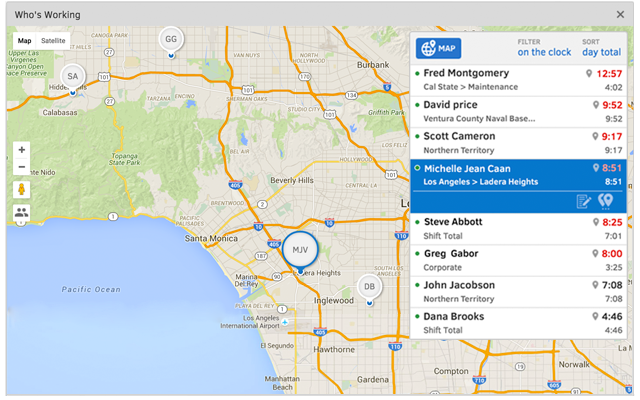
QuickBooks Time (formerly TSheets) is a cloud-based time tracking and scheduling app that allows employees to clock in and out from the job site with the devices they’ve already got in their pockets. The vendor aims to help companies replace paper timesheets with accurate, electronic time data as well as make payroll and invoicing faster and less costly. QuickBooks Time also accurately tracks time and GPS points (even without cell or internet service) then automatically syncs when back…
$0
1 user, unlimited projects
Time Doctor
Score 8.8 out of 10
N/A
Time Doctor offers in-depth productivity analytics, giving business owners insight on how to improve performance and scale. Going beyond tracking and monitoring, Time Doctor’s suite of tools put data-driven improvement front and center, helping to ensure that teams of all sizes are actively working on the right things while also offering actionable insights to maximize performance and efficiency. Time Doctor tracks the collective hours a team puts in. But it also provides a…
$7
per month per user
Pricing
QuickBooks Time
Time Doctor
Editions & Modules
Free
$0
1 user, unlimited projects
Premium
$8
per user/month + $20 base fee/month (paid annually)
Elite
$10
per user/month + $40 base fee/month (paid annually)
It's easy and it integrated with QuickBooks. Plus, when we began evaluation, the customer service team went above and beyond to make sure we had all the information we needed. Emily spent more than 2 hours on the phone with us making sure all our questions were answered.
It would be very useful for certain remote jobs that require a high level of presence, as in the case of web development, or remote maintenance sessions, so that when reviewing the work data it is possible to ensure that there will be no failures. By being able to include files in the management, from the equipment tab, it is possible to fully control the hours in which each change in these files were made.
Time Doctor is great if you need to time how long you spend on different projects throughout the day. I am editing multiple books at once and I need to keep track of how long I spend on each one. It is not worth it if you don't need to keep track of how long you spend on a large project. I find it too cumbersome to time individual tasks and not useful enough to time just one project.
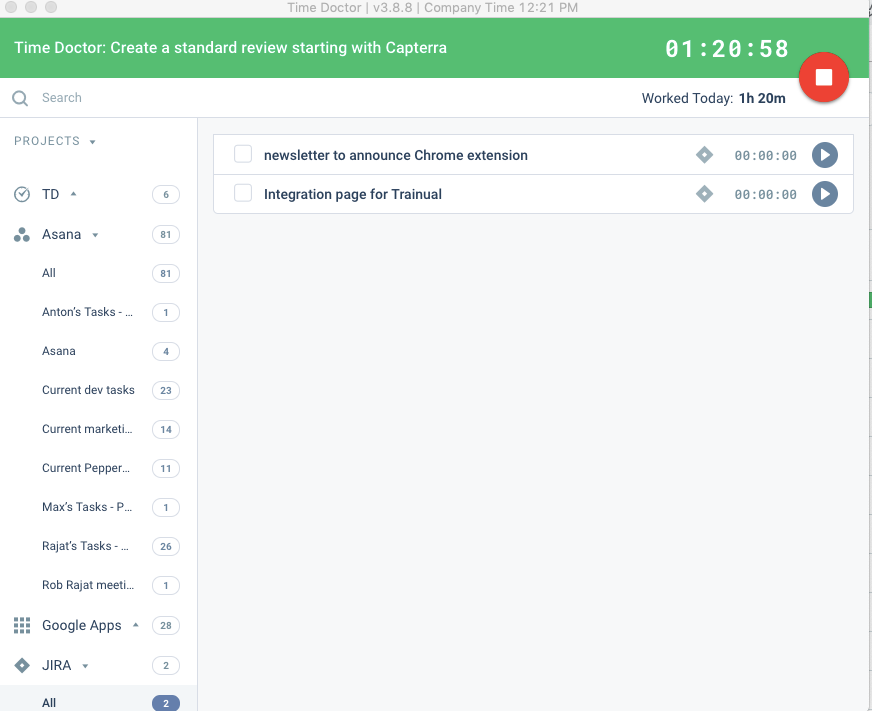
One click to choose projects and tasks you've already created so that you can quickly choose what you're working on and basically set it and forget it.
Automatic screenshots so that I can always reference back to what I was working on.
The reports! There are reports for every project and time use. Helps me see exactly where my time is going and how I can better maximize it.
When checking/viewing Web and App Usage, I wish there's an option on this page to update or change the app's rating without going to settings page. It will be a lot easier for us to update the ratings on the Web and App Usage.
TSheets tech support people, like Shawn Sommer, from Tsheets. She has been instrumental, after terminating the person in charge of TSheets I was left with a learning curve too high to climb but after 10 mins of her instructions I was able to make payroll in no time. She cleared all errors that nobody had fixed before. TSheets is not a vendor for me, TSheets is my partner in business. Thank you TSheets.
Overall good product. I think some integration issues that are probably on the way would give it a higher score. Easy to use, easy to see how well it connects to current book keeping software we use, and would be easy to adopt by someone who is a QuickBook user that has billable clients or just wants that metric to see how their time is allocated.
I have never failed to have an issue resolved within minutes of contacting Support. Jen D recently assisted my with an export issue and I was back on track in less the 10 minutes. She was knowledgable and thought about the current and future contexts of the issue and assured there would be no recurrence next payroll.
The support was terrible! They never responded in sufficient time and their assistance was always super vague. I never felt like they had an actual solution to my concerns. They were nice, but I don't feel like they were trained in their own system. It felt like I was talking to a wall.
We used to do all of our scheduling manually or in archaic software that wasn't user-friendly. We researched other software and found that this was going to meet our needs most comprehensively. Staff used to track their hours on a notepad on their phone or on an excel spreadsheet. There was really nothing else available to us that did what TSheets could do and the price fit in our budget. We have been very happy with our decision!
We previously used the time tracking component within Kanbanflow.com. However, it was confined to a specific task and we needed something more holistic. Enter Time Doctor! The difference between the two was night and day. I know there are other similar time tracking apps that exist that we could have investigated. We started with Time Doctor Lite and that gave us enough of a taste to upgrade to Pro.
Helps to ensure that employees are being held accountable for their clocked in time and allows us to clock them out if we see they're not where they say they are, saving us money.
Decreases time our staffing coordinator has to spend on inputting times after events - when managers can clock staff in and out during the event, it allows our staffing coordinator to use their office time more effectively.
For a small amount each month I believe I get a huge return on investment in form of traceability of my hours spent. The major factor that made me choose Time Doctor was the price and the value. I don't think I would still be interested if it was more expensive.