
Alok Singh ☁️
Technical Consultant
Chose Google Meet
Slack is not capable of handling large attendees so we are using Google Meet when number of attendees are higher.

| Product | Rating | Most Used By | Product Summary | Starting Price |
|---|---|---|---|---|
 Google Meet | N/A | Google Meet, formerly Hangouts Meet, replaces the former Google Hangouts as the company's G Suite integrated web conferencing tool, allowing users to join meetings directly from a Calendar event or email invite from a computer, phone, or conference room. G Suite's Enterprise edition also creates a dial-in phone number for each meeting, as an additional convenience. | $6 per month | |
 RemoteMeeting | Enterprise companies (1,001+ employees) | A web-based video conferencing tool. Supports mobile, browser and AI minutes. RemoteMeeting is a video conferencing solution. Use a browser to start and join video conferences. No need for a dedicated application. Present a desktop, share documents and interactively mark on them. Create automated meeting minute as record them for later review. RemoteMeeting can detect the speaker automatically and pin it in the main screen for a more immersive… | $0.20 per usage |
| Google Meet | RemoteMeeting | |||||||||||||||
|---|---|---|---|---|---|---|---|---|---|---|---|---|---|---|---|---|
| Editions & Modules |
|
| ||||||||||||||
| Offerings |
| |||||||||||||||
| Entry-level Setup Fee | No setup fee | No setup fee | ||||||||||||||
| Additional Details | — | ** Server deployment option available upon request. | ||||||||||||||
| More Pricing Information | ||||||||||||||||
| Google Meet | RemoteMeeting | |
|---|---|---|
| Considered Both Products |  Google Meet Alok Singh ☁️ Technical Consultant Chose Google Meet Slack is not capable of handling large attendees so we are using Google Meet when number of attendees are higher.  rishabh mishra Senior Project Manager Chose Google Meet It stands out because of its user friendly interface which is quite intuitive and simple to use and its integration with Google work space. Unlike Zoom which comes up with more advanced webinar features. Meet provides ease of use and accessibility. As compared to Microsoft …  Ashadujaman Khan Commis Chef Chose Google Meet Microsoft Teams and Webex Meetings  Souvik Giri Graduate Engineer Trainee Chose Google Meet Zoom can be defined as a much easier , advanced and accessible version of the Google meet with multiple features such as selective chat enable , polls , emoticons , real time liveboard and calendly integration as well  Sanjay kumar Teaching Assistant Chose Google Meet Cisco Webex DX80 and GoTo Meeting  Naman Goel Teaching Assistant Chose Google Meet Google Meet provides good facilities at many situations than any other software.  Stan York VP of Development Chose Google Meet We haven't actually selected Google Meet as a replacement for the others - rather each has its own niche.  Joshua Schiffer Partner Chose Google Meet I prefer Zoom, but Google Meet is a good alternative. Zoom is more secure and easier to manage. Zoom has more customization and I trust it more, as too many Google apps get changed without you knowing.  Rahat Afnan Freelancer Chose Google Meet Well we switched from Zoom because of paying issue. While Google Hangouts Meet is almost free there zoom needs extra charge to long meetings. And Zoom couldn’t meet up our common interests while meeting with foreign clients always. Performing Zoom meetings with phone isn’t …  Sergey Gorbanenko QA Engineer Chose Google Meet To maintain in-depth and frequent communication, we use Google Hangouts Meet because the conversation is stable and flexible. We can achieve our goals through effective communication; communication with suppliers and purchasers is significant. |  RemoteMeeting  Monica Villaroel Human Resources Chose RemoteMeeting The results we have obtained with RemoteMeeting have been unparalleled, it is an online meeting solution that improves the way we share screen perfectly from anywhere because it provides collaboration tools for more efficient meetings from offering virtual backgrounds, face … |
| Google Meet | RemoteMeeting | ||||||||||||||||||
|---|---|---|---|---|---|---|---|---|---|---|---|---|---|---|---|---|---|---|---|
| Performance & Compatibility of Online Events Software |
| ||||||||||||||||||
| Screen Sharing |
| ||||||||||||||||||
| Online Meetings / Events |
| ||||||||||||||||||
| Online Events Collaboration |
| ||||||||||||||||||
| Online Events Security |
|
| Google Meet | RemoteMeeting | |
|---|---|---|
| Small Businesses |  Whereby Score 9.9 out of 10 | Whereby Score 9.9 out of 10 |
| Medium-sized Companies |  JioMeet Score 10.0 out of 10 | JioMeet Score 10.0 out of 10 |
| Enterprises |  Webex Meetings Score 8.4 out of 10 | Webex Meetings Score 8.4 out of 10 |
| All Alternatives | View all alternatives | View all alternatives |
| Google Meet | RemoteMeeting | |
|---|---|---|
| Likelihood to Recommend | 8.6 (0 ratings) | 8.0 (0 ratings) |
| Likelihood to Renew | 7.0 (0 ratings) | - (0 ratings) |
| Usability | 8.2 (0 ratings) | - (0 ratings) |
| Support Rating | 9.8 (0 ratings) | - (0 ratings) |
| Google Meet | RemoteMeeting | |
|---|---|---|
| Likelihood to Recommend |
|
Monica Villaroel Human Resources |
| Pros |
|
Monica Villaroel Human Resources |
| Cons |
|
Monica Villaroel Human Resources |
| Likelihood to Renew |
 Chantal Matthews, MSEd, CHES®, CHWC Assistant Director of Health Promotion | No answers on this topic |
| Usability |
| No answers on this topic |
| Support Rating |
| No answers on this topic |
| Alternatives Considered |
|
Monica Villaroel Human Resources |
| Return on Investment |
|
Monica Villaroel Human Resources |
| ScreenShots | RemoteMeeting Screenshots 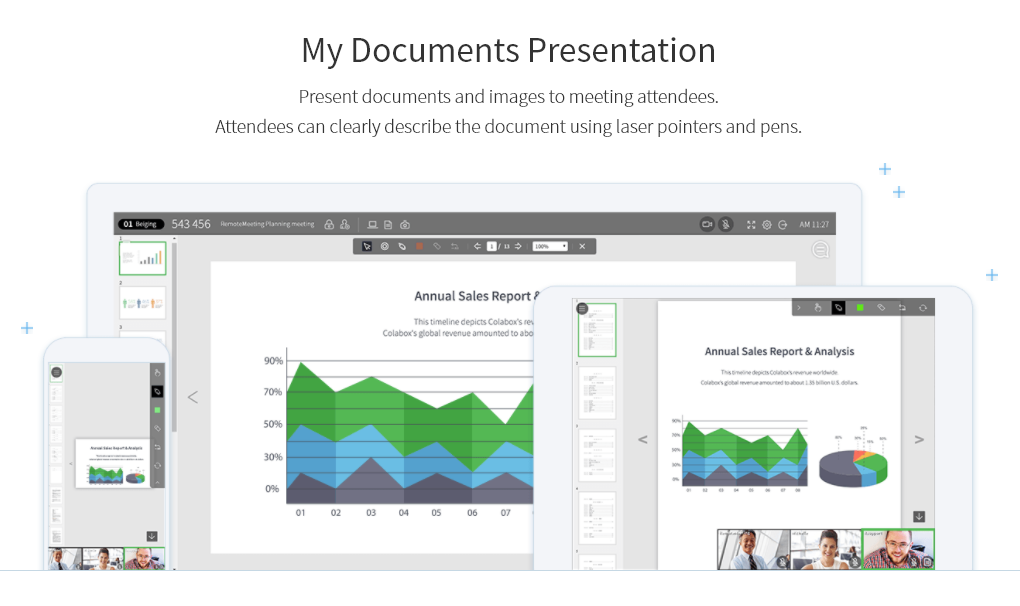    |