
Bob Hines
Director Of Licensing
Chose Salesforce Mobile
Neither are simple to use, neither bring consistent results.

| Product | Rating | Most Used By | Product Summary | Starting Price |
|---|---|---|---|---|
 Salesforce Mobile | N/A | Salesforce Mobile (formerly Salesforce1 Mobile App) provides sales reps and marketers to update their pipeline and lead statuses on the go, as well as share notifications and keep their team and collaborators updated on the movement of prospects through the sales pipeline. | N/A | |
 Salesken | N/A | Salesken.ai is a conversational intelligence platform that helps sales teams, improve performance, and reduce acquisition costs. The platform gives managers and sales reps visibility into every call, via detailed Call Analytics including emotions, objections, intent etc. The tool also gives sales reps real-time cues during their conversation to help them engage their customers better. | N/A |
| Salesforce Mobile | Salesken | |||||||||||||||
|---|---|---|---|---|---|---|---|---|---|---|---|---|---|---|---|---|
| Editions & Modules | No answers on this topic | No answers on this topic | ||||||||||||||
| Offerings |
| |||||||||||||||
| Entry-level Setup Fee | No setup fee | No setup fee | ||||||||||||||
| Additional Details | — | — | ||||||||||||||
| More Pricing Information | ||||||||||||||||
| Salesforce Mobile | Salesken | |
|---|---|---|
| Considered Both Products | Salesforce Mobile Bob Hines Director Of Licensing Chose Salesforce Mobile Neither are simple to use, neither bring consistent results.  Erik Viager Sr. Strategic Development Manager, B2D Chose Salesforce Mobile I have used HubSpot and Copper CRM at previous companies but both of them are fundamental CRMs. Salesforce can truly be implemented to meet your unique business attributes and can scale as your company grows. It's no wonder it's the #1 CRM in the world. Plus with 100s of …  Emily Sperduto Partnership Ops, Manager Chose Salesforce Mobile Salesforce Mobile is by far the cleanest interface and most user friendly mobile app in comparison to similar apps I've used.  Rob Thomason ☁ Director of Sales Operations Chose Salesforce Mobile We use Salesforce Mobile [(formerly Salesforce1 Mobile App)] as its our backbone for the Sales, Support, SE, Finance and Implementations team. Salesforce Mobile [(formerly Salesforce1 Mobile App)] allows all of our teams to collaborate from anywhere "live" on records or …  Kenneth Shelton Account Executive Chose Salesforce Mobile I have never used any other source.  Ben Caplan Risk Manager, and Insurance Agent Chose Salesforce Mobile
 Shawn Bennett Senior Account Executive Chose Salesforce Mobile Well, the Salesforce1 application is specific to managing a Salesforce platform, so the application comparison for the same base cannot be made here. However, the application overall vs. Zoho has the advantage over UI and performance. Salesforce is the clear leader, Zoho is in … |  Salesken |
| Salesforce Mobile | Salesken | |
|---|---|---|
| Small Businesses |  Salesflare Score 6.0 out of 10 |  Lead411 Score 9.1 out of 10 |
| Medium-sized Companies | Lead411 Score 9.1 out of 10 |  Paperflite Score 9.3 out of 10 |
| Enterprises |  Dialpad Sell Score 9.5 out of 10 | Paperflite Score 9.3 out of 10 |
| All Alternatives | View all alternatives | View all alternatives |
| Salesforce Mobile | Salesken | |
|---|---|---|
| Likelihood to Recommend | 7.0 (0 ratings) | 8.0 (0 ratings) |
| Likelihood to Renew | 10.0 (0 ratings) | - (0 ratings) |
| Usability | 9.9 (0 ratings) | - (0 ratings) |
| Support Rating | 9.9 (0 ratings) | - (0 ratings) |
| Implementation Rating | 10.0 (0 ratings) | - (0 ratings) |
| Salesforce Mobile | Salesken | |
|---|---|---|
| Likelihood to Recommend |
|
|
| Pros |
|
|
| Cons |
Bob Hines Director Of Licensing |
|
| Likelihood to Renew |
Rob Thomason ☁ Director of Sales Operations | No answers on this topic |
| Usability |
| No answers on this topic |
| Support Rating |
Ben Caplan Risk Manager, and Insurance Agent | No answers on this topic |
| Implementation Rating |
Rob Thomason ☁ Director of Sales Operations | No answers on this topic |
| Alternatives Considered |
|
|
| Return on Investment |
|
|
| ScreenShots | Salesken Screenshots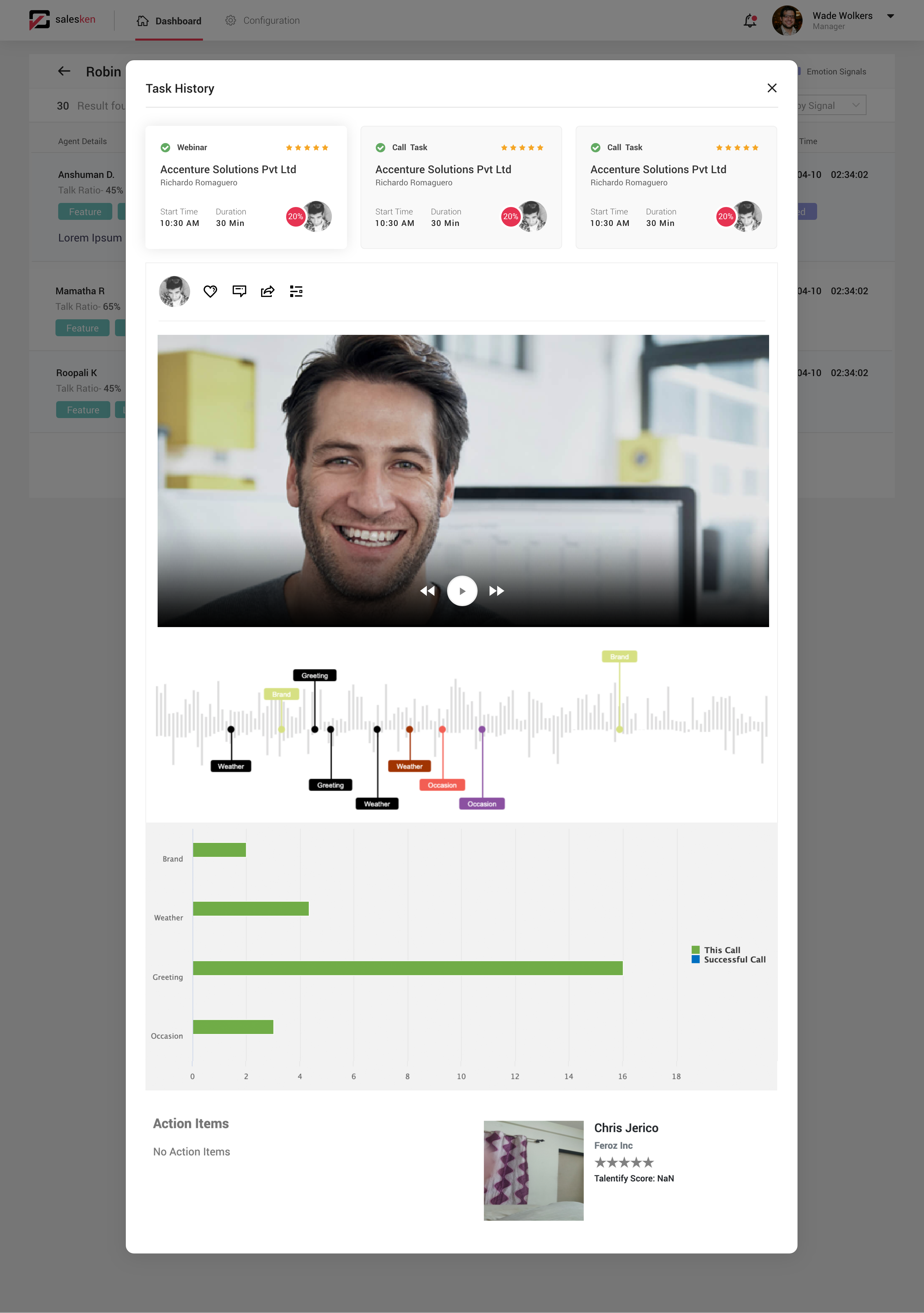    |