Tovuti LMS vs. Trakstar Learn

Overview
ProductRatingMost Used ByProduct SummaryStarting Price
Tovuti LMS
Score 10.0 out of 10
Mid-Size Companies (51-1,000 employees)
Designed as a people-centric LMS, Tovuti aims to make learning fun and management simple to boost productivity for users and admins alike. Users can generate courses with AI and increase learner engagement with interactive videos, memory games, and 40+ other gamification options, as well as create bespoke experiences with customizable learning paths. Tovuti is designed to integrate into currently in place ecosystems, and supports data-driven decisions with its internal reporting feature.…N/A
Trakstar Learn
Score 9.0 out of 10
Enterprise companies (1,001+ employees)
Trakstar Learn (formerly Mindflash) is an online training platform. Users can create courses, add quizzes and track results. Users can upload external content and access the platform via mobile devices. It also provides user management and reporting for internal and external training and scaling purposes.
$249
Pricing
Tovuti LMSTrakstar Learn
Editions & Modules
No answers on this topic
Basic
249/mo
Advanced
599/mo
500 trainees
Pro
1,199/mo
1000 trainees
Enterprise
Call for details
Unlimited
Offerings
Pricing Offerings
Tovuti LMSTrakstar Learn
Free Trial
YesYes
Free/Freemium Version
NoNo
Premium Consulting/Integration Services
NoNo
Entry-level Setup FeeRequiredNo setup fee
Additional Details
More Pricing Information
Community Pulse
Tovuti LMSTrakstar Learn
Considered Both Products
Tovuti LMS
Chose Tovuti LMS
It doesn’t, but we use a group review and an attractive interface won over.

Chose Tovuti LMS
Tovuti LMS is super easy to use compared to Relias. Relias is very clunky and we always would have learners have issues with the platform. Tovuti's buildout process compared to Relias is very clean and easy to use. The analytics and reporting are also amazing, plus the cost …
Chose Tovuti LMS
Tovuti LMS had transparent pricing, which was very reasonable, was responsive to questions, offered a faster go-live time, and had some authoring tools to help get material online faster.
Chose Tovuti LMS
I selected Tovuti LMS due to its price range and interactive content authoring abilities available.
Chose Tovuti LMS
There are more features in Tovuti LMS compared to others. It's easier to use as well. The layout is really nice and the customization for CSS and HTML is great if you know what you're doing.
Chose Tovuti LMS
While all the LMS' listed above were good platforms, we found small barriers to using their software. Price is always a driver, and Open LMS happened to be the most expensive. But I would not use that as a blanket statement. Each company has its pricing structure and based …
Chose Tovuti LMS
We used Asana briefly before we moved to Tovuti LMS.
Chose Tovuti LMS
I keep coming back to this, but the customization of Tovuti is fantastic. There is a bit of a learning curve, but if you dive in, there are wonderful tools to create engaging content. BizLibrary has a great existing library of courses, but that is not what we needed. The …
Chose Tovuti LMS
This is the first learning management system I've used at my organization. My executive director had researched a few others, but none of their features compared to that of Tovuti (e.g., the capabilities of the interactive activity design, accessibility that allows for …
Chose Tovuti LMS
Most of my previous e-learning and LMS experience was with articulate. I love articulate 360 but in terms of LMS functionality, it is not nearly as robust as Tovuti.
Chose Tovuti LMS
In 2015 my company did a deep dive of the five top rated LMS in the industry. None of them did exactly what we wanted and ALL of them were cost prohibitive in a competitive B2B market in the automotive industry. I am sure authoring and content management has taken a huge leap …
Chose Tovuti LMS
Tovuti offered a virtual classroom, the interactive content, and did not impede on our intellectual property rights. Their development team is also interested in growing with us, pushing the envelope on what is possible for virtual learning. That was an important point.
Chose Tovuti LMS
We did a source selection with Accord LMS and Talent LMS. All the products were favorably evaluated, Tovuti, though, was selected as the product that provided the best integrated solution. This was the value we needed in the tool.
Chose Tovuti LMS
It best suited our industry and training needs. There are tools that we may never use, but the interactive content available is awesome. I cannot remember the other platforms that were investigated; the final decision was made by the training manager. I am a trainer and only …
Chose Tovuti LMS
Namastream didn't offer the features we wanted/needed for our clients and wasn't able to handle the volume of content. Tovuti was a much more robust and inclusive option. Namastream didn’t allow us to interact with our clients the way Tovuti does. We were also confident in …
Chose Tovuti LMS
The feature set for the price was the best. Some of these other products offer too many options for what our company was looking for, actually making the platform more confusing for both learner and admin, whereas Tovuti was perfect for both.
Chose Tovuti LMS
We explored Edvance360, LearnUpon, and Auzmor prior to our purchase with Tovuti. Due to the customization of the software, customer support experience, and available options we went with Tovuti. They were also willing to give us a Non-profit discount off of the purchase price …
Chose Tovuti LMS
We vetted close to 10 different LMS. We chose Tovuti almost entirely based on the user friendly layout and the feature capabilities. Only a few other platforms even came close to the amount of capabilities as Tovuti.
Chose Tovuti LMS
Tovuti was in the top 4 right off the bat but our secondary review found that it was the right blend of functions (one key function being that it had built-in authoring that seemed very robust) and cost. It was not the least expensive but was on the lower end and compared to …
Trakstar Learn
Chose Trakstar Learn
The only other training platform similar to Mindflash that I have used is RedVector. However, we use that platform entirely differently than Mindflash. RedVector has a very large available library for our users to stay current on their PDU/education credits for their PE and …
Chose Trakstar Learn
Drive was too big and just a big bucket. Lessonly was pricey.
Chose Trakstar Learn
The ease of use for both learners and administrators in Mindflash is unbeatable in my opinion. The system may not have all the fancy bells and whistles that Cornerstone or Litmos has but we didn’t need all that and honestly, it was all getting in the way.
Chose Trakstar Learn
This is an alternate software that we have looked into, right now we don't have the need for the increased flexibility that lesson.ly provides with learning from your mobile or tablet. We haven't seen a lot of those things as particularly useful for our current training …
Chose Trakstar Learn
Our organization found Mindflash's pre-sales experience to be a lot smoother than its competitors. Ultimately, we felt their software was easier to use and had more business functions than other options. They provided one on one information calls, webinars and quotes for our …
Chose Trakstar Learn
While the Saba Centra system offered the ability to deliver live classes, the program became cost prohibitive.
Chose Trakstar Learn
Our priorities are ease of use, economy and flexibility. Skillsoft was too content-heavy. It would have been good had we only been interested in ready-made content. Their content just didn't meet our needs. Cornerstone was too expensive, too complicated and would have required …
Chose Trakstar Learn
I feel like I've looked at them all. For my unique needs at Responsys, MindFlash was the right solution. Some of the key attributes that I was looking for were: Usability, Ramp time of my team to learn how to use the product, Dependability of the product, Cost, Ability to build …
Chose Trakstar Learn
I have not used other LMS's
Features
Tovuti LMSTrakstar Learn
Learning Management
Comparison of Learning Management features of Product A and Product B
Tovuti LMS
9.5
Ratings
15% above category average
Trakstar Learn
9.3
Ratings
13% above category average
Course authoring9.70 Ratings10.00 Ratings
Course catalog or library9.60 Ratings10.00 Ratings
Player/Portal9.60 Ratings9.00 Ratings
Learning content9.60 Ratings9.00 Ratings
Mobile friendly8.40 Ratings5.00 Ratings
Progress tracking & certifications9.70 Ratings10.00 Ratings
Assignments9.60 Ratings10.00 Ratings
Compliance management9.70 Ratings10.00 Ratings
Learning administration9.60 Ratings10.00 Ratings
Learning reporting & analytics9.70 Ratings10.00 Ratings
Social learning9.00 Ratings00 Ratings
Best Alternatives
Tovuti LMSTrakstar Learn
Small Businesses
iSpring Learn
iSpring Learn
Score 9.6 out of 10
iSpring Learn
iSpring Learn
Score 9.6 out of 10
Medium-sized Companies
iSpring Learn
iSpring Learn
Score 9.6 out of 10
iSpring Learn
iSpring Learn
Score 9.6 out of 10
Enterprises
Axonify
Axonify
Score 10.0 out of 10
Axonify
Axonify
Score 10.0 out of 10
All AlternativesView all alternativesView all alternatives
User Ratings
Tovuti LMSTrakstar Learn
Likelihood to Recommend
9.4
(0 ratings)
10.0
(0 ratings)
Likelihood to Renew
9.3
(0 ratings)
10.0
(0 ratings)
Usability
9.3
(0 ratings)
9.0
(0 ratings)
Availability
10.0
(0 ratings)
-
(0 ratings)
Performance
10.0
(0 ratings)
-
(0 ratings)
Support Rating
9.5
(0 ratings)
10.0
(0 ratings)
Online Training
10.0
(0 ratings)
-
(0 ratings)
Implementation Rating
9.8
(0 ratings)
9.0
(0 ratings)
Configurability
9.0
(0 ratings)
-
(0 ratings)
Product Scalability
9.0
(0 ratings)
-
(0 ratings)
Vendor post-sale
10.0
(0 ratings)
-
(0 ratings)
Vendor pre-sale
10.0
(0 ratings)
-
(0 ratings)
User Testimonials
Tovuti LMSTrakstar Learn
Likelihood to Recommend
Tovuti is really well suited for anything that involves instruction, whether that be to a class or to provide training to your company's staff. While the interactive content is wonderful and allows for many accommodations (visual and hearing impairments included), it is not always an easy task to create activities that work comfortably for individuals with mobility/dexterity disabilities.
Read full review
I believe Mindflash is perfect for corporate training in any industry. It's quick, efficient and provides an unprecedented platform to provide training information digitally. Especially when you do not have enough resources to provide in-person training that requires detailed attention covering a massive territory.
Read full review
Pros
  • You can effortlessly set up logins and manage registered courses with Tovuti LMS.
  • The interface is easy to use and can be easily linked with a variety of APIs.
  • You can customize the learning module by adding or removing information.
  • During virtual events, groups can be divided into multiple virtual teams and then return to the original group.
Read full review
  • Mindflash is very clean and user-friendly. Very easy for learners to navigate and understand.
  • Mindflash’s reporting tool is unmatched. You can pull any type of report you could want or need.
  • Customer service is top-notch. From our Sales Executive to our CSM, all the way up to the VP, our experience has been amazing.
Read full review
Cons
  • I would love to see Tovuti LMS add privacy measures that would confine visibility by course to allow more external partner participation.
  • While I appreciate the speed of response from the solution team, efficiency could be added by allowing quick video calls for identifying issues. It often takes a lot of effort to describe the issue, and it would be a quicker process to be able to show the problem.
Read full review
  • Admin: They only allow one admin account, which can be a headache. Instead of logging into my personal Mindflash I log into a shared user, that makes and assigns all the videos.
  • Agent UI: It isn't the prettiest UI and can be hard to navigate for beginners.
  • Certificates: The certificates for passing a course are just dumb. I have them all turned off and I could never see that being useful.
Read full review
Likelihood to Renew
We have established the training department to extend our training capabilities into one central area. I have mentioned training production, internal and external sales staff. But the training department will surely delve into the HR area of new hire orientation, annual recertification processes, etc. We truly have just scratched the surface of this iceberg. Now that we have made the investment, we will surely continue with this product. I cannot see us moving to another product at all. We will definitely renew our subscription with Tovuti
Read full review
I am extremely likely to continue using Mindflash for a few reasons. One, Mindflash has increased its capabilities dramatically during the year that I have been using it. Like any good business or service provider, Mindflash seems to have the desire to constantly improve its users experience. I know in another year, Mindflash will be better than it is today. For example, I know that Mindflash is at least exploring the possibility of adding language support to its capabilities. As someone who works in many non-English speaking countries, this would be a huge benefit to me. Additionally, I have been very impressed by Mindflash's customer service. They have always been very helpful and gracious.
Read full review
Usability
The in-platform authoring tool really isn't an authoring tool. It is a content management system/database that requires you to build each and every component of your course under another tab and remember and correctly string them together. You can't author anything directly into a Tovuti LMS course. Everything is its own separate 'thing.'
Read full review
The interface is just so simple to understand. It's clean and efficient. We showed Mindflash off to the Safety group, who are not computer gurus and they were beyong excited to use it.
Read full review
Reliability and Availability
I have yet to have an outage on the availability. As far as I know, no trainee has run into it either. Excellent rating on that front
Read full review
No answers on this topic
Performance
I have worked with so many software packages that are slow to load, take for ever for screen changes, etc. I do not have that issue here with Tovuti at all. I have yet to really do any reporting on it as we are fairly new with the package, but if it operates like the rest of the system, then I am going to assume that reporting will be no more difficult than the rest of the platform
Read full review
No answers on this topic
Support Rating
The pre-sales team was very helpful and responsive and then stopped responding to my mail as soon as I had signed the contract, not even a reply from the last couple of emails sent. The post-sale teams are engaged and quick to respond and really good. Unfortunately, I need to use them more than I should, and sometimes the reply is "we don't support that feature", but the support from the support team is excellent.
Read full review
Any problems or questions we have had with Mindflash have been handled promptly and effectively. I normally use the online chat option but have had to correspond with them through email and phone as well. We have never had an issue languish for weeks or months with Mindflash. They either fix the problem or let you know that the software isn't capable to handle the need at that point.
Read full review
Online Training
Hayden was awesome. He knows his product inside and out and was able to answer all my questions. I had a lot of questions. I was actually starting to build courses while I was going through the training so that when the next session on the schedule came up, I had even more questions about what I had done vs the way I maybe should have. In the end, I was doing my own hands-on while going through the training. Tovuti is that easy to use.
Read full review
No answers on this topic
Implementation Rating
The implementation had extremely wonderful support from Tovuti in the form of a series of one-on-one meetings to hear the clients needs and intended usage and then to set up the platform to meet those needs while demonstrating how to use it.
Read full review
If you're going to develop a short course to demo the product internally, don't bother avoiding your own topics. Mindflash rolls whatever content you create during the trial into your production environment when you decide to buy. The time taken to go from not having a system to being live with Mindflash is virtually instant. What you'll be wanting for is time to develop content and people to test it out.
Read full review
Alternatives Considered
I keep coming back to this, but the customization of Tovuti is fantastic. There is a bit of a learning curve, but if you dive in, there are wonderful tools to create engaging content. BizLibrary has a great existing library of courses, but that is not what we needed. The ability to create specific permission levels for users that overlap in unique ways due to the nature of workforce development makes Tovuti stand out for our needs. BizLibrary and Schoology just were not as flexible in this regard. And while Schoology has strong content creation features, it mainly serves educational organizations and is developed to suit their needs. Again, just not as flexible as we needed.
Read full review
The only other training platform similar to Mindflash that I have used is RedVector. However, we use that platform entirely differently than Mindflash. RedVector has a very large available library for our users to stay current on their PDU/education credits for their PE and PMP licenses. It does have the option to build training within it as well, but we have not used that feature because it is more focused on providing external training for others.
Read full review
Scalability
Scalability is great. We bought their first 'size' package and that covers 300 trainees. Transitioning to the next level is more a matter of accounting and payment. My take on it is that its just a matter of paying the higher level of subscription and its done
Read full review
No answers on this topic
Return on Investment
  • Tovuti LMS is easy to use for our learners and they are retaining more information than our previous eLearning platform.
  • Learners are coming to training class with a thorough understanding of their role and are more prepared than previously
  • We've seen an increase in attendance of webinars since we are able to post them in the media library for employees to attend after they are life.
Read full review
  • Mindflash has had a positive impact on our business because it allows us to train more new users with less effort, and ensure that trainees have access to the course materials for a period of time after they have started using our software to do their daily jobs. Review of the course materials allows them to get answers to common questions without having to submit requests to our support team, thereby reducing the administrative burden on our resources.
Read full review
ScreenShots

Tovuti LMS Screenshots

Screenshot of a unique landing page for loginScreenshot of courses, appearing in TovutiScreenshot of checklists, where learners can find what's importantScreenshot of where managers can see everything they need to know, in one place

Trakstar Learn Screenshots

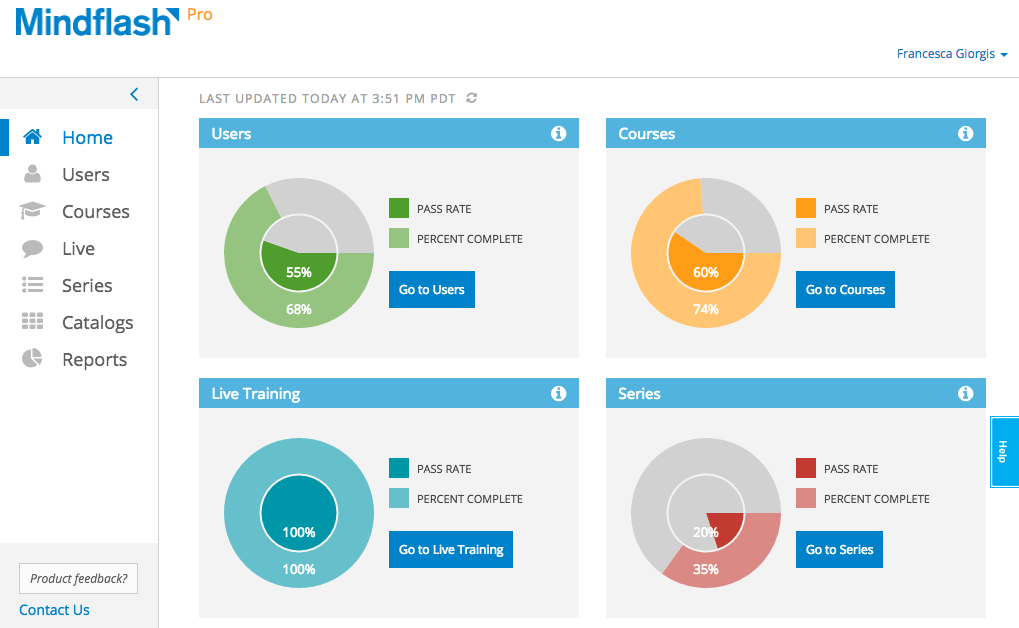
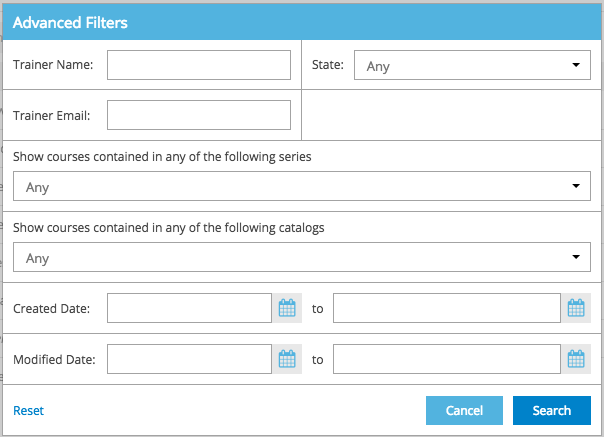
Screenshot of Trainer home - Get key information on how a program is doing with real-time graphs on the new Trainer Home. From here, viewers can dive into the details on users, courses and series using the convenient and persistent left navigation bar.Screenshot of Personalize the view - On every grid, the settings cog can be used to select the columns to view. This will be the new view even when logging in from a different computer. To maximize the content, collapse the left navigation bar to reveal just the icons.Screenshot of Filters - Advanced filters on users, courses, series and catalogs help get to just the list of items to focus on.Change, reset or keep these filters while moving across items.Screenshot of Bulk Actions - Once the list is filtered down to just the trainees to focus on, a couple of clicks a couple of clicks are required to take actions like setting a new deadline, reminding or dropping users.Screenshot of Export - Extract the whole list or the filtered list of trainees to Excel for further analysis.Screenshot of Trainer Photo - Take a photo in Mindflash and use it as a trainer photo.