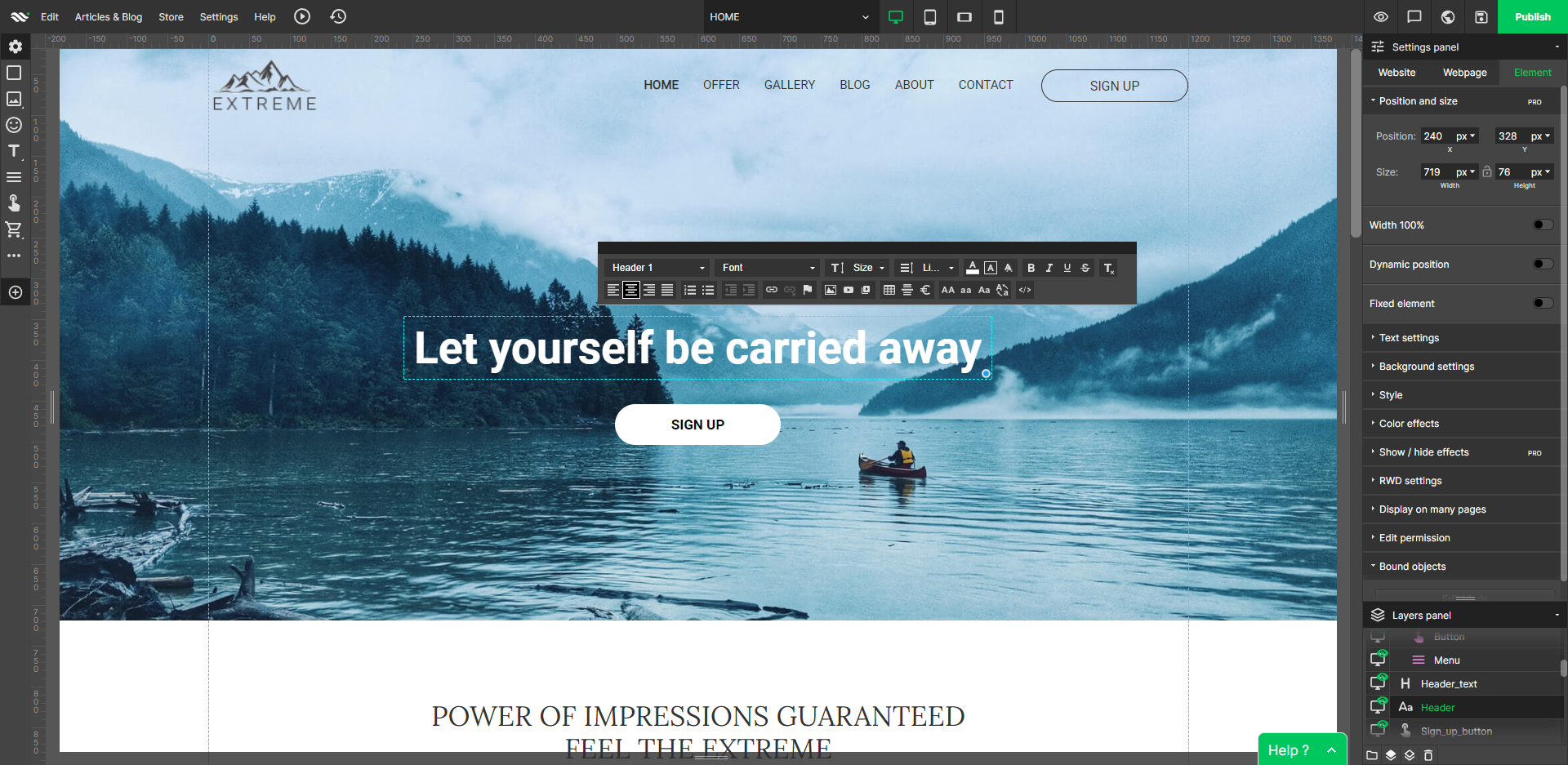
WebWave — an alternative for agencies and freelancers for creating custom websites for clients with the support of CMS. Using CMS with no sacrifices WebWave is a CMS platform that gives a designer precision up to 1 px in every single detail just like in more sophisticated graphic programs such as Photoshop while remaining a drag and drop software. This is to make creating websites much faster without loosing on details. Spend less time talking WebWave…
N/A
WP Engine
Score 8.9 out of 10
N/A
WP Engine is a website hosting service built to host WordPress for companies of any size, with features such as daily backups, firewall,SSL, and proprietary caching technology.
Fast load times: WebWave's websites have fast load times, which is critical for ensuring a positive user experience and better SEO performance. Responsive design: WebWave's websites are optimized for mobile devices, ensuring that they look great and function well on any screen …
It is compatible with many WordPress plugins and offers many more possibilities than google sites, Wix, or similar builders. It is a WordPress as easy to use as Microsoft Word.
WebWave is easy, the sites are stunning, and I don't have to pay an arm and a leg for it. Usually, there is a drop in customizability using WordPress. But WebWave allows a great site and an incredible price. For that reason, I'm leaving a great platform in WordPress and jumping …
Due to WebWave's innovative and intuitive layer-based design system, it is infinitely more user-friendly than both Webflow and WordPress. Webflow's websites feel lighter and faster, but I'm sure WebWave will address this as they mature. Webflow's animation features are also …
Only the traditional ones like WordPress with Elementor or WPBakery page builder. It's not an easy comparison. WordPress is the big boss but you have to buy a bunch of services, plugins, other embedded SAAS and such tools to make it work. WebWave, on the other hand, is making …
In terms of flexibility and functionalities, WebWave falls behind Webflow. However, practically anyone with a basic understanding of web development or who can use a word processor will be able to teach themselves how to utilize WebWave. Webflow, on the other hand, is far more …
It's an easier, super complete option and cheaper Instead of paying everything separately like Wix, this option gives you all for a good price. And is the same with Elementor, you need to pay their license, the hosting, the domain, and connect everything manually, but this …
Most Wix and WebWave have the same features as well as their distinctions. They are pretty good on their own functionality. They have their own functionality. From the pricing perspective, WebWave is slightly ahead of Wix. The pricing of Wix is a bit more than WebWave. So, if I …
WordPress is a great product but I need to figure out hosting myself, also I need to make sure the theme I am using is mobile friendly. We WebWave, I don't need to worry about any of those and the drag and drop builder is very easy to get familiar with.
Wordpress is a more flexible and adaptive content management system than Webwave. In addition to the functionalities that are already built-in, I am unable to add any customizable plugins or add-ons. However, in the majority of cases, the inherent features of Webwave are …
WebWave is fairly easy to use. For novice users, it is easier to use than WordPress or Shopify. I think WebWave will be more SEO friendly than Wix. The price is affordable for small businesses/clients as well. The template system is much easier and takes less time than …
web starts, Convertri Pro, and other alternatives Webstarts has a lot of issues with mobile view. U have to rearrange almost everything again. WebWave on the other hand lets u group and save so that don't have this problem. Also, animations work as they should same with …
WebWave stacks up well with other website builders. Especially the all-in-one types. It does things well and things make sense when it comes to editing. There are a lot of options to help you get things the way you want. I like how it can grow with the users. I feel the …
For Acquia and AEM the major differentiator was the cost for WPEngine was significantly lower and we could use the more common WordPress CMS. AEM is better for large marketing sites that integrate with the Abobe Marketing Cloud and we didn't feel we could support Drupal on …
WP Engine provides premium WordPress hosting. I haven't dealt with other dedicated WordPress hosts, except for wordpress.com by Automattic, which is good, but WP Engine is professional-grade, dedicated WP hosting. I have found that generally, non-dedicated WordPress hosting …
WP Engine and Go Daddy both had great support offerings and were both very competent when it comes to hosting websites. We chose WP Engine because their platform was just much easier to use and our marketing personnel could perform the majority of the essential daily tasks that …
DreamHost is good as well, but overall I really enjoy the experience I have had working with WP Engine with all of our clients. The support is pretty good with all three that I mentioned, but WP Engine is superb. WP Engine is really great and the interface is super easy to …
There's absolutely no comparison between the other companies and WP Engine. WP Engine is far superior in all ways. Every time I do a security audit on a potential client's website, I can tell right away that it's on an overloaded server at one of the competitors. The first …
We were originally on GoDaddy until we got a malware attack on their shared server. Cleaning up an infected server is almost impossible, so we decided to jump ship and set up our sites on Site Ground. We needed faster hosting anyway. Site Ground was decent, but their customer …
While we still use GoDaddy for some services, WP Engine definitely has been a major upgrade for our WordPress hosting. In addition to faster load speeds, WP Engine has been more adept at allowing us to manage a high number of websites without straining the system. We have never …
Other hosting companies are garbage by comparison. Budget, shared environment hosts are clunky, slow, and not as secure. Larger hosts generally require someone with a decent amount of knowledge with configuring and maintaining the hosting environment. WPEngine fills the void in …
We've evaluated many hosting providers over the years and in fairness, we've now been with WP Engine for 5 years so I'd imagine each of them has improved over that time also. However, WP Engine's support team, product development, and user experience is better than any other …
I selected Kinsta to replace WP Engine because their performance statistics, security configuration, and technical support prowess reminded me of WP Engine circa 2012 - top-notch.
I used a solution from Rackspace years ago which was just their dedicated server product (not available for selection above so had to choose managed hosting). They pretty much give you shell access to a box and then it's up to you to manage everything yourself. This is …
I used to work for GoDaddy when they released their own WordPress hosting. It's not bad, but not nearly as well developed. They have too many irons in the fire if you ask me, and WP Engine is so laser-focused on WP hosting. A2 hosting is a great budget solution that is also …
WP Engine blows all these hosting companies out of the water when it comes to WordPress hosting. I ultimately moved to WP Engine when my to WordPress sites continued to go down, performed slowly, or got to the point where they were impossible to manage. Now, if I see someone …
I have used WP Engine for several years and love the service. Their technology, security, speed & support are unparralleled. I've had to file several support tickets & the experience was really good every time. Being a consultant & tech integrator, I often have to deal with B2B …
WP Engine has a no worry solution for automatic backups and free SSL is great for $30/month. They scale to our needs as well so we never have to worry about being throttled if we get a lot of press. and at $1 for every 1000 visitors over your quote, hits one of the cheapest …
I have worked with other top web hosting companies and none offer the simplicity of WP Engine. WP Engine is more expensive, however we deem the cost justifiable for the features that are included.
Other web hosts are simple boxes that give you more control, however do not offer …
We used to use HostGator in the past. We feel they've gone downhill in the past few years. When other hosting companies offer free SSL certificates through the trusted "Lets Encrypt", HostGator still down't offer it (last I checked). Support takes a long time. Ability to use a …
Prior to WP Engine, we had an off-site consultant hosting our site. It was terribly inconvenient and counterproductive. We selected WP Engine because the platform is intuitive and the price is very reasonable. I've never used another hosting service, so I can't speak to how …
WP Engine was cheaper than the alternatives, and our site was already present on their servers. It wasn't so much a choice of WP Engine over another hosting company as it was a choice to stay with WP Engine rather than invest the time required to switch to another provider. All …
I don't know if I can repeat myself another time, but I suppose I will. WP Engine is a WordPress first hosting solution. If you are looking to build a simple or complex WordPress website, you should use this solution. Whether you're a company that builds WordPress websites or …
There's no comparision in terms of reliability, uptime, convenience, flexibility, pricing, and especially, tech support. WPEngine support is just simply superb. GoDaddy support cannot come close, nor can the others. InMotion Hosting has been very unreliable of late. So was A2 …
WP engine is good if you don't want to do all of the IT work such as back up, website scaling, website performance, etc. Of course you will have complete control over customization.
The WYSIWYG web builder marketspace is saturated, but there are not many solutions out there that eschew table-based design in favor of letting creators build sites where anything goes wherever you want. You’ll likely want to skip this product if you need a plug-and-play solution where everything is automatically responsively. However, if you have an eye for design, love creative control, and like to sweat the details until you have made the perfect website, WebWave is a must buy.
New users to WordPress can rejoice with a very hands-off hosting approach. If 100% uptime is not essential, you can get breakneck speeds with minimal tinkering using their platform. If you need to get up and running quickly and scale as required, the cost-benefit is here, although you need to pay a lot to get the most from it.
WebWave's site builder is the platform's truly innovative feature. I've never come across another service that deploys a layer-based approach in web design, as most of them usually deploy a grid-based system. This is an incredible alteration that ensures WebWave behaves much like a traditional graphic design tool, thereby resulting in an experience that is a lot more intuitive and instinctive. I believe this has the potential to radically change the way people approach no-code web design.
WebWave provides automatic, daily backups and a free SSL certificate for every website. This results in excellent security.
WebWave's support team is first-class! I had some teething-issues in the beginning, but the support team quickly got me back on track.
WebWave's community/forum is an excellent place to vote and request new features. This proves the development team is committed to making WebWave better by listening to their users.
I love the database backups and how quickly & easy it is to restore from an old backup point. This gives me & my clients confidence that any change can be rolled back.
The built in caching & CDN mean that I have to spend less time worrying about the speed of the server & site. The caching has some side-effects that take getting used to (on-page dynamic PHP code sometimes needs to be moved to API endpoints), but this is true for most caching systems.
They have really good support for multiple environments. It's very easy to have separate production & staging environments. It's also very simple to deploy from staging to production, making product launches and large scale website copy changes much easier to coordinate.
Some scope for improvement in UX (colors are not very appealing). It is simple to use but design is a little dated. Especially in the builder section, I'd like to see modern design for buttons and maybe gradients also: as this is where visual motivation is also important
Some edits take effect only after pressing OK. That should be eliminated as it's an unnecessary addition. It's also kind of annoying to do that again and again, which can add up to a lot as we do so many small tweaks while building the website.
Few things (maybe glitches) in design. The rectangle below the footer was uneditable for me. I spent quite some time trying to figure it out so I'm convinced it's a glitch.
The user interface is not very intuitive, which means new staff members require more training than I'd like.
The way they manage production/development servers and FTP access is somewhere between nebulous and tragically unique.
Their premium pricing is surely worthwhile, but it is significantly higher than virtually all of their competitors, without much obvious distinction in feature sets.
Some very basic features like spinning up a second instance require a PHONE CALL to their BILLING department to enable. What is this, 1990?
I was in a situation where I had to bolt Wordpress on to an existing infrastructure that could not support it. If I ever end up in that situation again, please kill me. Other than that reasonably common use case, I don't think it offers a lot of value over robust shared hosting, virtual private server (VPS) or dedicated servers.
It took very little time to learn their dashboard for managing WordPress sites. Their built-in tools are really well done, and the addition of security and CDN tools is great.
1. The support person does not seem to understand the issues, and seems like they go off to talk to somebody and revert back every 5 to 10 minutes. It takes up a lot of time. 2. There is a lack of reading material to address simple issues like changing the website name in the dashboard, pasting a code, etc.
Support is generally great. Enterprise support is fantastic, with little to no wait times. I find that chat support can almost always take care of the problem without escalating to a ticket for a higher level of troubleshooting. The chat support for many other hosting providers can only handle basic issues. This is a big bonus for us to get quick and helpful answers.
Fast load times: WebWave's websites have fast load times, which is critical for ensuring a positive user experience and better SEO performance. Responsive design: WebWave's websites are optimized for mobile devices, ensuring that they look great and function well on any screen size. Wix simply just doesn't have that and I was really struggling with this issue. Cost-effective: WebWave's pricing plans are affordable and provide excellent value for money, making it a cost-effective option for small businesses and entrepreneurs.
For Acquia and AEM the major differentiator was the cost for WPEngine was significantly lower and we could use the more common WordPress CMS. AEM is better for large marketing sites that integrate with the Abobe Marketing Cloud and we didn't feel we could support Drupal on Acquia. AWS EC2 is a viable option if you are going to self support and maintain your own WordPress experts. We felt that the value from WPEngine was they handled the support and the WordPress security patches and knowledge beyond simple theme usage. Pantheon was the closest in matching but we felt with our large installs that the hosting model for WPEngine was more cost-effective than the Container architecture for Pantheon