Chose Yooz
PDF is too much slow in OCR reading, comparing to Yooz. you can't compare it even.

| Product | Rating | Most Used By | Product Summary | Starting Price |
|---|---|---|---|---|
 Yooz | Small Businesses (1-50 employees) | Yooz delivers intelligent financial operations automation that aims to reduce waste, mitigate risk, prevent fraud, and eliminate errors from the AP process. Yooz provides Lean Financial Operations™ for companies of all sizes, offering clarity and control in the most complex environments. The Yooz platform combines a workflow engine, real-time applied AI, and transparency, with advanced fraud detection. Boasting over 7,000 customers worldwide and processing more than 300 million… | N/A | |
 Zoho Books | N/A | Zoho Books is an accounting solution that is designed to help small businesses manage their finances. This solution includes dashboards and a wide variety of reports. Business users can automate tasks and set up custom workflows. Zoho offers a 14 day free trial. | $0 For businesses with turnover <50K USD per annum |
| Yooz | Zoho Books | |||||||||||||||
|---|---|---|---|---|---|---|---|---|---|---|---|---|---|---|---|---|
| Editions & Modules | No answers on this topic |
| ||||||||||||||
| Offerings |
| |||||||||||||||
| Entry-level Setup Fee | No setup fee | No setup fee | ||||||||||||||
| Additional Details | Subscription price based on the volume of documents processed. Unlimited number of users. 4 hours of complimentary service to start. | Zoho Books is available for both monthly and yearly plans. Users who sign up for the annual plan get a discount. | ||||||||||||||
| More Pricing Information | ||||||||||||||||
| Yooz | Zoho Books | |
|---|---|---|
| Considered Both Products |  Yooz  Christina Comparato Accounting Clerk Chose Yooz Chrome River is slow and full of inconsistencies. Capturing invoices is confusing, as you have to assign approvers and coding at that time. No time to save it and research those details. It has multiple screens labeled inbox but are for different stages in the approval process …  Jacob Gardner Assistant Manager Chose Yooz We used POs or excel sheets you had to manually enter and scan in invoices so it was definitely a pain and super time consuming.  Marcos Urbina Controller Chose Yooz Yooz comes close to Coupa, but Coupa is much more robust and can handle much larger batches of information. Yooz performed well against Bank of America's Checkbook product, because it was more efficient. |  Zoho Books  Sanjay Singh Business Development Manager Chose Zoho Books Zoho Books has a much simpler GUI and the reason we selected Zoho is because of the integration of Zoho Books across other applications and especially into Zoho products. One of the other reasons is the time log feature we can easily pair up with a client service ticket to show …  Trevor Gibbs Founder Chose Zoho Books equally comparable to other payment processing made online, the benefit of using Zoho is that it has so many other apps and tools that are easily integrated like Zoho Sign, e.g. for sending out quotes etc. but also can be connected via an API to many other commercial platforms …  Mike Koolwijk SEO Specialist | MA consultant Chose Zoho Books We had a lot of problems with Exact Online, support-wise and price-wise. So Zoho Books wins on every point there. While Exact offers way more options, it tends to be really slow... and complex. Again Zoho Books wins. If you want an easy-to-use tool and not pay a lot of money, …  Cedric Haynes Owner Chose Zoho Books Easier to integrate with other Zoho apps. It’s also customized for mobile use making it easy to use wherever I am. I can get real-time updates on payments while in the field via the mobile app. The software is customizable and adaptable so I can easily make it fit various …  Daniel Coburn Sr. Product Manager Chose Zoho Books [QuickBooks and Zoho] are very comparable until you open your wallet. While they are both neck-and-neck with one another in features, QuickBooks does have the integration advantage. There are many more platforms that integrate with QB than Zoho Books. But Zoho has so many …  Mehdi Aherraki General Manager Chose Zoho Books The very easy to read dashboard, the clear categorization, the customization features, the easy learning curve and the seamless integration with other Zoho products (that we use a lot and frequently) are for our company the reasons why we favored Zoho books over other …  Miguel Useche Wordpress developer Chose Zoho Books I love the price/quality ratio of Zoho Books, and it's an awesome application to handle all your accounting, inventory, and buying processes. It's simple to use so the company doesn't have to spend too much time and money on training new employees.  Nathan Sichilongo Digital Marketing Manager Chose Zoho Books Zoho Books was an easy choice for us because of the features and smaller learning curve. Most of our staff have been able to come in and learn how to use it within hours versus the days it used to take to learn QuickBooks. Also being online, we are able to have real-time stats …  Scott French Operations Manager Chose Zoho Books Quickbooks is the standard. ZOHO Books will give it a run for its money. Your accountant may not like the fact that you switch over to Zoho Books, but since it's completely web-based, you are able to give them access to your account easily.  Wesley Johnson Director Chose Zoho Books The main difference here was the time tracking functionality that goes to a project specific nature. We do multiple projects with the same client and need to be able to split our time amongst those different projects for the purpose of reporting and invoicing.  Marc Charette Commercial Photographer: Google Street View | Trusted Chose Zoho Books Zoho Books is plain clunky. It does integrate with their CRM and other apps and that was why I had been attracted to it. But if you are in Australia, be very careful if you are moving from Zoho invoices. You won't get transferred data to the Australian platform and you will …  Hazem Kassem Managing Director Chose Zoho Books Price and easier to use
Other many applications that could be integrated with zoho  Ramin Sultanov Digital Instructor Chose Zoho Books One of the best business decisions we have made in our company is getting Zoho Books. Customer service is really really fast. If you have a problem or questions they will get to you within minutes and they are constantly improving the application and listening to our feedback … Chose Zoho Books It's cloud based and AccountEdge wasn't at the time we needed it, a cloud based app. Zoho Books updates come automatically which makes it real convenient. Pricing was comparable and with AccountEdge it seems we were having frequent networking issues when being used by …  Brandy Perez Communications Specialist Chose Zoho Books We made the switch from Quickbooks to ZohoBooks because of the CRM integration. Though Zoho Books has proven to be less hectic and less of a search when it comes to finding the needed features. In other words, its very user friendly! Everything is set up in a very simple, easy … |
| Yooz | Zoho Books | ||||||||||||||||||||||||||||||
|---|---|---|---|---|---|---|---|---|---|---|---|---|---|---|---|---|---|---|---|---|---|---|---|---|---|---|---|---|---|---|---|
| Payment Management |
| ||||||||||||||||||||||||||||||
| Accounts Payable |
| ||||||||||||||||||||||||||||||
| Customization |
| ||||||||||||||||||||||||||||||
| Security |
| ||||||||||||||||||||||||||||||
| Reporting & Analytics |
| ||||||||||||||||||||||||||||||
| General Ledger and Configurable Accounting |
| ||||||||||||||||||||||||||||||
| Inventory Management |
| ||||||||||||||||||||||||||||||
| Order Management |
|
| Yooz | Zoho Books | |
|---|---|---|
| Small Businesses |  Square 9 Softworks Score 9.1 out of 10 |  QuickBooks Self-Employed (discontinued) Score 8.9 out of 10 |
| Medium-sized Companies | Square 9 Softworks Score 9.1 out of 10 |  Accounting Seed Score 6.4 out of 10 |
| Enterprises |  Webexpenses Score 9.2 out of 10 |  Oracle Fusion Cloud Enterprise Performance Management Score 10.0 out of 10 |
| All Alternatives | View all alternatives | View all alternatives |
| Yooz | Zoho Books | |
|---|---|---|
| Likelihood to Recommend | 8.4 (0 ratings) | 8.2 (0 ratings) |
| Likelihood to Renew | 8.6 (0 ratings) | - (0 ratings) |
| Usability | 8.0 (0 ratings) | 8.4 (0 ratings) |
| Support Rating | - (0 ratings) | 5.3 (0 ratings) |
| Yooz | Zoho Books | |
|---|---|---|
| Likelihood to Recommend |
|
Nathan Sichilongo Digital Marketing Manager |
| Pros |
|
Mehdi Aherraki General Manager |
| Cons |
|
Daniel Coburn Sr. Product Manager |
| Likelihood to Renew |
| No answers on this topic |
| Usability |
|
|
| Support Rating | No answers on this topic |
|
| Alternatives Considered |
Christina Comparato Accounting Clerk |
|
| Return on Investment |
Marcos Urbina Controller |
Mike Koolwijk SEO Specialist | MA consultant |
| ScreenShots | Yooz Screenshots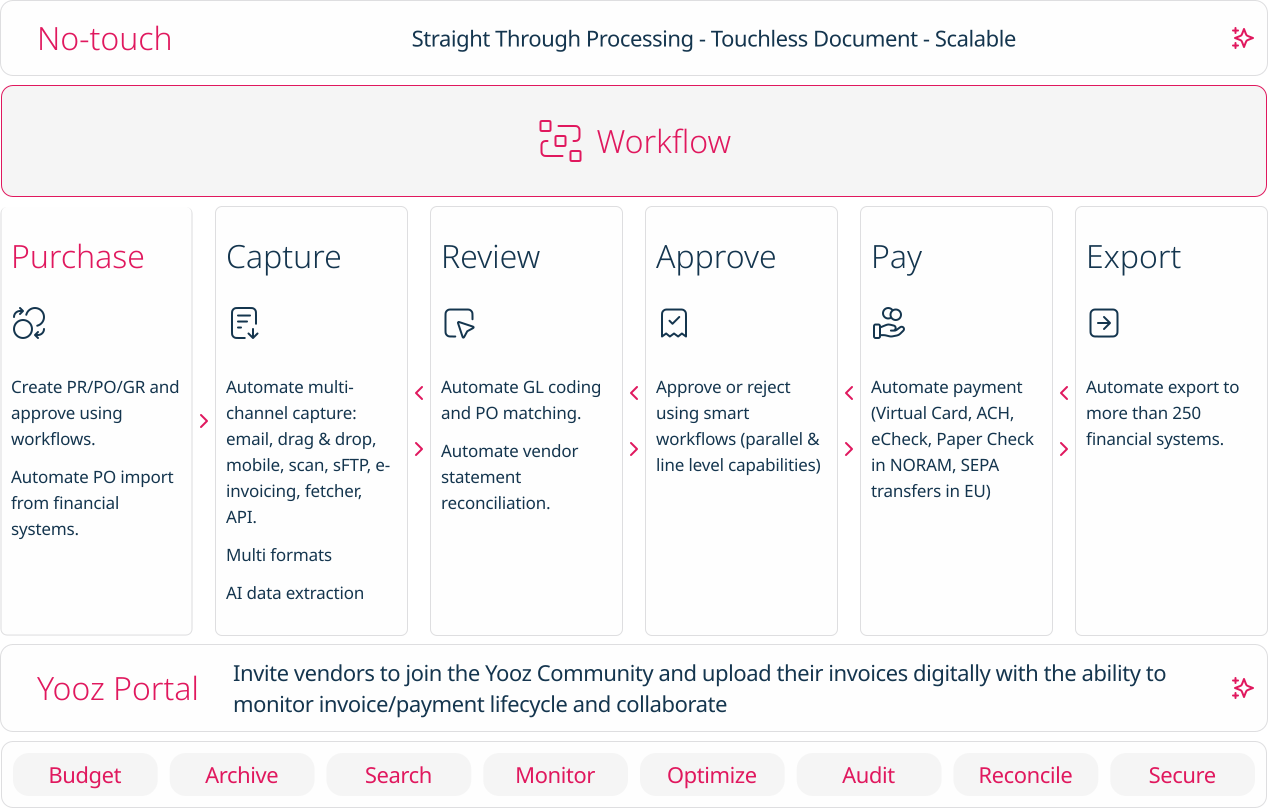    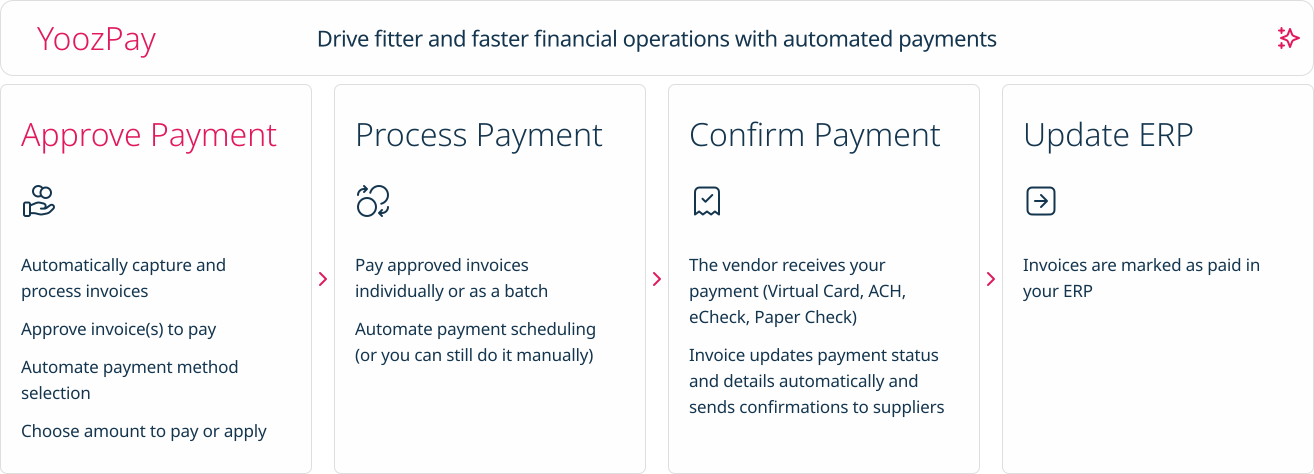  | Zoho Books Screenshots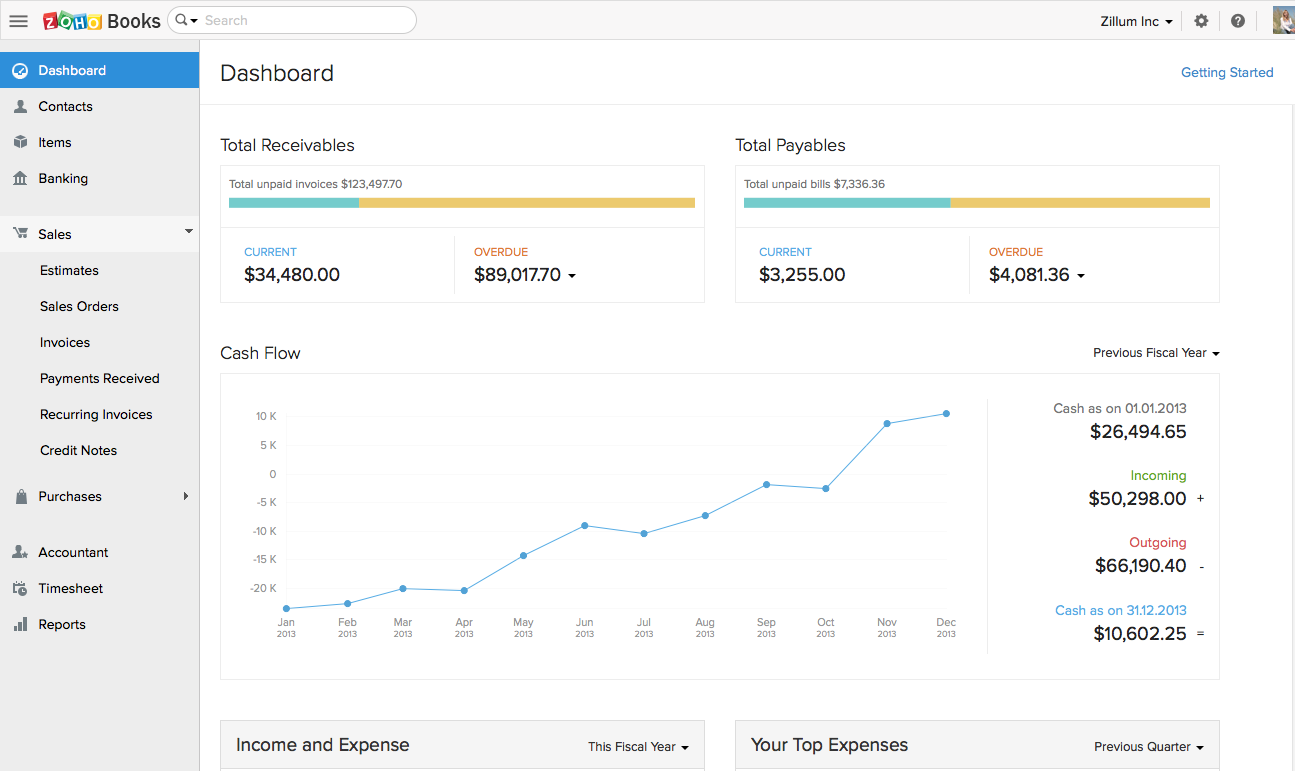    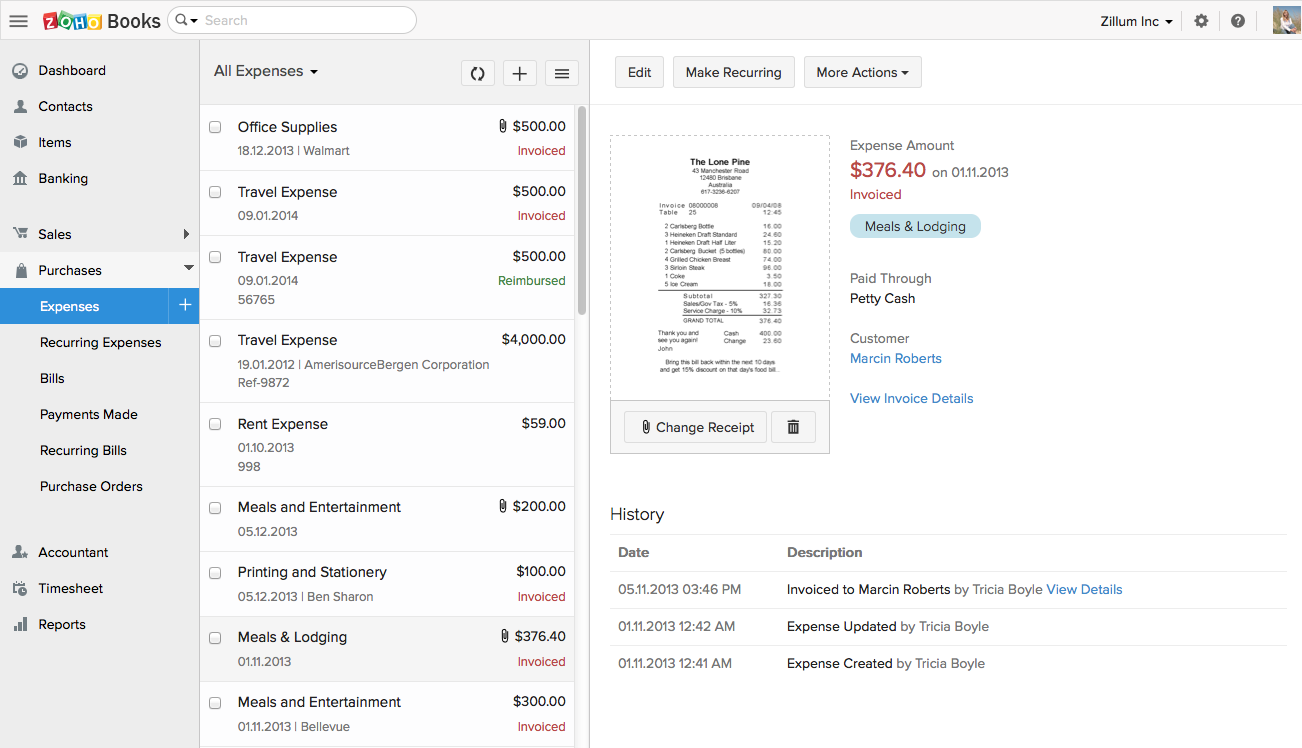  |
