Zoho Books vs. Zoho One

Overview
ProductRatingMost Used ByProduct SummaryStarting Price
Zoho Books
Score 9.0 out of 10
N/A
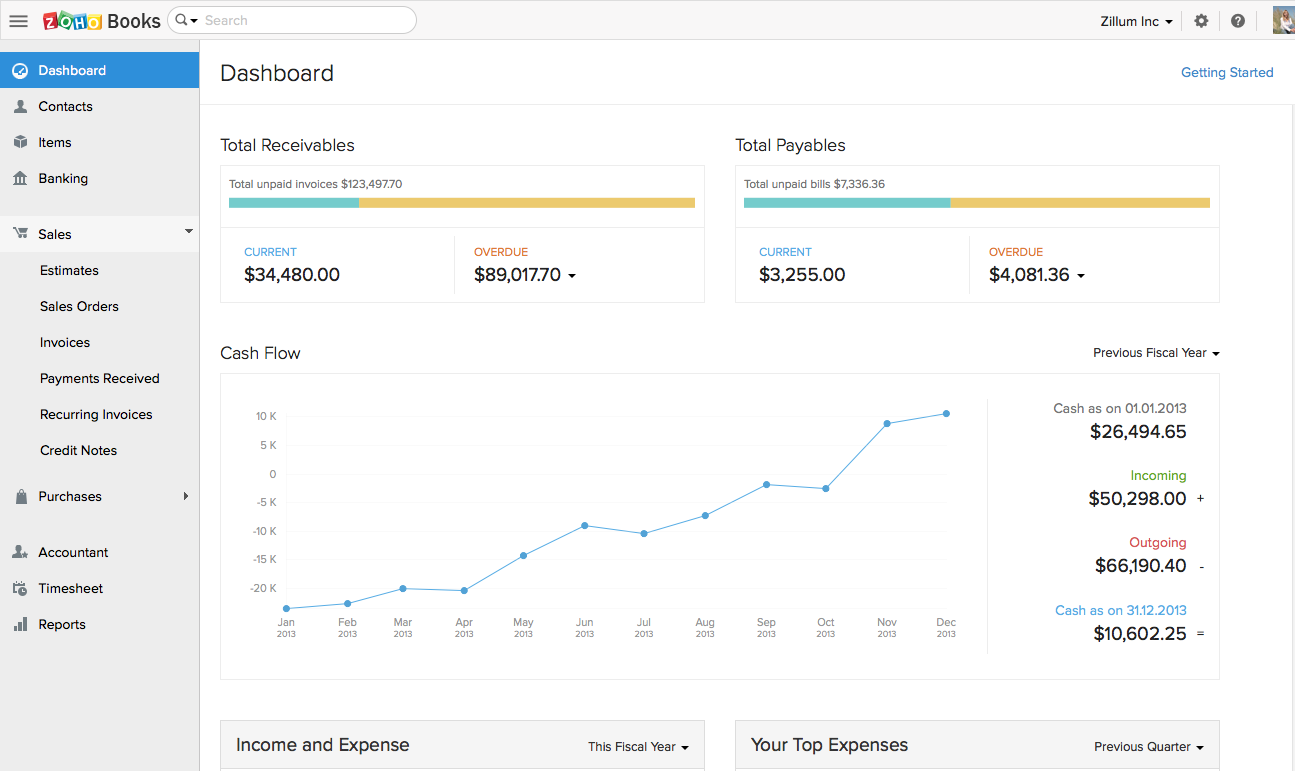
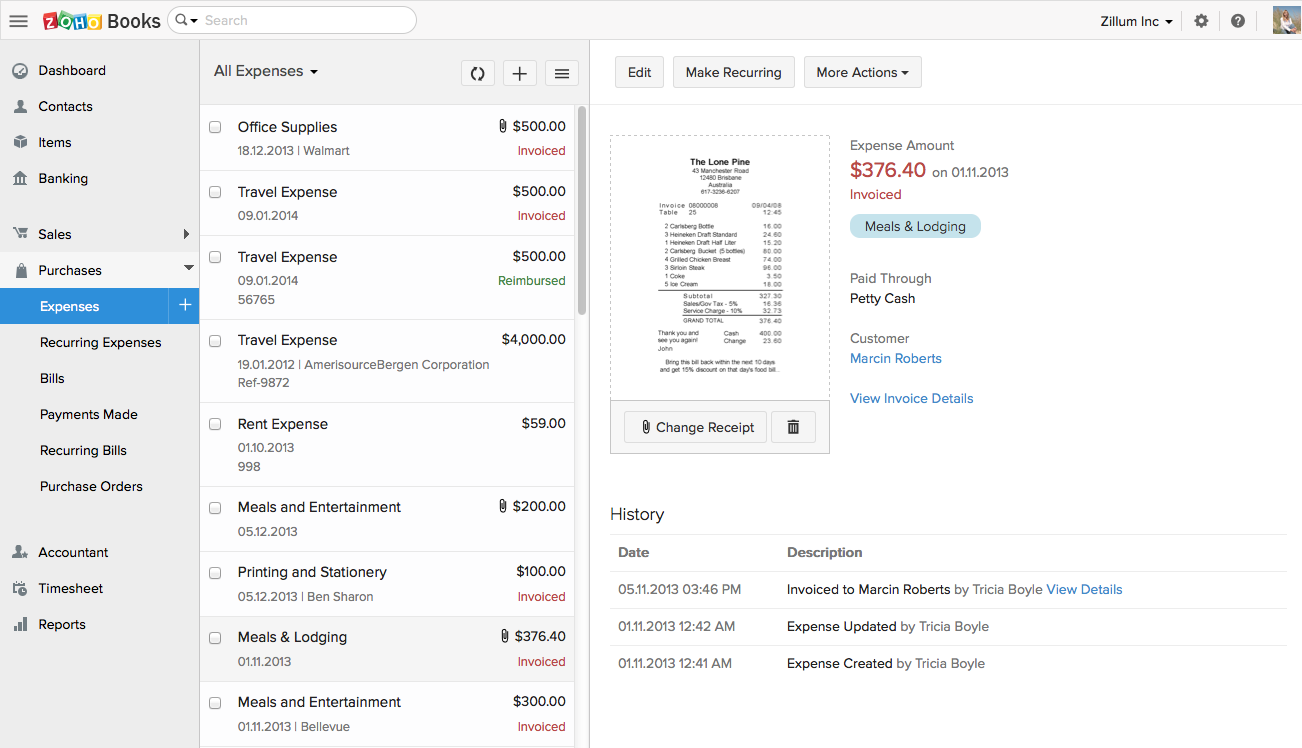
Zoho Books is an accounting solution that is designed to help small businesses manage their finances. This solution includes dashboards and a wide variety of reports. Business users can automate tasks and set up custom workflows. Zoho offers a 14 day free trial.
$0
For businesses with turnover <50K USD per annum
Zoho One
Score 8.9 out of 10
N/A
Zoho One is a suite product from Zoho Corporation, that combines their sales and marketing application, and also gives organizations a comprehensive set of tools to organize finances, track payables, and manage bills and expenses.
$444
per year per employee (Must purchase license for ALL employees)
Pricing
Zoho BooksZoho One
Editions & Modules
Free
$0
For businesses with turnover <50K USD per annum
Standard
$20
per month per org
Professional
$50
per month per org
Premium
$70
per month per org
All Employee Pricing
$444
per year per employee (Must purchase license for ALL employees)
Flexible User Pricing
$1080
per year Licenses for any no. of users
Offerings
Pricing Offerings
Zoho BooksZoho One
Free Trial
YesYes
Free/Freemium Version
YesNo
Premium Consulting/Integration Services
NoNo
Entry-level Setup FeeNo setup feeNo setup fee
Additional DetailsZoho Books is available for both monthly and yearly plans. Users who sign up for the annual plan get a discount.Month-to-month plans available.
More Pricing Information
Community Pulse
Zoho BooksZoho One
Considered Both Products
Zoho Books
Chose Zoho Books
Affordability better, online access better, automations better, integration with our CRM and inventory better, customizability better

Chose Zoho Books
Zoho Books has a much simpler GUI and the reason we selected Zoho is because of the integration of Zoho Books across other applications and especially into Zoho products. One of the other reasons is the time log feature we can easily pair up with a client service ticket to show …
Chose Zoho Books
equally comparable to other payment processing made online, the benefit of using Zoho is that it has so many other apps and tools that are easily integrated like Zoho Sign, e.g. for sending out quotes etc. but also can be connected via an API to many other commercial platforms …
Chose Zoho Books
Much simpler than QuickBooks Desktop. For our needs, the pricing for Zoho Books when bought through a Zoho One subscription was a much better value. Our outside Audit firm was also able to follow Zoho Books much easier than our previous records.
Chose Zoho Books
I found Zoho Books to be more intuitive and user friendly. I also appreciated that it is cloud based, unlike the versions of QB I had used in the past. So our team was able to work remotely when needed, which was especially helpful during a pandemic.
Chose Zoho Books
We had a lot of problems with Exact Online, support-wise and price-wise. So Zoho Books wins on every point there. While Exact offers way more options, it tends to be really slow... and complex. Again Zoho Books wins.

If you want an easy-to-use tool and not pay a lot of money, …
Chose Zoho Books
Zoho Books is significantly inferior to the competition. The listings offered here would not allow me to choose QB or MYOB.
Chose Zoho Books
I believe it is way easier to use, has more robust features, seamless integration with other Zoho apps like CRM, Projects, etc. is super useful and has saved a lot of time. Streamlining this process has been easy, and the end result is better reporting, improved decision making …
Chose Zoho Books
  • QuickBooks Online is much harder to use than Zoho Books. We found that Zoho Books was easy to train staff, and the online help is excellent.
  • Qickbooks Desktop is endlessly buggy, requiring frequent IT support calls and a dedicated server for multi-user access.
  • Online payments for …
Chose Zoho Books
Cloud vs. desktop, this and the fact that Zoho Books syncs with our other Zoho apps were the most pressing reasons for switching to Zoho Books. As mentioned previously, we consider our accounting software to be an integral part of doing business efficiently, and we can now do …
Chose Zoho Books
Easier to integrate with other Zoho apps. It’s also customized for mobile use making it easy to use wherever I am. I can get real-time updates on payments while in the field via the mobile app. The software is customizable and adaptable so I can easily make it fit various …
Chose Zoho Books
[QuickBooks and Zoho] are very comparable until you open your wallet. While they are both neck-and-neck with one another in features, QuickBooks does have the integration advantage. There are many more platforms that integrate with QB than Zoho Books. But Zoho has so many …
Chose Zoho Books
The very easy to read dashboard, the clear categorization, the customization features, the easy learning curve and the seamless integration with other Zoho products (that we use a lot and frequently) are for our company the reasons why we favored Zoho books over other …
Chose Zoho Books
I love the price/quality ratio of Zoho Books, and it's an awesome application to handle all your accounting, inventory, and buying processes. It's simple to use so the company doesn't have to spend too much time and money on training new employees.

Chose Zoho Books
Zoho Books was an easy choice for us because of the features and smaller learning curve. Most of our staff have been able to come in and learn how to use it within hours versus the days it used to take to learn QuickBooks. Also being online, we are able to have real-time stats …
Chose Zoho Books
Quickbooks is the standard. ZOHO Books will give it a run for its money. Your accountant may not like the fact that you switch over to Zoho Books, but since it's completely web-based, you are able to give them access to your account easily.
Chose Zoho Books
The main difference here was the time tracking functionality that goes to a project specific nature. We do multiple projects with the same client and need to be able to split our time amongst those different projects for the purpose of reporting and invoicing.
Chose Zoho Books
Zoho Books is plain clunky. It does integrate with their CRM and other apps and that was why I had been attracted to it. But if you are in Australia, be very careful if you are moving from Zoho invoices. You won't get transferred data to the Australian platform and you will …
Chose Zoho Books
In comparison, Zoho is about the same price but comes with a lot more customizable fields. There are other solutions that feed right in and make it so there is only one place you need to go to get a full picture of your business and what you need to do to keep it running …
Chose Zoho Books
One of the best business decisions we have made in our company is getting Zoho Books. Customer service is really really fast. If you have a problem or questions they will get to you within minutes and they are constantly improving the application and listening to our feedback …
Chose Zoho Books
It's cloud based and AccountEdge wasn't at the time we needed it, a cloud based app. Zoho Books updates come automatically which makes it real convenient. Pricing was comparable and with AccountEdge it seems we were having frequent networking issues when being used by …
Chose Zoho Books
We made the switch from Quickbooks to ZohoBooks because of the CRM integration. Though Zoho Books has proven to be less hectic and less of a search when it comes to finding the needed features. In other words, its very user friendly! Everything is set up in a very simple, easy …
Chose Zoho Books
I selected Zoho Books initially for the best price, it offered and thereafter I became a fan of using the software and It was a nice experience using it overall, I even recommended at times in the place of Tally ERP 9. The more once used, the more it can be recommended to …
Chose Zoho Books
Would rank Zoho Books high up there among the options in the market. It has a wide feature base, smooth interface and comes highly trusted and reviewed.
Zoho One
Chose Zoho One
Once again I think that Zoho One does above almost everyone because of its ease of use easy integration and again the money savings at the long run is what really sells us on this plus I think that live customer service is one of the best in the industry. I only use others if …
Chose Zoho One
All the similar products I mentioned are available in One ssubscription of Zoho One.
Chose Zoho One
The primary reason we switched from Daylite is when we started using Virtual Assistants and wanted a cloud based alternative which Daylite didn't provide. We left MYOB when I think it stopped supporting Apple computers. We left AccountEdge when it stopped supporting payroll tax …
Chose Zoho One
ZOHO was cost-friendly compared to the above tools. This is the biggest pro ZOHO has. Using the above tools requires a manager who works and sets everything up in one place so that others can easily access the data, but in ZOHO, it is very easy to segregate data and use it …
Chose Zoho One
I wasn’t part of the decision-making process, but I will say that coming into using Zoho One, I was really skeptical. Based on my use of it about 10 years ago, but I have seen massive improvement. It is really quite functional and allows us to do a lot of different things that …
Chose Zoho One
Zoho One is the upgraded version of CRM Plus, with added features and apps.
I can't recommend it enough.
Chose Zoho One
5 years ago, we decided to use Odoo. At that time, the enterprise version of Odoo was not competitive enough for a small company with minor integration needs when it comes to the pricing per user.

Nowadays, pricing is almost equal. The effort of integration processes with Odoo …
Chose Zoho One
During the Demo, Zoho One performed well; however, post-implementation - the product has fallen short on all fronts.
Chose Zoho One
There is nothing quite close to what Zoho offers with Zoho One in terms of breadth and depth of applications integrated together as a single product.
Also, you get to manage a single license and user management on Zoho One, whereas you would need to work with multiple vendors …
Features
Zoho BooksZoho One
Customization
Comparison of Customization features of Product A and Product B
Zoho Books
7.8
Ratings
2% above category average
Zoho One
9.7
Ratings
24% above category average
API for custom integration7.80 Ratings10.00 Ratings
Plug-ins00 Ratings9.50 Ratings
Security
Comparison of Security features of Product A and Product B
Zoho Books
9.2
Ratings
10% above category average
Zoho One
9.0
Ratings
10% above category average
Single sign-on capability8.30 Ratings9.00 Ratings
Role-based user permissions10.00 Ratings9.00 Ratings
Reporting & Analytics
Comparison of Reporting & Analytics features of Product A and Product B
Zoho Books
8.7
Ratings
10% above category average
Zoho One
9.0
Ratings
22% above category average
Dashboards8.20 Ratings9.00 Ratings
Standard reports9.00 Ratings9.00 Ratings
Custom reports9.00 Ratings9.00 Ratings
General Ledger and Configurable Accounting
Comparison of General Ledger and Configurable Accounting features of Product A and Product B
Zoho Books
8.4
Ratings
8% above category average
Zoho One
8.0
Ratings
4% above category average
Accounts payable8.20 Ratings8.00 Ratings
Accounts receivable8.20 Ratings8.00 Ratings
Cash management7.00 Ratings00 Ratings
Bank reconciliation8.00 Ratings00 Ratings
Expense management8.80 Ratings00 Ratings
Time tracking8.80 Ratings00 Ratings
Multi-currency support9.20 Ratings00 Ratings
Regulations compliance8.00 Ratings00 Ratings
Self-service portal9.00 Ratings00 Ratings
Global Financial Support00 Ratings7.00 Ratings
Standardized Processes00 Ratings9.00 Ratings
Inventory Management
Comparison of Inventory Management features of Product A and Product B
Zoho Books
7.0
Ratings
5% below category average
Zoho One
10.0
Ratings
23% above category average
Inventory tracking9.00 Ratings10.00 Ratings
Automatic reordering5.00 Ratings00 Ratings
Location management00 Ratings10.00 Ratings
Order Management
Comparison of Order Management features of Product A and Product B
Zoho Books
8.7
Ratings
12% above category average
Zoho One
9.1
Ratings
15% above category average
Pricing9.00 Ratings9.50 Ratings
Order entry9.00 Ratings9.00 Ratings
Credit card processing6.70 Ratings8.00 Ratings
Cost of goods sold10.00 Ratings10.00 Ratings
Subledger and Financial Process
Comparison of Subledger and Financial Process features of Product A and Product B
Zoho Books
-
Ratings
Zoho One
9.3
Ratings
21% above category average
Billing Management00 Ratings8.00 Ratings
Cash and Asset Management00 Ratings10.00 Ratings
Travel & Expense Management00 Ratings10.00 Ratings
Project Execution Management
Comparison of Project Execution Management features of Product A and Product B
Zoho Books
-
Ratings
Zoho One
10.0
Ratings
38% above category average
Project Planning and Scheduling00 Ratings10.00 Ratings
Task Insight for Project Managers00 Ratings10.00 Ratings
Procurement
Comparison of Procurement features of Product A and Product B
Zoho Books
-
Ratings
Zoho One
10.0
Ratings
36% above category average
Bids Analyzed and Compared00 Ratings10.00 Ratings
Supplier Management00 Ratings10.00 Ratings
Risk Management
Comparison of Risk Management features of Product A and Product B
Zoho Books
-
Ratings
Zoho One
10.0
Ratings
42% above category average
Control Management00 Ratings10.00 Ratings
Logistics
Comparison of Logistics features of Product A and Product B
Zoho Books
-
Ratings
Zoho One
10.0
Ratings
40% above category average
Fulfillment Management00 Ratings10.00 Ratings
Supply Chain
Comparison of Supply Chain features of Product A and Product B
Zoho Books
-
Ratings
Zoho One
8.0
Ratings
12% above category average
Forecasting00 Ratings6.00 Ratings
Performance Monitoring00 Ratings10.00 Ratings
Best Alternatives
Zoho BooksZoho One
Small Businesses
QuickBooks Self-Employed (discontinued)
Score 8.9 out of 10
Acumatica
Acumatica
Score 8.6 out of 10
Medium-sized Companies
Accounting Seed
Accounting Seed
Score 6.3 out of 10
Infor VISUAL
Infor VISUAL
Score 8.0 out of 10
Enterprises
SAP S/4HANA Cloud
SAP S/4HANA Cloud
Score 8.6 out of 10
24SevenOffice
24SevenOffice
Score 9.0 out of 10
All AlternativesView all alternativesView all alternatives
User Ratings
Zoho BooksZoho One
Likelihood to Recommend
8.2
(0 ratings)
9.0
(0 ratings)
Usability
8.3
(0 ratings)
9.5
(0 ratings)
Support Rating
5.3
(0 ratings)
5.5
(0 ratings)
User Testimonials
Zoho BooksZoho One
Likelihood to Recommend
Zoho Books is good for a company or organization that wants to keep track of invoices, payments, and cash flow. If you do not have a full-time accountant in your organization, it can work well as whenever you hire one or have someone check your books, the information they need will be there, provided it has been entered into Zoho Books. It works as a one-man operation or a small team. For larger teams, it would depend on how much information needs to be input on a daily basis.
Read full review
Zoho One helps me to create and document each of my closures by creating deals. Zoho One helps me to generate reports, which helps me to track my contact. Zoho One helps me on creating tasks and reminds me to get it done on time. Zoho One keeps each steps and actions I took from lead to a deal.
Read full review
Pros
  • The projects feature is what we use a lot it helps setting up projects as well as tracking expenses and bills for the whole project. The budgeting feature is very developed, allowing you to budget by total project cost, total project hours, hours per task, or hours per staff.
  • Customer Estimates and Invoices are very easy to setup and send directly from the app (it also has a very nice and customizable reminder option).
  • Stock and pricing listings is very intuitive and easy and makes it a very helpful and time saving feature.
  • Bank reconciliation and Financial reporting are very developed and make it easy to share information with bookeepers and accounting specialists.
Read full review
  • Customized dashboards
  • Easy to see the kpis for different aspects of my business
  • And offers a consolidation of CRM campaign and other applications without having to use other technologies from other companies so it's great to consulate consolidated
  • The analytics is great what else
  • Collaboration tools are excellent
Read full review
Cons
  • Printing checks - they only offer one vendor and they are expensive compared to QuickBook alternatives.
  • Their interface for bids - retainers and applying them against income could be improved, but once you know how it's easy.
  • Their recurring fees don't seem to always work the way I'd want. But overall they work.
Read full review
  • In my opinion, SUPPORT IS AWFUL!!!
  • If you want to get in touch with a support representative, your best bet is to call the sales number and demand to speak with an agent.
  • Each of the tools operates in a silo, from a support perspective. Some applications, like books, have chat-based support and others require an e-mail.
  • In my experience, expect any e-mail to the main support e-mail to go unanswered.
  • The first year of support was great, but after we renewed for the second year, it has become terrible.
Read full review
Usability
Customization is the biggest struggle for us and most of the time we need to involve a tech person. The chat support is a great feature and very helpful. It would be great to be able to customize and create invoices and correspondence (templates) such are reminders in multiple languages within one organization. The currency (USD) would be the same. We have clients in different countries that don't speak English but pay in USD.
Read full review
ZOHO is very easy to use. All you need to do is follow the steps and features aligned in it. ZOHO doesn't need complex coding or training; anyone can easily access and use it. You may feel a bit of difficulty initially, but show me an easy tool when you are using it for the first time.
Read full review
Support Rating
The support team feels very disjointed. We have filtered through a number of "lead" contacts and are frequently spammed by other Zoho members. Once getting an appropriate support contact on the phone - the team is very helpful, it just takes a lot of hoop jumping to get there. We actually unsubscribed from their support package as we were not getting the value we were looking for.
Read full review
Support is great as a customer, as a partner I get moved to that team more often and find issues in the support being provided. It also appears that the support agents do not take into account all the information provided and default back to the "step 1 of the playbook" instead of taking into account the business reason the support is being requested and understanding the steps already taken.
Read full review
Alternatives Considered
Cloud vs. desktop, this and the fact that Zoho Books syncs with our other Zoho apps were the most pressing reasons for switching to Zoho Books. As mentioned previously, we consider our accounting software to be an integral part of doing business efficiently, and we can now do that considering our systems are all integrated.
Read full review
The primary reason we switched from Daylite is when we started using Virtual Assistants and wanted a cloud based alternative which Daylite didn't provide. We left MYOB when I think it stopped supporting Apple computers. We left AccountEdge when it stopped supporting payroll tax tables for Apple computers. Thankfully, each time we left one software company we were led to Zoho and have remained ever since.
Read full review
Return on Investment
  • I was able to cut my costs for a more complete and easy to use tool.
  • Many transactions, and accounting tasks on 1 platform, reduction in time by a lot.
  • Clients can pay without leaving your website (less drop-off, better conversions).
Read full review
  • Projects is a lifeline for the onboarding team, as it does the major heavy lifting in onboarding project management
  • Data flow between apps is a must have for contextual information to pass on between teams
  • In terms of ROI, it happens much quicker compared to having multiple apps to do the job, as Zoho One is a lot cheaper than having many tools.
Read full review
ScreenShots

Zoho Books Screenshots

Screenshot of Screenshot of Screenshot of Screenshot of Screenshot of Screenshot of