TrustRadius: an HG Insights company

Astera Data Pipeline Builder (Centerprise)

Score8.8 out of 10

55 Reviews and Ratings

What is Astera Data Pipeline Builder (Centerprise)?

Astera Data Pipeline Builder is a no-code solution for designing and automating data pipelines. It allows users to read and write data across various file formats, databases, and applications. Users can execute ETL and ELT pipelines manually, schedule automated reruns, or integrate them into broader data management processes.

Media

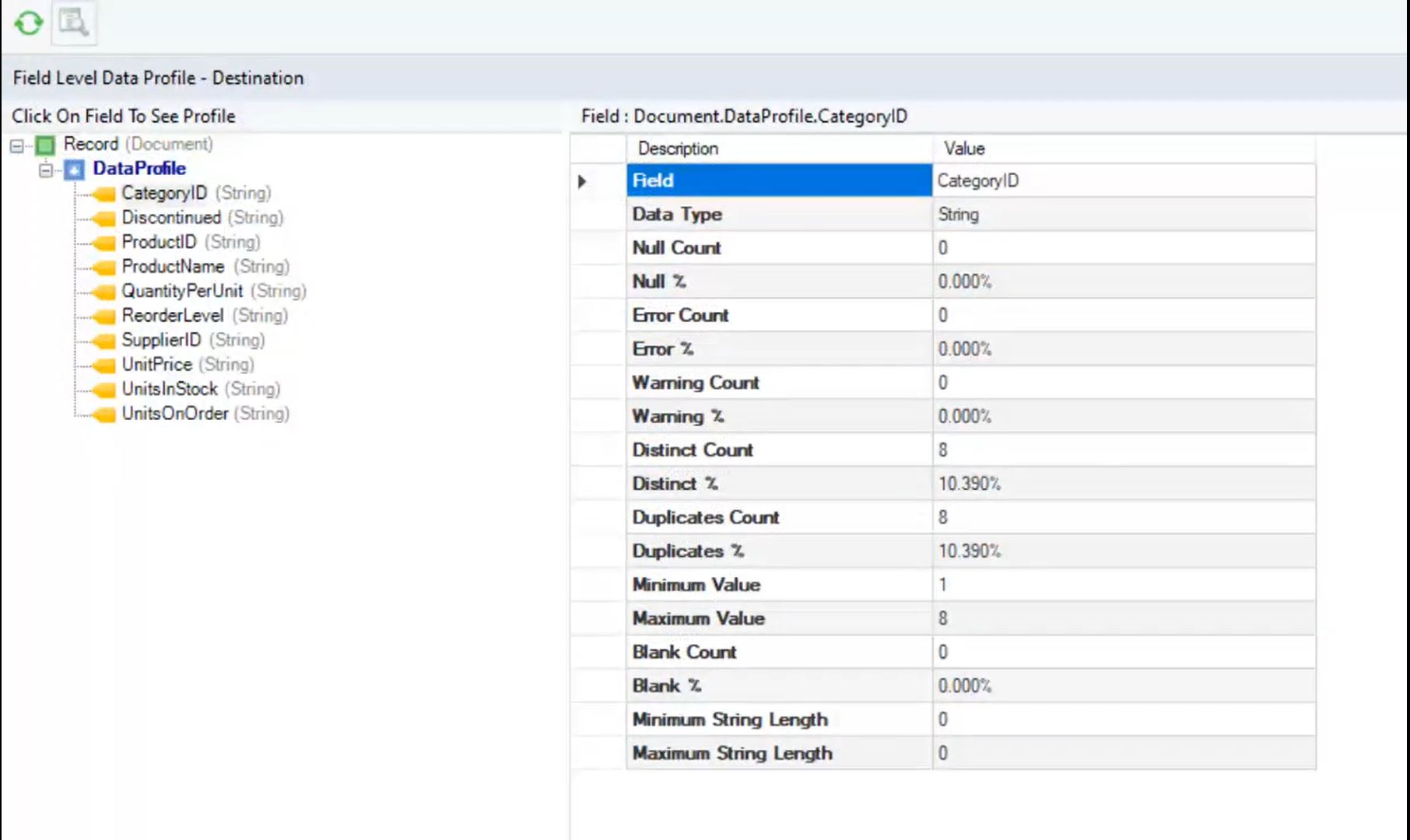
Centerprise's data profiling feature, that ensures that only quality data is delivered to end users.
a variety of write strategies available for workflows.
the built-in scheduler used to automate most tasks. Triggers can be based on time, event or even a file or mail drop.
the AI-powered mapping that allows users to automate the mapping process from source to destination. The tool also supports The Dynamic Layout/Template Mapping feature in Astera Centerprise that allows users to create a template dataflow that can be used to process multiple files and generate copies of the same dataflow, without changing the mapping links individually for each source dataset. Upon execution, Centerprise replaces the values dynamically and generates a new dataflow automatically for all source files.
the two types of transformations supported by Astera Centerprise: record level and set level transformation. Record level transformations are used to create derived values by applying a Lookup, Function, or Expression to fields from a single record. Set level transformations, on the other hand, operate on a group of records and may result in the Joining, Reordering, Eliminating, or aggregating of records.

1 / 5

Top Performing Features

  • Business rules and workflow

    Ability to define and manage business rules and workflows

    Category average: 8.2

  • Simple transformations

    Simple data transformations are calculations, data type conversions, aggregations and search and replace operations

    Category average: 8.1

  • Data model creation

    Ability to create and maintain data models using a graphical tool to define relationships between data

    Category average: 8.4

Areas for Improvement

  • Collaboration

    Collaboration is enabled by a shared repository of project information and metadata

    Category average: 7.1

  • Complex transformations

    Complex data transformations are data normalization, advanced data parsing, etc.

    Category average: 7.1

  • Testing and debugging

    Tool to debug and tune for optimal performance

    Category average: 6.9

My Astera experience

Use Cases and Deployment Scope

It is used by the software development department. We are using this for the ETL process to move and transform the data from one data source to another based on the business rules. We also use this to read the data from the source, transform the data and then feed our application.

Pros

  • It is easy to use. Does not required too much technical background to learn.
  • It can quickly transfer the data across different data sources as it supports the multi-thread processes.
  • It supports many different data sources.
  • It supports Azure connection

Cons

  • Better support for SQLite, as it is only partially support it.
  • Supporting the spatial functions. For example, connection SDE or geo databases.
  • More user-friendly error message reporting.
  • Move the ServerAdminConfig.Xml into cluster database as the file access always caused the issue

Most Important Features

  • The ability to exchange and valid the data between different data sources

Return on Investment

  • It is quickly adapted by many of my co-workers and easy to learn. That saved a lot of training time.
  • As I am dealing with a big data set, it helps us to move and verify the data quickly.
  • It took me some time to get used to the error message, as it is a bit too technical. This has also caused some issues as other users may need more support on it.
  • The cdc file caused the issue a lot. We have to remove that from our design.
  • Astera provides a fast response for support.

Usability

Alternatives Considered

Informatica B2B Data Exchange

Other Software Used

Microsoft SQL Server, Microsoft 365 Business Premium, Microsoft Visual Studio, Microsoft Visual Studio Code, Oracle SQL Developer, FME

Astera Centerprise is Great!

Use Cases and Deployment Scope

Loading data from customers into setup/UAT environments for ERP deployments. We use Centerprise to bypass the need for full SQL access/scripting experience in order to load data in a more timely fashion. Mostly addresses issues with bottlenecks & availability of dedicated data developers.

Pros

  • Integrity check dataflows
  • Bulk load speed
  • Ease of mapping keys & fields

Cons

  • Errors - always stops on the first instance; would be nice to attempt each line & see ALL lines that will error out so you can fix them all at once
  • When working with very large (wide) tables, the load speed when choosing which fields to map, insert, etc. is slow
  • Syntax helper for writing expressions

Return on Investment

  • Faster turnarounds on pre-live data loads

Usability

Other Software Used

Smartsheet, Aha! Roadmaps, DevOps board

Astera Centerprise Review

Use Cases and Deployment Scope

Astera Centerprise is being used by the IT Application Department in Aspen Medical Products. It is being used to integrate the Magento eCommerce platform to host the company's website with ERP Application (IQMS). I've been using the Astera Centerprise for the last 5 years to create Integration Dataflows, Workflows, Scheduled jobs to integrate the Magento and IQMS APIs. These jobs run round the clock from 4 am till midnight 7 days a week to keep the data flowing between the applications. The data includes customers orders, customer's account setups, address information updates, Credit limit updates, Customer's product pricing updates, etc...

Pros

  • API integrations vis REST Web Service transformation
  • Stored Procedure integration via SQL statement Lookup transformation
  • Bulk imports and exports to and from tables
  • Data dumps from SQL tables to excel, csv, text files etc...
  • EDI Integrations like 810, 856, 940, 945 etc.. via Astera Centerprise Data Integrator plus EDI Connect

Cons

  • I would say Server Monitor is not very user-friendly. Astera [Centerprise] can add sorting features on different columns to make it more intuitive
  • The search box in server monitor doesn't display the the way I expect.
  • Astera CDI can add Temp tables object to store staging/temporary data instead of using excel or data files.

Other Software Used

Adobe Commerce (Magento Commerce), Microsoft SQL Server, Microsoft Power BI, IFS Applications

Most Important Features

  • REST API client, Rest Connection to generate refresh API tokens
  • EDI Connect features like EDI message parser, source, destination.
  • Loop feature to loop the records in the workflows
  • Sending Outbound EDi files like 940, 855, 856, 810 etc..

Return on Investment

  • Instead of using Mulesoft which was very costly tool, we chose Astera Centerprise which helped in saving thousands of dollars in licensing fees per year.
  • Last year we were looking for EDI tools for our needs to consume EDI files like 850 and also generate the outbound EDI files like 810, 856 etc. but after comparing others in the market, Astera's EDI Connect was the best choice for us as it was much cheaper and Integrating with our existing Astera CDI tool was easier.

Alternatives Considered

MuleSoft Anypoint Platform

Usability

Excellent Tool

Use Cases and Deployment Scope

We are using Astera Centerprise for automatically capturing data from PDF files and uploading to different databases. We are also using this for integration of different systems, data comparison, data validation, data extraction, and data transformation.

We initially purchased Astera Centerprise for us to automatically capture and load data from PDF documents to improve our data quality. With all the available functions in Centerprise, we expanded to different areas and continue to grow in terms of application. We also continue to work with Astera support group on possible improvements and functionalities.

Pros

  • Data parsing from PDF
  • Data transformation
  • Data loading
  • Data validation
  • Data migration/ transfer of data between systems
  • Data Comparison

Cons

  • Extraction of data from HTML
  • Data extraction from websites
  • Can you look at front end handling similar to RPA
  • Allow generation of formatted output files in PDF or MS word
  • Allow formatting of MS excel output files (highlighting of cells, underlining of values)

Most Important Features

  • Data parsing
  • System integration
  • Data loading

Return on Investment

  • Productivity improvement
  • Quality improvement
  • Cost reduction as a result of improved productivity

Alternatives Considered

Altair Monarch

Other Software Used

Blue Prism Intelligent RPA, TIBCO Spotfire, Microsoft SQL Server

Usability

Fast and easy-to-manage ETL software

Use Cases and Deployment Scope

Our business intelligence group uses it to run our ETLs to pull data from over 10 source systems to our enterprise data warehouse. We also use it to generate data feeds to other systems from EDW.

Pros

  • Simplistic in standing up a complex ETL process in days.
  • Low maintenance.
  • Fast execution time.

Cons

  • Better normalization functions.
  • Shouldn't have to adjust to daylight savings.

Most Important Features

  • data connectors
  • ease of use transformations

Return on Investment

  • Because of Astera we have been able to evolve and manage our EDW which has data from multiple sources today and is being used across our organization.

Other Software Used

IBM Cognos Analytics with Watson, Microsoft BI (MSBI)

Usability