TrustRadius: an HG Insights company

Conga Composer

Score9.5 out of 10

197 Reviews and Ratings

What is Conga Composer?

Conga Composer is a document generation and automation tool designed to simplify and streamline the process of creating and distributing customized documents, presentations, and reports.

Read more details.

Media

Screenshot of how documents are created automatically, directly from Salesforce
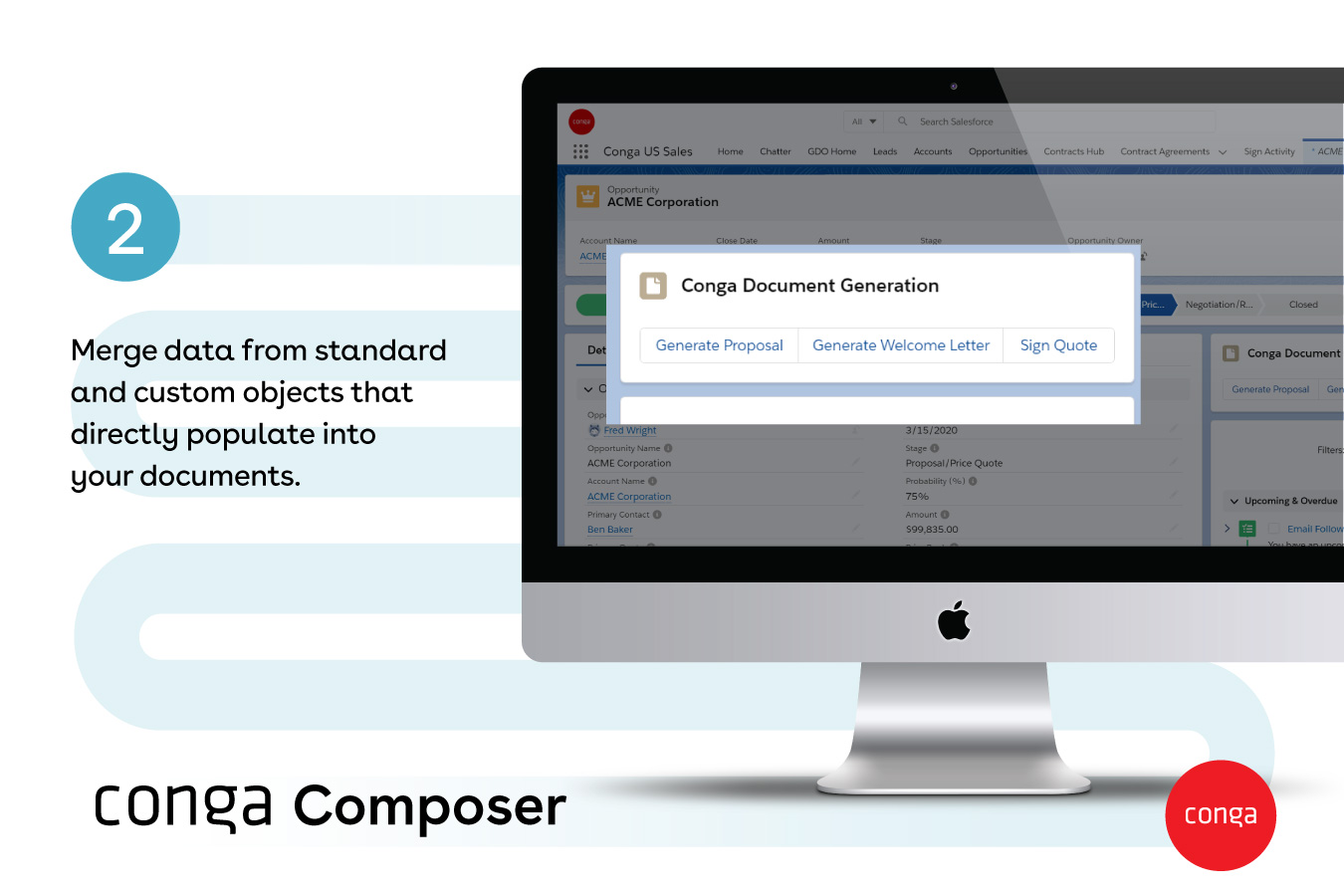
Screenshot of documents generated with any data, from any object - standard or custom
Screenshot of Conga Document Generation
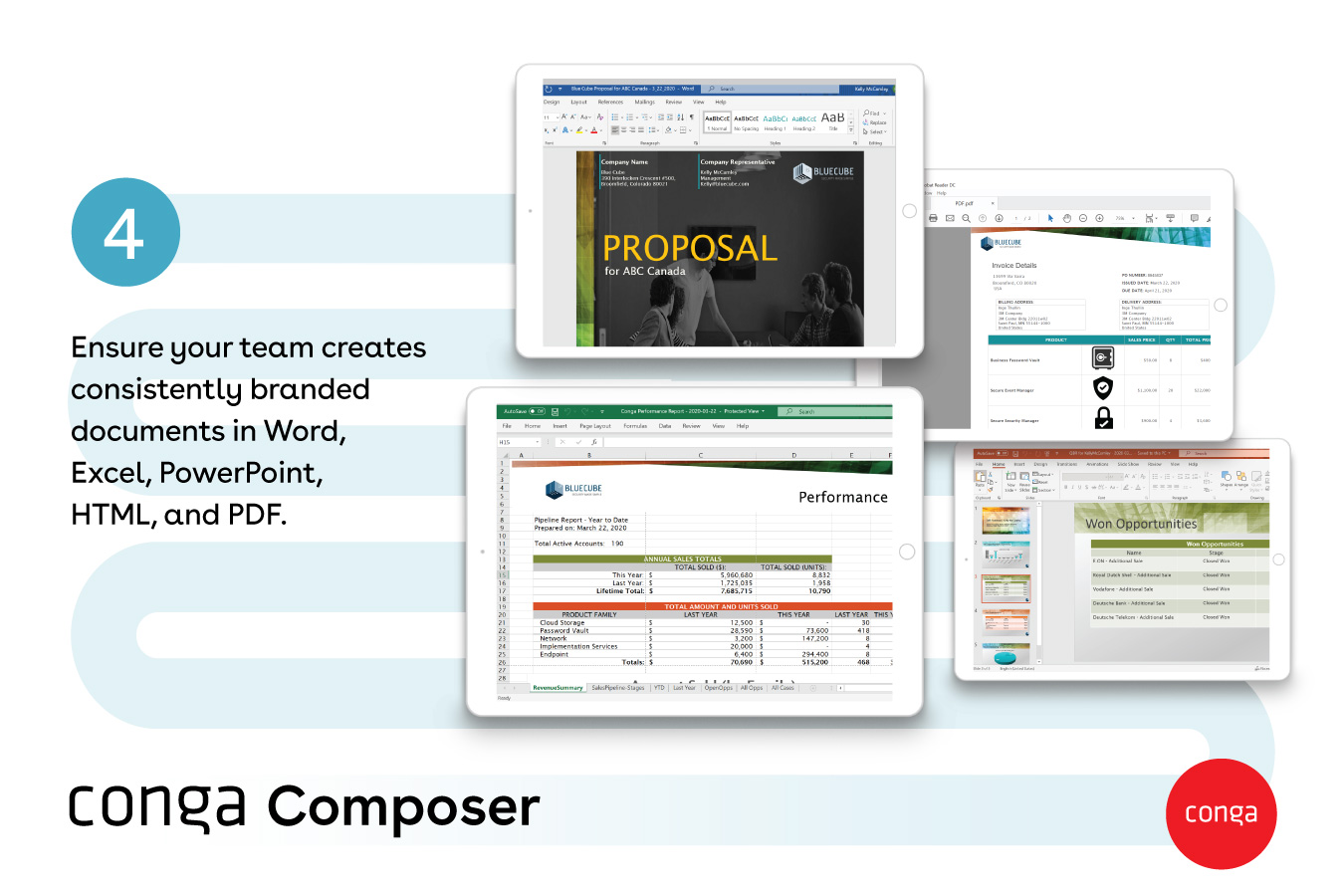
Screenshot of popular document formats available, like Word, Excel, PowerPoint, HTML, and PDF
Screenshot of how large documents are sent via a link - and they provide visibility into customer document engagement
Screenshot of how multiple documents can be sent with one or no clicks

1 / 6

Screenshot of how documents are created automatically, directly from Salesforce

Who Buys & Uses Conga Composer

Pros

  • Efficient document generation
  • Automation of document-related tasks
  • Seamless integration with Salesforce

Cons

  • Error handling can be difficult
  • Template creation can be challenging
  • Formatting issues with special characters and images

Conga Composer A Powerful Document Generation and Management Tool.

Use Cases and Deployment Scope

We have been using Conga Composer to automate the creation of the business's critical documents directly from Salesforce. It has become an optimal tool for generating contracts, quotes, service agreements, and customer communications with speed and accuracy. Helps with the slow turnaround times and data accuracy issues. Especially useful for our sales team as it allows them to generate quotes, proposals, and contracts directly from Salesforce with just a few clicks.

Pros

  • Conga Composer creates error-free, branded documents directly from Salesforce records instantly. Can create complex documents like multi-line quotes, NDAs, and service agreements in a moment.
  • Improves real-time data accuracy by pulling live data from Salesforce; the documents are always up-to-date and accurate.
  • Conga Composer is a powerful tool for streamlining document workflows, improving accuracy, and saving time across departments.

Cons

  • Faced some challenges with Mail Merge, which can result in delays and slow down the entire process.
  • Integration with google is not that great when compared to other software's.

Return on Investment

  • One of the most visible impacts was that document errors dropped by over 80%, boosting customer satisfaction and uptime.
  • Automated the document creation and management process, saving a great deal of time.
  • Turnaround times have also remarkably faster, deals close sooner, boosting the profits.
  • Overall, the time savings and error reduction covered the licensing costs within the first quarter.

Alternatives Considered

S-Docs

Other Software Used

Salesforce CRM Analytics, Microsoft Dynamics 365 Customer Insights

Conga Composer helps streamline financial proposal process

Use Cases and Deployment Scope

RealtyCom partners supports our clients by negotiating and managing all of their telecom contracts. We do this through the use of data management, and CRM systems to make sure that we always have our finger on the pulse of what is happening with our clients. As part of our process we negotiate contract terms with various telecom companies and need to present those different options to our clients in a concise and visual way. For years we have been doing a manual process to incorporate data from our CRM, requests for proposals and additional other data points then pull that into templates that we use to present to our clients. That process has historically created lots of opportunity for user error as well as long approval processes to comb through all of that manually entered information. Not to mention template management when something needs to change or be updated. We've been looking for a solution to be able to automate that process and remove some of that user error while also trying to speed up that process. We discovered Conga Composure as a way to improve that process

Pros

  • It is able to incorporate all of the Microsoft products that we use to build & showcase proposals
  • Once a solution is built it's easy to update templates
  • The processing time is quick and allows us to move through proposals at a pace we haven't had

Cons

  • Creating the solution can be a confusing process and getting that set up required us to hire outside help to do so. As we look at continued uses for composer having that issues causes us to need to be strategic as it impacts the budget we have for such thins

Return on Investment

  • Time saved
  • Ease with Data validation
  • Trust that the final product is correct which helps with our approval process timeline

Branding and contract creation made simple with Conga Composer.

Use Cases and Deployment Scope

Our primary use case with Conga Composer is to create brand documents and after-sales agreement documents. This was a manual process earlier, consuming a lot of time for us. Still, after implementing Conga Composer, we have been able to automate the process, and our workflow has become quicker and much more efficient.

Pros

  • One great feature of Conga Composer is the ability to create various document types, including Word files, PDFs, and even PowerPoint presentations.
  • The ability to encrypt and share data is quite impressive with Conga Composer.
  • The integration, especially with different email providers, is quite good with Conga Composer.

Cons

  • The API deployment method during the initial implementation could have been more flexible.
  • Lack of high-quality learning materials and knowledge base documents can be addressed.
  • The overall user interface is not very modern.

Return on Investment

  • We have been able to standardize our branding in documents to give them a more professional appearance.
  • The number of manual errors is significantly reduced, thereby improving our turnaround time by 30%.
  • Our overall working efficiency has improved by over 70% with the introduction of Conga Composer.

Other Software Used

Conga CPQ, Zoho Cliq, DocuSign

Conga Composer Creator has allowed our small agency to compete with the Big Dogs

Use Cases and Deployment Scope

Our agency uses Conga Composer to put together an Employee Benefit Booklet for every client. We also use Conga Composer for our Quoting and Renewal process. We are a Benefits Brokerage and Conga Composer has allowed us to provide very professional reports to even our smallest clients. We have templates in place which makes this very user friendly. Every once in a while there is a formatting issue that arises but that's an easy fix once identified.

Pros

  • Creating Templates
  • Populating formatted data
  • Professional Presentation
  • Easy to use

Cons

  • Not very intuitive. Once you know the system it's fine but there is a learning curve
  • I would like to see training opportunities on features that I am not using or aware of
  • I am sure I am only using about 3% of it's full potential

Return on Investment

  • Time Saved on Document Creating was a game changer
  • This has increased efficiency and allows us to provide the same level of quality to even our smallest clients
  • Occasionally we find an error or need to adjust for a formatting issue but that's not very common

Other Software Used

Benelinx - Agency Management System

Very helpful in creating documents within minutes

Use Cases and Deployment Scope

We use Conga to generate automated documents directly from salesforce. It saves a lot of time because previously, we used to create manual documents by copying data from salesforce to word or pdf which was never perfect. Furthermore, they were not formatted properly because every team use their own format and slowed our responses. by using Conga, we can easily generate documents from salesforce directly using the data available and send them to clients. There are so many pre-made templates available to choose from and the growth of our company increased by using this simple automation.

Pros

  • It allows us to generate multiple documents at once using batch generation. This simple automation saves a lot of time for our team.
  • Its very user friendly. Even a newbie can simply generate document by clicking a button once this is setup by the admin.
  • Integrate Conga Sign with Conga Composer and it will automatically sent for e- signature once generated saving lot of time. we previously had to wait a lot for the signature.

Cons

  • No realtime review of what your document is gonna look like. Team has to generate a document first just to check how it looks which slows down template testing.
  • Pricing can be a issue for new business as your tier will increase if you need more users or generate a lot documents. I think flexible pricing options should be there.
  • If this app missed any field from salesforce while generating the document, errors are too confusing for a normal user and cannot be resolved without developers support.

Return on Investment

  • For sales leads, Proposal time reduced to 85% for our team.
  • They can now close the deals very fast as this improves our efficiency and lot of errors which we faced in manual document creation.
  • One click generated a document in couple minutes which previously used to take hours.

Alternatives Considered

PandaDoc, DocuSign Gen and Adobe Acrobat

Other Software Used

Atlassian Jira, Microsoft Excel