TrustRadius: an HG Insights company

GlobiFlow for Podio

Score10 out of 10

6 Reviews and Ratings

What is GlobiFlow for Podio?

GlobiFlow for Podio is a workflow automation and data visualization tool designed specifically for Citrix Podio™. According to the vendor, this solution offers features that can streamline processes and enhance productivity for businesses of any size that utilize Citrix Podio™. Professionals from various industries, including project management, accounting & finance, sales & marketing (CRM), human resources, and operations, may find value in the automation capabilities and data visualization offered by GlobiFlow for Podio.

Key Features

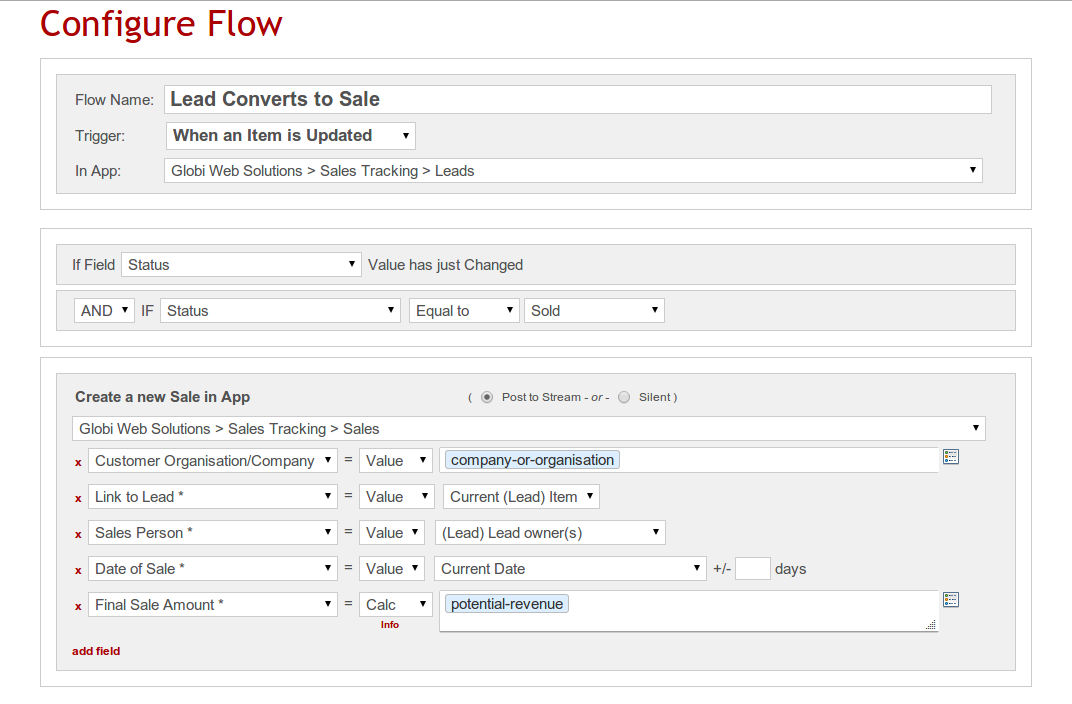
Workflow Builder: According to the vendor, users can design and customize workflows based on specific business processes, triggering actions such as creating new items, updating items, assigning tasks, and sending emails.

Date Triggers: Users can create workflows based on item date fields, such as due dates or follow-up dates, to automatically perform actions on items that match predefined conditions, as stated by the vendor.

Generate PDF's: The vendor claims that users can generate professional PDF documents using Podio data, attaching them to the current Podio item or sending them via email to customers. This feature can be useful for generating invoices, purchase orders, contracts, and more.

Send Emails: According to the vendor, users can easily send rich text emails to external contacts as an action from any flow, utilizing the email editor to customize emails with data from Podio items. Replies to emails can trigger additional flows for further actions.

Send SMS Texts: Users can send SMS texts to mobile phones as an action from any flow, including Podio data in the text messages, as stated by the vendor. Replies to texts can also trigger additional flows for further actions.

3rd-Party Integrations: The vendor claims that GlobiFlow for Podio seamlessly integrates with other applications, such as saving generated PDFs to a ShareFile account or sending PDFs to contacts via RightSignature for e-signatures.

Embed in Website: According to the vendor, users can embed Podio items or app table views directly on websites, allowing visitors to click through to item detail views. This feature enables the use of Podio as a website content management system (CMS).

Image Charts: Users can convert report widgets into visually appealing charts or graphs, easily inserting them into workspaces, app image widgets, or app item image fields, as claimed by the vendor. This feature enables the creation of informative dashboard apps within Podio.

Intelligent Email Buttons: According to the vendor, users can insert buttons and links into emails that execute flows and display messages when clicked. This feature enables the daisy-chaining of message pages for multiple selections and actions.

Data Feeds: The vendor states that users can transform any app into a data feed in JSON or XML format, facilitating third-party integrations with specific filtering conditions.

Categories & Use Cases

Media

Podio Workspace with Charts
Flow UI with App Reference Map
Flow Builder

1 / 3

Top Performing Features

  • Business rules engine

    Business rules engine allows non developers to change business logic in a model

    Category average: 8

  • Custom reports

    Users can create custom reports.

    Category average: 7.9

  • Process simulation

    Evaluating model performance with real data, and optimizing

    Category average: 7.5

Areas for Improvement

  • Social collaboration tools

    Social tools for discussion threads, wikis, enabling decision making

    Category average: 8.3

  • Model execution

    Ability to execute model and build code without programming skills

    Category average: 7.3

Use GlobiFlow to take your Podio and Sharefile to the next level

Pros

  • GlobiFlow allows one event to prompt a task or notification automatically, which greatly improves workflows and internal communications.
  • GlobiFlow makes it possible to automate some interactions we have with people outside the agency, for example, responding immediately to an application when it is received, creating a Sharefile folder to collect submitted documents all in one secure location, etc.
  • GlobiFlow suggests new ways of setting up workflows that makes us think through and improve our processes.
  • GlobiFlow helps us keep track of events in new and improved ways. For example, when a leave request is approved GlobiFlow automates the process for putting that date on an agency-wide calendar.
  • GlobiFlow helps us use Podio and Sharefile better so we communicate with employees in other offices and out in the field more effectively.

Cons

  • There is a steep learning curve for your typical PC user. I've used GlobiFlow for over a year but there are many things I still don't understand about it. The help pages are somewhat helpful, but there is a whole vocabulary associated with GlobiFlow that is a bit mysterious at the front end.
  • Any limitations in Podio are repeated in GlobiFlow.
  • Setting up processes in GlobiFlow is somewhat complicated, which makes it a little tedious when employees change and responsibilities shift, as they often do in a growing organization. Naming your processes well is important so you can go back and find places where changes need to be made.

Return on Investment

  • GlobiFlow saves time once you get it up and running.
  • GlobiFlow improves internal communication and cross-agency collaboration.
  • GlobiFlow helps us communicate with external clients and applicants in a more efficient and professional manner.

Alternatives Considered

Podio and Citrix ShareFile

Other Software Used

Bloomerang, RightSignature, Adobe Acrobat DC