TrustRadius: an HG Insights company

Progress Kendo UI

Score8 out of 10

244 Reviews and Ratings

What is Progress Kendo UI?

Kendo UI is a JavaScript UI toolkit that allows users to build responsive web-based apps integrated into their framework of choice (jQuery, Angular, React, or Vue). The vendor’s value proposition is that Kendo UI offers a large library of popular and configurable components ranging from sophisticated grids and charts to basic buttons, so users don’t have to waste development time building their UI. The vendor also says the large library of customizable themes means users can easily deploy a consistent look and feel across the entire user experience.

Media

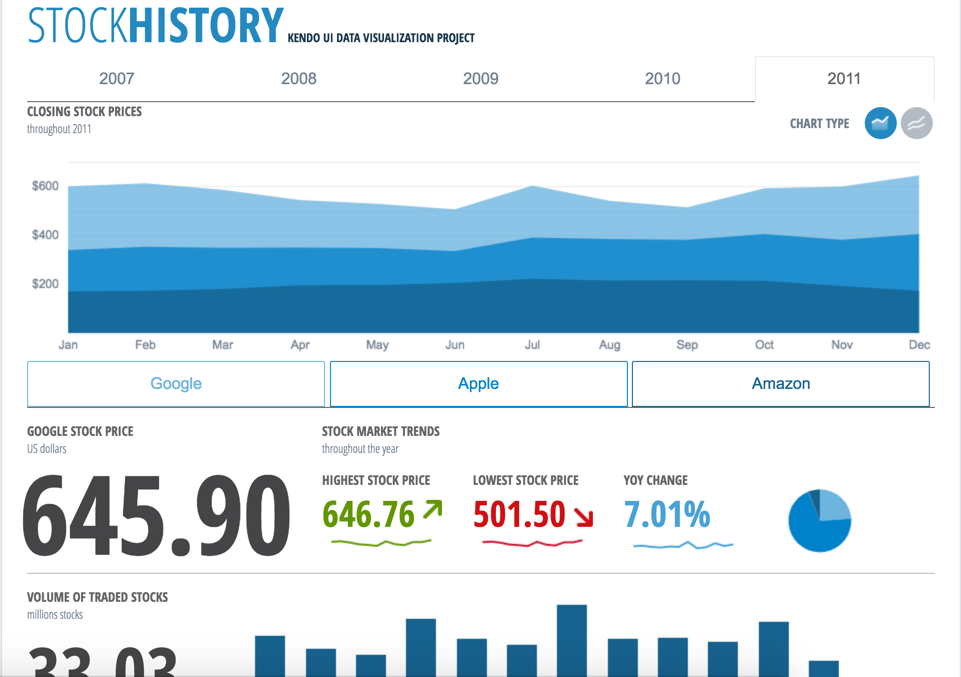
Our extensive library provides you with the tools you need to easily control your app and display data in whatever format you need. Our advanced Sass Themebuilder lets you take any of our stock library themes and modify it to precisely match your brand requirements. Enhance your customer’s user experience with seamlessly integrated Kendo UI components.
Easily create eye-catching and full-featured user interfaces by selecting from our rich library of components. Use advanced features like our grid component to create tables that display data in a wide range of formats from both local and remote sources.  We support popular frameworks like jQuery, Angular, React, Vue, and others so you can integrate our Kendo UI components into whatever environment you choose.
Create rich dashboard applications by taking advantage of the breadth of UI widgets available within the Kendo UI toolset. Easily wire up the UI widgets to any existing RESTful API and backend to display any and all kind of data that you need to surface in your applications.
Combine existing HTML elements and styling alongside with the Kendo UI components to create the exact kind of user interface that your users are requesting. The Kendo UI widgets can be dropped in to any existing application and be added widget-by-widget to ensure that adding the rich Kendo UI components can be done in a timely manner without disrupting existing app dev workflows.

1 / 4

Using Kendo UI with ASP.NET

Use Cases and Deployment Scope

In my daily work I use Kendo UI for jQuery in the software development department. I write custom Kendo UI plugins that integrate components from different products. With its wide range of components, Kendo UI for jQuery is very useful to reduce development time.

Pros

  • Reduce development time
  • Easiliy create custom (e.g. composite) plugins
  • Easiliy write Kendo UI plugins
  • Numerous widgets out of the box.
  • Responsive components
  • Theamable components
  • Highly customizeable components

Cons

  • No query builder widget available.
  • No timezone calendar. Timezone should be adjustable.
  • Grid: Timezone should be adjustable

Return on Investment

  • With Kendo UI we didn't start from scratch. The gallery of live examples with full source code helped us to get started.
  • It was easy to integrate Kendo UI with other libraries and Frameworks (ASP.NET).
  • With Kendo UI we updated the user interface of our applications to modern looking web applications.

Alternatives Considered

jQuery UI and knockout js

Other Software Used

Microsoft Visual Studio, Microsoft SQL Server, ASP.NET

Usability

Improvement in Kendo Dynamic LINQ

Use Cases and Deployment Scope

We have angular app for our .net core backend application. we have used Progress/Kendo-ui version 2021.2.616. Our need for clinet-ui is responsive UI and dynamic controls with great UI feel. Our application is based on dental web application so we need to use tooth charts and many other controls to display data to users.

Pros

  • kendo-panelbar
  • kendo-calendar
  • kendo-grid

Cons

  • Kendo Dynamic LINQ

Return on Investment

  • We are still in development phase of our product, need to see when site goes live

Usability

Perfect integration with Vue

Pros

  • It has a good redesign of the components we cannot find in other UI. I have even noticed a lot of improvement in the file upload component. Particularly, it has been very easy to make it work.
  • It works perfectly with Vue. I have had no problems adding components.
  • The ThemeBuilder is the best. You can customize the theme of the application without touching a single line of code. The results in examples are shown in real-time.

Cons

  • They should improve the documentation on certain components, not all of them have well-detailed help.

Return on Investment

  • At first, I was a bit skeptical to implement it in my next project, but I decided to test out the trial version and it simply convinced me. It is a good investment and I am very satisfied. I was able to buy it since I included it in the development budget and slightly mitigated the high price.
  • I am currently using it in a second project and it has gone wonderfully.

Alternatives Considered

MariaDB Platform

Other Software Used

MariaDB Platform, Laravel PHP Framework

Usability

Progress Kendo UI is best for all UI developments

Pros

  • Multi Platform Support
  • Detailed usage guide for all the feature
  • Grid control provides flexibility to create robust design
  • Fast troubleshooting support from the Progress Kendo UI Team
  • Standardized UI
  • Easy to apply customizations

Cons

  • Upgrade process is very complex and has led to breaks in the UI design. More stable approach needs to be designed for the same
  • Initial learning curve is required while implementing by the developers

Return on Investment

  • Reduction in time for development
  • Meet the project timeline and satisfy the client requirements
  • Fluid look and feel of the UI for the end users

Alternatives Considered

Progress Telerik UI

Other Software Used

Oracle Access Management, Oracle Cloud Platform

Usability

Kendo UI is a great tool not just for developers, but for the end users as well

Pros

  • Showing data in a table/grid.
  • Drag and drop functionality.
  • Accessing remote data to widgets.

Cons

  • Better error handling messages.
  • Examples for edge cases.

Return on Investment

  • Better looking web applications.

Other Software Used

Microsoft Visual Studio Code, Visual Studio IDE

Usability