TrustRadius: an HG Insights company

MicroBiz

Score8.1 out of 10

3 Reviews and Ratings

What is MicroBiz?

MicroBiz Cloud is POS and retail automation software for independent retailers. It allows retailers to ring-up sales on iPads, PCs and Macs, manage inventory at multiple locations and integrate seamlessly with QuickBooks Online and the WooCommerce ecommerce platform. MicroBiz includes features such as:

  • real-time multi-store inventory and store transfers
  • automated purchasing/receiving
  • special orders for sale of items not in stock
  • credit accounts/AR/customer statements
  • customer-based pricing
  • matrix products
  • order/delivery management, and
  • customer relationship management
The software provides the ability to run a repair or service department and keep inventory synchronized between retail stores and your Woocommerce ecommerce site. According to the vendor, MicroBiz Cloud can save hours of management time each month.


Videos

Screenshots

Screenshot of MicroBiz Cloud runs on iPads, Macs and PCs
Screenshot of Register Screen - Ring Up Sales Quickly and Easily.  Quickly scan items into the register using bar codes – or add items with one touch. Discount individual items, groups of items or the entire transaction. You can do price checks and check inventory. It’s so intuitive that employees will be able to use the POS application with almost no training.
Screenshot of Register Screen  - Add any items to a transaction with one touch – even non-inventory items such as service and delivery charges. The keys can be set to prompt for the price or the size or color of an item. You can set up an unlimited number of Quick Pick Panels, use colors to highlight keys and arrange them in any order that you choose.
Screenshot of Customer Order Dashboard - Manage Layaways, Work Orders, Deliveries and Phone Orders. Use the Orders in Progress capabilities in MicroBiz to manage layaways, phone orders and orders in progress.  You can collect a deposit and set whether the order will be fulfilled via store pick-up, shipment or delivery.
Screenshot of Filtered Product Search - Use multiple ways to search for products and add them to a transaction. In addition to the top product search bar, MicroBiz Cloud features a flexible advance search feature.  This feature allows you to search by item name, SKU, style, UPC or Alternate ID.  Search results can be displayed in table format or as product tiles.  Advanced filters allow you to view results by category, vendors, brand, color, size or other attribute.
Screenshot of Product Record - Simple and Matrix Products and Flexible Pricing Schemes.  Products records are critical to a retail system – as the sale of products and services drives revenue.  Our product records make your job easier by offering all kinds of flexibility and capabilities around product type (simple products, matrix products, prompt for price, services, etc) and pricing strategies (discounts, promotions, customer-based pricing, quantity-based pricing).
Screenshot of Customer Orders - Manage sales of items not taken immediately from store.  You can attach a customer, change status. Set a due date, define a handling type, print pick-up slips and add notes.  Customer orders can be transferred to the register so that payment can be made and ‘cash and carry’ items can be sold on the same receipt.
Screenshot of Credit Accounts/Accounts Receivable - Offer and manage credit accounts to customers, including defining authorized users, setting credit limits and payment terms and the display of current balance and available credit. Credit account records display all charges to the accounts, payments on balances and authorized user activity.
Screenshot of Register Close Outs and End of Day Reports - Registers can be batched at the end of the day to help reconcile sales to deposits. Close-out process allows you to keep a specified amount of cash in the till and includes a Z report showing a daily snapshot, salesperson activity, category totals, taxes collected and tender types.
Screenshot of Register Summary Customer Profile - The customer profile in MicroBiz Cloud displays all relevant data about the customer attached to the transaction.  You can view the customers pricing group, store credit and credit account balance and whether that customer has any store credits or gift cards outstanding.
Screenshot of Auto Stock Replenishment - MicroBiz automates your ordering process by defining targeted reorder points and restock levels for products.  You can add automatically add quantities to purchase order based on current inventory as compared to desired restock levels, historical sales of the item over a set time period or a specific order amount.
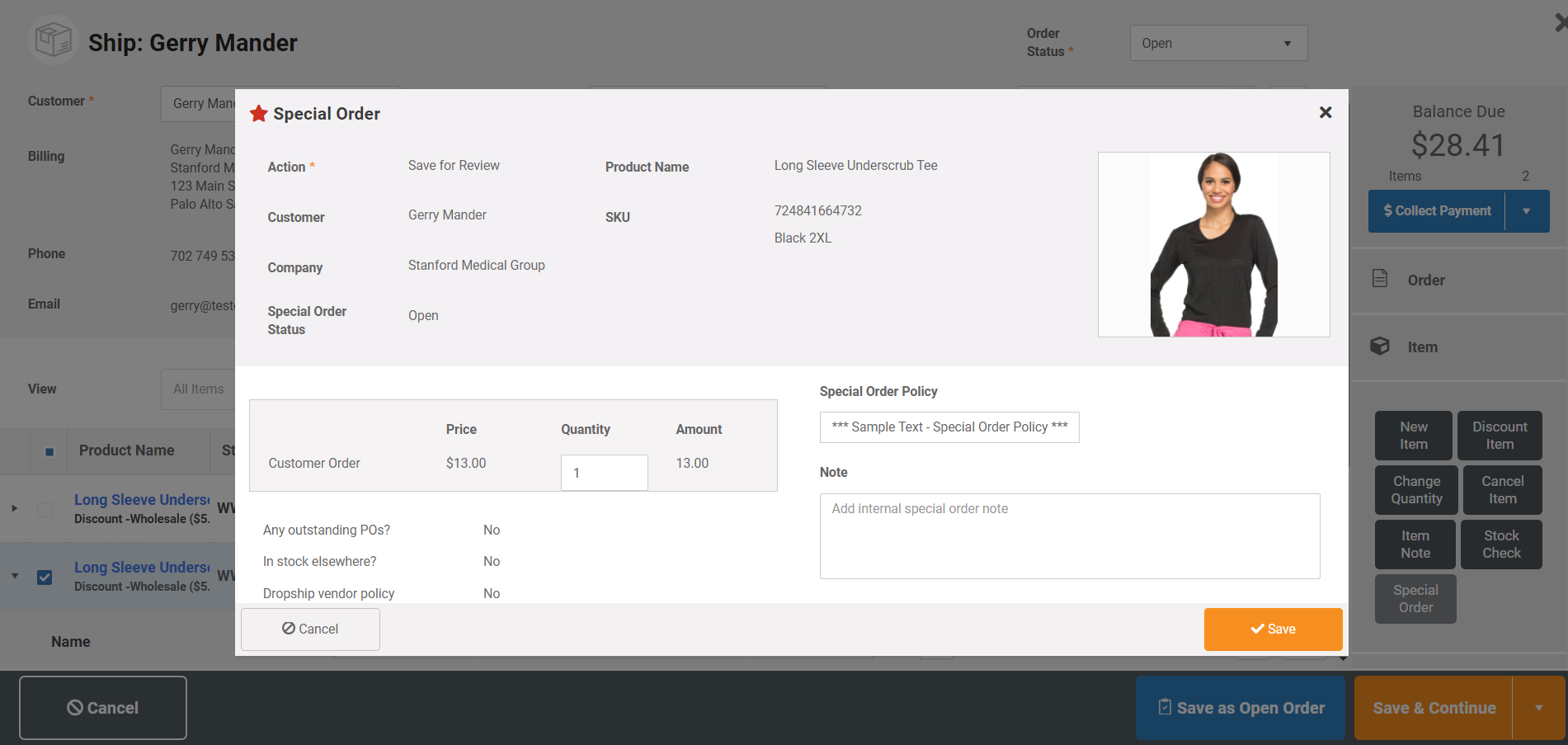
Screenshot of Special Orders - Manage sales of items not in stock that need to be special ordered from vendor.  Special order items are grouped so that they can be quickly added to a vendor purchase order.  Special order items are tagged through the ordering and fulfillment process, so that they can be treated differently than standard items in purchase orders and vendor shipments.
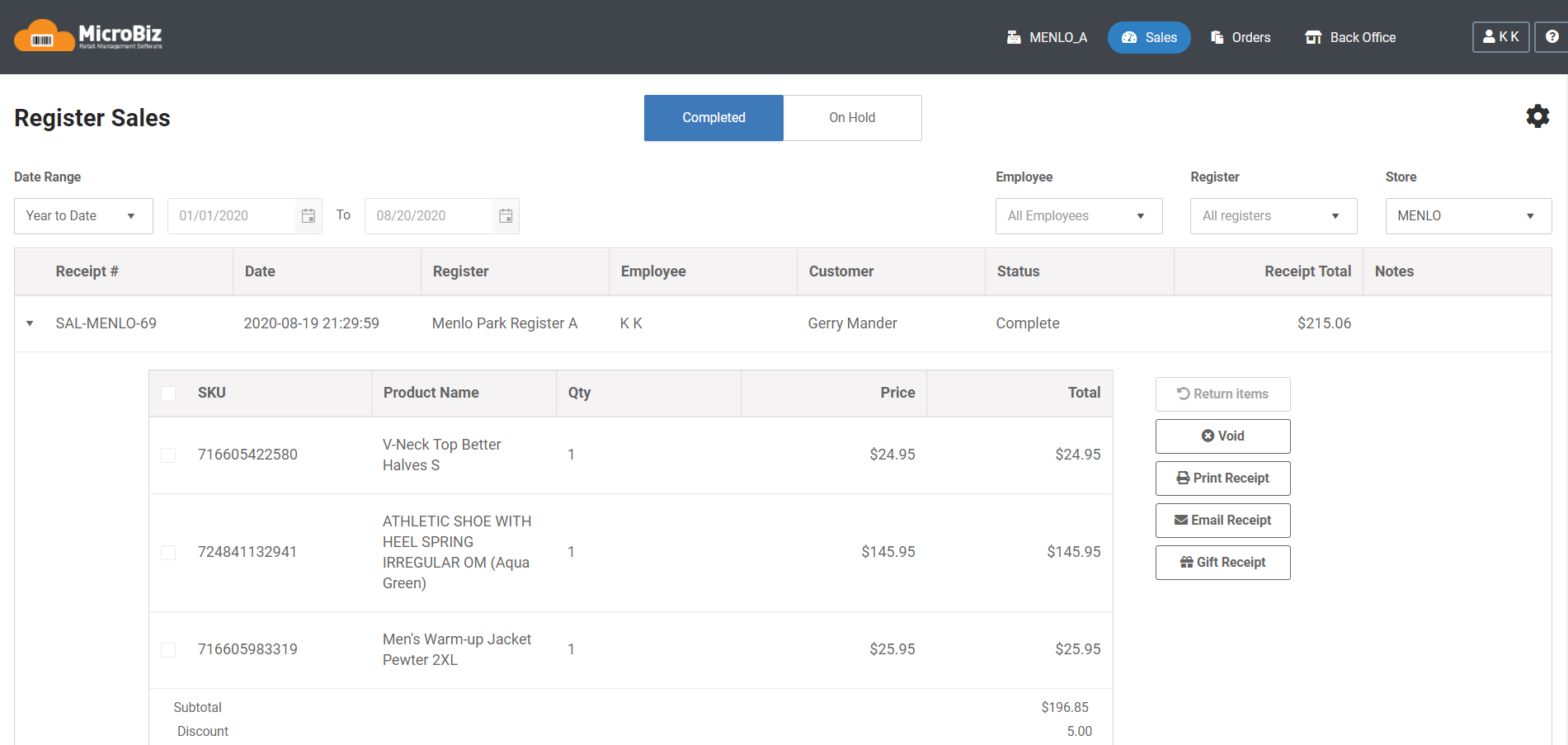
Screenshot of Register Sales Dashboard - MicroBiz Cloud includes a register sale dashboard which displays transactions on hold and closed register transactions. This is useful to look-up transactions by date range, store, register or employee.  In addition, this dashboard enables the following functions: Void Transactions, Reprint Receipts, Return items, Gift Receipts.
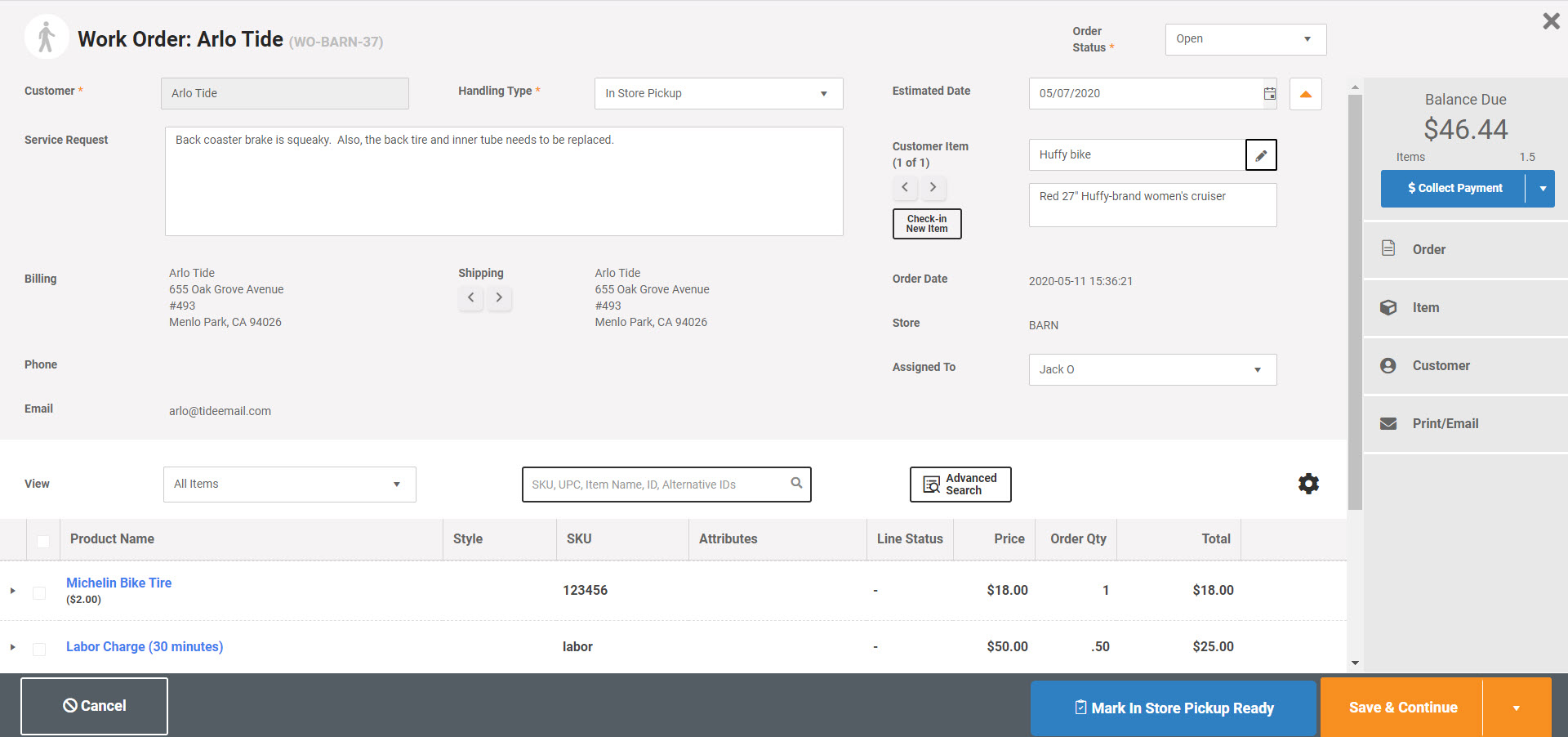
Screenshot of Service/Repair Department - Run a repair and services department with MicroBiz. You can check in an item to be serviced, attach a customer record, assign to an employee, set priorities, add parts and services, manage order status, collect a deposit and print full page quotes and estimates. 
Run a repair and services department with MicroBiz. You can check in an item to be serviced, attach a customer record, assign to an employee, set priorities, add parts and services, manage order status, collect a deposit and print full page quotes and estimates. For more information on the work order capabilities of MicroBiz, click here.
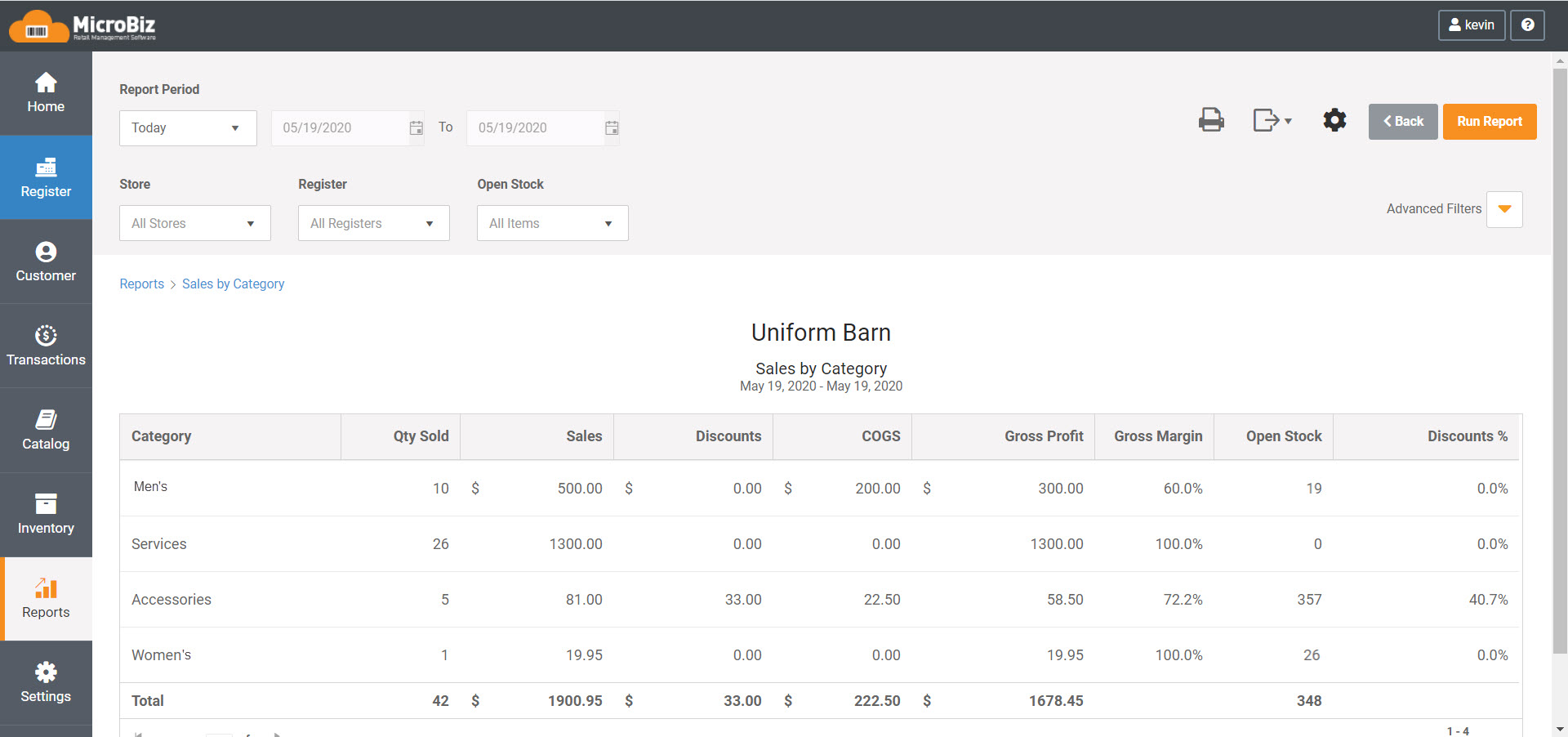
Screenshot of Popular Preconfigured Reports - MicroBiz comes with a variety of pre-configured allowing you to better understand your business. Quickly view standard reports on hot selling items and slowest moving items. Generate pre-configured reports showing your best customers as well as your most productive salespeople. These standard reports include settings to view different store locations, date ranges, etc.

1 / 15

Screenshot of MicroBiz Cloud runs on iPads, Macs and PCs

Technical Details

Technical Details
Deployment TypesSaaS
Mobile ApplicationNo
Supported CountriesUnited States, Canada
Supported LanguagesEnglish

FAQs

What is MicroBiz?
MicroBiz is an eCommerce retail management solution butil around features such as inventory management, payment gateway, and purchase orders / receiving tracking.
What are MicroBiz's top competitors?
Lightspeed Retail, Vend, and ShopKeep are common alternatives for MicroBiz.
Who uses MicroBiz?
The most common users of MicroBiz are from Small-Business.