TrustRadius: an HG Insights company

N-able MSP Manager

Score10 out of 10

25 Reviews and Ratings

What is N-able MSP Manager?

N-able™ MSP Manager (formerly Solarwinds MSP Manager) is a cloud-based help desk and billing software for IT service providers, which includes a ticketing system, customer portal, technician mobile apps, billing tools, and reporting dashboards.

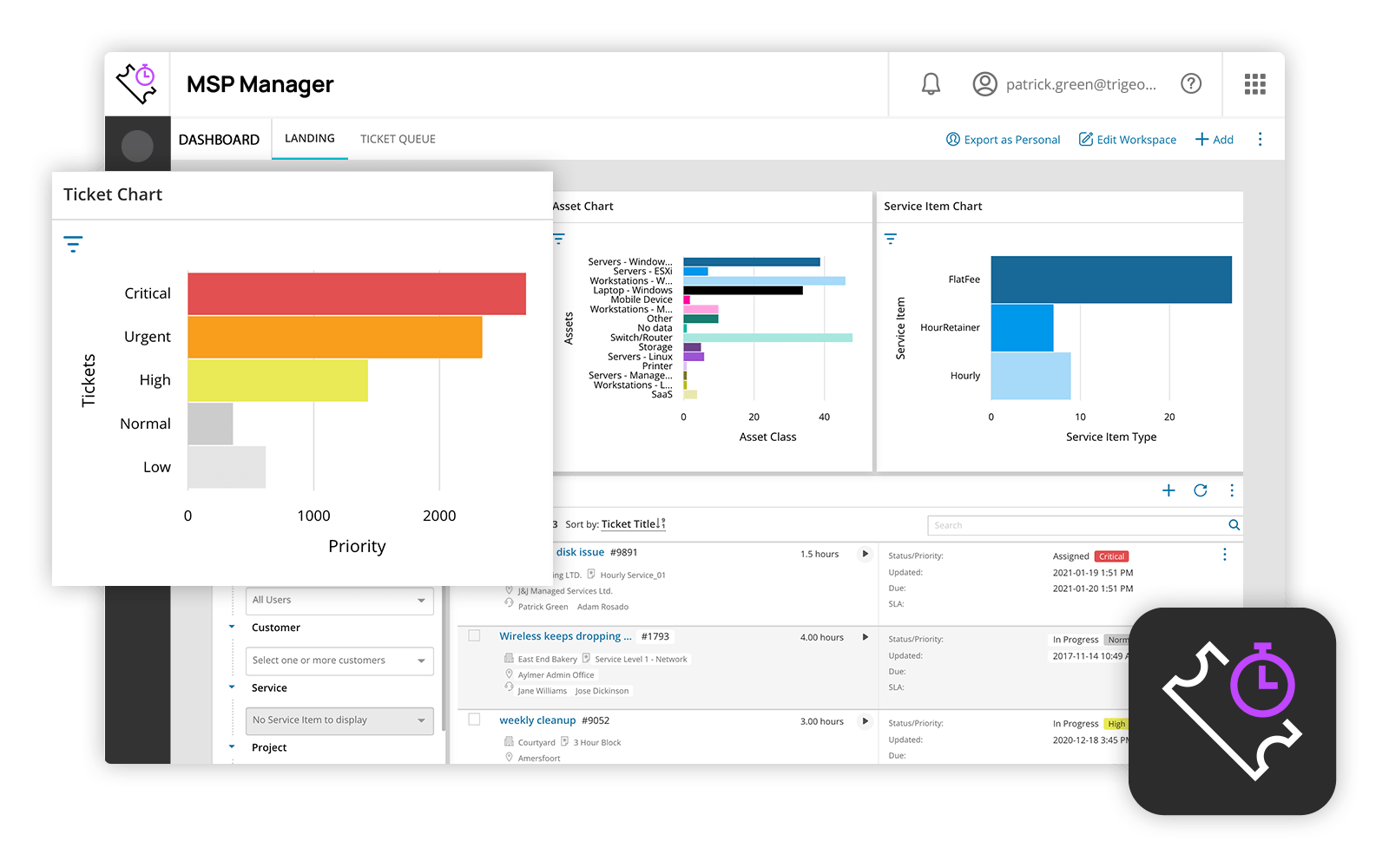
MSP Manager offers a lightweight ticketing system with a quick entry feature that allows users to capture essential information such as customer name, service items, and issue details from any screen. Tickets can also be created automatically from emails, with all email correspondence between clients and technicians captured within the ticket. Engineers can view their assigned tickets in the dashboard, prioritize work, and use the built-in timer to track time spent on each ticket. The native mobile apps for Android and iOS also allow technicians to create and view tickets, track time and expenses, receive notification of updates or changes, capture issues in notes or photos, access customer, location, device, and system information, and check standard procedures and configurations.

MSP Manager allows users to create invoices in batches and generate sample invoices to preview bills for individual clients. Billing is based on the time logged by engineers, but users can also log scheduled client appointments as billable time rather than having engineers create tickets. All invoices include details of service items, tickets, logged time, and expenses to keep clients informed of exactly what they are paying for.

Media

N-able MSP Manager Dashboard

Good program to use with different levels of user experience

Pros

  • Communicates well with clients.
  • Quick to respond when there is an issue.

Cons

  • Labeling/titling work "labels" without all the extra steps.

Return on Investment

  • Certainly has made it easier to track our clients.
  • Tracks spent hours on each job.

Other Software Used

QuickBooks Online

Don't buy this.

Pros

  • Web Based
  • Automated Ticket creation

Cons

  • Needs to auto refresh when tickets come in
  • Reporting in MSP Manager is terrible

Return on Investment

  • We have had to spend time and resources to create our own reports, as MSP Manager does not have them.
  • Searching for a ticket requires scrolling, wasting time

Alternatives Considered

Solarwinds Backup, SolarWinds Mail Assure, SolarWinds N-central, Spiceworks and ServiceNow

Other Software Used

SolarWinds N-central, SolarWinds Mail Assure, Solarwinds Backup

The best solution if you already use SolarWinds' other products.

Pros

  • Billing automation straight through to Quickbooks' desktop has saved me a lot of time for clients on subscriptions. Adding tickets during the month and having them all show up in the Quickbooks invoices at month-end is a godsend in terms of time spent in billing/invoicing.
  • The ticketing system in the helpdesk definitely gives my business a more professional look, especially for clients looking for that kind of ticketing system.
  • Alerting me to aging tickets and the use of SLA (service level agreements) helps me prioritize client responses. Even with some of my better clients who don't have an SLA with me, I set up some fake SLAs to ensure I am responding in a timely manner.

Cons

  • It is just simply too slow! The web interface requires patience, even when moving between tabs or menu choices. This is by far the biggest detracting element of MSP Manager.
  • Input customization -- I would like the settings pages to allow me to customize some input screens, especially the Ticket Entry window. The "Quick Ticket" entry is missing a few key items I want in a trouble ticket, and the full ticket entry window has numerous fields I never use or are always the same, and so it just takes more time and effort than is necessary.
  • Both the asset tracking and the knowledge base should be more robust and integrally tied into the RMM console, so that licenses, serial numbers, procedures, network data are quick and simple to access from either interface.

Return on Investment

  • For my managed service clients, MSP Manager has seriously reduced the time I spend billing. Overall data entry time may be the same, but now it's focused on documenting the work that was done and the billing simply follows.
  • The first few months of learning MSP Manager definitely meant doing lots of admin work twice, and double-checking the MSP manager invoices against the paper trail, to ensure it was accurate and working. Plan for this extra time overhead during the learning phase.

Alternatives Considered

Pulseway and Kaseya Virtual System Administrator (VSA)

Other Software Used

Evernote, Asana, Sublime Text, QuickBooks Pro

MSP Manager Review

Pros

  • Help Desk Ticketing is very easy to use and organize.
  • Billing is robust and keeps track of client contracts and time very well.
  • Role management and ticket routing client are very robust.

Cons

  • The options for billing take a lot of learning and tweaking to get just right for your company. It could be easier and have more options to choose from.
  • Custom templates for automatic helpdesk responses would be very helpful.
  • Per user-banked responses for each user to have quick replies to general tickets.

Return on Investment

  • It helped keep us organized and well managed.
  • It made us be able to keep track of time better, resulting in more time being billed.
  • It made us more responsive to client issues and less likely to forget anything.

Alternatives Considered

Spiceworks

Other Software Used

SolarWinds Remote Monitoring & Management, QuickBooks Online, ConnectWise Control (formerly ScreenConnect)