TrustRadius: an HG Insights company

Sage 100cloud

Score7.2 out of 10

111 Reviews and Ratings

What is Sage 100cloud?

Sage 100 (or Sage 100cloud is a business management software offering a broad range of modules designed to meet the many needs of virtually any business. It encompasses financial operations and accounting, payroll, business intelligence, CRM, eBusiness, manufacturing and distribution.

Media

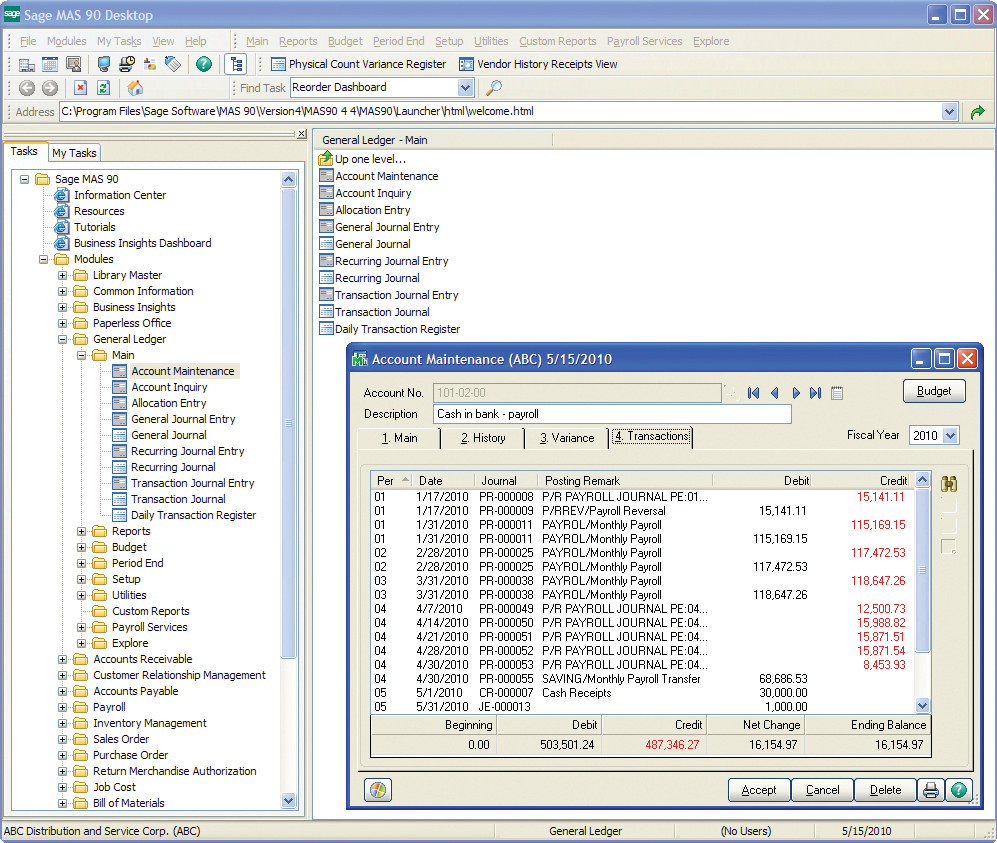
General Ledger uses our exclusive dual grid entry for quick, efficient, and accurate data entry. The grid entry format allows you to easily customize the data entry screens.

Top Performing Features

  • Direct deposit files

    Direct deposit is the ability to electronically transfer pay to an employee’s personal bank account.

    Category average: 7.4

  • Custom reports

    Users can create custom reports.

    Category average: 7.6

  • Plug-ins

    A number of third-party plug-ins are available to expand the core functionality of the software.

    Category average: 7.6

Areas for Improvement

  • Dashboards

    Users can create, customize and share dashboards, which provide an overview of the most important metrics.

    Category average: 7.7

  • Product Master Data Management

    Create, classify, and manage product items, BOMs and product changes

    Category average: 7.1

  • Proposal Management

    Capture budget, resource, and benefit expectations for proposals

    Category average: 6.6

Sage 100 for Accounting

Use Cases and Deployment Scope

Sage 100 is used in the organization as the back office accounting tool for keeping the company's accounts in order, receivables and payables tracked, etc. We use the financial reporting tools and reports to highlight the monthly financials for our executives. We also are in process of utilizing Sage Field Ops in order for our field operations team to be able to collaborate better on their jobs and keep track of all the job details.

Pros

  • Customer relations - our implementation representative is phenomenal.
  • Accounting functionality and a plethora of reports.
  • Job costing and tracking both in Field Ops and regular site.

Cons

  • The reports take a long time to load and run.
  • The dashboard could be more easily customizable.

Return on Investment

  • Better visibility by the CEO for financial reporting.
  • Positive impact of faster payroll processing, less than 1 day versus multi-day.

Usability

Alternatives Considered

Sage Intacct, Foundation and Tenna

Other Software Used

QuickBooks Online, Google Sheets, Microsoft Teams

Efficient Easy to use

Use Cases and Deployment Scope

Sage 100 is the heart of our business. We use it for pretty much all of our day to day operations such as; order entry, inventory tracking, customer purchase history, historical product data, & pricing. While not limited to these categories, these are what modules are most typically used among our employees.

Pros

  • Tracks inventory / flags us when it's time to order more product in as inventory is running low
  • Data filters are very quick and easy to use
  • We appreciate the simple layout of Sage 100, it's easy to navigate & even if you aren't familiar, it's easy to learn the basics from simply just playing around.

Cons

  • Sage 100 at times will simply not connect to our server, we get remote support & all is well but, that issue tends to happen 2-3X a year.
  • Other than the above, I really can't complain. Coming from a more custom U.V. type database that used a whole bunch of codes to navigate, I think Sage 100 is 10x easier to use.

Return on Investment

  • Sage 100 has allowed us to better serve & manage our customers since we integrated it into our system in 1996. Since then, we have seen a lot of changes but, the consistent, simple layout has kept us re-newing our contract year after year.
  • Ordering inventory has been easier than ever since we integrated inventory tracking. No more ordering too much or too little.

Usability

Good for smaller companies bad for data integrators

Use Cases and Deployment Scope

As a manufacturing company, we use Sage to track inventory and payment collections. We also leverage the service center capabilities to process repairs.

Pros

  • Inventory tracking
  • Bill of materials
  • Invoicing

Cons

  • Needs a modern API
  • Become a true cloud application
  • Needs tax rate lookup

Return on Investment

  • Helped us identify dead inventory so we could quit ordering stuff we don't use anymore.

Usability

Other Software Used

Salesforce Sales Cloud, SAP Integration Suite

Excellent ERP software for manufacturing and B2B industries

Use Cases and Deployment Scope

Our company is a larger conglomeration of multiple related organizations. We have roughly 300 employees, across 10 companies in the US. Our organization needed an ERP solution with a full range of modules from payroll, receivables, payables, and inventory management. Sage 100 was the best fit for our company and we have been using it for well over 20 years.

Pros

  • Inventory Management, with bin locations, and customizable fields
  • Full sales workflow from Quote, Sales Order, to Receivables
  • Payroll module with robust reporting capability

Cons

  • Database backend, Sage 100 relies on the ProvideX database, which has limited ODBC functionality
  • Document management. Paperless Office is not a robust solution for Sage 100 and feels like an add-on.
  • Support. Getting support is tricky, and you will usually have to work with your reseller/support partner.

Return on Investment

  • Sage 100 isn't as user friendly as newer ERP solutions, so training is the biggest issue we face now. Knowledge transfer is done entirely from the previous employee, unless you are lucky enough to have a department dedicated to documenting and outlining standardized processes.

Other Software Used

KnowledgeSync, StarShip

Sage 100cloud is a good software for small businesses.

Pros

  • AR
  • AP
  • Bank Reconciliation
  • Month End
  • inventory

Cons

  • It is unforgiving when a mistake is made
  • When posting a batch there is no way to preview it first
  • There is no way to undo an entry

Return on Investment

  • It has been a great ROI for the company.
  • The use across several departments is great.
  • Only negative impact is when a mistake is made that one department doesn't catch and causes another department an issue.

Other Software Used

QuickBooks Desktop Premier, Microsoft Dynamics GP, Infor CloudSuite SCM (formerly Lawson)
